
1. Introducere
Thank you for choosing the T-Wolf T61 60% Wired Mechanical Gaming Keyboard. This manual provides detailed instructions for setting up, operating, and maintaining your keyboard to ensure optimal performance and longevity. Please read this manual carefully before using the product.
2. Produs terminatview
2.1 Caracteristici cheie
- Comutatoare mecanice: Delivers precise tactile feedback and long-lasting performance.
- Conexiune USB cu fir: Stable USB 2.0 plug-and-play interface; no drivers required.
- Aspect compact 60%: Functional design that saves space while maintaining key usability.
- Multi-Key Rollover: Supports simultaneous key presses without input errors, ensuring precise performance during intense typing or gaming sessions.
- Iluminare din spate RGB: Customizable vibrant RGB backlighting for enhanced aesthetics.
- Funcționare cu zgomot redus: Moderate sound level suitable for various environments.
- Design rezistent la varsare: Helps protect against light spills (not waterproof).
2.2 Conținutul pachetului
- 1 x T-Wolf T61 60% Wired Mechanical Gaming Keyboard
- 1 x Manual de utilizare (acest document)
2.3 Diagrama tastaturii
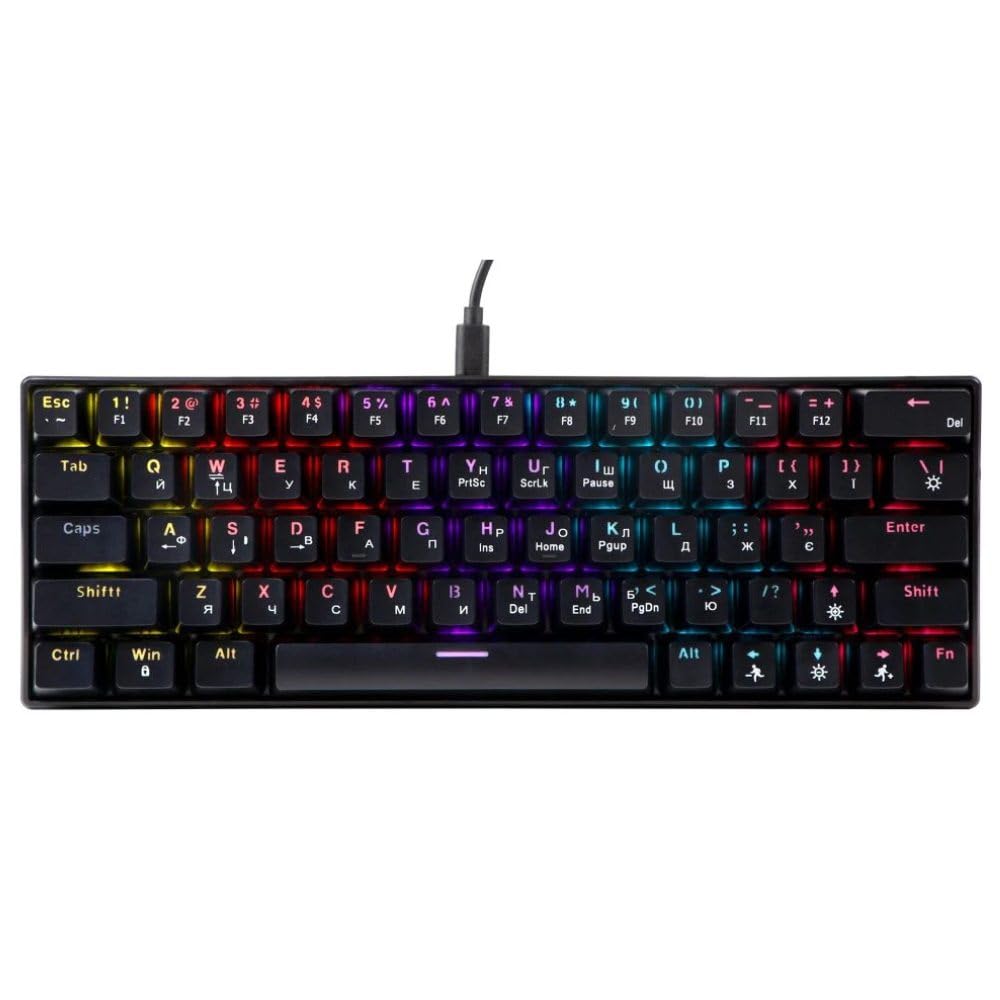
An image showing the T-Wolf T61 60% Wired Mechanical Gaming Keyboard, highlighting its compact layout and design.
3. Configurare
- Despachetați tastatura: Scoateți cu grijă tastatura și toate accesoriile din ambalaj.
- Conectați-vă la dispozitivul dvs.: Locate an available USB port on your computer (PC, laptop) or gaming console. Insert the USB connector of the T-Wolf T61 keyboard into the USB port.
- Instalare automată a driverelor: The keyboard is plug-and-play. Your operating system will automatically detect and install the necessary drivers. This process may take a few moments.
- Gata de folosit: Odată ce driverele sunt instalate, tastatura este gata de utilizare imediată.
4. Instrucțiuni de utilizare
The T-Wolf T61 keyboard functions as a standard QWERTY layout keyboard. Its 60% compact design means some functions are accessed via key combinations.
Controlul iluminării de fundal RGB 4.1
The keyboard features customizable RGB backlighting. Specific key combinations are used to change lighting modes and effects. Refer to the keyboard's function layer markings for exact controls, typically involving the Fn key combined with other keys (e.g., Fn + \| for mode changes, Fn + [{ or Fn +]} for brightness/speed adjustments).
- Schimbarea modurilor de iluminare: Presa Fn + \| to cycle through various RGB lighting effects.
- Reglarea luminozității: Utilizare Fn + [{ pentru a reduce luminozitatea și Fn +]} pentru a crește luminozitatea.
- Ajustarea vitezei: Utilizare Fn +;: pentru a reduce viteza efectului și Fn + '" pentru a crește viteza efectului.
4.2 Multi-Key Rollover
The T61 keyboard supports multi-key rollover, allowing multiple keys to be pressed simultaneously without ghosting or missed inputs. This feature is particularly beneficial for fast typing and complex gaming commands.
5. Întreținere
Întreținerea corectă asigură longevitatea și performanța tastaturii tale.
- curatenie: Use a soft, dry cloth to wipe the surface of the keyboard. For deeper cleaning, use a can of compressed air to remove dust and debris from between the keycaps. For stubborn dirt, a slightly damp Se poate folosi o lavetă cu o soluție de curățare delicată, asigurându-vă că nu pătrunde lichid în tastatură.
- Design rezistent la varsare: While the keyboard features a spill-resistant design to protect against light spills, it is nu este impermeabil. In case of a spill, immediately disconnect the keyboard from your device, gently wipe away any liquid, and allow it to air dry completely before reconnecting.
- Depozitare: Depozitați tastatura într-un loc răcoros și uscat, ferit de lumina directă a soarelui și de temperaturi extreme.
6. Depanare
If you encounter issues with your T-Wolf T61 keyboard, please refer to the following common solutions:
- Tastatura nu răspunde:
- Ensure the USB cable is securely connected to both the keyboard and your device.
- Încercați să conectați tastatura la un alt port USB.
- Test the keyboard on another computer to rule out a device-specific issue.
- Reporniți computerul.
- RGB Backlighting Not Working/Incorrect:
- Asigurați-vă că tastatura este alimentată corespunzător.
- Cycle through the RGB modes using the designated key combinations (e.g., Fn + \|).
- Adjust brightness settings (e.g., Fn + [{ / Fn +]}).
- Cheile nu se înregistrează sau tastează de două ori:
- Clean the affected keycap and switch area using compressed air to remove any debris.
- Ensure no software conflicts are present (e.g., other keyboard drivers or utilities).
Dacă problema persistă după ce ați încercat acești pași, vă rugăm să contactați serviciul de asistență pentru clienți.
7. Specificații
| Caracteristică | Descriere |
|---|---|
| Marca | LUPUL-T |
| Model | T61 |
| Tehnologia de conectivitate | USB cu fir |
| Descrierea tastaturii | Mecanic |
| Numărul de chei | 65 |
| Aspectul tastaturii | QWERTY |
| Caracteristici speciale | RGB Backlit, Multi-Key Rollover, Low-Noise Operation, Spill-Resistant Design |
| Dispozitive compatibile | PC, laptop, gaming consoles |
| Material | Metal, plastic |
| Culoare | Negru |
| Țara de origine | China |
8. Garanție și asistență
The T-Wolf T61 keyboard comes with a standard manufacturer's warranty. Please refer to the warranty card included with your purchase or contact your retailer for specific warranty terms and conditions.
For technical support, troubleshooting assistance, or warranty claims, please contact the retailer where you purchased the product or visit the official T-Wolf website pentru resurse de asistență.