
Introducere
This manual provides instructions for the Brydge 10.9 MAX+ Wireless Keyboard Case. This product is designed to enhance your iPad experience by providing a physical keyboard with a multi-touch trackpad and a protective case. Please read this manual thoroughly before use to ensure proper operation and care.
Compatibilitate
The Brydge 10.9 MAX+ Wireless Keyboard Case is compatible with the following iPad models:
- iPad 10th Generation (Model Numbers: A2696, A2757, A2777)
- iPad A16 (11th Generation) (Model Numbers: A3354, A3355, A3356)
Important: This keyboard case is not designed for use with iPad Air, iPad Pro, iPad 9th Gen, or older iPad models.
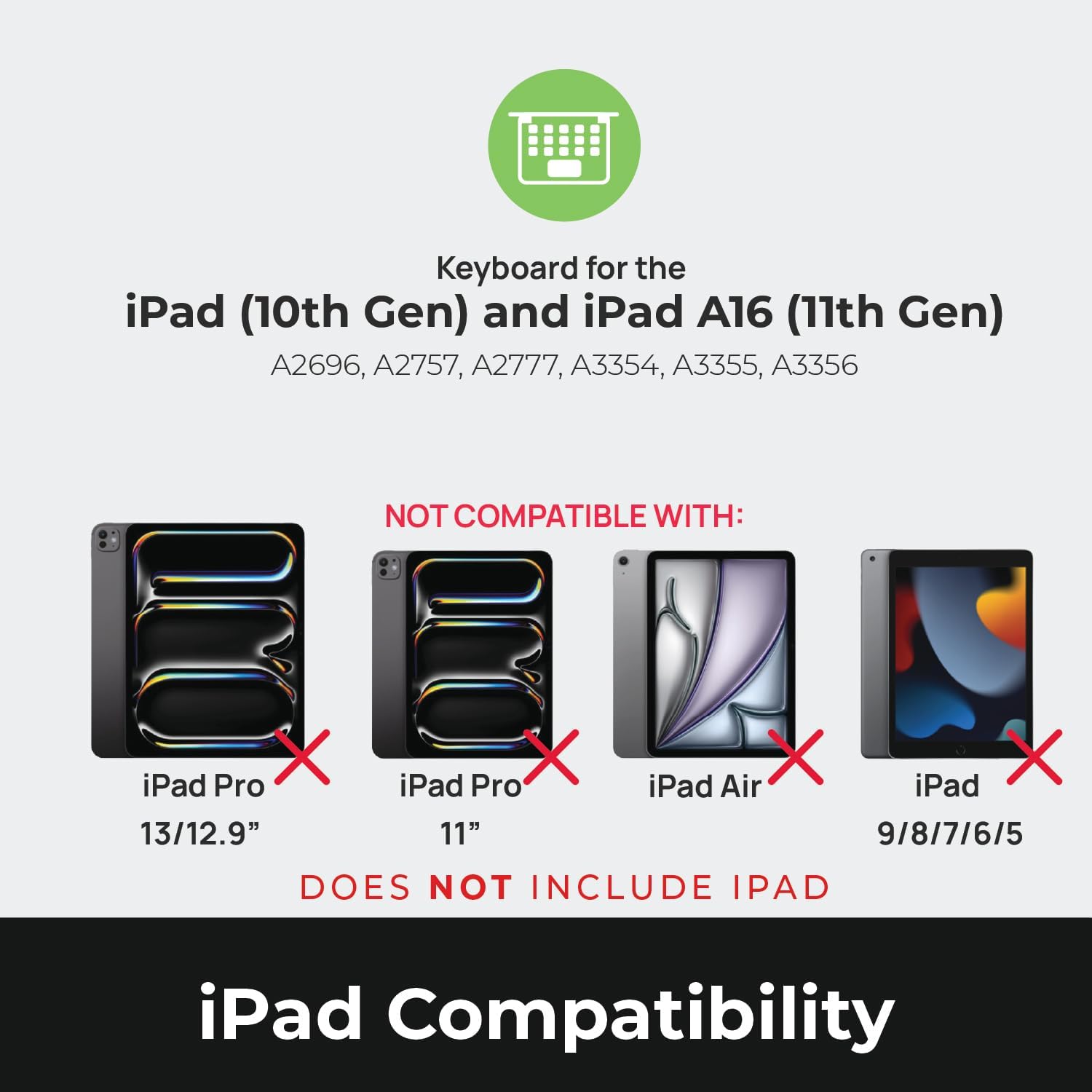
Image: Compatibility chart showing supported iPad models (10th Gen, A16 11th Gen) and incompatible models (iPad Pro 13/12.9", iPad Pro 11", iPad Air, iPad 9/8/7/6/5).
Ce este în cutie
La despachetare, asigurați-vă că toate articolele sunt prezente:
- 1 x Brydge 10.9 MAX+ Wireless Keyboard
- 1 x Detachable Magnetic SnapFit Case
- 1 x Manual de utilizare (acest document)
Note: An iPad and USB-C charging cable are not included. The USB-C cable typically comes with your iPad.

Image: Depiction of the box contents, including the keyboard, case, and user manual.
Instrucțiuni de configurare
1. Attaching Your iPad to the SnapFit Case
- Carefully align your iPad with the SnapFit Case.
- Gently press the iPad into the case until it is securely seated. The case is designed for a snug fit to provide protection.
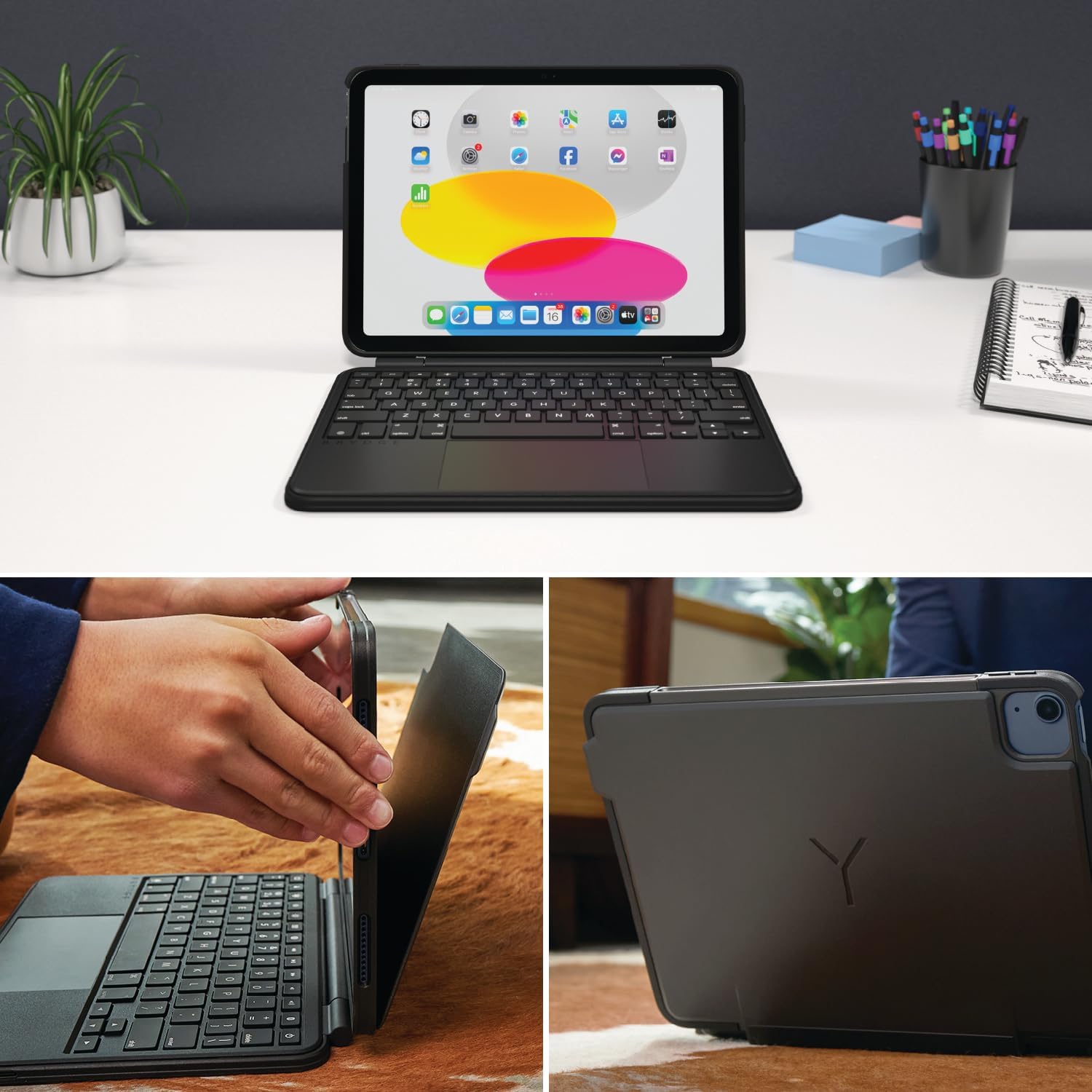
Image: Shows the process of attaching the iPad to the SnapFit case and the case attached to the keyboard.
2. Connecting the Case to the Keyboard
The SnapFit Case features a magnetic back cover that securely attaches to the Brydge keyboard. Simply align the back of the cased iPad with the magnetic area on the keyboard base until it snaps into place.
3. Încărcarea tastaturii
Before first use, it is recommended to fully charge the keyboard. Use a USB-C cable (not included) to connect the keyboard's charging port to a power source. The charging port is typically located on the side or back of the keyboard.
4. Asociere Bluetooth
- Asigurați-vă că tastatura este încărcată și pornită.
- Pe iPad-ul dvs., accesați Setări > Bluetooth.
- Activați Bluetooth.
- Tastatura Brydge ar trebui să apară în lista „Alte dispozitive”. Atingeți numele acesteia pentru a vă conecta.
- Dacă vi se solicită, introduceți codul de asociere afișat pe iPad folosind tastatura Brydge, apoi apăsați Intră.
The keyboard features Instant-On™ Connectivity via Bluetooth 5.0, providing a quick and stable connection once paired.

Image: Illustrates the keyboard's Bluetooth 5.0 and Instant-On connectivity features.
Instrucțiuni de operare
Funcțiile tastaturii
- Taste iluminate din spate: The keyboard features adjustable backlit keys with 3 brightness levels. Use the dedicated function keys (usually located in the top row) to cycle through brightness settings or turn the backlight off.
- Taste funcționale: The top row of keys provides quick access to iPadOS functions such as Home, Search, Brightness, Media Controls, and Volume.
Trackpad multi-touch
The integrated multi-touch trackpad supports various iPadOS gestures for navigation and interaction. Refer to your iPad's settings for a full list of supported gestures.
- Făcând clic: Press down on the trackpad to perform a click.
- Derulare: Folosește două degete pentru a derula în sus sau în jos.
- Zoom: Ciupiți cu două degete pentru a mări sau micșora.
- Comutator de aplicații: Swipe up with three fingers to open the App Switcher.
- Ecranul principal: Swipe up with one finger from the bottom edge to return to the Home Screen.

Image: Highlights the detachable magnetic SnapFit case and the native multi-touch trackpad.
Reglare Viewunghiuri
The keyboard allows for a screen rotation of up to 135 degrees, enabling various viewing angles for typing, drawing, or media consumption.

Image: Displays key features including up to 3-month battery life, 3 levels of backlit keys, and 0-130° viewunghiuri de ing.
Durata de viață a bateriei
The keyboard offers up to 3 months of battery life on a single charge, depending on usage and backlight settings. To conserve battery, the keyboard will enter sleep mode after a period of inactivity.
Întreţinere
- curatenie: Folosiți un moale, damp, lint-free cloth to clean the keyboard and case. Avoid abrasive cleaners or solvents.
- Depozitare: When not in use for extended periods, ensure the keyboard is fully charged and stored in a cool, dry place.
- Îngrijirea bateriei: Pentru a prelungi durata de viață a bateriei, evitați descărcarea completă frecventă a tastaturii. Încărcați-o când indicatorul bateriei este descărcat.
Depanare
Tastatura nu se conectează prin Bluetooth
- Asigurați-vă că tastatura este încărcată.
- Verificați dacă Bluetooth este activat pe iPad.
- Uită de dispozitiv în setările Bluetooth ale iPad-ului și încearcă să îl asociezi din nou.
- Reporniți atât iPad-ul, cât și tastatura.
Trackpad Not Responding or Moving Erratically
- Ensure the keyboard is fully charged. Low battery can affect trackpad performance.
- Clean the trackpad surface with a soft, dry cloth to remove any debris or smudges.
- Deconectați și reconectați conexiunea Bluetooth.
- Check for any firmware updates for the Brydge keyboard via the Brydge Connect App (if available).
Cheile nu răspund
- Confirm the keyboard is powered on and connected via Bluetooth.
- Verificați dacă există obstacole fizice sub taste.
- If specific keys are not working, try restarting the keyboard and iPad.
Specificații
| Numărul de model | BRY8042 |
| Dimensiunile produsului | 10 cm L x 7.65 cm l x 0.8 cm Î (10 x 7.65 x 0.8 cm) |
| Greutatea articolului | 1.85 lire sterline |
| Tehnologia de conectivitate | Bluetooth 5.0 |
| Descrierea tastaturii | Fără fir |
| Caracteristici speciale | Backlit, Rechargeable, Multi-Touch Trackpad, Detachable Magnetic SnapFit Case |
| Culoare | Negru |
| Material | Polycarbonate, Thermoplastic Polyurethane (TPU) |
| Baterie | 1 Nonstandard Battery (included), up to 3 months battery life |
| Viewunghiul ing | Până la 135 de grade |
Garanție și suport
This product is subject to a standard return policy, typically 30 days from the date of purchase for refunds or replacements. For specific warranty details, please refer to the documentation provided with your purchase or contact Brydge customer support.
For technical assistance, troubleshooting, or warranty claims, please visit the official Brydge support website or contact their customer service department. Contact information can usually be found on the Brydge webla fața locului sau în materialele de ambalare.
Note: Protection plans may be available for purchase separately.