
1. Introducere
Thank you for choosing the NEWFAST NF-RE516 WiFi Range Extender. This device is designed to expand your existing wireless network coverage, eliminate Wi-Fi dead zones, and provide a stable internet connection throughout your home or office. With its easy setup and reliable performance, you can enjoy seamless streaming, gaming, and browsing.
This manual provides detailed instructions on how to set up, operate, and maintain your NEWFAST NF-RE516 WiFi Range Extender. Please read it carefully before using the device.
2. Informații de siguranță
Vă rugăm să respectați următoarele instrucțiuni de siguranță pentru a preveni deteriorarea dispozitivului sau vătămarea corporală:
- Nu expuneți dispozitivul la apă, foc, umiditate sau medii fierbinți.
- Nu încercați să dezasamblați, să reparați sau să modificați dispozitivul.
- Utilizați numai adaptorul de alimentare furnizat împreună cu dispozitivul.
- Țineți aparatul departe de copii.
- Asigurați o ventilație adecvată în jurul dispozitivului pentru a preveni supraîncălzirea.
3. Produs terminatview
The NEWFAST NF-RE516 WiFi Range Extender is a compact and powerful device designed to seamlessly integrate into your existing network. It features multiple antennas for enhanced signal strength and coverage.
3.1 Conținutul pachetului
- NEWFAST NF-RE516 WiFi Range Extender
- Ghid de instalare rapidă
3.2 Aspectul dispozitivului
Familiarize yourself with the ports and indicators on your extender:
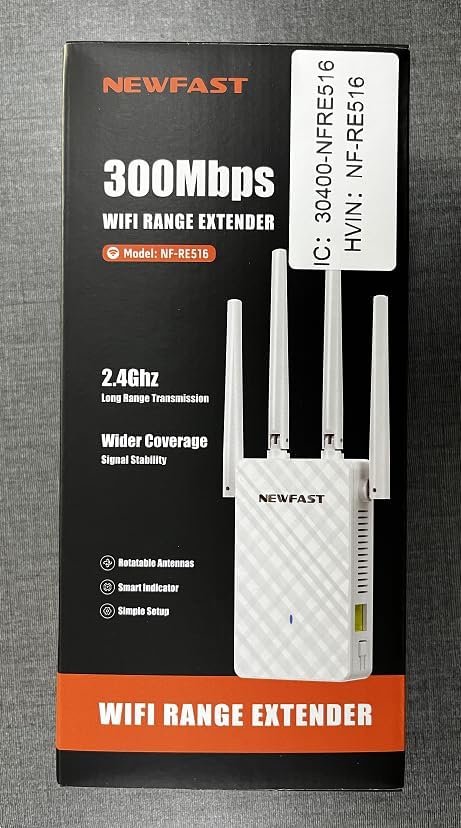
Imagine: față view of the NEWFAST NF-RE516 WiFi Range Extender, showing its compact design and four adjustable external antennas.

Imagine: Spate view of the NEWFAST NF-RE516 WiFi Range Extender, displaying the power prongs and regulatory labels.

Image: A visual representation of the NEWFAST WiFi Extender providing signal to various devices within a multi-room home, highlighting its ability to boost WiFi coverage.
4. Instrucțiuni de configurare
Follow these steps to set up your NEWFAST NF-RE516 WiFi Range Extender:
4.1 Pornire
- Plug the extender into a power outlet near your existing Wi-Fi router.
- Wait for the Power LED to turn solid blue.
4.2 Connect to Your WiFi Router (WPS Method)
Metoda WPS (Wi-Fi Protected Setup) este cea mai rapidă modalitate de a conecta extenderul la router.
- Apăsați butonul WPS de pe routerul Wi-Fi existent.
- Within 2 minutes, press the WPS button on your NEWFAST NF-RE516 extender.
- The Wi-Fi LED on the extender should change from blinking to solid, indicating a successful connection.
If your router does not support WPS, or if you encounter issues, please refer to the Web UI/App setup method in the Quick Installation Guide.
Video: A seller-provided video demonstrating the setup process for the NEWFAST NF-RE516 WiFi Range Extender, including connection to the router and initial power-on steps.
5. Moduri de operare
The NEWFAST NF-RE516 typically operates in Repeater Mode, extending the range of your existing Wi-Fi network. It can also function as an Access Point (AP) if connected to your router via an Ethernet cable, creating a new Wi-Fi hotspot.
5.1 Modul repetitor
In Repeater Mode, the extender wirelessly connects to your router and amplifies its signal, extending coverage to areas with weak or no Wi-Fi. This is the default and most common operating mode.
5.2 Modul punct de acces (AP)
To use AP Mode, connect the extender to your router using an Ethernet cable. The extender will then create a new wireless network, converting your wired connection into a Wi-Fi hotspot.
6. Întreținere
To ensure optimal performance and longevity of your NEWFAST NF-RE516 WiFi Range Extender, follow these maintenance tips:
- curatenie: Folosiți o lavetă moale și uscată pentru curățarea dispozitivului. Nu utilizați agenți de curățare lichizi sau cu aerosoli.
- Ventilare: Ensure the device is placed in a well-ventilated area and that its ventilation holes are not blocked.
- Actualizări firmware: Regularly check for and install firmware updates from the NEWFAST official website to ensure the best performance and security.
- Relocare: If you need to move the extender, ensure it is powered off before unplugging and replugging it into a new location.
7. Depanare
If you encounter issues with your NEWFAST NF-RE516, try the following solutions:
- Fără putere: Ensure the extender is securely plugged into a working power outlet. Check if the Power LED is solid blue.
- Fără conexiune internet: Verificați dacă routerul principal are o conexiune activă la internet. Reporniți atât routerul, cât și extenderul.
- Semnal slab: Relocate the extender closer to your main router. Ensure there are no major obstructions (e.g., thick walls, large metal objects) between the extender and your devices.
- Întreruperi ale conexiunii: Check for interference from other electronic devices. Try changing the Wi-Fi channel on your router if possible.
- Aţi uitat parola: If you forget the extender's Wi-Fi password, you may need to reset the device to factory defaults and set it up again.
- Resetați la setările implicite din fabrică: To reset the extender, use a paperclip to press and hold the Reset button (usually a small pinhole) for about 5-10 seconds until the LEDs flash.
8. Specificații
| Caracteristică | Detaliu |
|---|---|
| Marca | NEWFAST |
| Model | NF-RE516 (also known as 1111111) |
| standard wireless | Frecvență radio de 2.4 GHz |
| Rata de transfer de date | Up to 300 Mbps (as per product title) |
| Clasa de bandă de frecvență | Tri-Band (Note: Wireless Standard only mentions 2.4GHz, please verify with product packaging) |
| Gamă | Up to 98,000 cubic feet |
| Culoare | Alb |
| Sursa de alimentare | Priza AC |
| Antene | Multiple external antennas (adjustable) |
9. Garanție și asistență
NEWFAST products come with a standard manufacturer's warranty. For specific warranty terms and conditions, please refer to the warranty card included in your product packaging or visit the official NEWFAST website-ul.
If you require technical assistance or have any questions about your NEWFAST NF-RE516 WiFi Range Extender, please contact our customer support team:
- E-mail: shenhuadianzi@outlook.com
- Suport online: Visit the NEWFAST official website pentru întrebări frecvente și resurse de asistență.
Our support team is dedicated to providing prompt and helpful assistance.