
1. Introducere
This manual provides essential information for the safe and efficient operation of your Tornado 65UA5300E 65-inch 4K Frameless Android Smart TV. Please read it thoroughly before using the product and retain it for future reference.

Imaginea 1.1: Față view of the Tornado 65UA5300E Smart TV, showcasing its frameless design and included stand.
2. Informații de siguranță
Respectați întotdeauna măsurile de siguranță de bază atunci când utilizați acest televizor pentru a reduce riscul de incendiu, electrocutare și vătămare corporală.
- Nu expuneți televizorul la ploaie sau umezeală.
- Asigurați o ventilație corespunzătoare; nu blocați orificiile de ventilație.
- Nu așezați televizorul pe un cărucior, stativ, trepied, suport sau masă instabilă.
- Deconectați televizorul în timpul furtunilor cu fulgere sau când nu este utilizat pentru perioade lungi de timp.
- Pentru toate lucrările de întreținere, adresați personalului de service calificat.
3. Conținutul pachetului
Verificați dacă toate articolele sunt prezente în colet:
- Tornado 65UA5300E 65-inch 4K Frameless Android Smart TV
- Telecomanda
- Cablu de alimentare
- Suport TV (2 bucăți)
- Șuruburi pentru ansamblul suportului
- Manual de utilizare (acest document)
4. Configurare
4.1 Despachetarea
Carefully remove the TV from its packaging. It is recommended to keep the original packaging for potential future transport or servicing.
4.2 Atașarea suportului
If you are not wall-mounting the TV, attach the included stand pieces. Place the TV face down on a soft, flat surface to prevent screen damage. Align each stand piece with the corresponding slots on the bottom of the TV and secure them with the provided screws.
Imaginea 4.1: Partea de jos view of the TV, illustrating the designated areas for stand attachment.
4.3 Montare pe perete
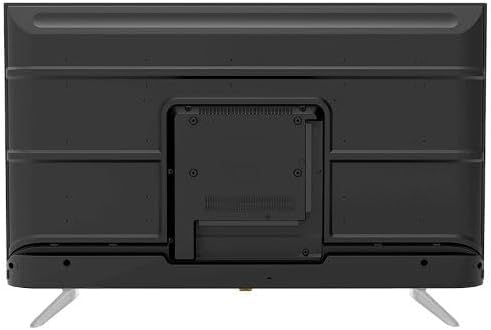
For wall mounting, remove the stand (if attached). Use a VESA-compatible wall mount (not included) that supports the TV's weight and dimensions. Consult a professional for wall mounting to ensure safety and proper installation.

Imaginea 4.2: Spate view of the TV, highlighting the VESA mounting pattern and various input/output ports.
4.4 Conectarea perifericelor
Conectați dispozitivele externe la televizor folosind porturile corespunzătoare:
- HDMI: For high-definition devices like Blu-ray players, gaming consoles, or set-top boxes. The TV has 3 HDMI ports, one with ARC support.
- USB: For connecting USB storage devices to play media (video, photos, music). The TV has 2 USB ports.
- LAN: Pentru o conexiune la internet prin cablu.
- Intrare RF: For connecting an antenna or satellite dish for the built-in digital receiver.
- Ieșire audio digitală (optică): Pentru conectarea la un sistem audio extern.
- Mufă pentru căști (3.5 mm): Pentru conectarea căștilor.

Imaginea 4.3: Laterală view of the TV, illustrating the accessible side input ports.
4.5 Pornirea inițială și expertul de configurare
After connecting the power cable, press the power button on the remote control or TV. The TV will guide you through an initial setup wizard, including language selection, network connection (Wi-Fi or LAN), channel scanning, and Google account setup for Android TV features.
5. Operarea televizorului
5.1 Control de la distanțăview
The included remote control allows you to navigate the TV's functions. It features dedicated buttons for power, volume, channel, input selection, smart TV apps (Netflix, YouTube, Prime Video, Disney+), Google Assistant voice search, and menu navigation.
5.2 Funcții de bază
- Pornire/Oprire: Apăsați butonul de pornire.
- Controlul volumului: Folosește butoanele de creștere/reducere a volumului.
- Selectarea canalului: Folosiți butoanele Canal sus/jos sau tastatura numerică.
- Sursa de intrare: Press the 'Input' button to select between HDMI, AV, TV, etc.
5.3 Smart TV Features (Android 11)
Your TV runs on Android 11, providing access to a wide range of smart features:
- Aplicatii: Access pre-installed apps like Netflix, YouTube, Prime Video, Disney+, Shahid VIP, and download more from the Google Play Store.
- Asistent Google: Folosește comenzi vocale prin intermediul telecomenzii pentru căutare, control și informații.
- Chromecast încorporat: Transmiteți conținut de pe smartphone sau tabletă direct pe televizor.
- Web Browser: Navigați pe internet direct pe televizor.
- Bluetooth 5.0: Conectați căști wireless, difuzoare sau alte dispozitive Bluetooth.
5.4 Setări de imagine și sunet
Personalizați-vă viewexperiența de ascultare și redare prin meniul de setări al televizorului:
- Moduri de imagine: Select from Dynamic, Game, Sports, Cinema, or User-defined modes.
- Temperatura de culoare: Adjust to Normal, Cool, or Warm.
- Moduri de sunet: Choose from Smart, User, Game, Movie, Music, or News.
- Dolby Digital Plus: Enhanced audio processing for compatible content.
6. Întreținere
6.1 Curățarea televizorului
- Ecran: Ștergeți ușor ecranul cu o lavetă moale, fără scame. Pentru petele persistente, folosiți un produs de curățare a ecranului special conceput pentru televizoare, aplicat pe lavetă, nu direct pe ecran.
- Corp: Wipe the TV's frame and back panel with a soft, dry cloth. Do not use abrasive cleaners or solvents.
6.2 Actualizări de software
Ensure your TV's software is up to date for optimal performance and security. Connect the TV to the internet and check for updates periodically through the settings menu.
7. Depanare
Dacă întâmpinați probleme, consultați următoarele soluții comune:
| Problemă | Soluție posibilă |
|---|---|
| Fără putere | Check if the power cable is securely plugged into the TV and the wall outlet. Ensure the outlet is functional. |
| Nu există imagine, dar există sunet | Verificați sursa de intrare. Asigurați-vă că dispozitivele externe sunt pornite și conectate corect. |
| Nu există sunet, dar imaginea este prezentă | Check the volume level and mute status. Verify audio settings and external audio connections. |
| Telecomanda nu funcționează | Înlocuiți bateriile. Asigurați-vă că nu există obstacole între telecomandă și senzorul IR al televizorului. |
| Nu se poate conecta la Wi-Fi | Verificați routerul și modemul. Introduceți din nou parola Wi-Fi. Încercați să reporniți televizorul și routerul. |
Dacă problema persistă, contactați asistența pentru clienți.
8. Specificații
| Caracteristică | Detaliu |
|---|---|
| Numărul de model | 65UA5300E |
| Dimensiunea ecranului | 65 inchi |
| Tehnologia de afișare | LED |
| Rezoluţie | 4K UHD (3840 x 2160) |
| Raportul de aspect | 16:9 |
| Viewunghiul ing | 178 de grade |
| Luminozitate | 250 cd/m² |
| Rata de reîmprospătare | 50/60 Hz |
| Suport HDR | HDR10, HLG |
| Tehnologia audio | Dolby Digital Plus, Surround Sound |
| Putere de ieșire audio | 10W x 2 |
| Sistem de operare | Android 11 |
| Memoria internă | 16 GB |
| Conectivitate | Wi-Fi, Bluetooth 5.0, LAN |
| Intrări | RF Input (Digital) x1, Video Input x1, HDMI x3 (ARC), USB x2, LAN x1 |
| Ieșiri | Digital Audio Output (Optical) x1, Headphone Jack (3.5mm) x1 |
| Alimentare electrică | AC 90-240V / 50Hz |
| Putere de așteptare | 0.5W |
| Dimensiuni (L x A x A) fara suport | 1446 x 832 x 84 mm |
| Dimensiuni (L x A x A) cu suport | 1446 x 892 x 305 mm |
| Greutate netă | 15.32 kg |
| Greutate brută | 21.32 kg |
| Țara de origine | Egipt |
9. Garantie
This Tornado TV comes with a 3-year full free warranty. Please retain your proof of purchase for warranty claims. For specific terms and conditions, refer to the warranty card included with your product or contact Tornado customer service.
10. Suport
For further assistance, technical support, or service inquiries, please contact Tornado customer service. Contact details can typically be found on the manufacturer's official webla fața locului sau pe cardul de garanție.