
XNANO X3
XNANO X3 Projector User Manual
WiFi and Bluetooth Home Theater Projector
1. Introducere
This manual provides essential information for the safe and efficient operation of your XNANO X3 Projector. Please read it thoroughly before using the device and retain it for future reference. This projector is designed to deliver a high-quality home theater experience with its advanced features, including WiFi, Bluetooth, and support for 4K video decoding.
2. Informații de siguranță
- Alimentare electrică: Folosiți doar adaptorul de alimentare specificat. Asigurați-vă că voltajultage corespunde cerințelor proiectorului.
- Plasare: Place the projector on a stable, level surface. Avoid placing it in direct sunlight, near heat sources, or in environments with high humidity or dust. Ensure adequate ventilation around the projector.
- Căldură: The projector generates heat during operation. Do not block ventilation openings. Allow sufficient space for heat dissipation.
- Obiectiv: Nu priviți direct în lentila proiectorului atunci cândamp este pornit, deoarece lumina puternică poate provoca leziuni oculare.
- curatenie: Deconectați cablul de alimentare înainte de curățare. Folosiți o cârpă moale și uscată. Nu utilizați agenți de curățare lichizi sau cu aerosoli.
- Baterie: The built-in battery is rechargeable. If storing the projector for an extended period, separate the battery from the projector as instructed in the feature bullets to prevent damage.
- Reparatii: Nu încercați să reparați singur proiectorul. Apelați la personal calificat pentru orice service.
3. Conținutul pachetului
Vă rugăm să verificați dacă toate articolele sunt prezente în coletul dumneavoastră:
- XNANO X3 Projector
- Telecomanda
- Adaptor de alimentare
- Manual de utilizare (acest document)
4. Produs terminatview
The XNANO X3 Projector is a compact and versatile home theater device. It features a built-in rechargeable battery for portability, electric focus for easy image adjustment, and a smart interface with pre-installed applications.

Image 1: The XNANO X3 Projector shown with its accompanying remote control. The projector has a sleek, compact design with a prominent lens and ventilation grilles.

Image 2: The XNANO X3 Projector highlighting its RGB lighting effect and electric focus capability. The projector supports 4K video and features a modern aesthetic.
Caracteristici cheie:
- Built-in 15Ah Rechargeable Battery: Provides portability for outdoor and indoor use.
- Focalizare electrică: Adjust image clarity easily via remote control.
- Voice Remote & Touch Keys: Multiple control options for convenience.
- 300 ANSI Brightness: Delivers clear images (recommended for dark environments).
- 4K Video Decode Support: Îmbunătățește viewexperiență.
- 5W Speaker: Soluție audio integrată.
- Fast 2.4G/5G WiFi & Bluetooth 5.2: Stable and quick wireless connectivity.
- Mai multe porturi: HDMI, USB, Audio, LAN, Type-C for versatile connectivity.
5. Configurare
5.1 Încărcarea bateriei
The projector includes a built-in 15Ah rechargeable battery. Before first use or if the battery is low, connect the power adapter to the projector and a power outlet. Charging time is approximately 6 hours. The projector can be used while charging.
5.2 Plasarea
Position the projector on a flat, stable surface. Ensure there are no obstructions to the projection path or the ventilation openings. For optimal viewproiectați pe un perete neted, de culoare deschisă sau pe un ecran de proiector.
5.3 Pornire/Oprire
- Pornire: Press and hold the power button on the projector or the remote control.
- Oprire: Apăsați din nou butonul de pornire/oprire. Confirmați oprirea dacă vi se solicită.
5.4 Reglarea inițială a focalizării
After powering on, use the F+/- buttons on the remote control to adjust the electric focus until the projected image is clear and sharp.
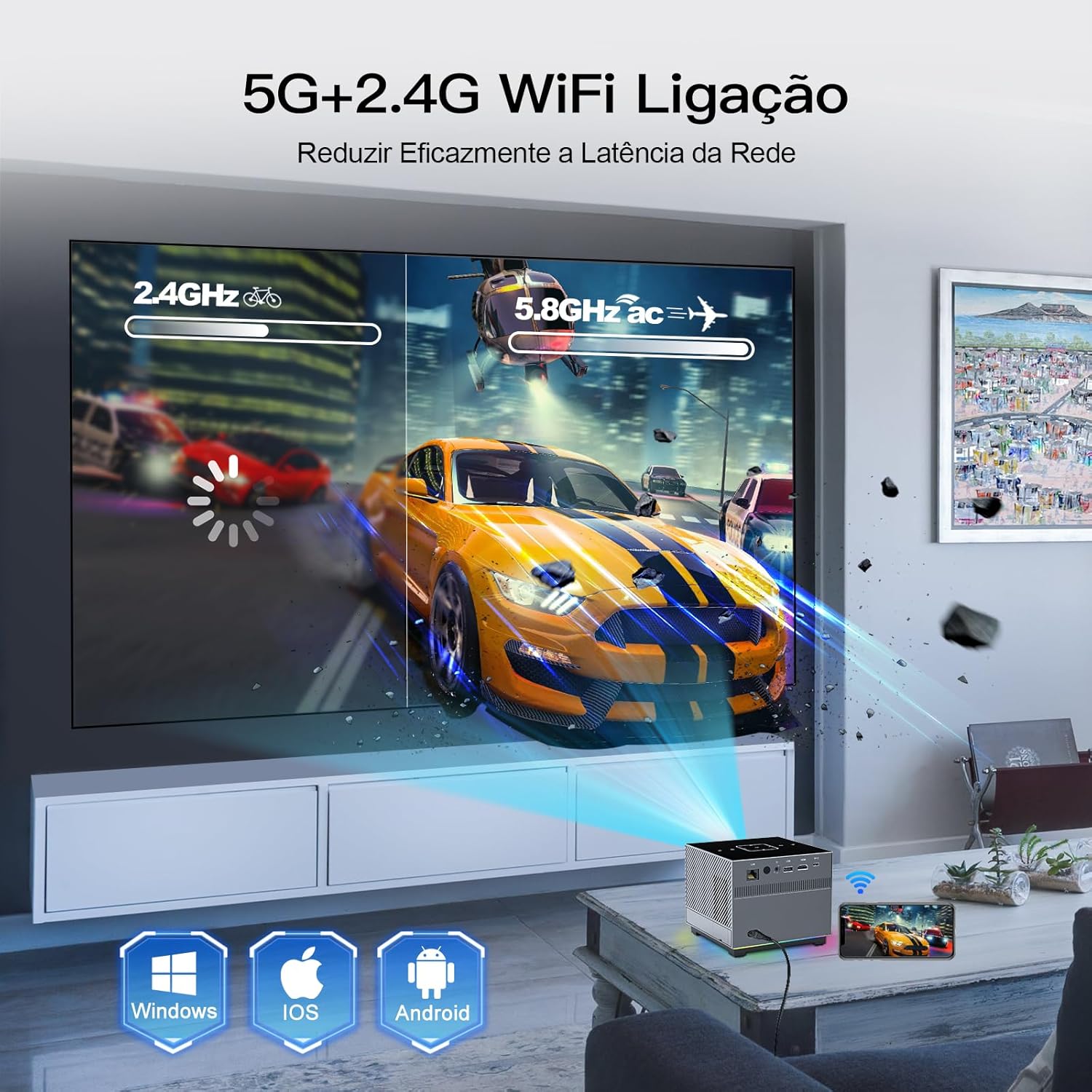
Image 3: The XNANO X3 Projector in an operational setting, projecting an image onto a screen. The image also illustrates the dual-band 2.4G and 5G WiFi connectivity.
6. Instrucțiuni de utilizare
6.1 Utilizarea telecomenzii
The remote control is your primary interface for the projector. Ensure it is paired via Bluetooth for full functionality, including the voice assistant.
- Navigare: Folosiți pad-ul direcțional și butonul OK pentru a naviga prin meniuri.
- Focus: Use F+/- buttons for electric focus adjustment.
- Asistent vocal: Press the voice button (if available and paired) to activate voice commands for most projector functions.
- Volum: Reglați ieșirea audio.
6.2 Using Touch Keys
The projector's top panel features touch-sensitive keys for basic operations. Gently touch the keys to activate functions such as power, volume, and navigation.
6.3 Navigare și setări
The projector runs on a smart operating system. Navigate through the home screen to access installed applications, input sources, and system settings. Adjust picture settings (brightness, contrast, color) and sound settings as desired.
7. Conectivitate
7.1 WiFi Setup (2.4G/5G)
- Go to the 'Settings' menu on the projector.
- Select 'Network' or 'WiFi'.
- Turn on WiFi and select your desired network (2.4G or 5G).
- Enter the password and connect. The 5G WiFi offers faster speeds for smoother streaming.
7.2 Asociere Bluetooth
Connect Bluetooth speakers, headphones, or the remote control for enhanced audio or control.
- Accesați „Setări” și selectați „Bluetooth”.
- Activați Bluetooth și căutați dispozitive.
- Selectați dispozitivul din listă pentru a-l asocia.
7.3 Conectarea dispozitivelor externe
Proiectorul oferă diverse porturi pentru conectarea dispozitivelor externe:
- HDMI: Connect Blu-ray players, game consoles, laptops, or TV sticks.
- USB: Redați conținut media filedirect de pe unități USB.
- Ieșire audio: Connect external wired speakers or sound systems.
- LAN: Pentru conexiune la internet prin cablu.
- Tip C: For compatible devices.

Image 4: The XNANO X3 Projector displaying its smart interface with pre-installed apps like Netflix and YouTube. The image also illustrates the various connectivity options including LAN, HDMI, USB, and Type-C ports.
8. Apps and Media Playback
8.1 Aplicații încorporate
The projector comes with pre-installed applications such as Netflix, YouTube, and the Play Store. Access these directly from the home screen to stream movies, TV shows, and music.
8.2 Playing Local Media
Insert a USB drive into the USB port. The projector's media player will allow you to browse and play compatible video, audio, and image filesunt stocate pe unitate.
8.3 Oglindirea ecranului
The projector supports screen mirroring from various devices, including Windows, iOS, and Android. Refer to the projector's on-screen instructions or settings for specific mirroring protocols (e.g., Miracast, AirPlay).
9. Întreținere
9.1 Curățarea lentilei
Folosiți o lavetă moale, fără scame, special concepută pentru lentile optice. Ștergeți ușor lentila pentru a îndepărta praful sau petele. Evitați utilizarea materialelor abrazive sau a substanțelor chimice dure.
9.2 Curățarea corpului proiectorului
Wipe the exterior of the projector with a soft, dry cloth. Do not use liquid cleaners directly on the device. Ensure ventilation openings are free from dust accumulation.
9.3 Battery Care for Long-Term Storage
If you do not plan to use the projector for an extended period, it is recommended to separate the battery from the projector to maintain battery health and prevent potential issues.
10. Depanare
- Fără putere: Ensure the power adapter is securely connected and the power outlet is functional. Check if the battery is charged.
- Nicio imagine: Verify the input source is correctly selected. Check all cable connections (HDMI, etc.). Adjust focus using the remote. Ensure the lens cap is removed.
- Imagine neclară: Use the F+/- buttons on the remote to adjust the electric focus. Ensure the projector is at an appropriate distance from the screen.
- Fără sunet: Check the projector's volume settings and any connected external audio devices. Ensure Bluetooth audio is correctly paired.
- WiFi/Bluetooth Connectivity Issues: Ensure the projector is within range of the router/device. Restart the projector and the router/device. Re-enter WiFi password or re-pair Bluetooth device.
- Telecomanda nu răspunde: Check battery in the remote. Ensure the remote is paired via Bluetooth for full functionality.
11. Specificații
| Caracteristică | Caietul de sarcini |
|---|---|
| Marca | XNANO |
| Model | X3 |
| Greutatea articolului | 1.65 lire sterline |
| Dimensiunile produsului | 10.16 x 5.43 x 5.75 inci |
| Rezoluția afișajului | 1280 x 720 (Nativ) |
| Tehnologia de conectivitate | Ethernet, WiFi (2.4G/5G), Bluetooth 5.2, HDMI, USB, Type-C, Audio |
| Caracteristici speciale | Built-in Speakers, Rechargeable Battery, Electric Focus, Voice Remote |
| Utilizări recomandate | Interior/Exterior |
| Luminozitate | 300 ANSI Lumens |
| Video Decode Support | Până la 4K |
12. Garanție și asistență
XNANO provides a one-year warranty for the X3 Projector. For technical assistance, troubleshooting, or warranty claims, please contact XNANO customer service. Professional technical support is available for the lifetime of the product.
Pentru asistență suplimentară, vă rugăm să vizitați XNANO Store on Amazon.
Ask a question about this manual
Ask about setup, troubleshooting, compatibility, parts, safety, or missing instructions. Manuals+ will review the question and use this page’s manual context to help answer it.