
1. Instrucțiuni importante de siguranță
Vă rugăm să citiți cu atenție toate instrucțiunile înainte de a utiliza acest aparat și să le păstrați pentru referințe ulterioare. Nerespectarea acestor instrucțiuni poate duce la electrocutare, incendiu sau vătămări corporale grave.
- Asigurați-vă că sursa de alimentare voltagcorespunde cu eticheta cu valorile tehnice de pe aparat.
- Nu folosiți ventilatorul cu un cablu sau un ștecher deteriorat. Dacă cablul este deteriorat, acesta trebuie înlocuit de producător, de agentul său de service sau de persoane cu calificare similară pentru a evita un pericol.
- Deconectați întotdeauna ventilatorul de la priză înainte de a-l curăța, repara sau muta.
- Nu introduceți degetele sau alte obiecte în grila ventilatorului în timp ce acesta funcționează.
- Keep the fan away from water or other liquids. Do not use it in wet or damp medii.
- Acest aparat este destinat exclusiv utilizării în interior. Nu utilizați în aer liber.
- Do not place the fan near heat sources such as radiators, heat registers, stoves, or other appliances that produce heat.
- Supravegheați copiii pentru a vă asigura că nu se joacă cu aparatul.
- Do not use the fan in areas where gasoline, paint, or flammable liquids are stored.
2. Produs terminatview
The Altus AL 40 TFB is a sleek and efficient tower air cooler designed for indoor use. It features a compact design, multiple speed settings, and easy-to-use push-button controls.
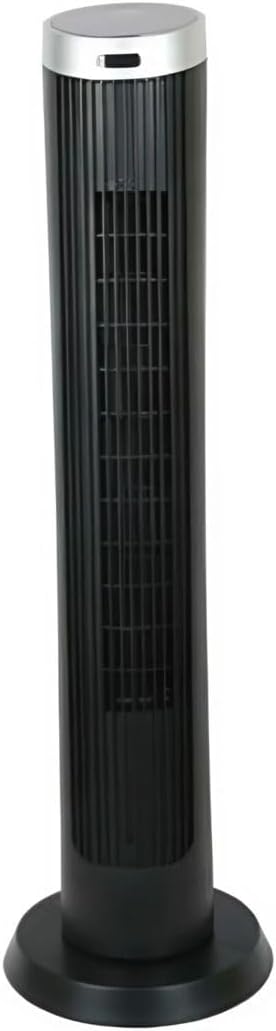
Figura 2.1: Faţă view of the Altus AL 40 TFB Tower Air Cooler. This image shows the tall, slender black body of the fan with its air outlet grille and a stable round base.
Componente:
- Panou de control: Situat în partea superioară a unității pentru acces facil la toate funcțiile.
- Grila de evacuare a aerului: Vertical grille on the front for air dispersion.
- Baza: Stable round base for secure placement.
- Cablu de alimentare: Situat în spatele unității.

Figura 2.2: Detaliat view of the control panel on top of the Altus AL 40 TFB Tower Air Cooler. The panel features a digital display showing '28' and several push buttons for various functions.
3. Configurare
Follow these steps to set up your Altus AL 40 TFB Tower Air Cooler:
- Despacheta: Scoateți cu grijă ventilatorul din ambalaj. Păstrați ambalajul pentru depozitare sau transport ulterior.
- Base Assembly (if required): Some models may require minor base assembly. If your unit's base is detached, align the base sections and secure them according to the diagrams in the packaging. Ensure it is firmly attached.
- Plasare: Place the fan on a firm, level surface. Ensure there is adequate space around the fan for proper airflow, at least 30 cm (12 inches) from walls or furniture. This appliance is designed for indoor use only.
- Conexiune de alimentare: Plug the power cord into a standard electrical outlet. Ensure the outlet meets the voltage cerințele specificate pe eticheta produsului.
4. Instrucțiuni de utilizare
Your Altus AL 40 TFB Tower Air Cooler is equipped with user-friendly push-button controls on the top panel.
Funcțiile panoului de control:
- Butonul de pornire (⏻): Press once to turn the fan ON, press again to turn it OFF.
- Buton de viteză (💨): Press repeatedly to cycle through the 3 available fan speeds: Low, Medium, and High. The current speed setting may be indicated on the digital display.
- Buton Mod (M): If available, press to select different operating modes (e.g., Normal, Natural, Sleep). Refer to the digital display for the active mode.
- Buton de oscilație (↔): Press to activate or deactivate the oscillation function, which allows the fan to rotate from side to side to distribute air over a wider area.
- Butonul temporizatorului (🕒): If available, press to set an automatic shut-off timer. Each press typically increases the timer duration by a set increment (e.g., 1 hour).
Operare generala:
- Conectați ventilatorul la o priză adecvată.
- Apăsați butonul de pornire (⏻) to turn on the fan.
- Select your desired fan speed using the Speed Button (💨).
- Activate oscillation if desired by pressing the Oscillation Button (↔).
- To turn off the fan, press the Power Button (⏻) din nou.
5. Întreținere
Regular maintenance ensures optimal performance and extends the lifespan of your Altus AL 40 TFB Tower Air Cooler.
curatenie:
- Deconectați întotdeauna ventilatorul înainte de curățare.
- Curatenie exterioara: Ștergeți suprafețele exterioare ale ventilatorului cu o lavetă moale șiamp Nu utilizați produse de curățare abrazive, ceară sau lustruire, deoarece acestea pot deteriora finisajul.
- Grile de admisie/evacuare a aerului: Use a vacuum cleaner with a brush attachment to gently remove dust and debris from the air inlet and outlet grilles. Do not attempt to disassemble the fan for cleaning.
- Asigurați-vă că ventilatorul este complet uscat înainte de a-l conecta din nou și a-l pune în funcțiune.
Depozitare:
When not in use for extended periods, store the fan in a cool, dry place. It is recommended to store it in its original packaging to protect it from dust and damage.
6. Depanare
If you encounter any issues with your Altus AL 40 TFB Tower Air Cooler, please refer to the following common problems and solutions:
- Ventilatorul nu pornește:
- Verificați dacă cablul de alimentare este conectat corect la o priză electrică funcțională.
- Ensure the power button on the control panel has been pressed.
- Verify that the household circuit breaker or fuse has not tripped.
- Flux de aer slab:
- Check if the fan speed is set to a higher setting.
- Ensure the air inlet and outlet grilles are not blocked by dust or obstructions. Clean them if necessary.
- Zgomot neobișnuit:
- Asigurați-vă că ventilatorul este așezat pe o suprafață stabilă și plană.
- Check for any foreign objects that might have fallen into the fan grilles.
- Dacă zgomotul persistă, întrerupeți utilizarea și contactați serviciul de asistență pentru clienți.
If the problem cannot be resolved using the above steps, please contact Altus customer support.
7. Specificații
Detailed technical specifications for the Altus AL 40 TFB Tower Air Cooler:
| Caracteristică | Caietul de sarcini |
|---|---|
| Marca | Altus |
| Numele modelului | AL 40 TFB |
| Culoare | Negru |
| Design ventilator electric | Floor Fan (Tower Type) |
| Sursa de alimentare | Electric cu fir |
| Dimensiuni produs (D x L x H) | 29A x 29L x 101Î cm |
| Tip de montare | Montare pe podea |
| Tip de finisare | Pictat |
| Utilizare în interior/exterior | De interior |
| Metoda de control | Buton de apăsare |
| Numărul de niveluri de putere | 3 |
| Fără fir | Nu |
8. Garanție și asistență
Altus provides comprehensive support for its products. For any assistance or warranty-related inquiries, please contact our customer service.

Figura 8.1: Altus customer service and warranty information. The image displays the Altus logo, a message about service availability, and a contact number for support.
Our services are always available for your Altus products. You can benefit from our door-to-door service by calling our support line for any assistance you may need.
Arçelik Service Warranty: For products under warranty, our home product pickup service is provided free of charge.
Customer Support Line: 0850 210 0 888
Please have your product model number (AL 40 TFB) and purchase details ready when contacting support.