
1. Produs terminatview
The NBBX Programmable Sprinkler Timer is designed to automate your garden watering, providing precise control over irrigation schedules. It features a clear LCD display, intuitive controls, and functions such as rain delay and manual watering mode.
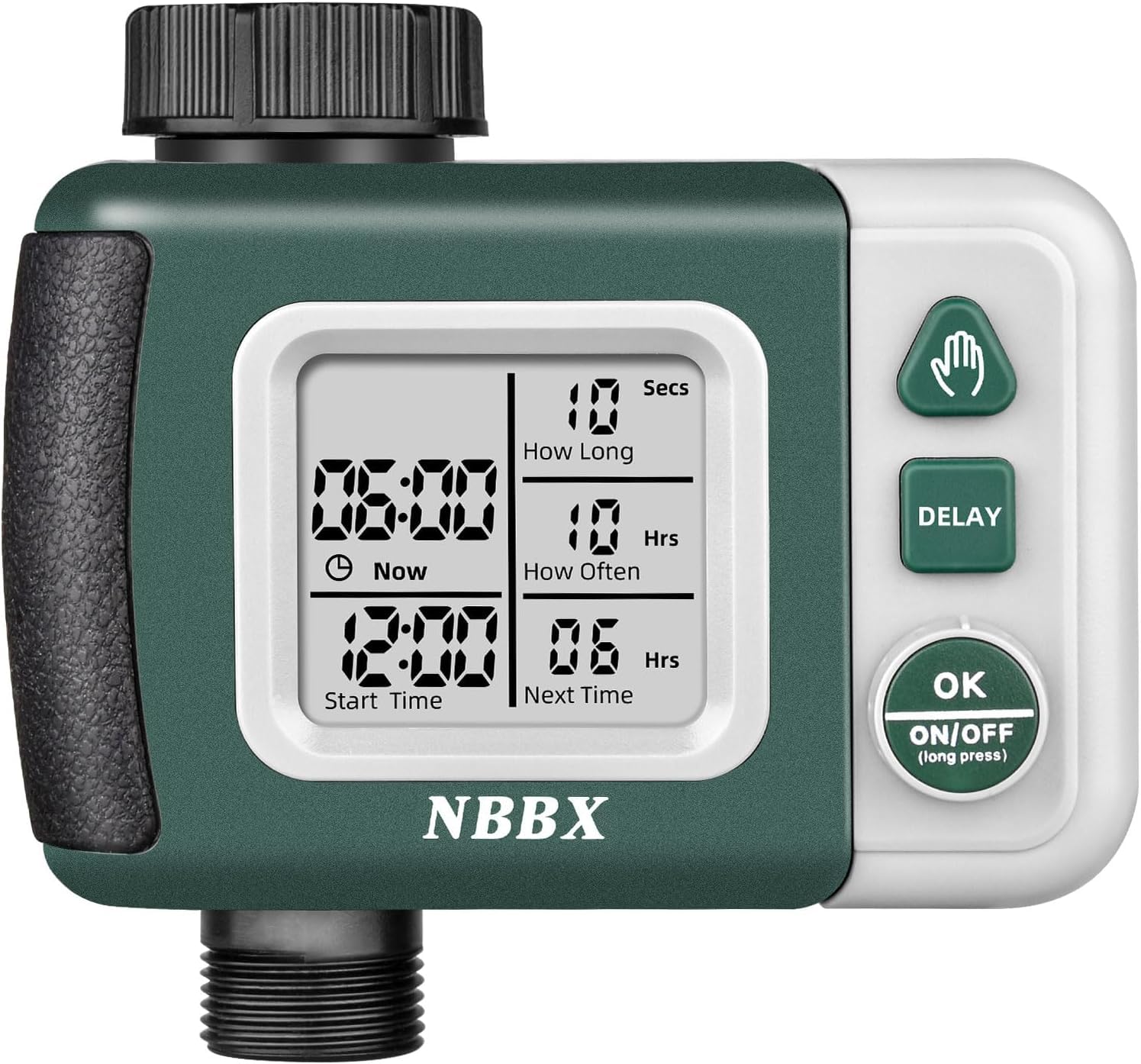
Image: The NBBX Sprinkler Timer, green and gray, connected to a standard garden faucet with a hose attached, shown in a garden setting.
2. Conținutul pachetului
- 1 x NBBX Programmable Sprinkler Timer
- 1 x Manual de utilizare
- Various hose connection adapters (may vary by region)
3. Configurare și instalare
3.1 Instalarea bateriei
- Localizați compartimentul bateriilor pe spatele cronometrului.
- Gently pry open the battery compartment cover using a blunt object like a flat-head screwdriver or butter knife. The cover is designed to be firm to ensure a watertight seal.
- Introduceți două (2) baterii AA, asigurându-vă că polaritatea este corectă (+/-).
- Carefully close the battery compartment cover, pressing firmly with both thumbs to ensure a complete and watertight seal. Visually inspect to confirm no part of the seal is exposed.
- After battery installation, allow a few minutes for the device to power up properly before attempting to program it. The display will activate once ready.
3.2 Connecting to Faucet
- Ensure the metal screen filter inside the timer's inlet connection is flush with the inner surface. If it is not, gently push it into place with a blunt object to prevent leaks. Avoid puncturing the washer.
- Screw the timer securely onto your outdoor garden faucet. Hand-tighten only; do not overtighten.
- Connect your garden hose to the outlet of the sprinkler timer.

Image: The NBBX Sprinkler Timer connected to a faucet, highlighting its large screen and ease of installation.
4. Instrucțiuni de utilizare
The timer features a large LCD display showing current time, start time, watering duration, and next watering schedule. Control buttons include a manual override, delay function, and an OK/power button.
4.1 Setarea orei curente
- Press the 'OK/ON/OFF' button to enter programming mode.
- Use the arrow buttons (if available, or cycle through options with 'OK') to set the current time (24-hour format).
- Confirm with 'OK'.
4.2 Programarea udării automate
The timer offers flexible scheduling with customizable duration and frequency.

Image: The NBBX Sprinkler Timer display illustrating options for setting watering frequency (Mode 1: 1-12 hours, Mode 2: 1-7 days) and duration (10 minutes to 24 hours).
- Set Watering Duration ('How Long'): Navigate to the 'How Long' setting. Adjust the watering time from seconds up to multiple hours using the adjustment buttons. Confirm with 'OK'.
- Set Watering Frequency ('How Often'): Navigate to the 'How Often' setting. Choose between two modes:
- Modul 1: Every 1-12 hours. Select the desired interval.
- Modul 2: Every 1-7 days. Select the desired number of days between watering cycles.
- Setați ora de începere: Navigate to the 'Start Time' setting. Set the desired time for the watering cycle to begin. Confirm with 'OK'.
- The 'Next Time' display will show the countdown to the next scheduled watering based on your programmed settings. This display will dynamically show days, hours, or minutes depending on the proximity of the next cycle.
4.3 Modul de udare manuală
To initiate immediate watering outside of the programmed schedule:
- Press the dedicated 'Manual' button (often represented by a hand icon).
- The timer will begin watering immediately for a default or pre-set manual duration.
- To stop manual watering, press the 'Manual' button again or the 'OK/ON/OFF' button.
4.4 Funcția de întârziere la ploaie
The rain delay function allows you to temporarily pause your watering schedule to prevent overwatering during rainy periods.

Image: The NBBX Sprinkler Timer display showing the rain delay function with options for 6 hours, 12 hours, or 1-7 days delay.
- Apăsați butonul „ÎNTÂRZIERE”.
- Use the adjustment buttons to select the desired delay duration (e.g., 6 hours, 12 hours, or 1-7 days).
- Confirm with 'OK'. The timer will pause its automatic schedule for the selected period and resume afterward.
5. Întreținere
5.1 Înlocuirea bateriei
Replace batteries when the low battery indicator appears on the display or if the timer stops functioning. Refer to section 3.1 for battery installation steps.
5.2 Curăţarea filtrului
Periodically check and clean the metal screen filter located in the timer's inlet connection to prevent debris from entering and affecting water flow or causing leaks.
5.3 Iernare
Before freezing temperatures, disconnect the sprinkler timer from the faucet and hose. Remove the batteries and store the timer indoors in a dry, protected location to prevent damage from frost.
6. Depanare
- Timer not powering on: Ensure batteries are correctly installed and have sufficient charge. After installing new batteries, allow a few minutes for the device to initialize before attempting to program.
- Scurgeri de apă din conexiuni: Check that the timer is securely tightened to the faucet and the hose is securely attached to the timer. Verify the metal screen filter in the inlet is flush and not damaged.
- Display is difficult to read: The LCD display is not backlit. Adjust your viewing angle or use your hand to shade the screen from direct sunlight for better visibility.
- Probleme de programare: If programming is unresponsive, remove batteries, wait for the display to completely fade, then reinsert and wait 5 minutes before attempting to program again. Ensure you are following the programming steps correctly.
- Cronometrul nu udă: Check battery level. Ensure the faucet is turned on. Verify that a watering schedule is programmed and the current time is set correctly. Check if rain delay is active.
7. Specificații
| Caracteristică | Detaliu |
|---|---|
| Marca | NBBX |
| Numărul de model | Nbbx-ht01 |
| Material | Plastic |
| Dimensiuni produs (D x L x H) | 5.83 cm x 2.68 cm x 4.65 cm |
| Greutatea articolului | 0.86 lire sterline |
| Sursa de alimentare | 2 x baterii AA (nu sunt incluse) |
| Numărul de setări | 3 (Modes for frequency/duration) |

Image: The NBBX Sprinkler Timer showing its physical dimensions: 4.92 inches in length, 2.56 inches in depth, and 4.92 inches in height.
8. Garanție și asistență
8.1 Informații despre garanție
Vă rugăm să consultați ambalajul produsului sau instrucțiunile distribuitorului. website for specific warranty details. Typically, NBBX products come with a limited warranty covering manufacturing defects.
8.2 Asistență pentru clienți
For technical assistance, troubleshooting, or warranty claims, please contact the seller or manufacturer directly through their official support channels. Contact information can usually be found on the product packaging or the brand's official website-ul.