
1. Introducere
This manual provides detailed instructions for the installation, operation, and maintenance of your Skyworth H30P WiFi 3MP Indoor Camera. Please read this manual carefully before using the product to ensure proper and safe operation. Keep this manual for future reference.
2. Informații de siguranță
- Asigurați-vă că sursa de alimentare voltage is within the specified range for the camera.
- Nu expuneți camera la apă, umezeală sau temperaturi extreme. Acest produs este conceput numai pentru utilizare în interior.
- Evitați amplasarea camerei în apropierea surselor de căldură sau în lumina directă a soarelui.
- Nu încercați să dezasamblați sau să modificați camera. Acest lucru poate anula garanția și poate provoca daune.
- Nu lăsați camera și accesoriile acesteia la îndemâna copiilor.
- Folosiți doar adaptorul de alimentare furnizat împreună cu camera.
3. Conținutul pachetului
Verificați dacă toate articolele sunt prezente în colet:
- Skyworth H30P WiFi 3MP Indoor Camera
- Adaptor de alimentare
- Accesorii de montare (șuruburi, dibluri)
- Manual de utilizare
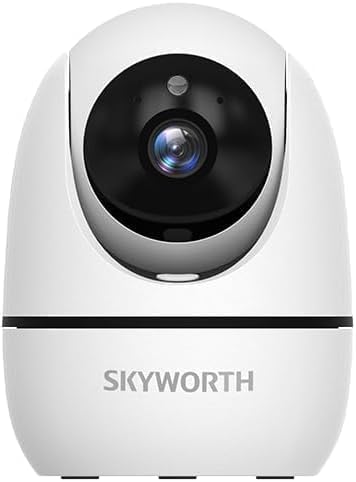
Image: The Skyworth H30P camera shown with its instruction manual and other accessories, indicating typical package contents.
4. Produs terminatview
The Skyworth H30P camera features a compact design with advanced surveillance capabilities. Familiarize yourself with its main components:
- Obiectivul camerei: Capturează videoclipuri de 3MP.
- Microfon: Pentru intrare audio și comunicare bidirecțională.
- Vorbitor: Pentru ieșire audio și comunicare bidirecțională.
- Indicator luminos de stare: Shows camera status (e.g., connected, recording).
- Port de alimentare: Se conectează la adaptorul de alimentare.
- Buton de resetare: Folosit pentru a restaura setările din fabrică.
- Port Ethernet RJ45: Pentru conexiune la rețea prin cablu.
- Slot pentru card MicroSD: Pentru stocarea video locală.
Imagine: Spate view of the Skyworth H30P camera, highlighting the RJ45 Ethernet port, power input, and other rear components.
5. Configurare
5.1 Pornire
- Conectați adaptorul de alimentare la portul de alimentare al camerei.
- Conectați adaptorul de alimentare la o priză de perete.
- The camera will power on, and the status indicator light will illuminate. Wait for the camera to initialize.
5.2 Instalarea aplicației
- Download the recommended surveillance app (e.g., 'Skyworth Smart' or similar, check product packaging for specific app name) from your smartphone's app store (App Store for iOS, Google Play Store for Android).
- Înregistrați-vă pentru un cont și conectați-vă.
5.3 Conectarea la rețea
The H30P supports both wireless (WiFi 6) and wired (RJ45) connections.
Wireless Connection (WiFi)
- Open the app and select 'Add Device'.
- Follow the on-screen instructions to connect the camera to your WiFi network. This typically involves scanning a QR code on the camera or entering your WiFi credentials.
- Ensure your WiFi network is 2.4GHz or 5GHz compatible (WiFi 6 for optimal performance).
Wired Connection (RJ45)
- Connect an Ethernet cable from your router to the RJ45 port on the back of the camera.
- Open the app and select 'Add Device'. The app should automatically detect the camera via the wired connection.
- Urmați toate instrucțiunile rămase de pe ecran pentru a finaliza configurarea.
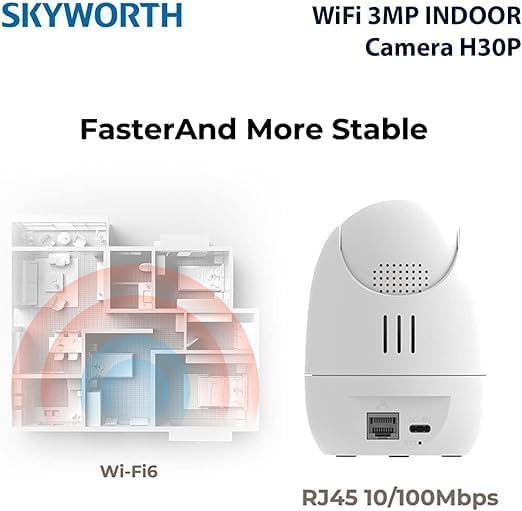
Image: A diagram illustrating the enhanced coverage of Wi-Fi 6 and the physical RJ45 port on the camera for stable network connectivity.
5.4 Montarea camerei
The Skyworth H30P camera can be placed on a flat surface or mounted to a wall.
Montare pe perete
- Choose a suitable location on a wall, ensuring it is within range of a power outlet and your network.
- Use the provided mounting template (if included) or mark the screw holes on the wall.
- Drill pilot holes and insert the wall plugs.
- Secure the mounting bracket (if applicable) or the camera directly to the wall using the screws.
- Reglați unghiul camerei după cum este necesar.
6. Instrucțiuni de utilizare
6.1 În direct View
Once connected, open the app to view the live feed from your camera. You can select the camera from your device list to access its real-time video stream.
6.2 Controlul Panoramic, Tilt și Zoom (PTZ)
The H30P camera offers 360-degree horizontal rotation and vertical tilt. Use the controls within the app to remotely adjust the camera's viewUnghi de vizibilitate. Acest lucru permite o acoperire completă fără unghiuri moarte.
6.3 Sunet bidirecțional
The camera features a built-in microphone and speaker. In the app, activate the microphone icon to speak through the camera and the speaker icon to listen to audio from the camera's location. This enables real-time communication.
6.4 Vedere nocturnă
The H30P camera supports color night vision, providing clear images even in low-light conditions. This feature typically activates automatically when ambient light is insufficient.
6.5 Detectarea și urmărirea mișcării
Enable motion detection in the app settings to receive alerts when movement is detected. The camera can also be configured to track detected motion, keeping the subject in view.
6.6 Înregistrare și stocare
The camera supports local storage via a MicroSD card (not included) and may offer cloud storage options (subscription may be required). Insert a MicroSD card into the designated slot for continuous or event-triggered recording. Manage recording settings and view playback through the app.

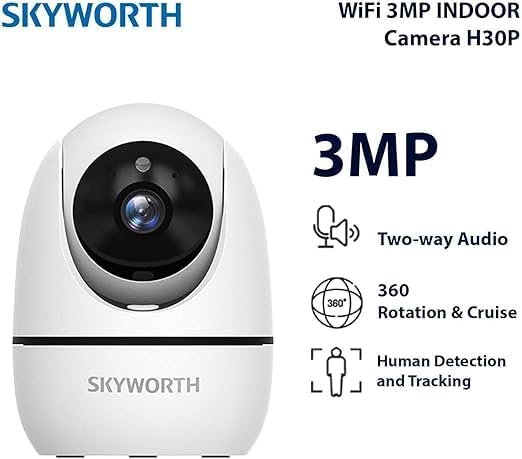
Image: A visual representation of the Skyworth H30P camera's key features, including 3MP resolution, two-way audio, 360-degree rotation, and human detection capabilities.
7. Întreținere
7.1 Curățare
To clean the camera, gently wipe the lens and body with a soft, dry cloth. Do not use harsh chemicals or abrasive cleaners.
7.2 de actualizări de firmware
Periodically check the app for available firmware updates. Keeping your camera's firmware up-to-date ensures optimal performance and security features.
8. Depanare
| Problemă | Cauza posibila | Soluţie |
|---|---|---|
| Camera nu pornește | No power, faulty adapter | Check power connection and outlet. Ensure adapter is working. |
| Nu se poate conecta la WiFi | Incorrect WiFi password, camera too far from router, 5GHz only network (if camera is 2.4GHz only) | Verify password. Move camera closer to router. Ensure router supports 2.4GHz or camera supports 5GHz. Reset camera and try again. |
| Fără flux video | Network issue, camera offline | Check network connection. Restart camera and router. Verify camera status in app. |
| Audio bidirecțional nu funcționează | Microphone/speaker muted in app, volume too low | Check app settings for audio controls. Adjust volume. |
| Detecția de mișcare nu se declanșează | Detection sensitivity too low, feature disabled | Adjust motion detection sensitivity in app. Ensure feature is enabled. |
9. Specificații
| Caracteristică | Detaliu |
|---|---|
| Numărul de model | H30P |
| Rezoluție captură video | 3 Megapixeli |
| Tehnologia de conectivitate | Wireless (WiFi 6), Wired (RJ45) |
| Protocolul de comunicare | Rețea WiFi |
| Caracteristici speciale | HD Resolution, Two-Way Audio, Color Night Vision, Motion-Activated Recording, Motion Sensor |
| Utilizare în interior/exterior | De interior |
| Dispozitive compatibile | Smartphone |
| Sursa de alimentare | Electric cu fir |
| Tip de montare | Montare pe perete |
| Utilizări recomandate | Baby Monitoring, Pet Monitoring, Indoor Security, Gaming, Tracking |
| Dimensiunile produsului | 4 x 8 x 8 cm; 240 de grame |
| Sunt necesare baterii? | Nu |
| Componente incluse | Skyworth Body |
| Țara de origine | China |
10. Garanție și asistență
Your Skyworth H30P camera comes with a standard manufacturer's warranty. Please refer to the warranty card included in your package or contact Skyworth customer support for details regarding warranty terms and conditions.
For technical support, troubleshooting assistance, or any inquiries regarding your product, please visit the official Skyworth website-ul web sau contactați departamentul de asistență pentru clienți. Informațiile de contact se găsesc de obicei pe ambalajul produsului sau pe fișa producătorului. website-ul.

