
FLEXISPOT V9-Max-AR
FLEXISPOT V9-Max-AR Exercise Bike with 2D Desktop User Manual
Model: V9-Max-AR (Exercise Bike with Desk)
1. Introducere
This manual provides essential information for the safe and effective use of your FLEXISPOT V9-Max-AR Exercise Bike with 2D Desktop. Please read all instructions carefully before assembly and operation. Retain this manual for future reference.
Informații importante privind siguranța
- Asigurați-vă că toate piesele sunt fixate în siguranță înainte de fiecare utilizare.
- Nu depășiți greutatea maximă recomandată de 300 de livre.
- Țineți copiii și animalele de companie departe de bicicleta de exerciții în timpul funcționării.
- Consultați un medic înainte de a începe orice program nou de exerciții.
- Use the product on a stable, level surface.
2. Produs terminatview și Componente
The FLEXISPOT V9-Max-AR is a versatile exercise bike designed for indoor use, featuring an integrated 2D adjustable desktop. It combines a stationary bike with a functional workspace, allowing for simultaneous exercise and productivity.

Figure 2.1: User operating the FLEXISPOT V9-Max-AR Exercise Bike with the desktop in use.
Key features include an 8-level quiet magnetic resistance system, an LCD display for tracking workout metrics, and a robust design supporting up to 300 lbs. The adjustable seat and desktop accommodate various user heights and preferences.
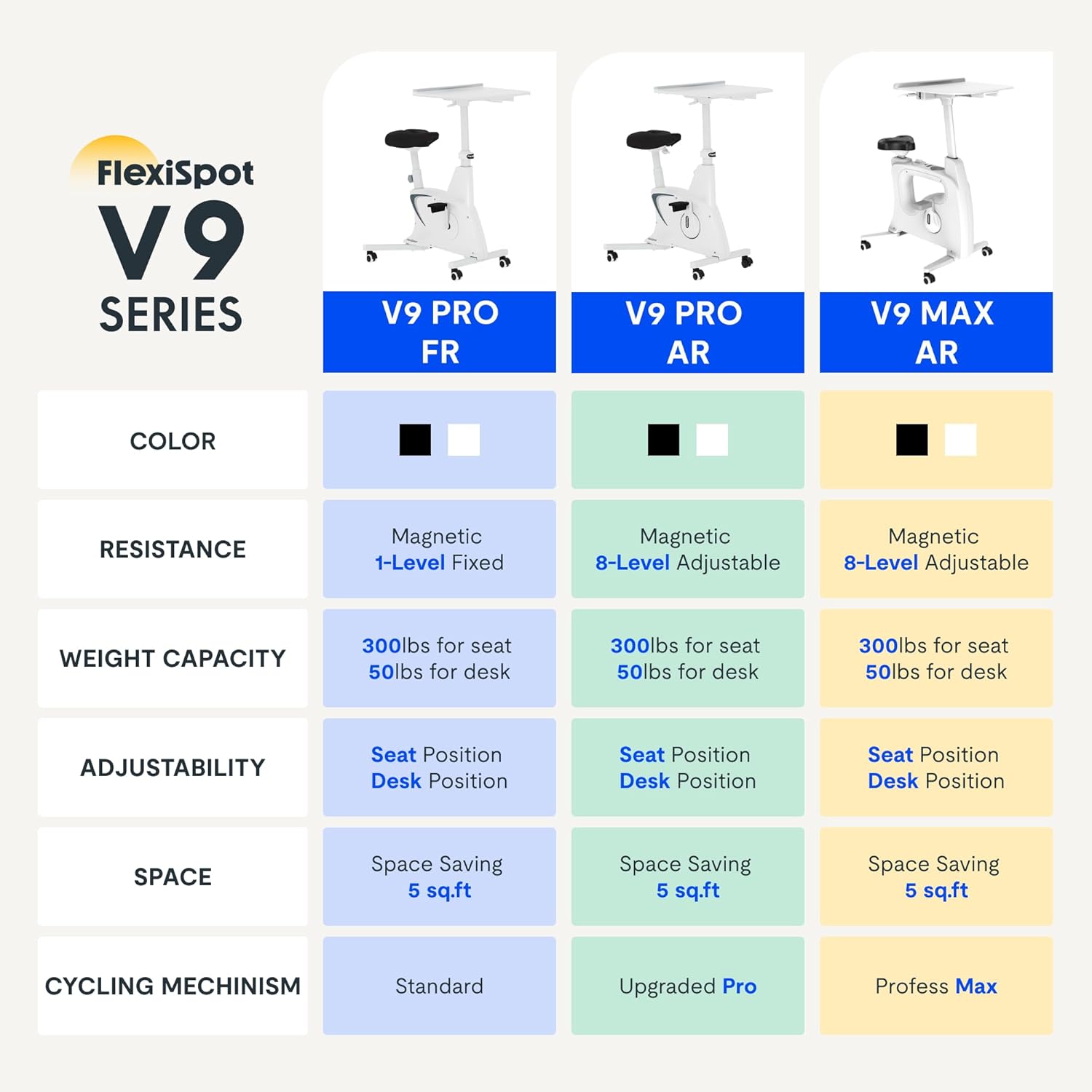
Figure 2.2: Comparison of FlexiSpot V9 series models, highlighting features like resistance and adjustability.
Componentele principale:
- Main Frame with Flywheel and Resistance Mechanism
- Scaun reglabil
- Adjustable Desktop
- Pedale
- Consolă cu afișaj LCD
- Roti de transport
3. Configurare și asamblare
The FLEXISPOT V9-Max-AR is designed for quick and straightforward assembly, typically requiring about 10 minutes.
Etape de asamblare:
- Despachetați toate componentele și verificați-le în funcție de lista de ambalare.
- Attach the front and rear stabilizers to the main frame using the provided screws.
- Install the pedals, ensuring the left pedal is tightened counter-clockwise and the right pedal clockwise.
- Mount the seat post and seat onto the main frame, securing them firmly.
- Attach the desktop support column to the main frame.
- Secure the desktop to its support column.
- Insert batteries into the LCD display (batteries not included) and connect the sensor wire.
- Ensure all screws and connections are tightened before first use.

Figure 3.1: Illustration of adjustable components for personalized setup.
4. Instrucțiuni de utilizare
Adjusting Seat and Desktop:
- Înălțimea scaunului: Use the quick-release lever located on the seat post to adjust the seat to a comfortable height. Ensure your leg has a slight bend at the knee when the pedal is at its lowest point.
- Desktop Height: The desktop can be adjusted vertically. Locate the adjustment lever beneath the desktop and raise or lower the desktop to your desired working height.
- Adâncimea biroului: The desktop can also be adjusted horizontally (forward/backward) to optimize your working posture.
Niveluri de rezistență:
The V9-Max-AR features 8 levels of quiet magnetic resistance. Rotate the resistance knob, located below the desktop, clockwise to increase resistance and counter-clockwise to decrease it.

Figure 4.1: LCD display and resistance control knob.
Utilizarea afișajului LCD:
The built-in LCD display monitors your workout statistics. It tracks:
- Timp
- Viteză
- Distanţă
- Calorii arse
- Total Distance Covered (Odometer)
- Viteza de rotatie
Press the button on the display to cycle through different metrics or hold it to reset values (refer to display specific instructions for exact operation).
Using the 2D Desktop:
The spacious desktop (20" x 22.8") is designed to hold a laptop, notebook, mobile phone, or water cup. It provides a stable surface for working or entertainment while exercising.

Figure 4.2: Desktop in use for studying or working.
Portabilitate:
Equipped with movable silent wheels, the exercise bike can be easily relocated within your home or office. Simply tilt the bike and roll it to your desired position.
5. Întreținere
Regular maintenance ensures the longevity and optimal performance of your FLEXISPOT V9-Max-AR Exercise Bike.
- curatenie: Wipe down the bike regularly with a damp o cârpă și un detergent blând. Evitați substanțele de curățare abrazive sau solvenții.
- Inspecţie: Periodically check all bolts, nuts, and moving parts for tightness. Tighten any loose components immediately.
- Lubrifiere: Nu este necesară o lubrifiere specifică pentru sistemul de rezistență magnetică.
- Depozitare: Depozitați bicicleta într-un loc uscat și răcoros, ferit de lumina directă a soarelui și de temperaturi extreme.
6. Depanare
Această secțiune abordează problemele frecvente pe care le-ați putea întâmpina cu bicicleta dumneavoastră de fitness.
| Problemă | Cauza posibila | Soluţie |
|---|---|---|
| Afișajul LCD nu funcționează | Bateriile sunt descărcate sau instalate incorect. | Replace batteries (AAA, not included) or ensure correct polarity. |
| Unstable or wobbly bike | Șuruburi slăbite sau suprafață neuniformă. | Check and tighten all assembly bolts. Ensure the bike is on a flat, stable surface. |
| Rezistența nu se schimbă | Problemă cu mecanismul de rezistență. | Asigurați-vă că butonul de rezistență este fixat corect. Dacă problema persistă, contactați serviciul de asistență pentru clienți. |
| Squeaking or unusual noises | Loose components or friction. | Inspect all connections and tighten any loose parts. Ensure no foreign objects are interfering with moving parts. |
7. Specificații
Detailed specifications for the FLEXISPOT V9-Max-AR Exercise Bike:
- Model: V9-Max-AR (Exercise Bike with Desk)
- Marca: FLEXISPOT
- Culoare: Negru
- Mecanism de rezistență: Magnetic
- Număr de niveluri de rezistență: 8
- Greutate maximă Recomandare: 300 lire sterline
- Dimensiunile produsului (A x L x Î): 37.6 cm x 23.2 cm x 47.2 cm
- Desktop Dimensions: Approximately 20" x 22.8"
- Minimum Height (Seat): 29.6 inchi
- Maximum Height (Overall): 47.2 Inches (desktop height can go up to 47.2")
- Sursa de alimentare: Acționat de pedală (neelectric)
- Sistem de acționare: centura
- Caracteristica speciala: Adjustable Seat, Adjustable Desktop
- Utilizări recomandate: De interior
- Space Occupied: Aproximativ 5 mp

Figura 7.1: Dimensiunile produsului.
8. Garanție și asistență
FLEXISPOT is committed to providing quality products and customer satisfaction.
- Returnări: Acest produs este eligibil pentru retururi ușoare în 30 de zile. Vă rugăm să consultați politica de returnare a platformei dvs. de achiziție pentru detalii.
- Garantie: For specific warranty terms and conditions, please refer to the official FLEXISPOT website-ul lor sau contactați direct serviciul de asistență pentru clienți.
- Asistență clienți: For any questions, assistance, or troubleshooting not covered in this manual, please contact FLEXISPOT customer support. Contact information can typically be found on the manufacturer's website-ul sau documentația achiziției dumneavoastră.
9. Informații suplimentare
While no specific official product videos were provided in the product data, users may find helpful assembly or usage guides on the manufacturer's official website or their authorized channels. Always ensure the source is official for accurate information.
Ask a question about this manual
Ask about setup, troubleshooting, compatibility, parts, safety, or missing instructions. Manuals+ will review the question and use this page’s manual context to help answer it.