
1. Introducere
The Thunderobot L1 Computer Monitor Lamp is designed to provide optimal lighting for your workspace, focusing on eye comfort and visual clarity. It features an asymmetric light source, high color rendering (Ra≥95), flicker-free illumination, low blue light protection, and adjustable color temperature and brightness levels.
2. Informații de siguranță
- Asigurați-vă că lamp is securely placed on the monitor to prevent accidental falls.
- Nu expuneți lamp la apă sau la umiditate excesivă.
- Avoid disassembling the product. Contact support for repairs.
- Use only the provided USB cable for power.
- A nu se lăsa la îndemâna copiilor.
3. Conținutul pachetului
Verificați dacă toate articolele sunt prezente în colet:
- Thunderobot L1 Computer Monitor Lamp
- Cablu de alimentare USB
- Manual de utilizare
4. Instrucțiuni de configurare
- Poziționarea Lamp: Gently place the Thunderobot L1 Monitor Lamp on top of your computer monitor. The gravity-activated clamping mechanism and silicone anti-slip stabilizers will help secure it in place. Adjust the lamp's angle using the dual-pivot adjustment system to direct light onto your workspace without screen glare.
- Putere de conectare: Connect the provided USB cable to the USB-C port on the lamp and plug the other end into an available USB port on your computer or a USB power adapter (not included). The lamp will power on.

Image: The Thunderobot L1 lamp features a gravity-activated clamp, silicone stabilizers, and a dual-pivot adjustment system for secure and flexible positioning.
Video: This video demonstrates the assembly and installation of the Thunderobot L1 Computer Monitor Lamp, showing how to attach it to a monitor and connect the power cable.
5. Instrucțiuni de utilizare
The Thunderobot L1 Monitor Lamp features intuitive touch controls located on the top surface of the lamp.
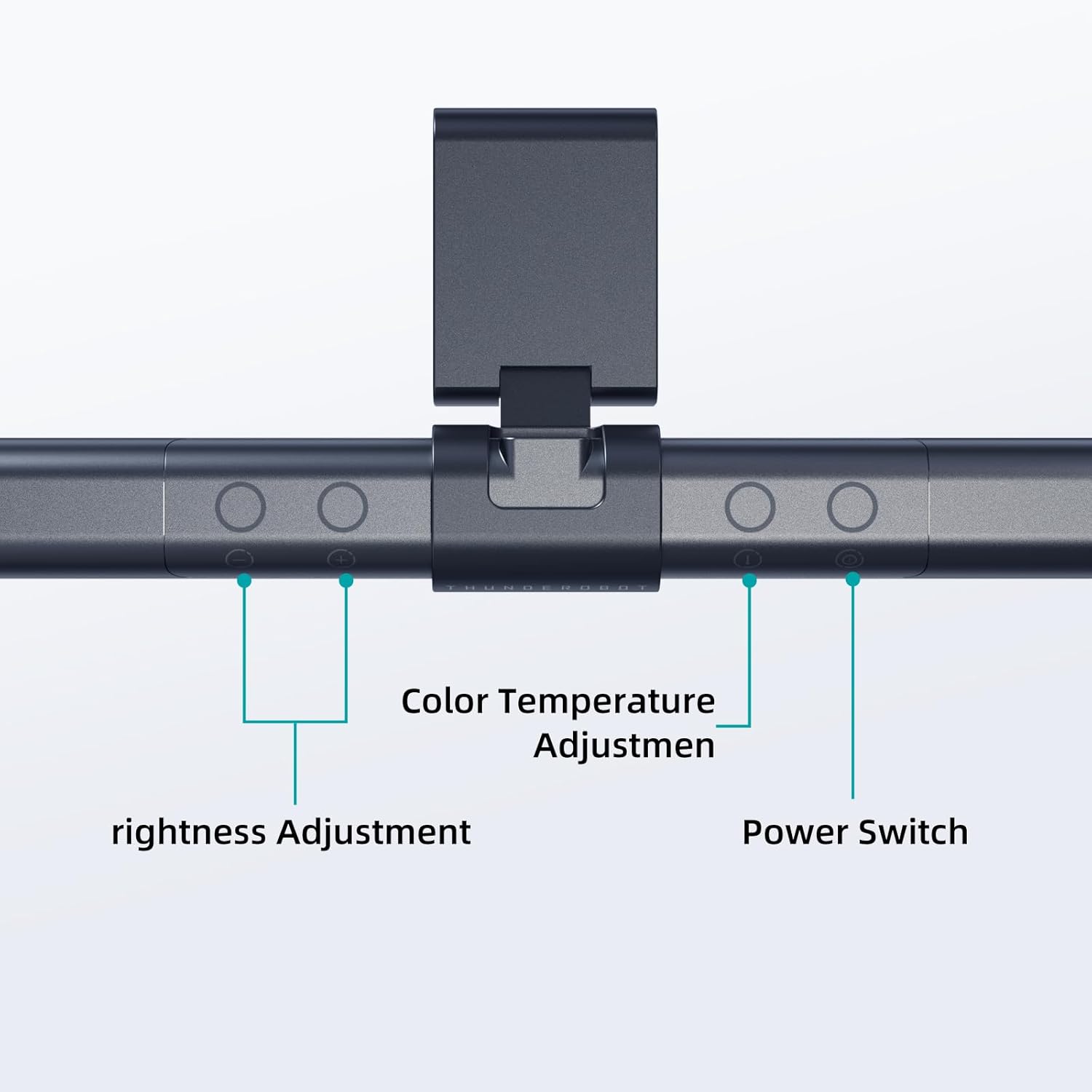
Image: The touch controls include buttons for brightness adjustment, color temperature adjustment, and power.
- Pornire/Oprire: Apăsați butonul de pornire (O) a întoarce lamp pornit sau oprit.
- Reglarea luminozității: Use the brightness adjustment buttons (+ şi -) to cycle through ten levels of brightness.
- Reglarea temperaturii culorii: Press the color temperature button (i) to switch between six different color temperature settings.

Imagine: L-ulamp offers six adjustable color temperatures, ranging from 3000K (Warm Light) to 6000K (Cool White Light), suitable for various activities like movie viewing, reading, studying, and working.
6. Caracteristici cheie
- Asymmetric Light Source: The advanced asymmetric light design ensures uniform light distribution across the workspace, eliminating screen glare and shadows. This optimizes the light path for comfortable, prolonged use.
- Ra≥95 High Color Rendering: With a color rendering index of Ra≥95, the lamp accurately reproduces colors, providing a vivid and true-to-life visual experience for various tasks.
- Iluminare fără pâlpâire: Equipped with flicker-free technology, this lamp provides constant, stable illumination, reducing eye strain and headaches associated with traditional lighting.
- Low Blue Light Protection: Advanced low blue light technology reduces harmful blue wavelengths, alleviating eye strain, dryness, and fatigue, especially during extended screen time.
- Six Color Temperatures: Offers a versatile range of six color temperature options, from warm white to cool white, allowing users to customize the lighting atmosphere for different scenarios and preferences.
- Ten-Level Dimming: Provides ten adjustable brightness levels for precise control over illumination intensity.

Image: The Ra≥95 High CRI ensures colors are displayed accurately and vibrantly, as demonstrated by the fruit comparison.

Imagine: L-ulamp provides low blue light protection, reducing harmful blue light exposure for eye comfort.
7. Specificații
| Caracteristică | Detaliu |
|---|---|
| Dimensiunile produsului | 3.5" D x 17.7" L x 3.85" H |
| Greutatea articolului | 16 uncii |
| Lamp Tip | Birou Lamp |
| Culoare umbră | Negru |
| Material de umbră | Poliester |
| Tip comutator | Buton de apăsare |
| Tehnologia de conectivitate | USB (pentru alimentare) |
| Voltage | 12 volți |
| Culoare | Negru |
| Formă | Plat |
| Tip material | Policarbonat |
| Numărul de model | TH-L1-B2 |
8. Întreținere
- curatenie: Deconectați alimentarea înainte de curățare. Folosiți o cârpă moale și uscată pentru a ștergeamp. Nu utilizați agenți de curățare abrazivi sau solvenți.
- Depozitare: Când nu este utilizat pentru perioade lungi de timp, depozitați l-ulamp într-un loc răcoros și uscat.
9. Depanare
- Lamp nu pornește:
- Asigurați-vă că cablul USB este conectat ferm la ambele lamp și sursa de alimentare.
- Verify that the power source (USB port or adapter) is functional.
- Pâlpâituri de lumină:
- Verificați conexiunea de alimentare.
- Dacă pâlpâirea persistă, contactați serviciul de asistență pentru clienți.
- Comenzile nu răspund:
- Disconnect and reconnect the power cable to reset the lamp.
- Asigurați-vă că degetele sunt curate și uscate atunci când utilizați comenzile tactile.
10. Garanție și asistență
Thunderobot provides 1-year product quality support for the L1 Computer Monitor Lamp. For warranty claims or technical assistance, please contact Thunderobot customer service.