
1. Introducere
This manual provides detailed instructions for the safe and effective use of the CEM ILDM-150 Laser Distance Measure. The ILDM-150 is a precision instrument designed for accurate distance, area, and volume measurements, featuring Bluetooth connectivity for data transfer and management via the Meterbox Pro application. Please read this manual thoroughly before operating the device to ensure proper functionality and safety.

Figure 1.1: CEM ILDM-150 Laser Distance Measure and included accessories.
2. Caracteristicile produsului
The CEM ILDM-150 Laser Distance Measure offers a range of features designed for efficiency and accuracy:
- Precizie ridicată: Utilizes a Class II Laser with 1mW output, providing accuracy up to ±1/16 inch (1.5mm) over a measuring range of up to 229 feet (70 meters).
- Moduri multiple de măsurare: Supports single distance, continuous measurement, area, volume, and Pythagorean (three-point) calculations.
- Comutarea unității: Easily switch between meters (M), inches (In), and feet (Ft).
- Conectivitate Bluetooth 4.0: Seamlessly transfer measured data to a smartphone or tablet using the Meterbox Pro application for analysis and sharing.
- Stocarea datelor: Stores up to 99 groups of measurement data, with manual deletion capability.
- Iluminare de fundal LCD: Large backlit screen for improved visibility in low-light conditions.
- Setare Mute: Option to turn the measurement beep on or off for use in quiet environments.
- Design durabil: IP54 rated for water and dust resistance, featuring a hard rubber body for enhanced grip and protection.
- Economisire de energie: Oprire automată după 150 secunde de inactivitate pentru a conserva bateria.
- Indicație baterie descărcată: Alertează utilizatorul când bateriile trebuie înlocuite.

Figura 2.1: Pesteview of CEM ILDM-150 key features.
3. Informații de siguranță
The CEM ILDM-150 is a Class II laser product. Adhere to the following safety guidelines:
- Nu priviți direct în raza laser.
- Nu îndreptați raza laser către oameni sau animale.
- Evitați utilizarea instrumentelor optice (de exemplu, binocluri, telescoape) pentru a view raza laser.
- Nu lăsați dispozitivul la îndemâna copiilor.
- Nu încercați să modificați sau să dezasamblați dispozitivul.
- Utilizați numai baterii specificate.
4. Noțiuni introductive (Configurare)
4.1 Conținutul pachetului
La deschiderea pachetului, verificați dacă sunt prezente toate articolele:
- CEM ILDM-150 Laser Distance Measure
- 1.5V AAA Batteries (Note: While typically included, please check the packaging upon receipt as specifications may vary.)
- Geanta portabila
- Manual de utilizare
- Curea de mână
- Cutie de pachet
4.2 Instalarea bateriei
The ILDM-150 requires 1.5V AAA batteries for operation.
- Localizați capacul compartimentului bateriei din spatele dispozitivului.
- Glisați capacul în direcția indicată de săgeată.
- Insert the AAA batteries, ensuring correct polarity (+/-) as marked inside the compartment.
- Închideți bine capacul compartimentului bateriei.
4.3 Pornire/Oprire
- Pentru a porni: Apăsați tasta MĂSURI butonul. Afișajul se va ilumina.
- Pentru a opri: Țineți apăsat butonul CLR/OFF button for approximately 2 seconds. The device will also automatically shut down after 150 seconds of inactivity.
5. Instrucțiuni de utilizare
5.1 Măsurare de bază
Pentru a efectua o singură măsurare a distanței:
- Îndreptați laserul spre suprafața țintă.
- Apăsați tasta MĂSURI Apăsați butonul o dată. Laserul se va activa.
- Apăsați tasta MĂSURI Apăsați din nou butonul pentru a efectua măsurătoarea. Rezultatul va fi afișat pe ecran.
5.2 Comutarea unităților
To change the measurement unit (M/In/Ft):
- Apăsați tasta Unitate apăsați butonul în mod repetat până când este afișată unitatea dorită.
5.3 Backlight and Mute Settings
- The backlight automatically activates when the device is in use.
- To toggle the measurement beep (mute/unmute), refer to the specific button or menu option in your device's interface, typically indicated by a speaker icon.
5.4 Moduri avansate de măsurare
The ILDM-150 supports various measurement functions:
- Măsurarea zonei: Press the Area/Volume button once. Follow the on-screen prompts to measure length and width. The device will calculate and display the area.
- Măsurarea volumului: Press the Area/Volume button twice. Follow the on-screen prompts to measure length, width, and height. The device will calculate and display the volume.
- Pythagorean Measurement (Indirect Measurement): Use this mode to calculate distances indirectly (e.g., height of a building). Press the Pythagorean button. Follow the on-screen prompts to take the required measurements (e.g., hypotenuse and one leg). The device will calculate the unknown side.
- Măsurare continuă (urmărire): Apăsați tasta MĂSURI button and hold it down. The device will continuously measure and display the distance as you move it, showing real-time minimum and maximum values. Release the button to stop.
- Adunarea și scăderea: After taking a measurement, use the '+' or '-' buttons to add or subtract subsequent measurements from the current total.

Figure 5.1: Multiple measurement modes supported by the ILDM-150.
5.5 Tailstock Function
The multi-functional tailstock allows for measurements from corners or edges, ensuring accuracy when the device cannot be placed flush against a surface.

Figure 5.2: Multi-functional use of the tailstock.
6. Conectivitate Bluetooth și aplicație
The ILDM-150 features Bluetooth 4.0 for seamless data transfer to your smartphone or tablet via the Meterbox Pro application.
6.1 Installing Meterbox Pro
- Caută "Meterbox Pro" in your device's app store (iOS App Store or Google Play Store).
- Descărcați și instalați aplicația.
6.2 Asocierea dispozitivului
- Asigurați-vă că Bluetooth este activat pe smartphone/tabletă.
- Power on the ILDM-150.
- Open the Meterbox Pro application. The app should automatically detect and connect to the ILDM-150.
- A Bluetooth icon on the ILDM-150's display will indicate a successful connection.

Figure 6.1: Bluetooth connectivity with Meterbox Pro app.
6.3 Data Transfer and Management
Once connected, measurements taken with the ILDM-150 can be transferred to the Meterbox Pro app. The app allows you to:
- View and organize measurement data.
- Create reports or charts.
- Share data via email, social media, or other applications.

Figure 6.2: Convenient data analysis and sharing via Meterbox Pro.
6.4 Data Storage on Device
The device can store up to 99 groups of historical data values.
- Reapelarea datelor: Use the memory buttons (e.g., up/down arrows) to scroll through stored measurements.
- Ștergerea datelor: Apăsați tasta CLR button to manually delete the currently displayed data.
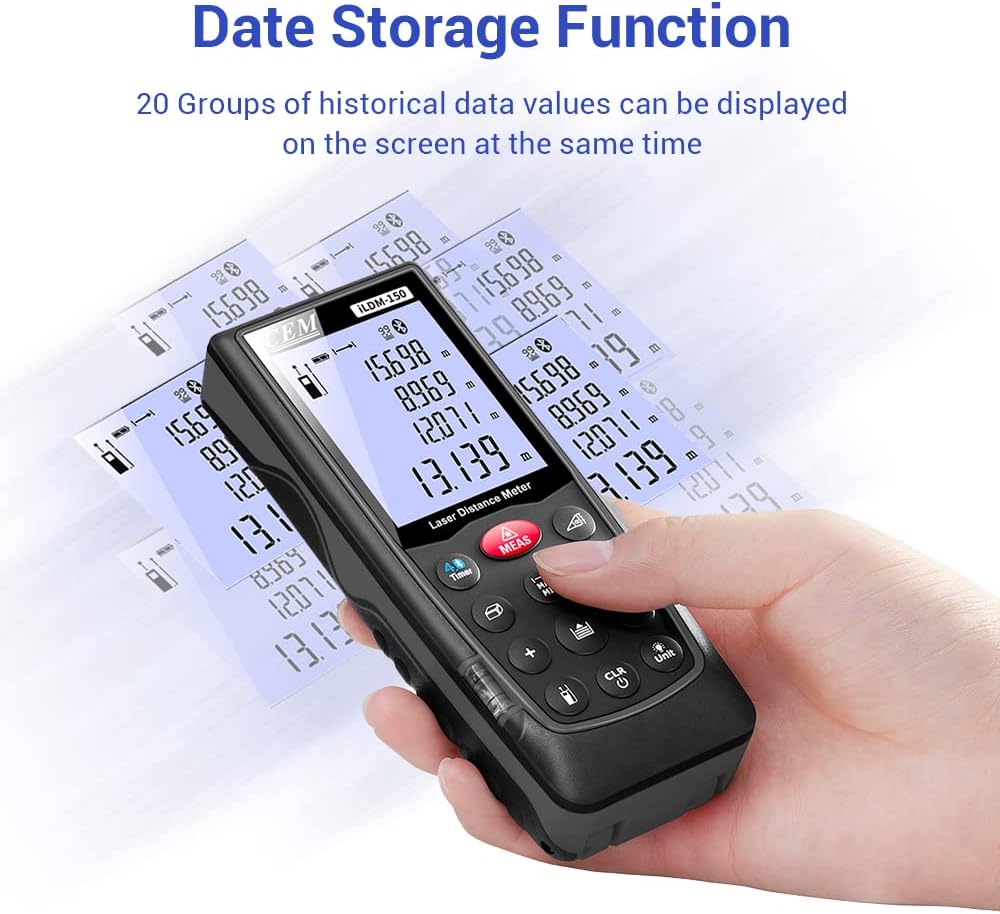
Figure 6.3: On-device data storage and display.
7. Întreținere și îngrijire
Proper maintenance ensures the longevity and accuracy of your ILDM-150.
- curatenie: Folosiți un moale, damp cloth to clean the device. Do not use abrasive cleaners or solvents. Pay special attention to the laser lens, cleaning it gently with a lens cloth if necessary.
- Depozitare: Store the device in its portable bag in a cool, dry place when not in use. Avoid extreme temperatures and direct sunlight.
- Îngrijirea bateriei: Scoateți bateriile dacă dispozitivul nu va fi utilizat pentru o perioadă lungă de timp, pentru a preveni scurgerile.
- Protecție la impact: Deși este durabil, evitați să scăpați dispozitivul sau să îl supuneți la impacturi puternice.

Figure 7.1: The ILDM-150 features IP54 water and dust protection.
8. Depanare
If you encounter issues with your CEM ILDM-150, refer to the following table for common problems and solutions:
| Problemă | Cauza posibila | Soluţie |
|---|---|---|
| Dispozitivul nu pornește. | Baterii descărcate sau descărcate; Instalare incorectă a bateriilor. | Replace batteries; Ensure correct polarity. |
| Măsurători inexacte. | Laser lens dirty; Unstable measurement surface; Device not held steady; Measurement taken over reflective or transparent surfaces. | Clean laser lens; Ensure stable placement; Use a target plate for difficult surfaces. |
| Conexiunea Bluetooth eșuează. | Bluetooth off on smartphone; Device out of range; App not running. | Enable Bluetooth; Ensure device is within 10m range; Restart Meterbox Pro app. |
| Afișajul este slab iluminat sau ilizibil. | Low battery; Extreme temperature. | Replace batteries; Operate within specified temperature range. |
| Dispozitivul se oprește pe neașteptate. | Auto-off feature activated; Low battery. | This is normal after 150 seconds of inactivity; Replace batteries if low battery indicator is on. |
9. Specificatii tehnice
Detailed specifications for the CEM ILDM-150 Laser Distance Measure:
| Caietul de sarcini | Valoare |
|---|---|
| Marca | CEM |
| Numele modelului | ILDM-150 |
| Numărul piesei | CEM ILDM-150 |
| Culoare | negru 1 |
| Domeniul de măsurare | 229 de picioare sau 70 metri |
| Precizie | ±1/16 inch (1.5mm) |
| Clasa laser | Clasa II, <1mW |
| Evaluarea internațională de protecție | IP54 (Waterproof, Dust-proof) |
| Material | Double Injection Molding Machine, Plastic |
| Greutatea articolului | 203 grame |
| Tip baterie | Alcalin (AAA) |
| Oprire automată | 150 secunde (aprox.) |
| Memorie de date | 99 de grupuri |
| Versiune Bluetooth | 4.0 |
| Dimensiuni articol (L x l x H) | 5.31 x 2.09 x 1.18 inci |
| UPC | 887327150034 |
| Producător | Shenzhen Everbest Machinery Industry Co.,Ltd. |
| Data primului disponibil | 9 iulie 2018 |

Figure 9.1: Dimensions of the ILDM-150.
10. Garanție și asistență
10.1 Informații despre garanție
The CEM ILDM-150 Laser Distance Measure comes with a 12 luni garantie from the date of purchase. This warranty covers defects in materials and workmanship under normal use. It does not cover damage caused by misuse, accidents, unauthorized modifications, or improper maintenance.
10.2 Asistență pentru clienți
For technical assistance, warranty claims, or further inquiries, please contact CEM customer support through their official website or the contact information provided with your purchase documentation. Please have your model number (ILDM-150) and purchase date ready when contacting support.