
Introducere
This manual provides detailed instructions for the installation, operation, and maintenance of your UNITOPSCI Single Din Car Stereo, Model 6886C. This unit features a 6.86-inch HD touchscreen, Apple CarPlay, Android Auto, Bluetooth 5.0, FM radio, USB connectivity, and support for a backup camera. Please read this manual thoroughly before use to ensure proper functionality and safety.
Conținutul pachetului
Verificați dacă toate articolele enumerate mai jos sunt incluse în pachetul dumneavoastră:
- 1 x Sistem stereo auto
- 1 x Cameră de rezervă
- 1 x cablu de alimentare
- 1 x cablu difuzor
- 1 x Remote Control (Battery Not included)
- 1 x Manual de utilizare
- 1 x Microfon

Image: All components included in the UNITOPSCI car stereo package.
Produs terminatview
The UNITOPSCI 6886C is a single DIN car stereo featuring a 6.86-inch HD touchscreen. Its compact design allows for installation in standard single DIN openings.
Dimensiuni și conexiuni
The unit measures approximately 187mm (7.3 inches) in length and 52mm (2.0 inches) in height. The screen itself is 6.86 inches. The rear panel includes various ports for power, speakers, microphone, video output, camera input, and GPS antenna.

Imagine: Față și spate view with dimensions and connection ports labeled.
Configurare și instalare
Se recomandă instalarea de către un profesionist. Asigurați-vă că vehiculul este deconectat de la rețeaua electrică înainte de a începe instalarea.
Pașii de instalare:
- Prepare Dash Opening: Confirm your vehicle's dash opening is suitable for a single DIN unit (187mm x 52mm). A suitable dash kit may be required if the opening is not standard.
- Conexiuni cablare: Connect the power cable and speaker cable to the corresponding ports on the car stereo and your vehicle's wiring harness. Refer to the wiring diagram in the included user manual for specific connections.
- Camera de rezervă: Connect the backup camera cable to the 'CAMIN' port on the rear of the stereo. Ensure the camera's power is correctly wired to the vehicle's reverse light circuit for automatic activation.
- Microfon: Connect the external microphone to the 'MIC' port for improved hands-free calling audio quality.
- Antena GPS: If applicable, connect the GPS antenna to the 'GPS' port.
- Unitate securizată: Mount the car stereo securely into the dash opening.
- Reconectați puterea: Reconnect the vehicle's battery and test all functions.
Instrucțiuni de operare
This section details the primary functions and features of your car stereo.
1. Apple CarPlay & Android Auto (Wired Connection)
Connect your iPhone or Android smartphone via a USB cable to access Apple CarPlay or Android Auto. This allows you to use navigation, make calls, send messages, and listen to music directly from your phone's interface displayed on the stereo screen. Voice control (Siri for CarPlay, Google Assistant for Android Auto) is supported for hands-free operation.

Image: Apple CarPlay, Android Auto, and Mirror Link functionality via wired USB connection.
2. Bluetooth 5.0
Pair your mobile device with the stereo via Bluetooth 5.0 for hands-free calling and wireless audio streaming. Access your phonebook and dial directly from the stereo's touchscreen. The Bluetooth name for pairing is 'CAR BT'.
3. Radio FM
Tune into FM radio stations (frequency range 87.5-108MHz). The unit supports 18 preset stations, allowing quick access to your favorite channels for news, music, and traffic updates.
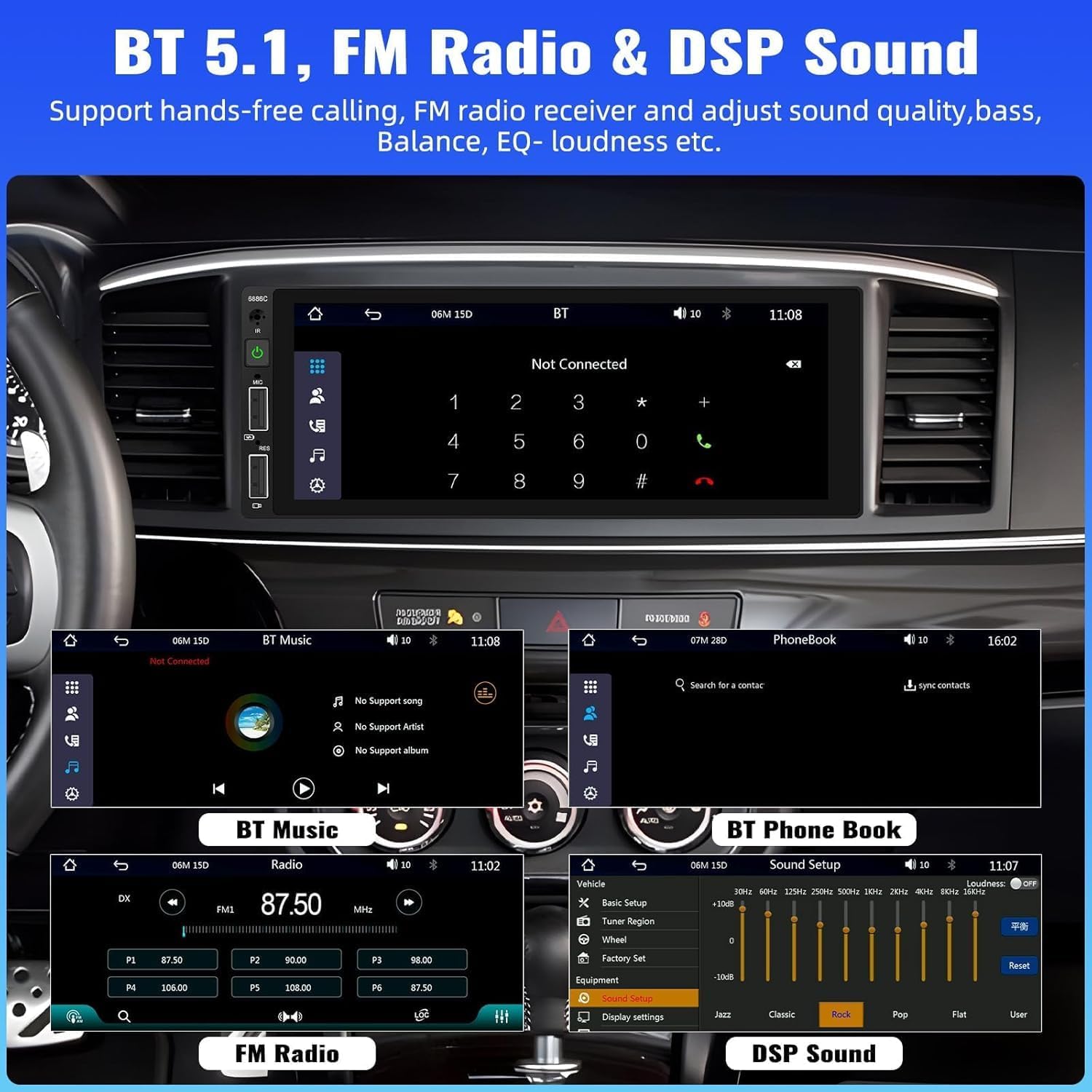
Image: Bluetooth, FM Radio, and Digital Sound Processing (DSP) settings interface.
4. Legătură în oglindă
Utilize the Mirror Link function to display your smartphone's screen directly on the car stereo. Connect your device using its original USB cable. This feature is useful for viewing maps or playing videos from your phone.
5. Redare și încărcare prin USB
The stereo features dual USB slots. Use these ports for media playback from USB drives or for fast charging your mobile devices. The unit also supports DVR connection via USB (DVR not included).

Image: Multiple playback options including USB charging and DVR support.
6. EQ Sound Feature
Adjust the audio output to your preference using the built-in EQ sound feature. Customize settings for bass, balance, and loudness to optimize your listening experience.
7. Controlul volanului (SWC)
If your vehicle supports it, connect the steering wheel control wires to easily manage radio functions, adjust volume, and handle calls without taking your hands off the wheel. This enhances driving safety.
8. Intrare cameră de rezervă
When the vehicle is shifted into reverse gear, the stereo automatically displays the video feed from the connected backup camera. The included camera features 4 LED lights for clear night vision and parking lines to assist with safer parking maneuvers.

Image: Backup camera input and steering wheel control interface.
9. Seven Color Backlight
Customize the button backlight color to match your vehicle's interior or your personal preference. Choose from seven available colors.
10. Memoria de oprire
The unit retains the last playing state (e.g., radio station, music track) when powered off and resumes from that point upon restart.
Întreţinere
Pentru a asigura longevitatea și performanța optimă a sistemului stereo auto, urmați aceste instrucțiuni de întreținere:
- curatenie: Folosiți o cârpă moale și uscată pentru a curăța ecranul și exteriorul. Evitați substanțele de curățare abrazive sau solvenții.
- Temperatură: Evitați expunerea unității la temperaturi extreme.
- Umiditate: Păstrați unitatea uscată și ferită de umezeală.
- Actualizări firmware: Verifică-l pe cel al producătorului webVerificați periodic site-ul pentru actualizări de firmware disponibile, pentru a îmbunătăți performanța și a adăuga funcții.
Depanare
Dacă întâmpinați probleme cu sistemul stereo al mașinii, consultați următoarele probleme și soluții frecvente:
| Problemă | Cauza posibila | Soluţie |
|---|---|---|
| Fără putere | Cablare incorectă; Siguranță arsă; Bateria vehiculului descărcată. | Verificați conexiunile de alimentare; Înlocuiți siguranța; Verificați bateria vehiculului. |
| Fără sunet | Cablurile difuzorului sunt deconectate; Volum prea scăzut; Funcția de dezactivare a sunetului este activă. | Verificați conexiunile difuzoarelor; Măriți volumul; Dezactivați dezactivarea sunetului. |
| Bluetooth nu se conectează | Bluetooth not enabled on device; Incorrect pairing process. | Ensure Bluetooth is on; Re-attempt pairing (Bluetooth name: CAR BT). |
| CarPlay/Android Auto nu funcționează | Cablu USB defect; Telefon incompatibil; Problemă de software. | Use original USB cable; Check phone compatibility; Restart phone and stereo. |
| Backup Camera No Display | Camera not powered; Video cable disconnected; Incorrect trigger wire. | Check camera power supply; Verify video cable connection; Ensure reverse trigger wire is connected. |
Specificații
Detailed technical specifications for the UNITOPSCI 6886C car stereo:
- Model: 6886C
- Voltage: DC12V
- Sistem: CRASĂ
- Cip CPU: F133
- Dimensiunea ecranului: 6.86 inci
- Rezoluția ecranului: 1280*480
- Legătură oglindă: Sprijinit
- Trupa Radio: FM
- Cip radio: QN8035
- Putere de ieșire: 45W*4 (180 Watts total)
- Temperatura de lucru: -10~60℃
- Versiune Bluetooth: 5.0
- Nume Bluetooth: CAR BT
- Iluminare de fundal colorată: Sprijinit
- Intrare inversă: CVBS
- Putere AmpCip de filtrare: TDA7388
- Frecventa radio: 87.5-108MHz
- Suport pentru formatul audio: MP3 / WMA / WAV / APE / FLAC
- Suport pentru format video: RM/RMVB/AVI/MP4/MKV/3GP
- Formate de imagine suportate: JPG BMP PNG
- Limbi acceptate: Engleză, chineză, spaniolă, portugheză, rusă, italiană, germană, franceză, turcă, cehă, arabă, poloneză, ebraică
Garanție și suport
Your UNITOPSCI car stereo comes with a 2 an garanție from the date of purchase, covering manufacturing defects. For technical assistance, troubleshooting, or warranty claims, please contact our support team.
Suport online: UNITOPSCI@126.com