
1. Introducere
Thank you for choosing the WiMiUS P62 Pro 4K Projector. This manual provides essential information for setting up, operating, and maintaining your projector to ensure optimal performance and longevity. Please read this manual thoroughly before use and retain it for future reference.
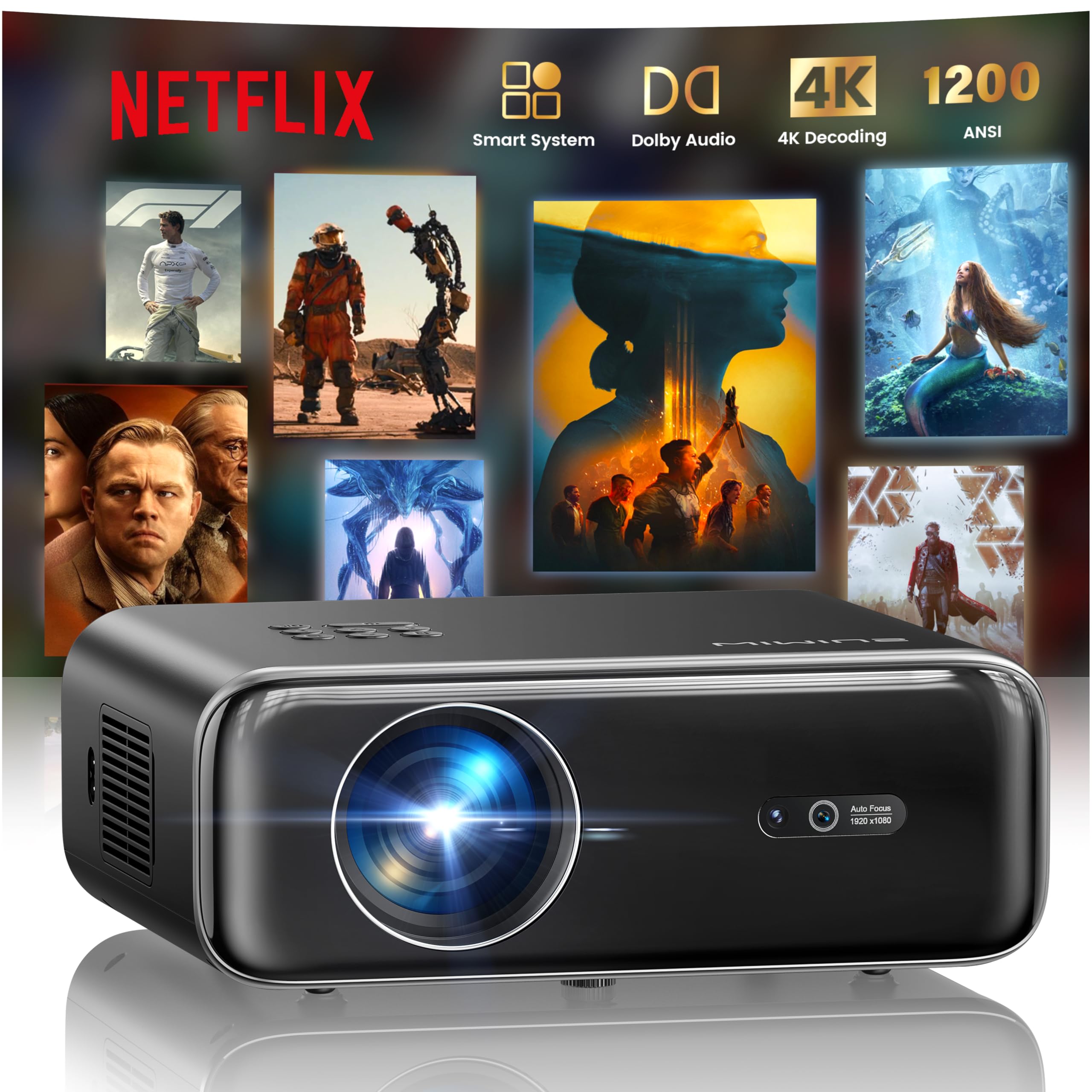
The WiMiUS P62 Pro 4K Projector, a compact and powerful device designed for home entertainment.
2. Ce se află în cutie
Carefully unpack your WiMiUS P62 Pro projector and ensure all items are present:
- WiMiUS P62 Pro Projector (Netflix included)
- Telecomanda
- Capac obiectiv
- Cablu de alimentare
- Cablu HDMI
- Kit de curatare
- Ghid de pornire rapidă

Contents of the WiMiUS P62 Pro package, including the projector, remote, and essential cables.
3. Produs terminatview și Caracteristici cheie
The WiMiUS P62 Pro is a versatile 4K-supported projector designed for a superior home cinema experience. Its key features include:
- High Brightness: 1400 ANSI lumens for clear images even in ambient light.
- Rezoluție nativă 1080P: Supports 4K Ultra HD input for crisp visuals.
- Smart OS with Official Apps: Pre-installed Netflix, YouTube, Prime Video, Plex, and access to over 20,000 apps.
- AI Intelligent Adjustment: Automatic focus, keystone correction, obstacle avoidance, and screen alignment.
- Dolby Audio: Integrated dual 36W speakers with Dolby Audio for immersive sound.
- Conectivitate versatilă: WiFi 6, Bluetooth 5.4 (bidirectional), HDMI (ARC & CEC), USB.
- Design portabil: Compact dimensions (25.7 x 20 x 10.3 cm) and lightweight (1.8 kg) for easy transport.
- Protecția ochilor: Utilizes diffuse reflection imaging technology to reduce eye strain.

The WiMiUS P62 Pro offers a revolutionary home cinema experience with integrated streaming apps like Netflix, YouTube, and Prime Video.

Experience exceptional audio quality with integrated Dolby Audio and powerful Hi-Fi speakers.
4. Configurare
Urmați acești pași pentru configurarea inițială a proiectorului:
- Plasare: Position the projector on a stable, flat surface or mount it (ceiling or tripod). Ensure adequate ventilation around the device. The projector can be placed between 1 to 6 meters from the projection surface.
- Conexiune de alimentare: Conectați cablul de alimentare la proiector și apoi la o priză.
- Pornire: Apăsați butonul de pornire de pe proiector sau de pe telecomandă pentru a o porni.
- Ajustări automate: The projector features AI-powered auto-focus and auto-keystone correction. It will automatically adjust the image for clarity and shape. It also includes intelligent obstacle avoidance and automatic screen alignment.
- Manual Adjustments (if needed): If further adjustments are required, use the remote control to access settings for focus, keystone, and zoom (50%-100%).

The projector features intelligent screen adaptation 3.0, including auto-focus, auto-keystone correction, and obstacle avoidance.
5. Instrucțiuni de utilizare
5.1 Pornire/Oprire
- Pentru a porni: Apăsați butonul de pornire de pe proiector sau de pe telecomandă.
- Pentru a opri: Apăsați din nou butonul de pornire/oprire. Confirmați oprirea dacă vi se solicită.
5.2 Navigation and Source Selection
- Use the remote control's directional buttons and OK button to navigate the on-screen menu.
- Select your desired input source (HDMI 1, HDMI 2, USB, or Smart Apps) from the main menu.
5.3 Setări de imagine și sunet
- Access the settings menu to adjust picture parameters such as brightness, contrast, color, and aspect ratio.
- Adjust sound volume and audio modes. The integrated Dolby Audio provides rich sound.

Enjoy an ultimate gaming experience with low latency and a 60Hz refresh rate.

Easily display your work or presentations on a larger screen.
6. Conectivitate
The WiMiUS P62 Pro offers multiple connectivity options:
- Porturi HDMI (x2): Connect devices like laptops, gaming consoles, Blu-ray players. HDMI 2 supports ARC (Audio Return Channel) and CEC (Consumer Electronics Control) for simplified audio setup and control.
- Porturi USB (x2): Play media directly from USB drives or connect external devices.
- WiFi 6: Connect to your home network for internet access and streaming. Supports screen mirroring from iOS, Android, and Windows 10 devices for seamless content sharing.
- Bluetooth 5.4 (Bidirectional): Connect external Bluetooth speakers or headphones for enhanced audio. The projector can also act as an independent Bluetooth speaker when connected to a phone.

The rear panel of the projector features multiple connectivity ports including HDMI and USB.

Synchronize and enjoy with multiple connectivity options for seamless entertainment.
7. Funcții inteligente
7.1 Integrated Streaming Applications
The projector comes with officially certified streaming applications pre-installed, providing direct access to a vast library of content:
- Netflix
- YouTube
- Prime Video
- Plex
- And more via the integrated App Store.

Access official integrated apps like Netflix and Plex directly from your projector.

Explore more applications through the integrated App Store.
7.2 AI-Powered Image Adjustment
The projector utilizes advanced AI algorithms for automatic image optimization:
- Focalizare automată: Automatically adjusts the image sharpness.
- Corecție automată a distorsiunii trapezoidale: Corectează imaginile distorsionate până la un dreptunghi perfect.
- Evitarea inteligentă a obstacolelor: Detects and adjusts the projection to avoid objects in the path.
- Alinierea automată a ecranului: Optimizes the image to fit the projection surface.

AI-optimized intelligent configuration ensures the best image quality wherever you are.
7.3 Web Navigare
Navigate the internet directly on your projector using the integrated web browser. This allows you to access websites, news, and online content without needing an external computer.

Răsfoiți web directly on your projector with the integrated navigation feature.
8. Întreținere
Proper maintenance ensures the longevity and performance of your projector:
- Curățarea lentilelor: Use the provided cleaning kit or a soft, lint-free cloth to gently clean the projector lens. Avoid abrasive materials or harsh chemicals.
- Ventilare: Asigurați-vă că orificiile de ventilație ale proiectorului sunt libere și neobstrucționate pentru a preveni supraîncălzirea. Nu așezați proiectorul pe suprafețe moi care pot bloca fluxul de aer.
- Îndepărtarea prafului: Periodically clean the exterior of the projector with a soft, dry cloth to remove dust.
- Depozitare: Când nu este utilizat pentru perioade lungi de timp, depozitați proiectorul într-un loc răcoros și uscat, ideal în ambalajul original sau într-o husă de protecție.
9. Depanare
If you encounter issues with your WiMiUS P62 Pro projector, refer to the following common problems and solutions:
| Problemă | Cauza posibila | Soluţie |
|---|---|---|
| Nu este afișată nicio imagine | Cablul de alimentare este deconectat, sursă de intrare incorectă, capacul obiectivului este pus. | Verificați conexiunea de alimentare, selectați sursa de intrare corectă, scoateți capacul obiectivului. |
| Imaginea este neclară | Out of focus, projector moved. | Allow auto-focus to engage or manually adjust focus using the remote. |
| Imaginea este distorsionată (formă trapezoidală) | Proiectorul nu este perpendicular pe ecran. | Allow auto-keystone correction to engage or manually adjust keystone settings. |
| Nici un sunet | Volum prea mic, dispozitiv audio extern neconectat, ieșire audio incorectă. | Increase volume, check external audio connections, ensure correct audio output is selected. |
| Cannot connect to WiFi/Bluetooth | Incorrect password, device out of range, network issue. | Verify password, move devices closer, restart router/projector. |
Pentru asistență suplimentară, vă rugăm să consultați informațiile de contact din secțiunea Garanție și asistență.
10. Specificații
Detailed technical specifications for the WiMiUS P62 Pro Projector:
- Marca: WiMiUS
- Model: P62 Pro
- Luminozitate: 1400 lumeni ANSI (38000 lumeni)
- Rezoluție nativă: 1920 x 1080P
- Rezoluția maximă de afișare: 3840 x 2160 (4K Ultra HD Support)
- Raport de contrast: 40000:1
- Tip de afișare: LCD sau LED
- Tehnologie de conectivitate: Bluetooth 5.4, HDMI, USB, Wi-Fi 6
- Utilizări recomandate: Home Cinema, Gaming, Live TV & Sports, Outdoor, Camping
- Caracteristici speciale: AI Auto Focus/Keystone, Obstacle Avoidance, Screen Alignment, Official Apps (Netflix, etc.), Dolby Audio, HDMI ARC/CEC
- Distanța de proiecție: 1 până la 6 de metri
- Dimensiunea imaginii: 40 până la 300 inci
- Tip control: Telecomanda
- Greutate: 1.8 kilograme
- Dimensiuni: 25.7 x 20 x 10.3 cm
- Codificare video: H.264, H.265

The projector boasts 1400 ANSI lumens and a 40000:1 contrast ratio for remarkable brilliance.

Bucurați-vă viewing without harmful blue light, reducing eye fatigue.
11. Garanție și asistență
The WiMiUS P62 Pro Projector comes with a 2-year warranty. For any questions or support needs regarding your projector, please refer to the service information provided in the Quick Start Guide or contact WiMiUS customer support directly. You can often find support contact details on the manufacturer's official website sau prin intermediul platformei dvs. de achiziții.