
1. Produs terminatview
The Getac S510 is a rugged laptop designed for demanding environments, featuring an Intel Core Ultra 5 125U processor, a 15.6-inch Full HD sunlight-readable display, and robust construction meeting MIL-STD-810H and IP53 standards. This manual provides essential information for setting up, operating, and maintaining your device.
Caracteristici cheie:
- Intel Core Ultra 5 125U Processor with AI-powered performance
- 15.6-inch TFT LCD FHD Sunlight Readable Display (1,000 nits)
- 32GB DDR5 RAM and 1TB PCIe NVMe SSD for high performance
- MIL-STD-810H and IP53 certified rugged design
- LED Backlit membrane Keyboard with dedicated Copilot key
- Comprehensive connectivity: USB 3.2 x2, Thunderbolt 4, HDMI, LAN, Audio In/Out, Docking Connector
- 5MP Webcam with Windows Hello for secure authentication
Ce este în cutie:
- Getac S510 Rugged Laptop
- 1x baterie
- Adaptor de curent alternativ de 65 W
Imagini de produs:


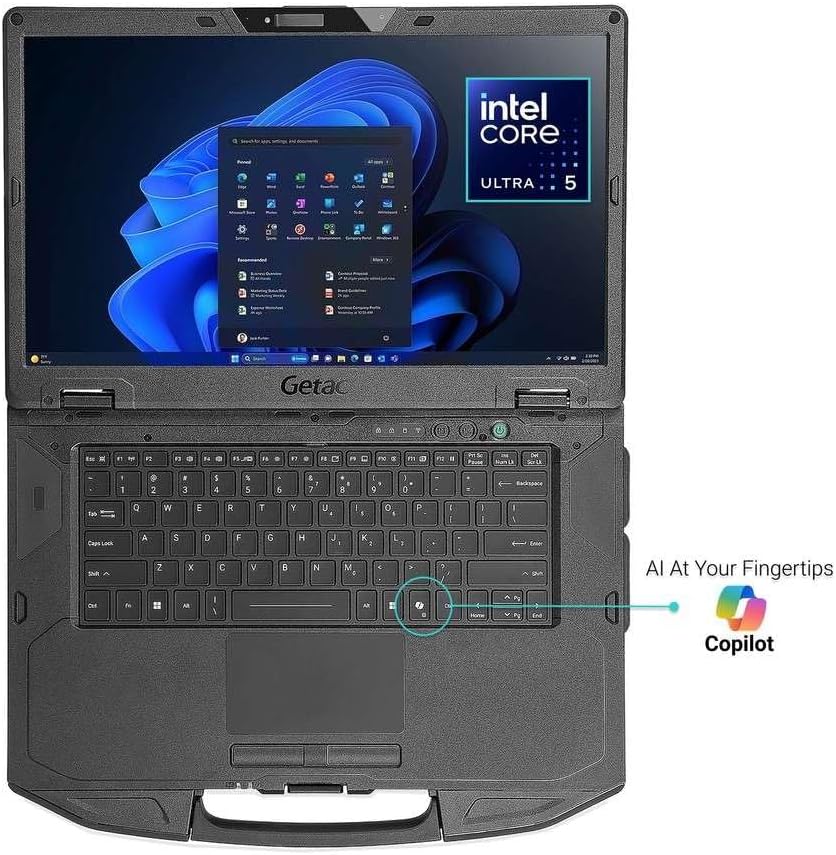
2. Configurare
Pornire inițială:
- Connect the provided 65W AC power adapter to the laptop's DC power jack and a power outlet.
- Apăsați butonul de pornire situat pe dispozitiv pentru a-l porni.
- Urmați instrucțiunile de pe ecran pentru a finaliza configurarea inițială a Windows 11 Pro.
Instalare/Înlocuire baterie:
The Getac S510 features a hot-swappable battery. To install or replace the battery:
- Ensure the laptop is powered off or in a safe state for battery removal.
- Localizați compartimentul bateriei pe partea inferioară a laptopului.
- Slide the release latches to unlock the battery.
- Carefully remove the old battery and insert the new battery, ensuring it clicks into place.
- Secure the latches.
Instalarea cartelei SIM:
Pentru a instala o cartelă SIM pentru conectivitate de date mobile:
- Opriți laptopul și deconectați adaptorul de curent alternativ.
- Locate the access panel on the underside of the laptop, typically secured by screws.
- Carefully unscrew and remove the panel.
- Identify the SIM card slot. It may be located near the SSD or other internal modules.
- Insert the SIM card into the slot, ensuring correct orientation.
- Replace the access panel and secure the screws.
- Power on the laptop. The system should detect the SIM card.
3. Instrucțiuni de utilizare
Reglarea luminozității afișajului:
The 1,000 nits sunlight-readable display ensures visibility in bright conditions. Adjust brightness using the function keys (e.g., Fn + F5/F6) or through Windows display settings.
Iluminarea tastaturii:
The LED backlit membrane keyboard allows for typing in low-light environments. Activate or adjust the backlight using the dedicated function key (e.g., Fn + Spacebar or a specific F-key).
Deblocarea amprentei digitale:
Utilize the integrated fingerprint reader for fast and secure login via Windows Hello. Set up your fingerprint in Windows Settings > Accounts > Sign-in options.
Conectivitate:
- Wifi: Conectați-vă la rețele wireless prin intermediul setărilor de rețea din Windows.
- Bluetooth: Pair Bluetooth devices (e.g., headphones, mouse) through Windows Bluetooth settings.
- Thunderbolt 4: Use the Thunderbolt 4 Type-C port for high-speed data transfer, video output, and power delivery.
- HDMI: Connect to external displays using the HDMI port.
- LAN: Use the RJ45 Gigabit Ethernet port for wired network connections.
Using the 5MP Webcamera:
Camera integrată de 5MP webcam supports Windows Hello face authentication and is suitable for video conferencing. Ensure proper lighting for optimal performance.
4. Întreținere
Curățarea dispozitivului:
Due to its rugged design, the S510 can withstand harsh conditions. Clean the exterior with a soft, damp cloth. For the display, use a microfiber cloth and a screen-safe cleaning solution. Avoid harsh chemicals or abrasive materials.
Îngrijirea bateriei:
To prolong battery life, avoid extreme temperatures and fully discharging the battery frequently. Store the laptop with a partial charge if not used for extended periods.
Extindere stocare:
The laptop features a 1TB PCIe NVMe SSD. Consult a qualified technician for any storage upgrades or replacements to maintain the device's ruggedness and warranty.
Ruggedness Guidelines:
The S510 is MIL-STD-810H and IP53 certified. While designed to be durable, avoid intentional abuse. Ensure all port covers are securely closed to maintain IP53 water and dust resistance.
5. Depanare
| Emisiune | Soluție posibilă |
|---|---|
| Laptopul nu pornește | Ensure the AC adapter is securely connected and the battery is charged. Try removing and reinserting the battery. |
| Afișajul este prea slab sau prea luminos | Adjust display brightness using Fn keys or Windows display settings. |
| Fără conexiune Wi-Fi | Check Wi-Fi settings in Windows. Ensure Airplane mode is off. Restart the laptop and your router. |
| Cartela SIM nu a fost detectată | Verify the SIM card is correctly installed in its slot. Restart the laptop. Check network settings in Windows. |
| System performance is slow | Close unnecessary applications. Check for background processes. Ensure sufficient free storage space. Run a system diagnostic. |
6. Specificații
| Caracteristică | Detaliu |
|---|---|
| Procesor | Intel Core Ultra 5 125U (up to 4.3GHz) |
| RAM | 32 GB DDR5 (5600 MHz) |
| Depozitare | SSD PCIe NVMe de 1 TB |
| Afişa | 15.6-inch TFT LCD FHD (1920 x 1080 pixels), 1,000 nits Sunlight Readable, Non-Touch |
| Grafică | Grafică Intel integrată |
| Sistem de operare | Windows 11 Pro |
| Webcam | 5 MP (Windows Hello compatible) |
| Conectivitate wireless | 802.11ax (Wi-Fi), Bluetooth |
| Porturi | USB 3.2 x2, Thunderbolt 4 (Type-C), HDMI, LAN (RJ45), Audio In/Out Jack, Docking Connector |
| Dimensiuni (lxlxh) | 14.8 x 10.9 x 1.5 inci |
| Greutate | 5.18 lbs (aproximativ) |
| Duritate | MIL-STD-810H, IP53 Certified, Vibration & 3ft (0.9m) drop resistant |
| Baterie | 1 baterie litiu-ion (inclusă) |
7. Garanție și asistență
For warranty information, technical support, or service inquiries, please refer to the official Getac website or contact your authorized Getac reseller. Keep your purchase receipt and product serial number readily available when seeking support.
Note: No official product videos from the seller for the Getac S510 were provided in the available data. Videos for other brands/models were excluded to maintain product relevance and accuracy.


