
MOBAPAD Huben2 H6
MOBAPAD Huben2 Wireless Switch Controller Pro Instruction Manual
Model: Huben2 H6 | Brand: MOBAPAD
1. Introducere
This manual provides detailed instructions for the setup, operation, and maintenance of your MOBAPAD Huben2 Wireless Switch Controller Pro. Please read this manual thoroughly before using the product to ensure optimal performance and longevity.
2. Informații de siguranță
- Țineți controlerul departe de apă și alte lichide.
- Do not expose the controller to extreme temperatures.
- Evitați să scăpați controlerul sau să îl supuneți la impacturi puternice.
- Do not attempt to disassemble or repair the controller yourself. Contact customer support for assistance.
- Folosiți doar cablul de încărcare furnizat sau un cablu USB-C certificat pentru încărcare.
3. Conținutul pachetului
Verificați dacă toate articolele sunt prezente în colet:
- MOBAPAD Huben2 Wireless Controller Pro
- Cablu de încărcare USB-C
- Wireless Dongle (2.4G)
- PU Travel Case
- Replaceable D-pad (Cross/Circle)
- Manual de instrucțiuni (acest document)
4. Aspectul controlerului
Familiarize yourself with the buttons and features of your Huben2 controller.

Figura 4.1: Față view of the MOBAPAD Huben2 Wireless Controller Pro. Shows the joysticks, face buttons (A, B, X, Y), D-pad, and central function buttons.
- Manete analogice stânga/dreapta: Capacitive joysticks with 4,096-step precision.
- Butoane A/B/X/Y: Omron mechanical face buttons.
- D-pad: Replaceable cross or circle D-pad.
- L1/R1 (Shoulder Buttons): Standard shoulder buttons.
- L2/R2 (Declanșatoare): Dual-mode triggers (Hall Effect and Microswitch).
- M1/M2/M3/M4 Buttons: Four programmable back buttons.
- Buton Acasă: Powers on/off and returns to system home screen.
- Buton Captură de ecran: Face capturi de ecran.
- Butoane Plus/Minus: Standard system menu buttons.
- Buton Turbo: Activates/deactivates turbo function.
- Port USB-C: Pentru încărcare și conexiune prin cablu.

Figura 4.2: Spate view showing the four programmable M1, M2, M3, M4 back buttons.
5. Configurare
5.1 Încărcarea controlerului
Before first use, fully charge the controller. Connect the provided USB-C cable to the controller's USB-C port and the other end to a USB power source (e.g., console, PC, or USB wall adapter). The charging indicator will show the charging status.
- A full charge provides approximately 15 hours of gameplay.

Figure 5.1: The controller features a 1000mAh battery for extended gameplay.
5.2 Moduri de conectare
The Huben2 controller supports three connection methods:

Figure 5.2: The controller supports 2.4G wireless, Bluetooth, and wired connections across various platforms.
- 2.4G Wireless (via Dongle):
- Compatible with Windows PC, Steam, and Android TV.
- Insert the 2.4G wireless dongle into a USB port on your device.
- Turn on the controller. It should automatically connect to the dongle.
- Wireless Bluetooth:
- Compatible with Nintendo Switch, Nintendo Switch 2, Android, and iOS devices.
- On your device, navigate to Bluetooth settings and enable Bluetooth.
- On the controller, press and hold the Bluetooth pairing button (refer to controller layout for exact location) until the indicator lights flash rapidly.
- Select "MOBAPAD Huben2" from the list of available devices on your system to pair.
- For Nintendo Switch, the controller can wake the console from sleep mode after initial pairing and firmware update via the Mobapad app.
- Conexiune prin cablu:
- Compatible with Windows PC and Android TV.
- Connect the controller to your device using the USB-C cable. The controller will be recognized automatically.
6. Instrucțiuni de utilizare
6.1 Pornire/Oprire
- Pornire: Apăsați butonul Acasă.
- Oprire: Press and hold the Home button for 3-5 seconds. The controller will also power off automatically after a period of inactivity.
6.2 Dual Trigger Modes
The L2 and R2 triggers feature dual modes for different gaming experiences:

Figure 6.1: Visual representation of the 2mm Microswitch Trigger and 10mm Hall Linear Trigger modes.
- Microswitch Trigger (2mm): Provides a short, tactile click for rapid input, ideal for FPS games.
- Hall Effect Linear Trigger (10mm): Offers analog input with a longer travel distance, suitable for racing or simulation games.
- Moduri de comutare: Use the physical switches located near the L2/R2 triggers to toggle between modes.
6.3 Customizable Features (Back Buttons, Macros, App Support)
The Huben2 controller offers extensive customization options:
- Programmable Back Buttons (M1-M4): Assign single button presses or complex macros to the four back buttons using the dedicated Mobapad PC/mobile application.
- Rapid-Fire Turbo Mode: Activate turbo functionality for any button. Refer to the Mobapad app or controller manual for specific button combinations to enable/disable.
- Mobapad App: Download the official Mobapad application for Windows or mobile devices to:
- Adjust joystick dead zones and response curves.
- Customize vibration intensity.
- Creați și gestionați macrocomenzi.
- Actualizați firmware-ul controlerului.
6.4 HD Rumble and ALPS Linear Motors
The controller features dual ALPS linear motors for precise HD Rumble feedback, reacting to in-game sound and motion with 0ms startup time.
6.5 Controlul mișcării pe 6 axe
The integrated 6-axis motion sensor provides precise motion control for compatible games.

Figure 6.2: The controller's internal 6-axis sensing motors enable precise motion control.
6.6 Replaceable D-pad and Faceplate
The controller allows for customization of the D-pad and faceplate.
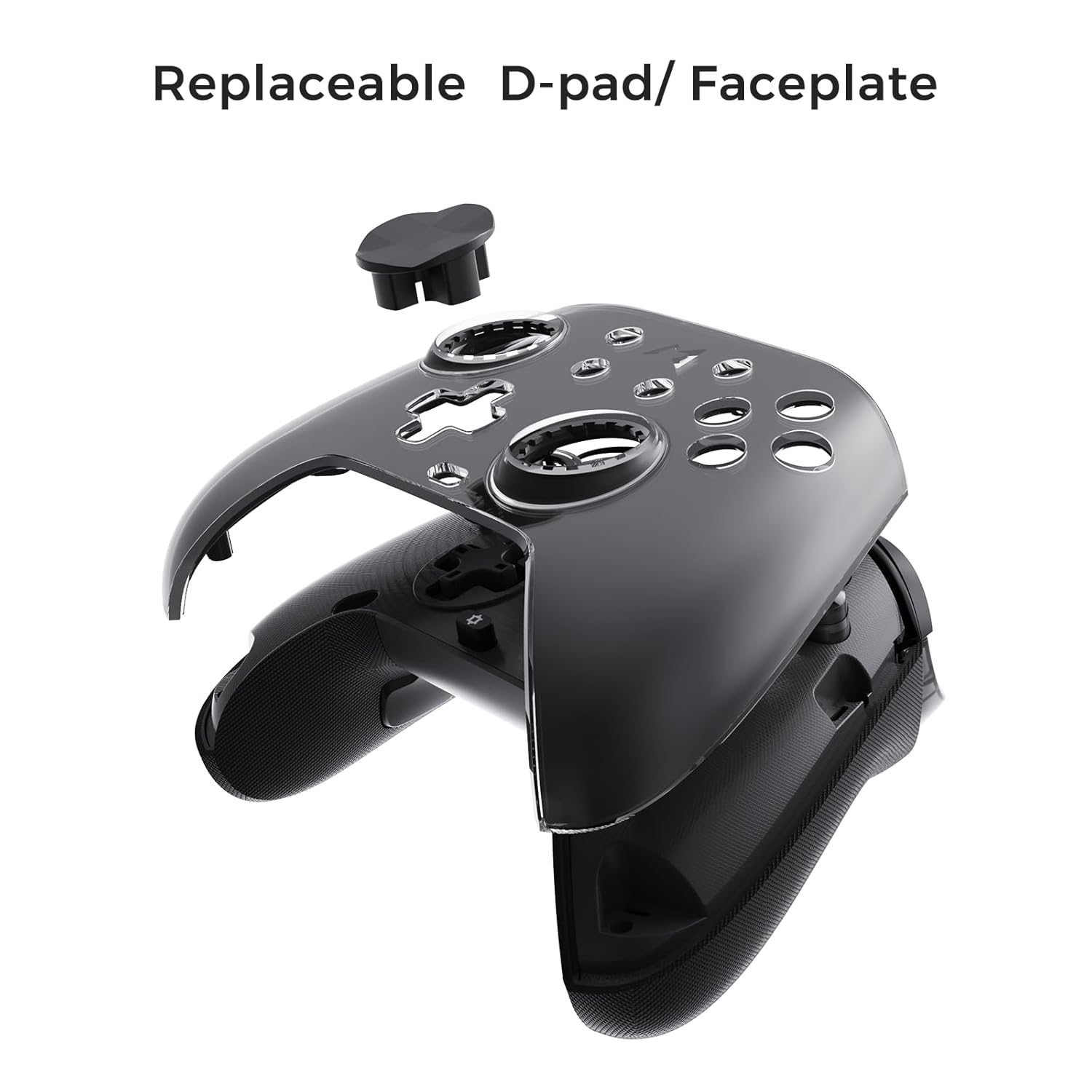
Figure 6.3: The D-pad and faceplate can be replaced for customization or preference.
- To replace the D-pad, gently remove the magnetic faceplate and then lift out the D-pad. Insert the desired D-pad (cross or circle) and reattach the faceplate.
7. Întreținere
- curatenie: Folosiți o cârpă moale și uscată pentru a curăța controlerul. Pentru murdăria persistentă, ștergeți ușor.ampClătiți cârpa cu apă. Nu folosiți substanțe chimice dure sau produse de curățare abrazive.
- Depozitare: Store the controller in a cool, dry place, away from direct sunlight and extreme temperatures. When not in use for extended periods, store it in the provided PU travel case.
- Îngrijirea bateriei: Pentru a prelungi durata de viață a bateriei, evitați descărcarea completă frecventă a controlerului. Încărcați-l regulat, chiar dacă nu îl utilizați constant.
8. Depanare
| Problemă | Cauza posibila | Soluţie |
|---|---|---|
| Controlerul nu pornește. | Baterie descărcată. | Încărcați controlerul timp de cel puțin 30 de minute. |
| Controller does not connect wirelessly. | Not in pairing mode; out of range; interference; incorrect mode selected. | Ensure controller is in pairing mode. Move closer to the device. Check for other wireless devices causing interference. Verify correct connection mode (2.4G or Bluetooth). |
| Input lag or dropped connections. | Wireless interference; low battery; outdated firmware. | Reduce distance to device. Charge controller. Update firmware via Mobapad app. Try wired connection. |
| Butoanele sau joystick-urile nu răspund. | Software glitch; physical obstruction; calibration issue. | Restart the controller and the connected device. Check for physical debris. Calibrate joysticks via Mobapad app. |
| HD Rumble not working. | Feature disabled in game/system settings; low battery. | Ensure rumble is enabled in game and system settings. Charge controller. |
If you encounter issues not listed here, please refer to the official MOBAPAD support website-ul sau contactați serviciul pentru clienți.
9. Specificații
| Caracteristică | Detaliu |
|---|---|
| Numărul de model | Mobapad Huben2 H6 |
| Conectivitate | Wireless 2.4G, Bluetooth, Cablu (USB-C) |
| Compatibilitate | Nintendo Switch, Nintendo Switch 2, Windows, Steam, Android, iOS |
| Joystick-uri | Capacitive, 4,096-step precision, 1000Hz polling rate |
| Declanșatoare | Dual Mode: 2mm Omron Microswitch, 10mm Hall Effect Linear |
| Butoane | Omron Mechanical Face Buttons, Programmable Back Buttons (M1-M4) |
| Vibrație | Dual ALPS Linear Motors (HD Rumble) |
| Controlul mișcării | Giroscop cu 6 axe |
| Capacitatea bateriei | 1000 mAh Litiu Ion |
| Durata de viață a bateriei | Până la 15 de ore (aproximativ) |
| Dimensiuni | 6.3 x 4.13 x 2.76 inci |
| Greutate | 1.87 lire sterline |
10. Garanție și asistență
MOBAPAD products are designed and manufactured to the highest quality standards. For warranty information, technical support, or customer service inquiries, please visit the official MOBAPAD website or contact their authorized support channels. Please retain your proof of purchase for warranty claims.
Website: Visit the MOBAPAD Store on Amazon
Ask a question about this manual
Ask about setup, troubleshooting, compatibility, parts, safety, or missing instructions. Manuals+ will review the question and use this page’s manual context to help answer it.