
1. Produs terminatview
This manual provides essential information for setting up, operating, maintaining, and troubleshooting your HP OMEN 16L Gaming Desktop. This high-performance desktop is equipped with an Intel Core i7-14700F processor, NVIDIA GeForce RTX 4060 graphics, 64GB DDR5 RAM, and a 2TB PCIe NVMe M.2 Solid State Drive, running on Windows 11 Pro.
The HP OMEN 16L is designed for demanding gaming and computing tasks, offering robust performance and efficient cooling. It comes bundled with a Thunderobot KG3089R Gaming Keyboard to enhance your experience.

Imaginea 1.1: Față view of the HP OMEN 16L Gaming Desktop.
2. Ghid de instalare
2.1 Despachetarea și amplasarea inițială
- Carefully remove the desktop and all accessories from the packaging. Retain packaging for future transport or service.
- Așezați biroul pe o suprafață stabilă și plană, cu ventilație adecvată pe toate părțile. Asigurați-vă că nu există orificii de ventilație obstrucționate.
2.2 Conectarea perifericelor
Connect your monitor, keyboard, mouse, and other peripherals to the appropriate ports on the desktop. Refer to the 'Ports' section for a detailed diagram.
- Monitor: Connect your monitor using a DisplayPort or HDMI cable to the dedicated graphics card ports.
- Tastatura mouse: Connect the Thunderobot KG3089R Gaming Keyboard and your mouse to any available USB Type-A ports.
- Putere: Connect the power cable to the desktop's power supply port and then to a grounded electrical outlet.
- Reţea: For wired internet, connect an Ethernet cable to the RJ-45 port. For wireless, ensure Wi-Fi 6 is enabled after initial setup.

Imaginea 2.1: Example of a complete desktop setup with peripherals connected.
2.3 Prima pornire și configurarea Windows 11 Pro
- Apăsați butonul de alimentare din partea frontală a desktopului.
- Urmați instrucțiunile de pe ecran pentru a finaliza configurarea inițială a Windows 11 Pro, inclusiv limba, regiunea, conexiunea la rețea și crearea contului de utilizator.
- Ensure all drivers are up-to-date after Windows setup for optimal performance.
3. Instrucțiuni de utilizare
3.1 Pornire/Oprire
- Pornire: Apăsați butonul de alimentare situat în partea din față a desktopului.
- Oprire: Click the Start button in Windows, then select Power > Shut down. Avoid direct power-offs unless necessary to prevent data loss.
3.2 Conectivitate la rețea
- Prin cablu (Ethernet): Connect an Ethernet cable to the RJ-45 port on the rear of the desktop. The connection should be automatically detected.
- Wireless (Wi-Fi 6): In Windows, click the network icon in the taskbar, select your Wi-Fi network, enter the password, and connect.
3.3 Using Ports and Connections
The desktop offers a variety of ports for connecting external devices:
- Porturi frontale: 3 x Superspeed USB Type-A (5Gbps signaling rate), 1 x Superspeed USB Type-C (10Gbps signaling rate), 1 x Headphone/Microphone combo.
- Porturi din spate: 4 x USB Type-A 2.0, 1 x RJ-45 (Ethernet), 1 x HDMI, 3 x DisplayPort, 2 x Audio Port.

Image 3.1: Front panel ports for easy access.
3.4 Jocuri și performanță
The HP OMEN 16L is optimized for gaming. Utilize the pre-installed OMEN Gaming Hub software to monitor system performance, customize RGB lighting, and optimize game settings. Ensure your graphics drivers are regularly updated for the best gaming experience.

Image 3.2: The HP OMEN 16L desktop in a gaming environment.
4. Întreținere
4.1 Curățare
- Exterior: Folosiți un moale, damp lavetă pentru curățarea suprafețelor exterioare. Evitați substanțele chimice dure.
- Vents: Periodically use compressed air to clear dust from the intake and exhaust vents to maintain optimal airflow and cooling. Ensure the system is powered off before cleaning vents.
4.2 Actualizări de software
- Regularly check for and install Windows updates through the Windows Settings.
- Update graphics drivers (NVIDIA GeForce RTX 4060) directly from the NVIDIA website or through the GeForce Experience application.
- Update HP-specific drivers and firmware using the HP Support Assistant or OMEN Gaming Hub.
4.3 Backup de date
Faceți în mod regulat copii de rezervă ale datelor importante pe o unitate externă sau în spațiul de stocare în cloud pentru a preveni pierderea datelor în cazul unei defecțiuni a sistemului.
5. Depanare
Această secțiune abordează problemele frecvente pe care le-ați putea întâmpina.
5.1 Fara putere
- Asigurați-vă că cablul de alimentare este conectat în siguranță atât la birou, cât și la priza electrică.
- Verificați dacă priza electrică funcționează conectând un alt dispozitiv.
5.2 Fără afișare
- Check that the monitor is powered on and the video cable (DisplayPort/HDMI) is securely connected to both the desktop's graphics card and the monitor.
- Asigurați-vă că este selectată sursa de intrare corectă pe monitor.
- If using multiple monitors, test with a single monitor.
5.3 Încetinirea sau blocarea sistemului
- Închideți aplicațiile inutile care rulează în fundal.
- Verificați Managerul de activități (Ctrl+Shift+Esc) pentru procesele care consumă multe resurse CPU, RAM sau disc.
- Ensure the system has adequate ventilation and is not overheating. Clean vents if necessary.
- Rulați o scanare completă a sistemului pentru malware sau viruși.
5.4 Probleme de conectivitate la rețea
- Cu fir: Check the Ethernet cable connection and router status.
- Fără fir: Restart your router/modem. Ensure Wi-Fi is enabled in Windows and try reconnecting to the network.
6. Specificații
Detailed technical specifications for the HP OMEN 16L Gaming Desktop (Model TG03).
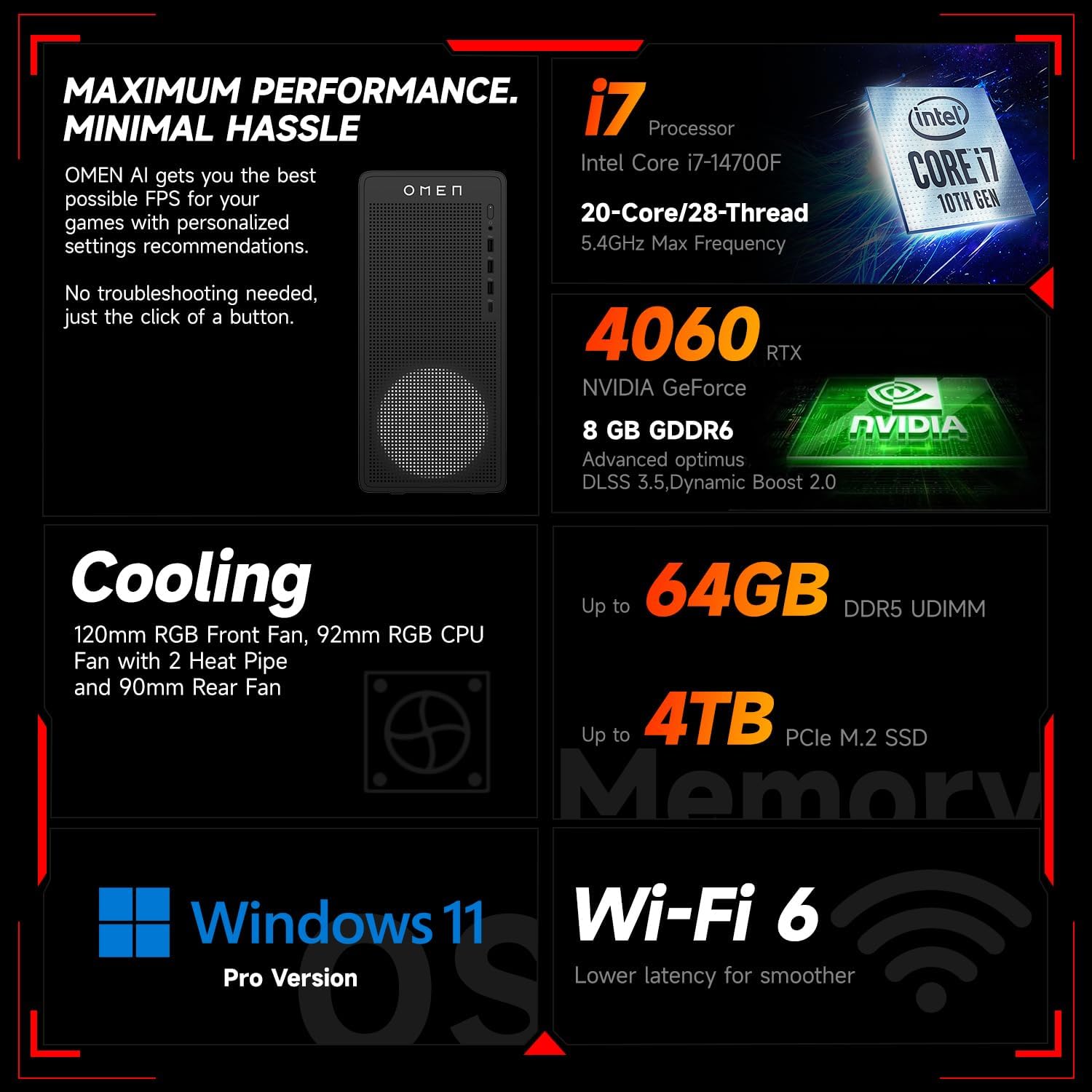
Imaginea 6.1: Pesteview of key performance and cooling specifications.
| Componentă | Caietul de sarcini |
|---|---|
| Marca | HP |
| Numărul de model | TG03 |
| Sistem de operare | Windows 11 Pro |
| Model CPU | Intel Core i7-14700F (20 de nuclee, 28 de fire de execuție, până la 5.4 GHz) |
| Coprocesor grafic | NVIDIA GeForce RTX 4060 (8GB GDDR6) |
| Dimensiunea memoriei RAM instalate | 64 GB RAM DDR5 |
| Capacitate de stocare a memoriei | Unitate SSD M.2 PCIe NVMe de 2 TB |
| Conectivitate wireless | Wi-Fi 6, Bluetooth |
| Porturi frontale | 3x USB Type-A (5Gbps), 1x USB Type-C (10Gbps), Headphone/Mic Combo |
| Porturi spate | 4x USB Type-A 2.0, 1x RJ-45, 1x HDMI, 3x DisplayPort, 2x Audio Port |
| Dimensiuni (L x l x H) | 13.26 x 6.1 x 12.12 inci |
| Greutatea articolului | 13.14 lire sterline |
| Culoare | Negru |
| Bundled Accessory | Thunderobot KG3089R Gaming Keyboard |

Image 6.2: Details of the Intel Core i7-14700F processor.

Image 6.3: Information on the NVIDIA GeForce RTX 4060 graphics card.
7. Informații despre garanție
Your HP OMEN 16L Gaming Desktop comes with a standard manufacturer's warranty. The specific terms and duration of the warranty are provided with your purchase documentation and are subject to HP's official warranty policy.
Notă importantă: Modifications to the system, such as upgrading components (e.g., RAM) with non-HP certified parts or by unauthorized personnel, may void the manufacturer's warranty. Always consult HP's official support or authorized service providers before making any internal hardware changes.
The Thunderobot KG3089R Gaming Keyboard bundled with this desktop may have a separate warranty provided by its manufacturer. Please refer to the documentation included with the keyboard for its specific warranty terms.
8. Suport
For further assistance, technical support, or warranty claims, please contact HP Customer Support through the following channels:
- Asistență HP Website: Vizita www.hp.com/support pentru drivere, manuale și ghiduri de depanare.
- Asistent asistență HP: Use the pre-installed HP Support Assistant software on your desktop for diagnostics, updates, and direct access to support.
- Suport telefonic: Refer to your product documentation or the HP support website-ul pentru numerele de contact regionale.