
1. Introducere
This manual provides detailed instructions for the safe and efficient assembly, operation, and maintenance of your SpeaKa Professional SP-TVS-600 TV Floor Stand. Please read this manual thoroughly before installation and retain it for future reference.
The SP-TVS-600 is designed to support televisions and monitors ranging from 37 to 86 inches, with a maximum load capacity of 45 kg. It features tool-free tilt adjustment, adjustable height for the screen (900 to 1100 mm), and an integrated cable management system. An additional height-adjustable storage shelf (200 to 910 mm) is included for media devices.
2. Informații de siguranță
AVERTIZARE: Failure to read, understand, and follow all instructions can result in serious personal injury, property damage, or voiding of your warranty.
- Ensure the floor stand is placed on a stable, level surface.
- Nu depășiți capacitatea maximă de încărcare de 45 kg (99 lbs).
- Verify that your TV's VESA mounting pattern is compatible with the stand (100x100 to 600x400 mm).
- Always use two people for lifting and positioning the TV onto the stand.
- Țineți copiii și animalele de companie departe de suport în timpul asamblării și utilizării.
- Do not hang on the stand or TV.
- Verificați periodic toate șuruburile și conexiunile pentru a vă asigura că acestea rămân fixate.
- Aruncați în mod responsabil materialele de ambalare.
3. Conținutul pachetului
Please check that all components are present and undamaged before beginning assembly. If any parts are missing or damaged, contact your retailer.
- TV Floor Stand (disassembled components)
- Manual de instrucțiuni (acest document)
- Fisa cu date de securitate
- Hardware Kit (screws, washers, spacers, tools for assembly)

Figura 1: Față view of the SpeaKa Professional SP-TVS-600 TV Floor Stand.
4. Configurare și asamblare
Follow these steps carefully to assemble your TV floor stand. It is recommended to have a second person assist with assembly, especially when mounting the television.
- Despachetați componente: Scoateți cu grijă toate piesele din ambalaj și așezați-le pe o suprafață moale și curată pentru a preveni zgârieturile.
- Asamblați baza: Attach the main support column to the base plate using the provided screws and tools. Ensure all connections are tight and secure.
- Instalați suporturile TV: Attach the VESA mounting brackets to the back of your television using the appropriate screws, washers, and spacers from the hardware kit. Refer to your TV's manual for specific screw requirements. Ensure the brackets are level and securely fastened.
- Montați televizorul: With assistance, carefully lift the television and hook the TV brackets onto the main support column's mounting plate. Secure the TV in place using the safety screws or locking mechanisms provided.
- Atașați raftul: Install the media shelf onto the main support column at your desired height. Secure it with the designated fasteners.
- Organizare de cabluri: Route all TV and device cables through the integrated cable management system within the stand's column for a tidy appearance.
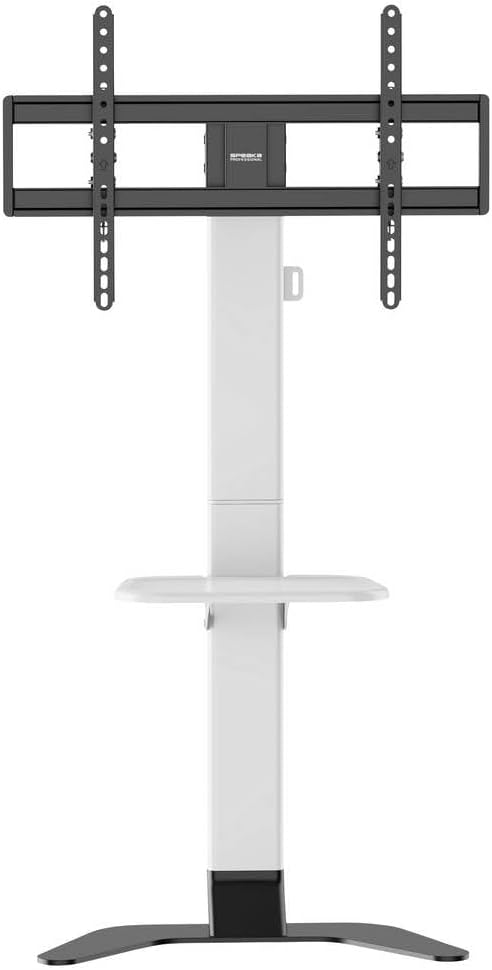
Figura 2: Față view of the stand showing the adjustable shelf.

Figura 3: lateral view of the stand, illustrating the profile si stabilitate.
5. Instrucțiuni de utilizare
5.1 Reglarea înălțimii televizorului
The TV mounting plate can be adjusted in height from 900 mm to 1100 mm. To adjust, loosen the height adjustment screws on the main column, carefully slide the TV to the desired height (with assistance), and then securely tighten the screws.
5.2 Adjusting TV Tilt
The stand features tool-free tilt adjustment. Gently push or pull the top or bottom of the TV to achieve your desired viewing angle. The mechanism will hold the TV in place.
5.3 Reglarea înălțimii raftului
The media shelf can be adjusted in height from 200 mm to 910 mm. Loosen the shelf adjustment screws, move the shelf to the preferred height, and then re-tighten the screws firmly.
6. Întreținere
- curatenie: Use a soft, dry cloth to clean the stand. For stubborn marks, a slightly damp Se poate folosi o lavetă cu detergent blând, urmată de uscare. Evitați substanțele de curățare abrazive sau solvenții.
- Verificări periodice: Regularly inspect all screws, bolts, and connections to ensure they are tight and secure. Re-tighten if necessary.
- Deteriora: If any part of the stand becomes damaged, discontinue use immediately and contact customer support for replacement parts or advice.
7. Depanare
| Problemă | Cauza posibila | Soluţie |
|---|---|---|
| Suportul este instabil sau ezitant. | Screws are loose; stand is on an uneven surface; weight capacity exceeded. | Ensure all assembly screws are tightened. Move stand to a level surface. Verify TV weight is within 45 kg limit. |
| TV does not tilt smoothly or stays in position. | Tilt mechanism needs adjustment or is obstructed. | Check for any obstructions. Ensure the tilt mechanism is clean. |
| Cablurile nu sunt gestionate cu grijă. | Cables not routed through the designated channels. | Re-route cables through the integrated cable management system in the main column. |
8. Specificații
- Model: SP-TVS-600
- Număr piesa: SP-13382656
- Marca: SPEAKA PROFESSIONAL
- Tip de montare: Stand de podea
- Tip de mișcare: inclinabila
- Material: Oțel aliat
- Culoare: Alb/Negru
- Dimensiuni TV compatibile: 37 - 86 inches (94.0 cm - 218.4 cm)
- Compatibilitate VESA: 100x100, 200x100, 200x200, 300x200, 400x200, 300x300, 400x300, 400x400, 600x400 mm
- Capacitate maximă de încărcare: 45 kg (99 lbs)
- TV Height Adjustment: 900 - 1100 mm
- Shelf Height Adjustment: 200 - 910 mm
- Dispozitive compatibile: Televizor, Monitor
- Greutatea articolului: 12.505 kg (12505 grame)
- Țara de origine: China
9. Garanție și asistență
9.1 Informații despre garanție
This SpeaKa Professional product comes with a 2-year manufacturer's warranty. Please refer to the terms and conditions provided with your purchase or visit the official SpeaKa Professional website for full details. Keep your proof of purchase for warranty claims.
9.2 Asistență pentru clienți
For technical assistance, missing parts, or warranty inquiries, please contact your retailer or SpeaKa Professional customer support. Contact information can typically be found on the product packaging or the official brand website-ul.