
1. Configurare
This section guides you through the initial setup of your Tivoli Audio Model Three Bluetooth Clock Radio.
1.1 Despachetarea și plasarea
Carefully remove the unit from its packaging. Place the radio on a stable, flat surface such as a tabletop. Ensure adequate ventilation around the unit.
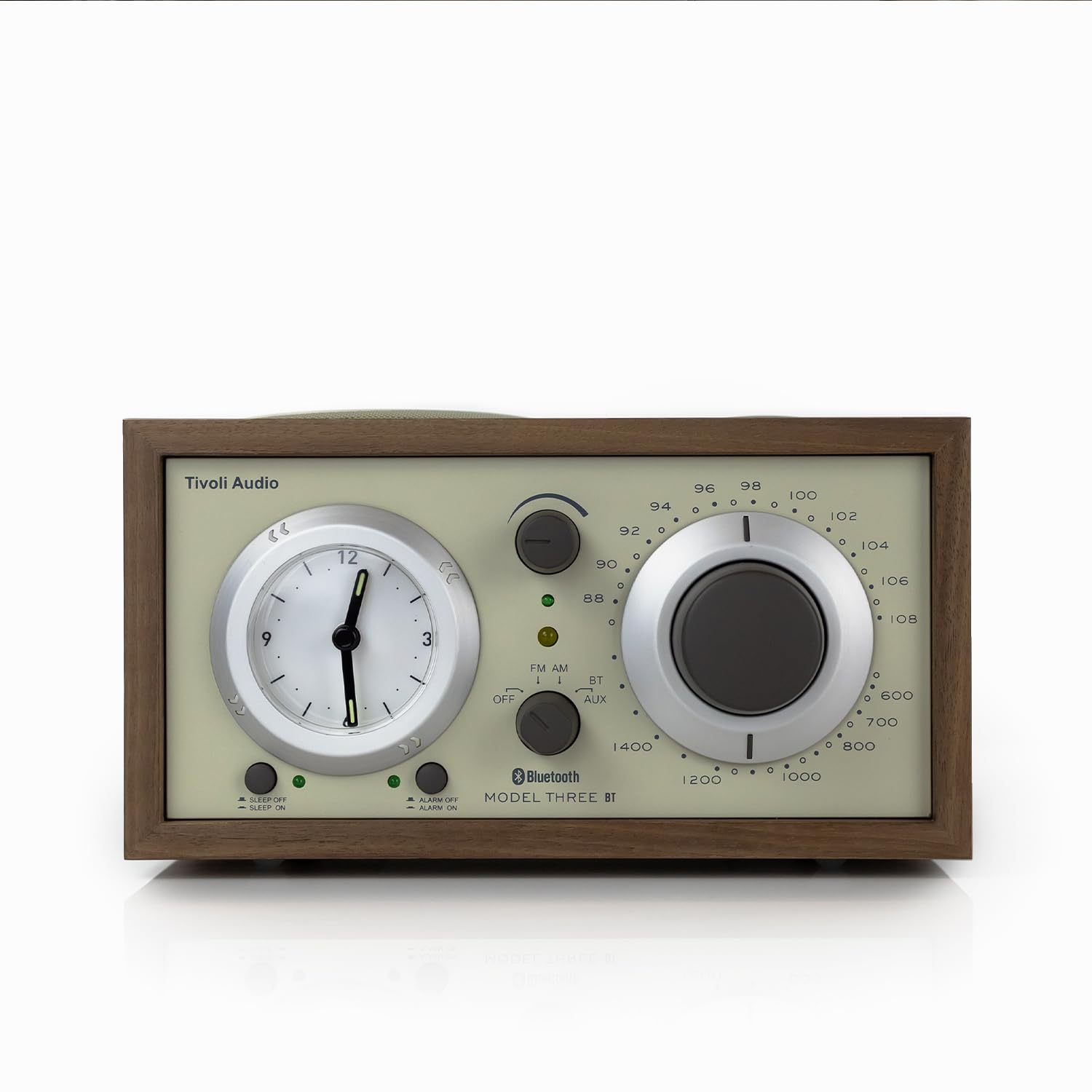
Faţă view of the Tivoli Audio Model Three Bluetooth Clock Radio in Walnut/Beige.
1.2 Conexiune la alimentare
Connect the provided power cord to the AC IN port on the back of the radio, then plug it into a wall outlet. The unit operates on corded electric power.
1.3 Battery Installation (for Clock)
The analog clock requires 1 AA battery (included) for operation. Locate the battery compartment on the back of the unit, insert the AA battery, ensuring correct polarity, and close the compartment. This battery powers the clock function independently of the main power supply.
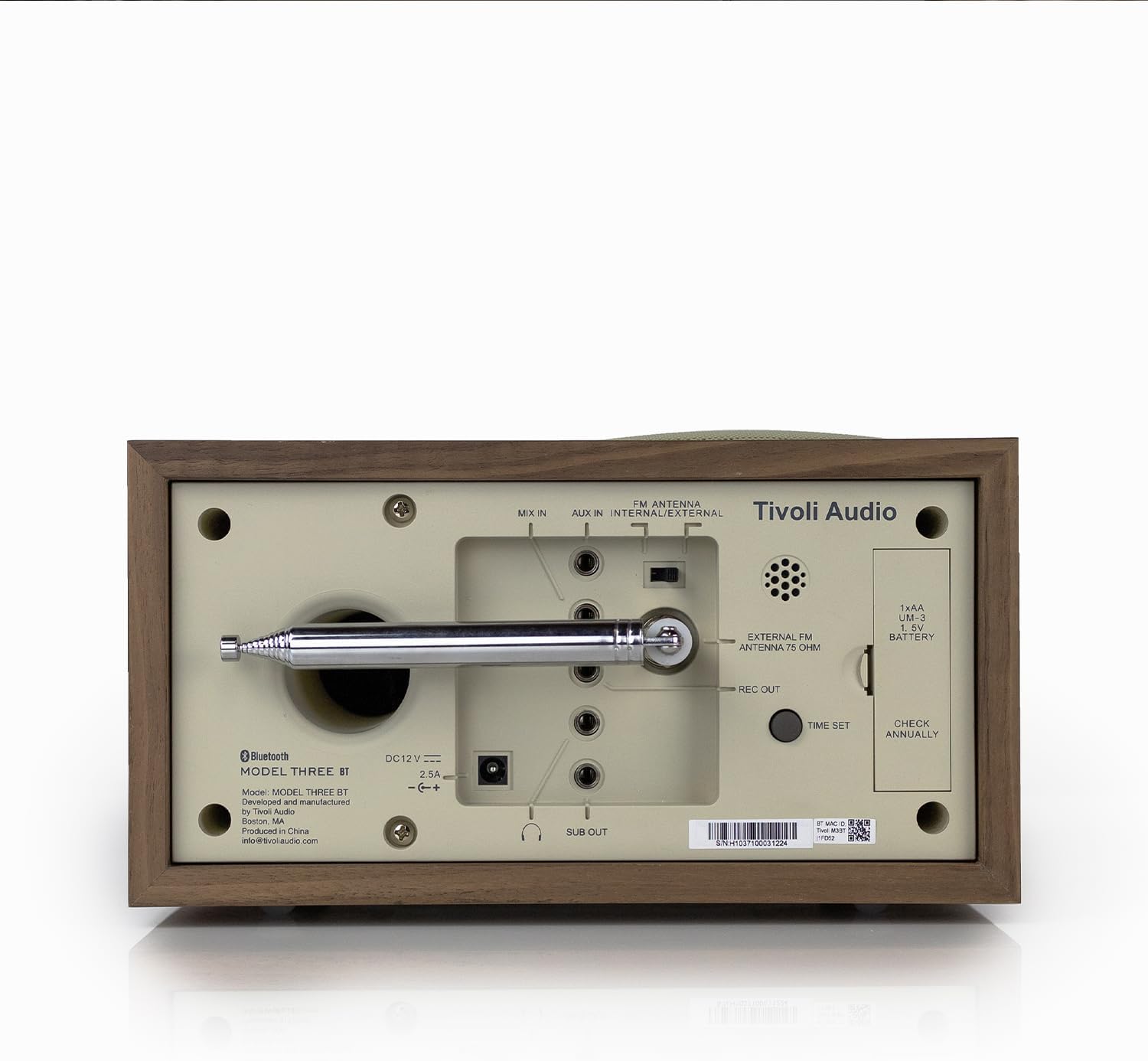
Spate view of the radio, highlighting the battery compartment and various input/output ports.
1.4 Conectarea antenei
For optimal FM reception, extend the built-in telescopic FM antenna. For external FM or AM antenna connections, refer to the ports on the back of the unit.
1.5 Setarea inițială a orei
To set the analog clock, use the 'TIME SET' control, typically a small knob or button on the back or side of the clock face. Rotate or press to adjust the hour and minute hands to the current time. Be aware that this is an analog clock and may require manual adjustment for time changes.
2. Instrucțiuni de utilizare
Learn how to use the various features of your Model Three Clock Radio.
2.1 Pornire/Oprire și selectare mod
Use the main function knob/switch to turn the unit ON or OFF. This control also allows you to select between FM, AM, Bluetooth (BT), and Auxiliary (AUX) input modes.

Close-up of the front panel showing the mode selector, tuning dial, and volume knob.
2.2 Operarea radioului (AM/FM)
- Comutați selectorul de mod la FM or AM.
- Rotiți cea mai mare Ajustare Dial to select your desired radio station. The tuning indicator light will illuminate when a strong signal is received.
- Reglați Buton de volum la nivelul dumneavoastră de ascultare preferat.
2.3 Asociere Bluetooth
- Comutați selectorul de mod la BT (Bluetooth). The Bluetooth indicator light will begin to flash, indicating it is in pairing mode.
- Pe dispozitivul mobil (smartphone, tabletă etc.), activați Bluetooth și căutați dispozitivele disponibile.
- Select "Tivoli Audio Model Three" from the list of devices.
- Once paired, the Bluetooth indicator light on the radio will stop flashing and remain solid. You can now stream audio wirelessly to your radio.
2.4 Intrare auxiliară
To play audio from an external device (e.g., MP3 player, older smartphone), connect a 3.5mm audio cable from your device's headphone jack to the AUX IN port on the back of the radio. Switch the mode selector to AUX. Control playback and volume from your external device.
2.5 Ceas deșteptător, temporizator de oprire și amânare
- Setarea alarmei: Use the dedicated alarm set buttons (e.g., ALARM SET, ALARM ON/OFF) to configure your desired wake-up time. Refer to the specific button labels on your unit for precise instructions.
- Sleep Timer: Activate the sleep timer function to automatically turn off the radio after a set period.
- Buton de amanare: When the alarm sounds, press the Snooze button to temporarily pause the alarm for a few minutes.
2.6 USB-A & USB-C Charging Ports
The radio features built-in USB-A and USB-C charging ports on its side. These ports provide 5V 1A power output for charging compatible phones and tablets. Simply connect your device's charging cable to the appropriate USB port.

Latura view of the radio, highlighting the USB-A and USB-C charging ports.
3. Întreținere
Proper care ensures the longevity and optimal performance of your radio.
3.1 Curățare
Wipe the cabinet and controls with a soft, dry cloth. Avoid using abrasive cleaners, waxes, or solvents as they may damage the finish. Do not spray liquids directly onto the radio.
3.2 Clock Battery Replacement
The analog clock's AA battery should be checked annually and replaced as needed to ensure accurate timekeeping. A weak battery may cause the clock to stop or lose time. Refer to section 1.3 for battery installation details.
4. Depanare
If you encounter issues with your radio, consult the following common solutions.
- Fără putere: Ensure the power cord is securely plugged into both the radio and a working wall outlet.
- Recepție radio proastă: Extend the FM telescopic antenna fully. Try repositioning the radio or the antenna. If using an external antenna, ensure it is correctly connected.
- Probleme de asociere Bluetooth: Make sure the radio is in BT mode and its indicator light is flashing. Ensure your device's Bluetooth is enabled and within range. Try forgetting the device on your phone and re-pairing.
- Clock Not Keeping Time / Difficult to Set: Verify the AA battery for the clock is fresh and correctly installed. The analog clock requires manual adjustment; ensure you are using the correct 'TIME SET' control.
- Porturile de încărcare USB nu funcționează: Check that the radio is powered on. Ensure your device's charging cable is fully inserted into the USB-A or USB-C port. Test with a different cable or device to rule out cable/device issues.
- No Audio from Auxiliary Input: Confirm the mode selector is set to AUX. Check the connection of the 3.5mm audio cable at both ends. Ensure the volume on your external device is turned up.
5. Specificații
| Caracteristică | Detaliu |
|---|---|
| Marca | Tivoli Audio |
| Model | Model Three |
| Culoare | Walnut / Beige |
| Tip de afișare | Analogic |
| Stil | Clasic |
| Caracteristici speciale | Alarmă, Port de încărcare, Radio |
| Dimensiunile produsului | 8.38 cm lățime x 4.5 cm înălțime |
| Sursa de alimentare | Electric cu fir |
| Utilizare în interior/exterior | De interior |
| Material | Walnut (Wood Frame) |
| baterii | Sunt necesare 1 baterii AA (incluse) |
| Tip de montare | Blat de masă |
| Tehnologia de conectivitate | Bluetooth, intrare auxiliară de 3.5 mm |
| Greutatea articolului | 5.21 lire sterline |
6. Garanție și asistență
Your Tivoli Audio Model Three Bluetooth Clock Radio is covered by a manufacturer's warranty. For specific warranty details, registration, and technical support, please visit the official Tivoli Audio website-ul sau contactați serviciul pentru clienți.
Pentru informații suplimentare și asistență, vă rugăm să vizitați Magazinul audio Tivoli pe Amazon.


