
1. Introducere
Thank you for choosing the VAVA 5.5" 720P HD Video Baby Monitor. This manual provides essential information for the safe and effective use of your device. Please read it thoroughly before operation and retain it for future reference.
This monitor offers a secure and clear way to observe your baby with its 5.5-inch 720p display, two-way audio, night vision, and pan/tilt/zoom capabilities. It operates on a dedicated wireless connection, ensuring privacy and reliability.
Ce este în cutie
- Monitor pentru bebeluși (unitate pentru părinți)
- Camera (Baby Unit)
- Adaptor de alimentare CA x2
- Set de montare
- Suport pentru cameră
- Cablu de alimentare x2
- Ghidul utilizatorului

Image 1.1: VAVA 5.5" 720P HD Video Baby Monitor components, including the parent unit (monitor) and baby unit (camera).
2. Informații de siguranță
Please observe the following safety precautions to prevent electric shock, injury, or damage to the product:
- Keep the monitor and camera out of reach of children.
- Do not place the camera or power cords within 3 feet (1 meter) of the crib.
- Use only the provided AC power adapters.
- Nu expuneți produsul la apă sau umezeală.
- Evitați plasarea produsului lângă surse de căldură sau lumina directă a soarelui.
- Ensure proper ventilation; do not cover the product with blankets or other materials.
- Do not attempt to repair or modify the product yourself. Contact customer support for assistance.
3. Produs terminatview
Unitate pentru părinți (monitor)
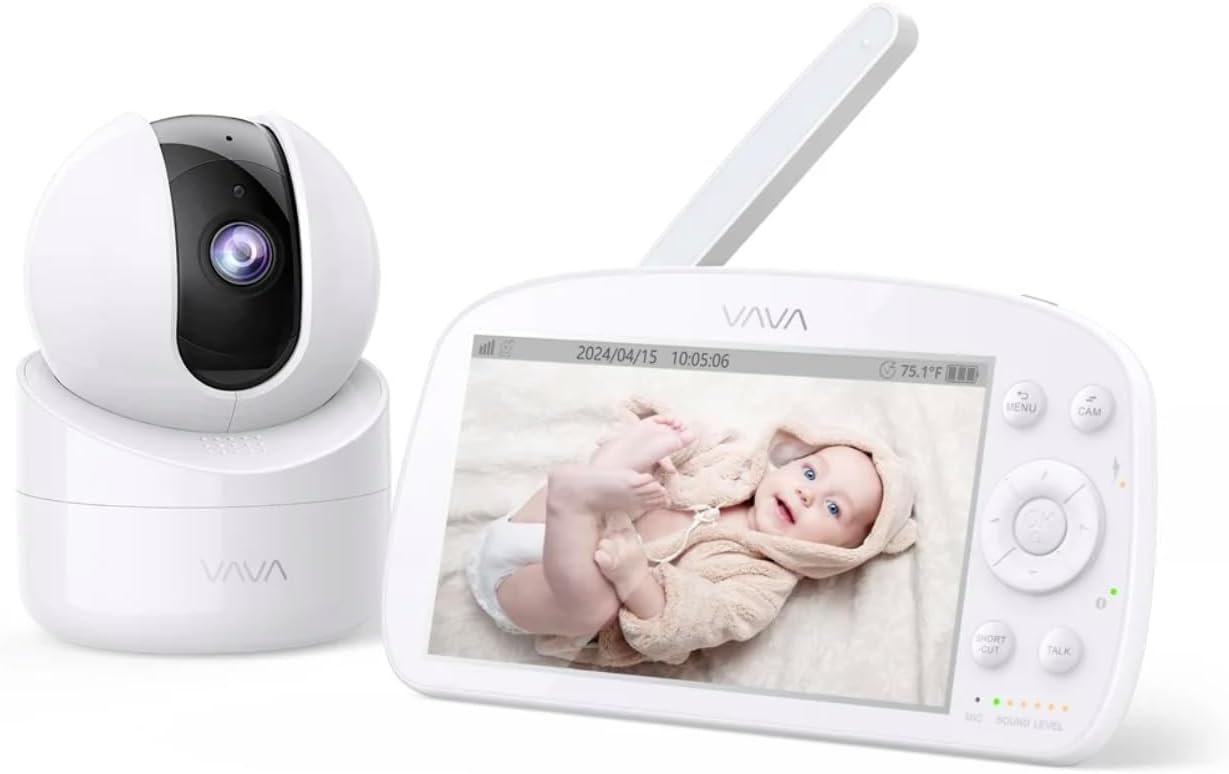
Image 3.1: The VAVA parent unit (monitor) and baby unit (camera) shown together.
The parent unit features a 5.5-inch HD display, control buttons, a microphone, speaker, and an antenna for signal reception.
Unitate pentru bebeluși (cameră foto)

Image 3.2: The VAVA baby unit (camera) with its pan/tilt base, featuring the lens and microphone.
The baby unit includes a 720p camera with infrared LEDs for night vision, a microphone, speaker, and a temperature sensor. It supports pan, tilt, and digital zoom functions.
4. Configurare
4.1 Amplasarea camerei
Plasați unitatea pentru bebeluș (camera) într-un loc care oferă vizibilitate clară view of your baby in the crib. Ensure it is at least 3 feet (1 meter) away from the crib to prevent entanglement with cords. The camera can be placed on a flat surface or mounted to a wall using the included mount kit.

Imaginea 4.1: Example of camera placement, mounted above a crib for optimal viewing.
4.2 Pornire
- Connect one AC power adapter to the baby unit and plug it into a power outlet.
- Connect the second AC power adapter to the parent unit and plug it into a power outlet. The parent unit has a built-in rechargeable battery for portable use.
- Press and hold the power button on the parent unit to turn it on. The display will activate.
4.3 Împerechere (dacă este necesar)
The baby unit and parent unit are pre-paired at the factory. If the connection is lost or you are adding an additional camera (up to 4 cameras supported), follow these steps:
- Pe unitatea părintelui, apăsați butonul MENIU buton.
- Navigate to the camera icon (Pairing) and select it.
- Choose an available camera channel (e.g., CAM 2, CAM 3, CAM 4).
- Press the pairing button on the back of the baby unit within 10 seconds.
- Once paired, the image from the camera will appear on the parent unit display.
5. Instrucțiuni de utilizare
5.1 Parent Unit Controls

Image 5.1: The parent unit in use, displaying the live feed from the baby unit.
- Butonul MENU: Access settings, pairing, lullabies, and other functions.
- Butoane de navigare (Sus/Jos/Stânga/Dreapta): Move through menus and control camera pan/tilt.
- Buton OK: Confirmați selecțiile.
- Butonul VORBIRE: Press and hold to speak to your baby through the camera's speaker (Two-Way Audio).
- Butonul ZOOM: Magnify the image (2X-4X digital zoom).
- Modul VOX: Voice Operated eXchange. The screen will turn on automatically when sound is detected from the baby unit. Adjust sensitivity in the menu.
- Cântece de leagăn: Select and play lullabies from the menu to soothe your baby.
- Vedere de noapte: Automatically activates in low light conditions, providing a clear black and white image.
- Modul Auto-Pilot: Cycles through connected cameras automatically.
5.2 Controlul camerei (Panoramare și înclinare)
From the parent unit, use the navigation buttons to remotely adjust the camera's viewunghiul de ing:
- Presa Sus/Jos pentru a înclina camera pe verticală.
- Presa Stânga/Dreapta pentru a panorama camera pe orizontală.
6. Întreținere
6.1 Curățare
- Deconectați ambele unități de la alimentarea cu energie electrică înainte de curățare.
- Use a soft, dry cloth to wipe the surfaces of the monitor and camera.
- For the camera lens, use a lens cleaning cloth to avoid scratches.
- Nu utilizați agenți de curățare abrazivi sau solvenți.
6.2 Îngrijirea bateriei (unitatea părintelui)
- Pentru a prelungi durata de viață a bateriei, evitați descărcarea completă frecventă a acesteia.
- Charge the parent unit regularly.
- Dacă depozitați unitatea pentru o perioadă lungă de timp, încărcați bateria la aproximativ 50% și depozitați-o într-un loc răcoros și uscat.
7. Depanare
| Problemă | Cauza posibila | Soluţie |
|---|---|---|
| Nicio imagine pe unitatea părintelui | Parent unit is off; Camera is off; Out of range; Not paired. | Ensure both units are powered on. Move units closer. Re-pair the camera (see Section 4.3). |
| Calitate slabă a imaginii | Weak signal; Obstructions; Dirty lens. | Move units closer. Remove obstructions. Clean camera lens. |
| Fără sunet sau sunet distorsionat | Volume too low; Out of range; Interference. | Increase parent unit volume. Move units closer. Avoid placing near other electronic devices. |
| Bateria unității părintelui se descarcă repede | High screen brightness; VOX mode off; Old battery. | Reduce screen brightness. Enable VOX mode. Contact support for battery replacement if necessary. |
| Camera not responding to pan/tilt | Connection issue; Camera malfunction. | Check connection. Power cycle both units. If issue persists, contact support. |
8. Specificații
| Caracteristică | Detaliu |
|---|---|
| Numele modelului | VAVA 5.5" 720P Video Baby Monitor |
| Numărul de model | 83-24011-022 |
| Dimensiunea afișajului | 5.5 inci |
| Rezoluție video | 720p HD |
| Interval de transmisie | Până la 900 ft (linia vizuală) |
| Tehnologia de conectivitate | Wireless (Dedicated 2.4GHz FHSS) |
| Sursa de alimentare | Corded Electric, Rechargeable (Parent Unit) |
| Caracteristici speciale | 2-Way Audio, Night Vision, Pan & Tilt, Zoom (2X-4X), VOX Mode, Lullabies, Temperature Sensor |
| Utilizare în interior/exterior | De interior |
| Tip de montare | Suport de masă |
| Dimensiunile produsului | 8.46 x 8 x 5 inci |
| Greutatea articolului | 2.2 lire sterline |
| UPC | 191280045666 |
9. Garanție și asistență
9.1 Informații despre garanție
VAVA products are designed and manufactured to the highest quality standards. This product is covered by a manufacturer's warranty from the date of purchase. Please refer to the warranty card included in your package or visit the official VAVA website-ul pentru termenii și condițiile detaliate ale garanției.
9.2 Asistență pentru clienți
If you encounter any issues or have questions regarding your VAVA 5.5" 720P HD Video Baby Monitor, please contact VAVA Customer Support. Our team is available to assist you with troubleshooting, technical support, and warranty claims.
Pentru cele mai recente informații de contact, vă rugăm să vizitați: www.vava.com/support