
Introducere
This manual provides essential information for the safe and efficient use of your SUPVAN T50M Pro Label Maker. Please read these instructions carefully before operating the device and retain them for future reference.
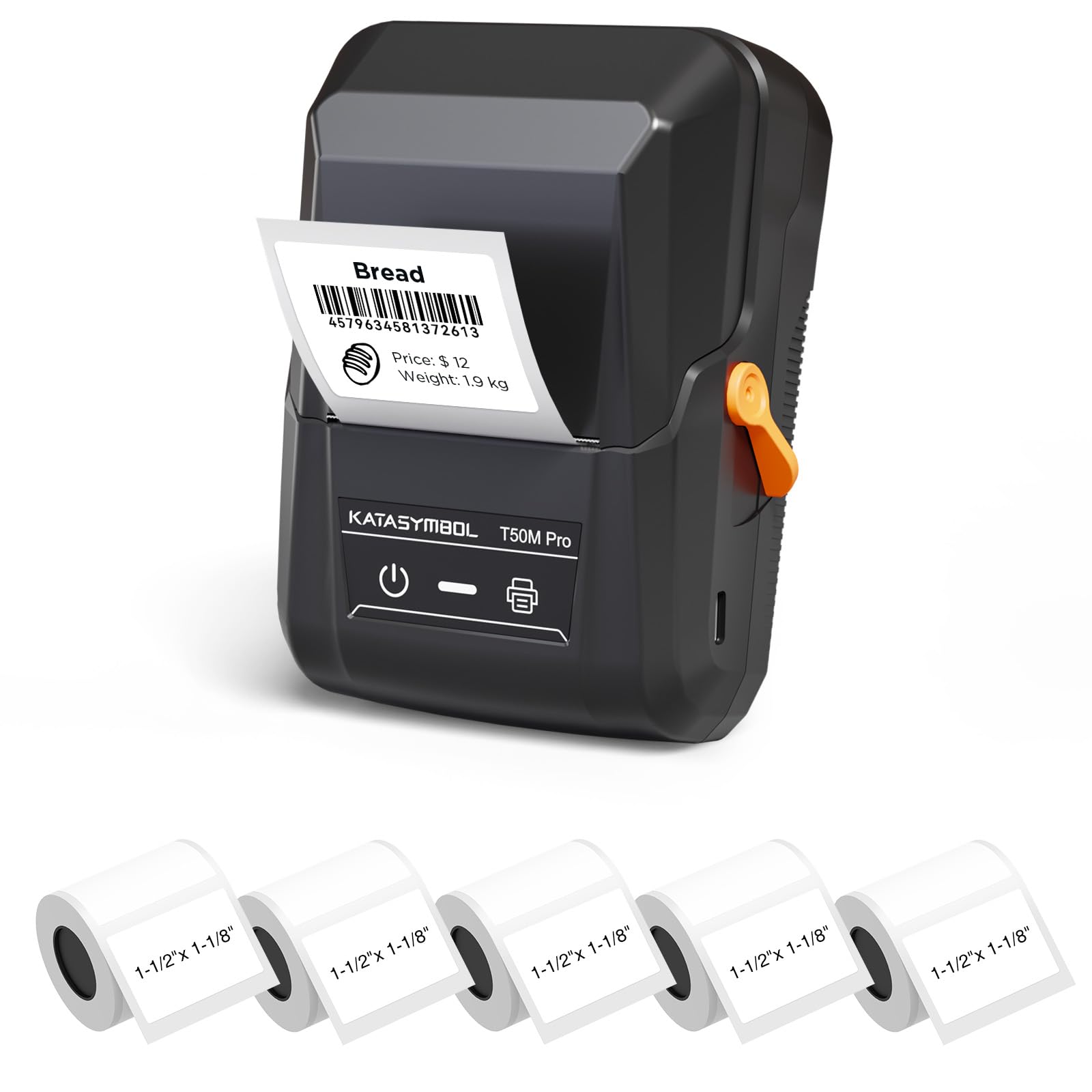
Image: The SUPVAN T50M Pro Label Maker, a compact thermal printer.
Conținutul pachetului
Verificați dacă toate articolele sunt prezente în colet:
- SUPVAN T50M Pro Label Maker
- 5 rolls of 1.57'' × 1.18'' (40mm × 30mm) white labels (250 labels/roll)
- USB Cable (for charging and connectivity)
- Manual de utilizare (acest document)
Ghid de instalare
1. Încărcarea dispozitivului
Before first use, fully charge the label maker using the provided USB cable. The device features a 1200 mAh built-in rechargeable battery, offering extended use on a single charge.
2. Instalarea rolei de etichete
The T50M Pro uses thermal paper, eliminating the need for ink or toner. Follow these steps to install a label roll:
- Deschideți capacul compartimentului pentru etichete.
- Introduceți rola de etichete cu suprafața de imprimare în sus.
- Ensure the label edge is aligned with the printer's feed mechanism.
- Close the cover. The device's Smart RFID Auto-Detection will recognize the label size automatically.

Image: Illustration of loading thermal paper into the label maker. The device uses thermal printing technology, requiring no ink or toner.
3. Instalarea și conectarea aplicației
Download the official SUPVAN app from your device's app store. The app provides all editing functions and is free to use.
- Porniți aparatul de etichetat.
- Open the SUPVAN app on your smartphone or tablet.
- Follow the in-app instructions to connect to your T50M Pro via Bluetooth or USB.
Instrucțiuni de operare
1. Creating Labels with the App
The SUPVAN app offers a comprehensive suite of editing tools:
- Editarea textului: Choose from over 40 fonts.
- Image & Picture Integration: Add custom images and logos.
- Șabloane: Access over 140 free, constantly updated templates for various uses.
- Auto Label Size Recognition: The app automatically detects the loaded label size, reducing errors.

Image: The SUPVAN app's editing interface, demonstrating font choices, image integration, and automatic label size detection.

Image: A selection of over 140 free templates available within the SUPVAN app, suitable for diverse labeling needs.
2. Imprimarea etichetelor
After designing your label in the app, select the "Print" option. Ensure the label maker is connected and has sufficient battery. The T50M Pro supports various label styles and sizes, printing 3/4 to 2-inch wide labels.

Imagine: Examples of labels created with the T50M Pro, including address labels, price tags, and decorative labels, demonstrating support for various styles.

Image: A visual comparison highlighting the high-quality image output from the SUPVAN T50M Pro's app compared to other label makers.
3. Aplicații comune
The SUPVAN T50M Pro is suitable for a wide range of labeling tasks:
- Întreprinderi mici: Shipping addresses, product information, QR codes, brand logos.
- Birou și școală: Nume tags, folder labels, documentation, asset taga mers.
- Organizarea casei: Pantry labels, storage bins, personal items.

Image: Demonstrates diverse uses for the label maker, such as labeling containers in a pantry, creating product labels, printing shipping labels, and organizing school supplies.
Întreţinere
1. Curățarea capului de imprimare
Pentru a asigura o calitate optimă a imprimării, curățați periodic capul de imprimare termică. Folosiți o cârpă moale, fără scame, frecați ușor.ampened with isopropyl alcohol. Do not use abrasive cleaners or sharp objects.
2. Îngrijirea bateriei
Recharge the device when the battery indicator is low. Avoid fully discharging the battery frequently to prolong its lifespan. Store the device in a cool, dry place when not in use for extended periods.
3. Label Storage
Store label rolls in a cool, dry place away from direct sunlight and heat to prevent degradation of the thermal material.
Depanare
1. Dispozitivul nu se pornește
- Asigurați-vă că dispozitivul este complet încărcat. Conectați-l la o sursă de alimentare folosind cablul USB.
- Apăsați și mențineți apăsat butonul de pornire pentru câteva secunde.
2. Printing Issues (Blank or Faint Prints)
- Check if the label roll is installed correctly with the printing surface facing up.
- Ensure the label roll is not empty.
- Curățați capul de imprimare conform descrierii din secțiunea Întreținere.
- Verify that the label type is compatible with the T50M Pro.
3. Probleme de conectivitate a aplicațiilor
- Asigurați-vă că Bluetooth este activat pe dispozitivul dvs. mobil.
- Make sure the label maker is turned on and within range.
- Restart both the label maker and the app.
- Dacă problemele persistă, încercați să reinstalați aplicația.
4. Label Misalignment
- Ensure the label roll is properly seated and aligned in the compartment.
- The Smart RFID Auto-Detection should prevent most misalignment issues; if not, try re-seating the roll.
Specificații
| Caracteristică | Detaliu |
|---|---|
| Numele modelului | T50M Pro |
| Marca | SUPVAN |
| Tehnologia de imprimare | Termic |
| Tehnologia de conectivitate | USB, Bluetooth |
| Interfață hardware | USB |
| Ieșire imprimantă | Monochrome (Black Ink Color) |
| Dimensiune maximă a suportului media | 1.57'' × 1.18'' (40mm × 30mm) - 3/4 to 2-inch wide labels supported |
| Caracteristica specială | Portable, Smart RFID Auto-Detection, BPA-free labels |
| Baterie | Baterie reîncărcabilă încorporată de 1200 mAh |
| Dimensiuni | Aprox. 5 cm x 3.7 cm x 2.3 cm |
| Greutate | Aproximativ. 0.6 lb |
| Componente incluse | Label Maker, Labels, USB Cable |

Image: The compact design of the T50M Pro, highlighting its portability, lightweight nature, and 1200 mAh rechargeable battery.
Garanție și suport
Informații despre garanție
For detailed warranty information, please refer to the warranty card included with your product or visit the official SUPVAN webTermenii și condițiile de garanție pot varia în funcție de regiune și de comerciant.
Asistență pentru clienți
If you encounter any issues or have questions regarding your SUPVAN T50M Pro Label Maker, please contact SUPVAN customer support through their official website-ul sau distribuitorul de unde a fost achiziționat produsul.
De asemenea, puteți vizita Magazinul SUPVAN pe Amazon pentru informații suplimentare despre produs și resurse de asistență.