
Introducere
This manual provides detailed instructions for the assembly, operation, and maintenance of your FLEXISPOT One-Piece Standing Desk with Rattan Drawers. Please read this manual thoroughly before installation and use to ensure proper function and safety. Keep this manual for future reference.

Image: The FLEXISPOT One-Piece Standing Desk in black with rattan drawers, featuring a monitor shelf and an integrated control panel.
Informații importante privind siguranța
Pentru a preveni vătămările corporale sau deteriorarea produsului, respectați următoarele instrucțiuni de siguranță:
- Urmați întotdeauna cu atenție instrucțiunile de asamblare.
- Țineți copiii și animalele de companie departe de zona de asamblare.
- Use appropriate tools and safety gear during assembly.
- Asigurați-vă că toate conexiunile sunt fixate înainte de a utiliza biroul.
- Do not overload the desk. The maximum weight capacity is 110 lbs.
- Nu apropiați mâinile și obiectele de piesele în mișcare în timpul reglării înălțimii.
Conținutul pachetului
Verify that all components are present before beginning assembly. The desk ships in two separate packages.
- Desktop with integrated monitor shelf and rattan drawers
- Desk frame and legs
- Panou de control
- Adaptor de alimentare și cabluri
- Elemente de asamblare (șuruburi, bolțuri, scule)
- Manual de utilizare

Image: A diagram illustrating the dimensions of the desk components and indicating that the product ships in two separate packages.
Instructiuni de asamblare
Assembly typically takes approximately one hour. Refer to the separate detailed assembly guide included in your package for step-by-step instructions and diagrams. Ensure all fasteners are correctly identified and used in their designated locations.
- Despachetați toate componentele și verificați-le în funcție de lista conținutului ambalajului.
- Attach the desk legs to the desktop frame using the provided hardware.
- Connect the control panel and motor cables as instructed.
- Secure any cable management components.
- Place the desk in its desired location.
Înființat
After assembly, connect the desk to a power source.
- Plug the power adapter into the desk's control box.
- Conectați cablul de alimentare la o priză electrică standard.
- The desk is now ready for initial use.
Instrucțiuni de operare
Reglarea înălțimii
The desk features an electric motor system for smooth height transitions.
- Apăsați tasta Săgeată sus buton pentru a ridica biroul.
- Apăsați tasta Săgeată în jos buton pentru a coborî biroul.
- The desk can adjust between 28.9 inches (minimum) and 46.5 inches (maximum).
- The motor operates quietly, typically below 50dB.

Image: The desk shown at its minimum (28.9") and maximum (46.5") adjustable heights.
Presetari de memorie
Program up to three preferred height settings for quick adjustments.
- Reglați biroul la înălțimea dorită.
- Apăsați tasta M button, then press one of the numbered preset buttons (1, 2, sau 3) within 3 seconds to save the current height.
- To recall a saved height, simply press the corresponding numbered preset button.

Imagine: Un prim-plan view of the desk's control panel, highlighting the up/down arrows and memory preset buttons.
Raft pentru monitor
The integrated monitor shelf is designed to elevate screens to an ergonomic eye level.
- Place your monitor(s) on the shelf to reduce neck and back strain.
- This helps maintain proper posture during extended work sessions.

Image: Visual comparison of poor posture versus ergonomic sitting and standing postures facilitated by the adjustable desk.
Rattan Drawers
The desk includes both sliding-door desktop compartments and an under-desk drawer for organized storage.
- Use the desktop compartments (47.2"x8.7"x5.5") for easy access to frequently used items.
- The under-desk drawer (23.6"x11.8"x3.9") provides discreet storage for documents or books.
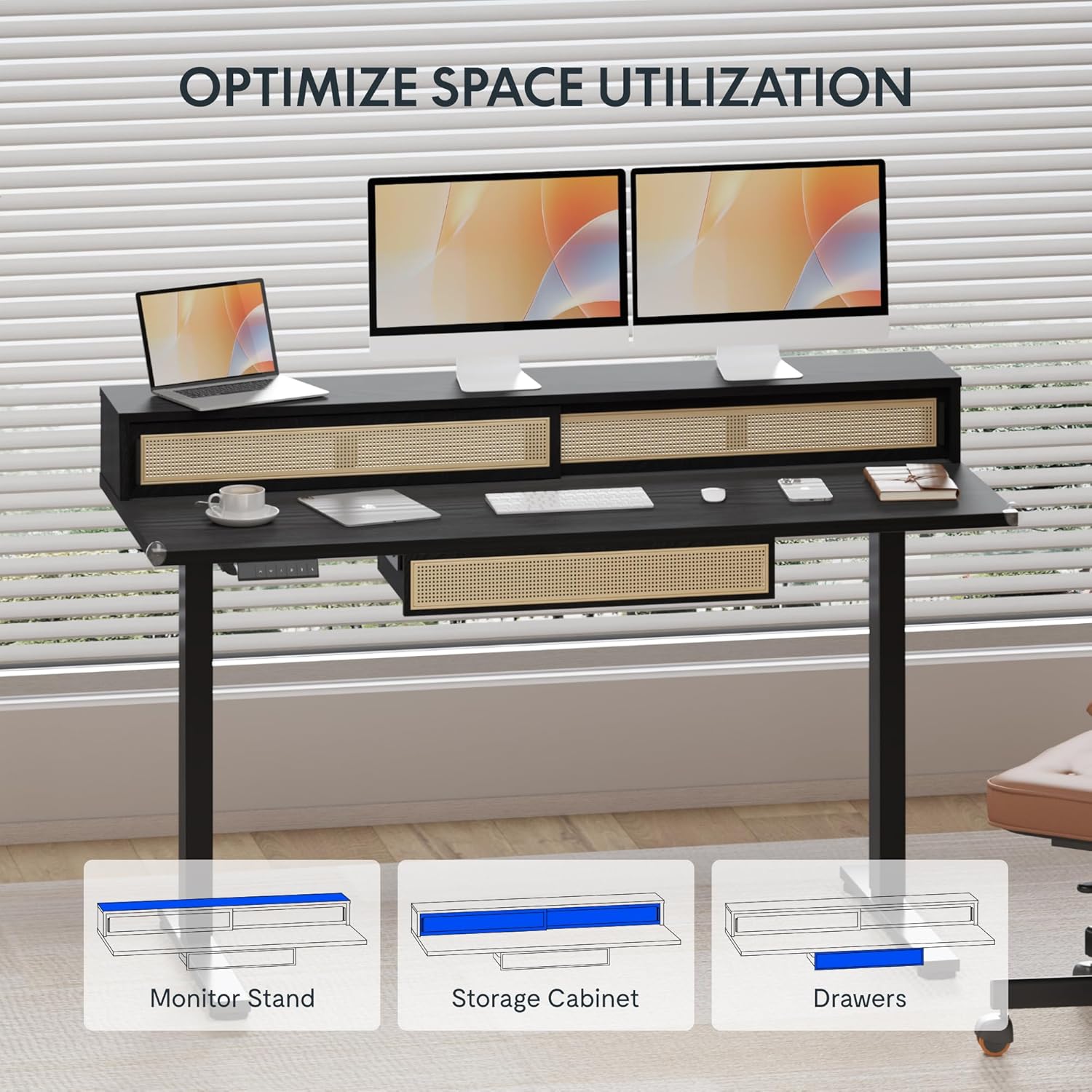
Image: An illustration demonstrating the various storage options, including the monitor stand, storage cabinet, and drawers, for optimal space utilization.
Întreţinere
Întreținerea regulată asigură longevitatea și performanța optimă a biroului dumneavoastră.
- curatenie: Ștergeți suprafețele biroului cu o lavetă moale șiamp pânză. Evitați agenții de curățare abrazivi sau substanțele chimice dure care pot deteriora finisajul.
- Inspecţie: Verificați periodic toate șuruburile și bolțurile pentru a vă asigura că sunt strânse. Strângeți-le din nou dacă este necesar.
- Organizare de cabluri: Ensure cables are neatly organized and not interfering with the desk's movement.
Depanare
Dacă întâmpinați probleme cu biroul dvs., consultați următoarele soluții comune:
| Problemă | Cauza posibila | Soluţie |
|---|---|---|
| Biroul nu se mișcă și nu răspunde la comenzi. | Power connection issue, cable disconnected, motor error. | Check power cord connection to outlet and desk. Ensure all motor cables are securely connected. Unplug and replug the power for 10 seconds to reset. |
| Biroul se mișcă neuniform sau face zgomote neobișnuite. | Uneven load, loose connections, obstruction. | Ensure weight is evenly distributed. Check for any obstructions under the desk. Verify all assembly screws are tight. |
| Memory presets are not working. | Presetările nu au fost salvate corect. | Re-save the desired height settings by pressing 'M' then the preset number within 3 seconds. |
Specificații
| Caracteristică | Detaliu |
|---|---|
| Marca | FLEXISPOT |
| Dimensiuni produs (D x L x H) | 23.6"D x 47.2"W x 29"H (at lowest point) |
| Culoare | Negru |
| Material de bază | Oțel aliat |
| Tip material de sus | Lemn |
| Inaltimea minima | 28.9 inchi |
| Înălțimea maximă | 46.5 inchi |
| Numărul sertarelor | 1 (under-desk) |
| Enclosed Shelves | 2 (sliding-door desktop compartments) |
| Caracteristica specială | Corded electric height adjustment, Memory Presets |
| Asamblare necesară | Da |
Garanție și suport
FLEXISPOT provides comprehensive warranty coverage for your standing desk:
- Cadru și motor: Acoperire de 5 ani.
- Electronica: Acoperire de 2 ani.
This warranty ensures lasting security for your workspace investment. For customer support, technical assistance, or warranty claims, please refer to the contact information provided in your product packaging or visit the official FLEXISPOT website-ul.