
1. Introducere
Thank you for choosing the Proster PST252-US Digital Rechargeable Pinless Moisture Meter. This device is designed for non-destructive measurement of moisture content in various materials such as wood, walls, plaster, and masonry. It features a clear LCD display, a 3-color LED bar graph, and an audible alarm for easy interpretation of moisture levels. Please read this manual thoroughly before use to ensure proper operation and to maximize the lifespan of your device.

Image: The Proster PST252-US Digital Rechargeable Pinless Moisture Meter, showing its orange and black design with an LCD screen.
2. Informații de siguranță
- Țineți dispozitivul departe de apă și medii cu umiditate ridicată pentru a preveni deteriorarea.
- Nu încercați să dezasamblați sau să modificați dispozitivul. Reparațiile trebuie efectuate numai de către personal calificat.
- Evitați expunerea dispozitivului la temperaturi extreme sau la lumina directă a soarelui pentru perioade prelungite.
- Ensure the device is fully charged before critical measurements to avoid inaccurate readings due to low battery.
- Be aware that the presence of metals or pipes within the material being measured can affect the reading accuracy.
3. Produs terminatview
3.1 Componente
- Umiditateametru digital
- Cablu de încărcare USB de tip C
- Geanta de depozitare
- Manual de utilizare

Image: The Proster PST252-US moisture meter, storage pouch, USB-C charging cable, and user manual.
3.2 Aspectul și afișajul dispozitivului
The device features an intuitive layout with a large LCD screen and clearly labeled buttons for various functions and measurement modes.

Imagine: Detaliată view of the Proster PST252-US display showing moisture percentage, battery indicator, 3-color LED bar graph (Dry, Risk, Wet), HOLD function, and mode selection icons for Wall, Masonry, Soft Wood, and Hard Wood.
- Display LCD: Shows moisture percentage, battery status, and selected material mode.
- 3-Color LED Bar Graph: Visually indicates moisture levels (Green for Dry, Yellow for Risk, Red for Wet).
- Buton de alimentare: Pornește/Oprește dispozitivul.
- Țineți butonul apasat: Short press to freeze the current reading; long press for calibration.
- Butoane de mod: Separate buttons for selecting Wall, Masonry, Soft Wood, and Hard Wood measurement modes.
4. Configurare
4.1 Încărcarea dispozitivului
The Proster PST252-US features a rechargeable lithium-ion battery. When the battery icon on the display shows low power or the device does not turn on, it needs to be charged.
- Conectați cablul USB Type-C furnizat la portul de încărcare al dispozitivului.
- Conectați celălalt capăt al cablului USB la un adaptor de alimentare USB standard (nu este inclus) sau la un port USB al computerului.
- The battery indicator on the display will show charging status. Charge until the battery icon indicates full charge.

Image: The Proster PST252-US moisture meter connected to a wall charger via its USB-C cable for recharging.
4.2 Pornirea inițială
Press the power button to turn on the device. The LCD display will illuminate, and the device will be ready for use.
5. Instrucțiuni de utilizare
5.1 Selecting a Measurement Mode
The device offers four specific measurement modes for different materials. Select the appropriate mode before taking a reading for optimal accuracy.
- Apăsați tasta PERETE button for plaster and drywall.
- Apăsați tasta ZIDĂRIE button for brick and concrete.
- Apăsați tasta LEMN MOI button for softwoods.
- Apăsați tasta LEMN TARE button for hardwoods.

Image: The Proster PST252-US displaying measurement ranges for different materials like walls, masonry, soft wood, and hard wood.
5.2 Luarea unei măsurători
The Proster PST252-US uses a non-destructive sensor to detect moisture up to 19mm (0.75 inches) below the surface.
- Asigurați-vă că dispozitivul este încărcat și pornit.
- Select the appropriate material mode using the dedicated buttons.
- Place the sensor panel (located on the back of the device) flat against the surface of the material you wish to measure. Ensure full contact.
- Read the moisture percentage displayed on the LCD screen. The 3-color LED bar graph will also provide a visual indication of the moisture level (Green: Dry, Yellow: Risk, Red: Wet).
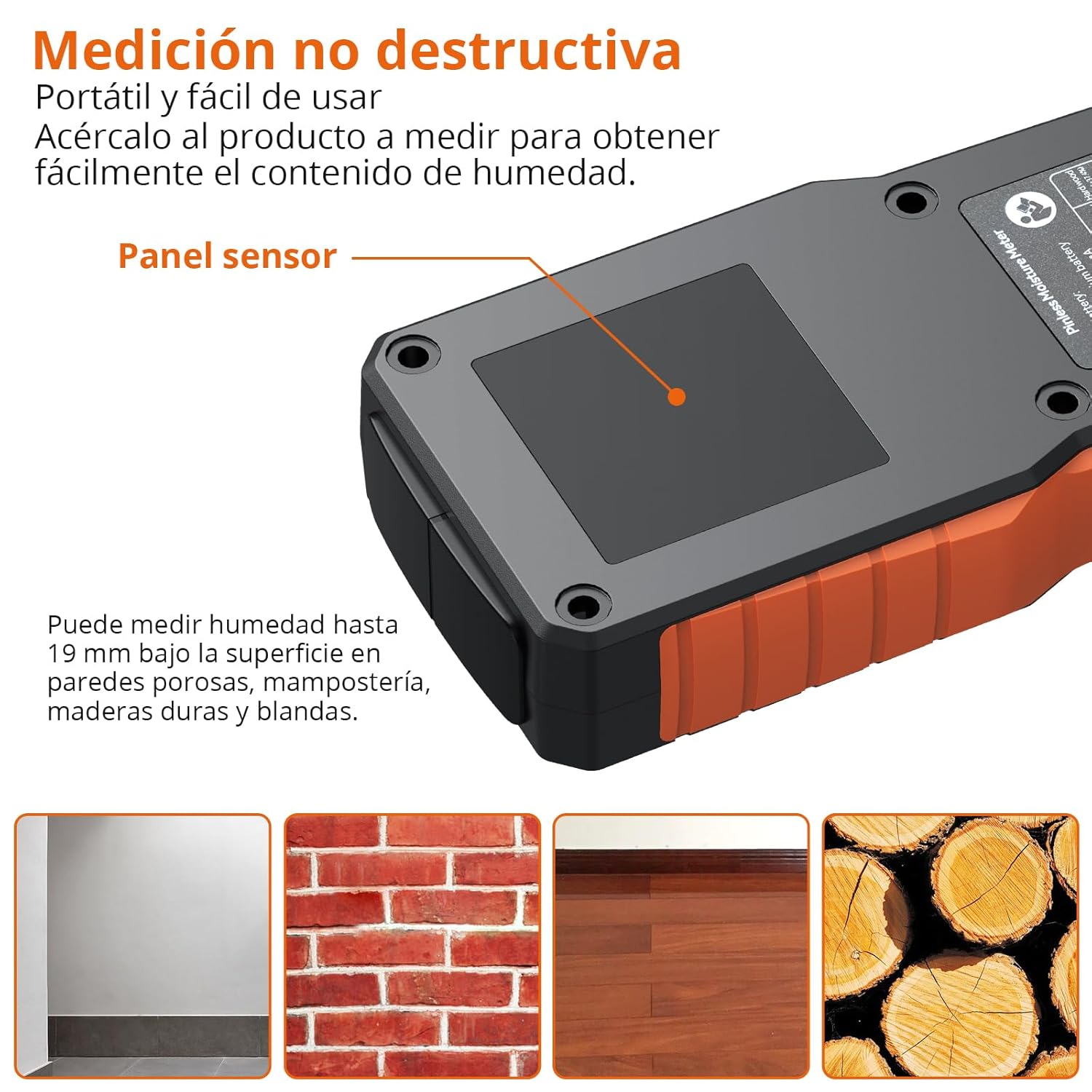
Image: The Proster PST252-US moisture meter being used to measure a wall, highlighting the sensor panel and showing examples of materials it can measure: porous walls, brick masonry, hardwood flooring, and wood logs.
Considerații importante:
- The material being measured should have a thickness greater than 19mm for accurate readings.
- The presence of metals, screws, nails, or pipes within the material can interfere with the sensor and affect measurement accuracy. Avoid these areas if possible.
- For precise measurements, place your finger on the rubber grip area of the device.

Image: Illustration showing correct measurement on a brick wall (left) and incorrect measurement on a damaged wall with exposed metal rebar (right), indicating that metals can affect accuracy.
5.3 Funcția de păstrare a datelor
Pentru a îngheța citirea curentă pe afișaj, apăsați scurt butonul ȚINE button. Press it again to release the hold and resume live measurement.
5.4 Alarmă sonoră
The device features an audible alarm that activates when moisture levels exceed predefined thresholds for the selected material. The alarm will sound faster as the moisture content increases.
| Material | Prag de alarmă |
|---|---|
| Lemn | >10% |
| Plaster/Drywall | >20% |
| Zidărie | >8% |

Image: The Proster PST252-US displaying a high moisture reading (27.3% on Wall mode) with a visual representation of the audible alarm.
5.5 Oprire automată
Dispozitivul se va opri automat după 5 de minute de inactivitate pentru a economisi bateria.
6. Întreținere
6.1 Curățare
Wipe the device with a soft, dry cloth. Do not use abrasive cleaners or solvents, as these may damage the casing sau afișaj.
6.2 Depozitare
When not in use, store the moisture meter in its protective pouch in a cool, dry place, away from direct sunlight and extreme temperatures.
6.3 Calibrare
The device can be calibrated by long-pressing the ȚINE button. Refer to the on-screen instructions or contact support if you suspect calibration issues.
7. Depanare
- Dispozitivul nu pornește: Ensure the battery is charged. Connect the USB-C cable and charge for at least 30 minutes.
- Citiri inexacte:
- Verify that the correct material mode is selected.
- Ensure the sensor panel is in full contact with the surface.
- Check for any metal objects (nails, pipes, rebar) within the measurement area that might interfere with the sensor.
- Ensure the material thickness is greater than 19mm.
- Perform a calibration if necessary (long press HOLD button).
- Afișajul este slab sau pâlpâie: Bateria poate fi descărcată. Reîncărcați dispozitivul.
- Audible alarm not working: Check if the device is in a high moisture area. If not, contact customer support.
8. Specificații
| Caracteristică | Caietul de sarcini |
|---|---|
| Numărul de model | PST252-US |
| Tip de măsurare | Pinless (Non-destructive) |
| Adâncimea de detecție | Până la 19 mm |
| Moduri de măsurare | Wall, Masonry, Soft Wood, Hard Wood |
| Precizia măsurătorilor | ±4% |
| Afişa | LCD with 3-color LED bar graph |
| Tip baterie | 1 Lithium-metal (rechargeable, included) |
| Port de încărcare | USB tip C |
| Oprire automată | Da (după 5 de minute de inactivitate) |
| Dimensiunile produsului | 19 x 8 x 4.3 cm |
| Greutatea produsului | 140 grame |
| Vol. De operaretage | 3.7 volți |
| Temperatura maximă de funcționare | 40 de grade Celsius |
9. Garanție și asistență
Proster products are designed for reliability and performance. For warranty information or technical support, please refer to the contact details provided with your purchase documentation or visit the official Proster webPăstrați bonul fiscal ca dovadă a achiziției pentru orice reclamații în garanție.