
1. Instrucțiuni importante de siguranță
Please read these instructions carefully before using the Audizio Canzo DAB+ Internet Radio. Keep this manual for future reference.
- Nu expuneți dispozitivul la ploaie sau umezeală pentru a preveni incendiul sau electrocutarea.
- Nu deschideți c.asing. În interior nu există piese care să poată fi reparate de utilizator. Apelați la personal calificat pentru orice service.
- Utilizați numai adaptorul de alimentare furnizat împreună cu dispozitivul.
- Asigurați o ventilație adecvată în jurul unității. Nu blocați orificiile de ventilație.
- Evitați amplasarea unității în apropierea surselor de căldură sau în lumina directă a soarelui.
- Clean the unit only with a dry, soft cloth. Do not use liquid cleaners.
2. Produs terminatview
The Audizio Canzo is a versatile DAB+ Internet Radio designed for high-quality audio reception and playback. It features multiple connectivity options including Wi-Fi, Bluetooth 5.3, AUX, and USB, along with a remote control for convenient operation. The elegant wooden finish and clear display make it suitable for various home environments.
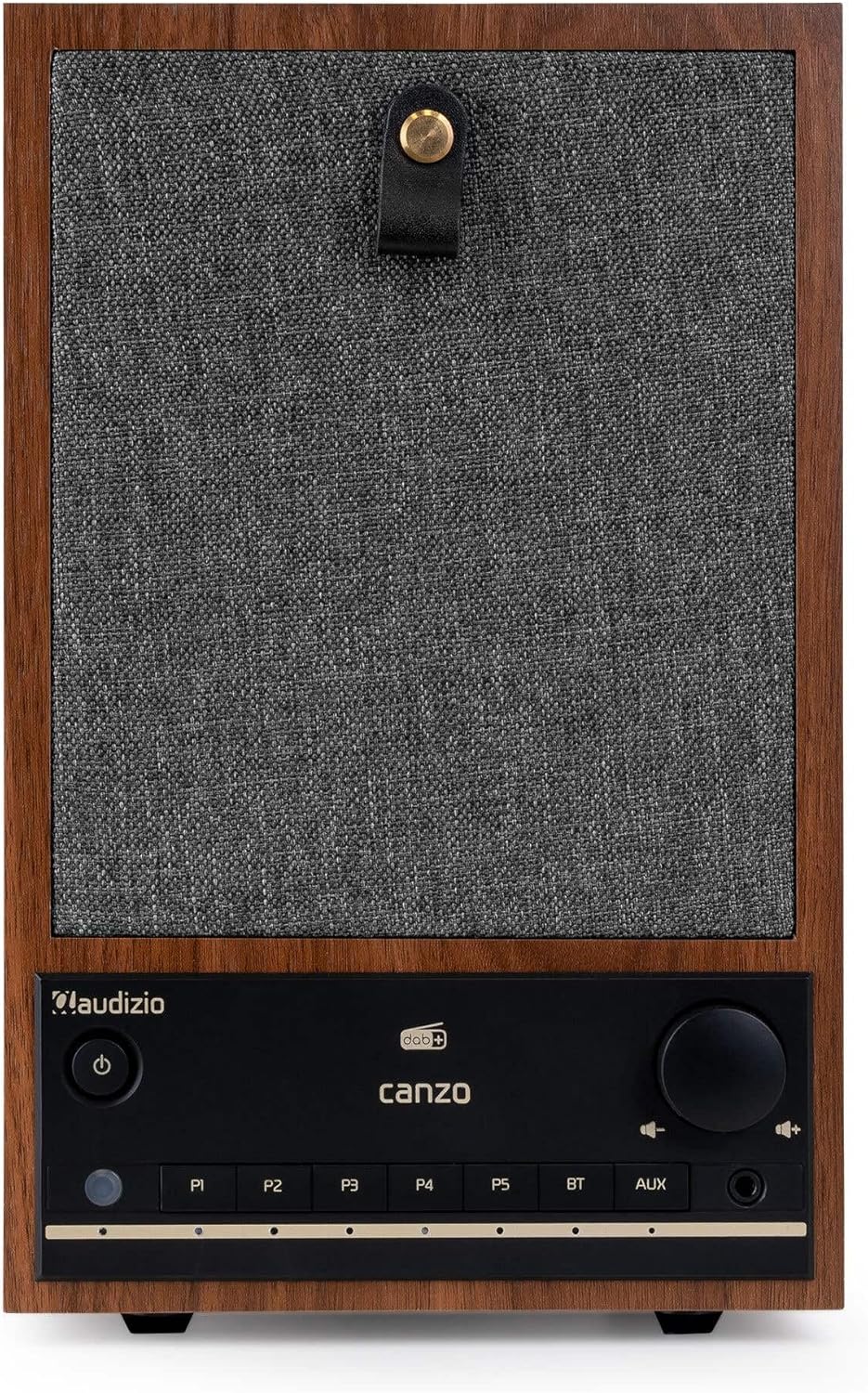
Figura 2.1: Față view of the Audizio Canzo DAB+ Internet Radio in walnut finish.

Figura 2.2: Față view with speaker grille removed, highlighting the speaker, display, and control panel.
3. Ce se află în cutie
Despachetați cu grijă cutia și asigurați-vă că toate articolele sunt prezente:
- Audizio Canzo DAB+ Internet Radio
- Adaptor de alimentare
- Telecomanda
- Ghid de pornire rapidă
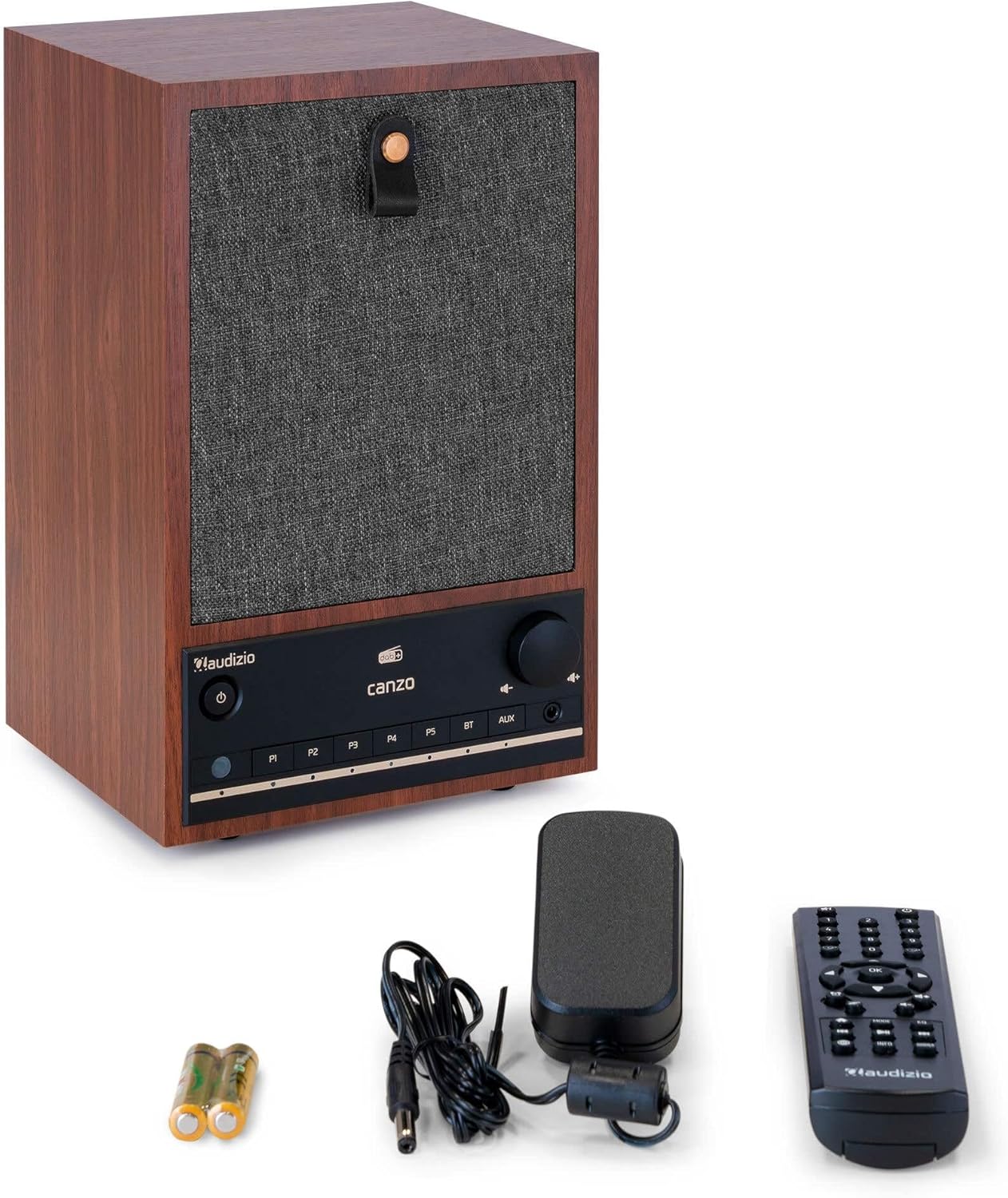
Figure 3.1: Audizio Canzo radio with its accessories.
4. Configurare
4.1 Conectarea puterii
- Insert the DC plug of the power adapter into the DC IN port on the back of the radio.
- Plug the power adapter into a standard wall outlet (220V).
- Întoarce ON/OFF switch on the back of the unit to the ON poziţie.
4.2 Conectarea antenei
For optimal DAB+ and FM reception, extend the telescopic antenna located on the back of the unit. Adjust its position for the best signal.

Figure 4.1: Rear panel with power input, audio ports, USB, LAN, and antenna.
4.3 Pornirea inițială și configurarea rețelei
- Apăsați tasta Putere button on the front panel or remote control to turn on the radio.
- The display will show the Audizio logo and then guide you through the initial setup wizard.
- Selectați limba preferată.
- The radio will prompt you to connect to a network. Choose Wifi or LAN.
- Pentru Wi-Fi: Select your Wi-Fi network from the list and enter the password using the navigation buttons and OK buton.
- For LAN: Connect an Ethernet cable from your router to the LAN port on the back of the radio. The connection should be established automatically.
- Once connected, the radio will update the time and date automatically.
5. Instrucțiuni de utilizare
5.1 Controale de bază
The front panel features a power button, preset buttons (P1-P5), Bluetooth (BT) and AUX input buttons, a volume knob, and navigation controls. The remote control provides full access to all functions.
5.2 Selectarea modului
Apăsați tasta MOD button on the radio or remote control to cycle through available modes: Internet Radio, DAB+, FM, Bluetooth, AUX, and USB Playback.
5.3 Internet Radio
- Selecta Internet Radio modul.
- Use the navigation buttons to browse stations by location, genre, or search.
- Presa OK pentru a selecta o stație.
- Pentru a salva un post ca presetare, apăsați și mențineți apăsat unul dintre butoane. P1-P5 butoane până când afișajul confirmă.
Radio DAB+ 5.4
- Selecta DAB+ modul.
- Radioul va scana automat posturile DAB+ disponibile.
- Use the navigation buttons to scroll through the list of found stations.
- Presa OK pentru a selecta o stație.
- Pentru a salva un post ca presetare, apăsați și mențineți apăsat unul dintre butoane. P1-P5 butoane.
5.5 Radio FM
- Selecta FM modul.
- Țineți apăsat butonul Scanează button (usually on the remote or via menu) to auto-scan for FM stations.
- Use the navigation buttons to tune manually or select from scanned stations.
- Pentru a salva un post ca presetare, apăsați și mențineți apăsat unul dintre butoane. P1-P5 butoane.
5.6 Redare Bluetooth
- Selecta Bluetooth mode. The radio will enter pairing mode, indicated on the display.
- Pe smartphone sau tabletă, activați Bluetooth și căutați dispozitivele disponibile.
- Select "Audizio Canzo" from the list to pair.
- După asociere, puteți reda sunet de pe dispozitiv prin radio.
5.7 Intrare AUX
- Conectați un dispozitiv audio extern (de exemplu, un player MP3) la AUX IN port on the back of the radio using a 3.5mm audio cable.
- Selecta AUX modul.
- Audio from the connected device will now play through the radio.
5.8 Redare USB
- Introduceți o unitate flash USB care conține sunet files în REDARE USB port on the back of the radio.
- Selecta USB modul.
- Use the navigation buttons to browse and select audio filepentru redare.
5.9 Ceas deșteptător și temporizator de repaus
- Alarma: Access the Alarm settings via the menu. Set up to two alarms with desired time, source (buzzer, radio), and volume.
- Temporizator de somn: Access the Sleep Timer settings via the menu. Set a duration (e.g., 15, 30, 60 minutes) after which the radio will automatically turn off.
- Amânați: Când sună o alarmă, apăsați butonul Amână button on the remote or radio to temporarily silence it.
6. Întreținere
6.1 Curățare
To clean the radio, use a soft, dry, lint-free cloth. Do not use abrasive cleaners, waxes, or solvents as they may damage the finish or internal components.
6.2 Depozitare
Dacă depozitați unitatea pentru o perioadă lungă de timp, deconectați-o de la priză și depozitați-o într-un loc răcoros și uscat, ferit de lumina directă a soarelui și de temperaturi extreme.
7. Depanare
| Problemă | Cauza posibila | Soluţie |
|---|---|---|
| Fără putere | Power adapter not connected; ON/OFF switch is OFF. | Ensure power adapter is securely connected and ON/OFF switch is ON. |
| Nici un sunet | Volume too low; incorrect source selected; headphones connected. | Măriți volumul; selectați modul de intrare corect; deconectați căștile. |
| Nu se poate conecta la Wi-Fi | Incorrect password; router too far; network issue. | Verify Wi-Fi password; move radio closer to router; restart router. |
| Recepție DAB+/FM slabă | Antena nu este extinsă; zonă cu semnal slab. | Fully extend and adjust the telescopic antenna; try repositioning the radio. |
| Telecomanda nu funcționează | Baterii descărcate; obstrucție între telecomandă și radio. | Replace remote control batteries; ensure clear line of sight to the radio's sensor. |
8. Specificații
| Caracteristică | Caietul de sarcini |
|---|---|
| Numărul de model | Canzo |
| Dimensiunile produsului | 22.5 x 20.5 x 34 cm |
| Greutatea articolului | 2.9 kilograme |
| Culoare | Nuc |
| Dimensiunea ecranului | 2.4 inchi |
| Tehnologia de conectivitate | Aux, Bluetooth, Wi-Fi, LAN |
| Versiune Bluetooth | 5.3 |
| Benzi radio acceptate | DAB+, FM, Radio pe internet |
| Sursa de alimentare | Corded Electric (220 Volt) |
| Caracteristici speciale | Integrated Clock, Sleep Timer, Alarm, Remote Control, Preset Stations |
| Dispozitive compatibile | Smartphone, Tablet, Headphones, MP3 Player, USB Storage Device |
9. Garanție și asistență
Pentru informații despre garanție și asistență tehnică, consultați cardul de garanție inclus împreună cu produsul sau contactați distribuitorul. Păstrați dovada achiziției pentru orice reclamații în garanție.