
1. Introducere
This manual provides instructions for the installation, operation, and maintenance of the JONSBO ZA-120W PC Case Fan. The ZA-120W is a 120mm computer case fan featuring Addressable RGB (ARGB) lighting with a 4-sided infinity mirror effect, a 28mm thick frame, and PWM (Pulse Width Modulation) control for silent and efficient cooling. It is designed to enhance both the thermal performance and aesthetic appeal of your computer system.
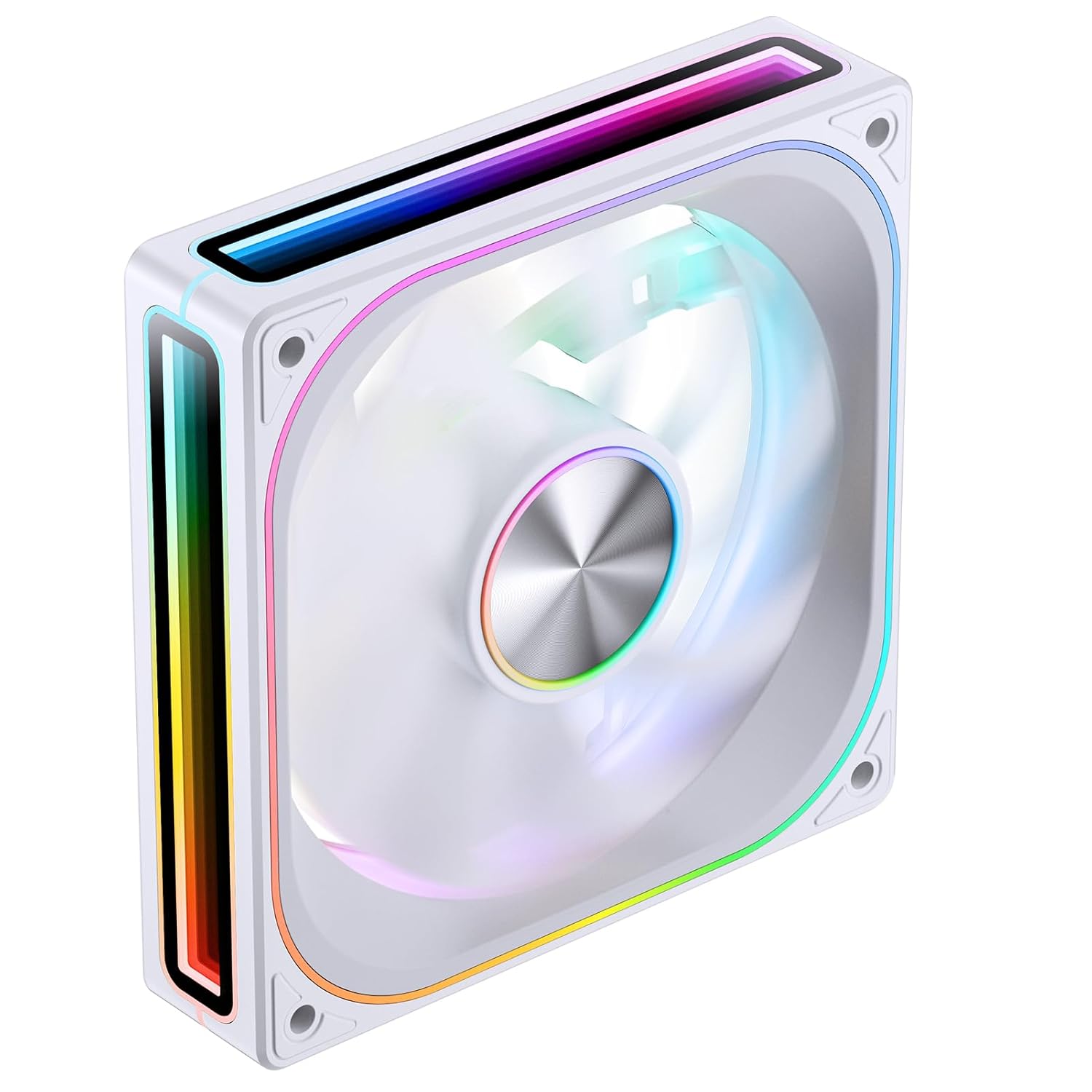
Imaginea 1.1: În unghi frontal view of the JONSBO ZA-120W PC Case Fan, showcasing its white frame and vibrant ARGB infinity mirror lighting.
2. Informații de siguranță
- Ensure your computer system is powered off and disconnected from the main power supply before installation or maintenance.
- Manevrați ventilatorul și componentele sale cu grijă pentru a evita deteriorarea.
- Do not attempt to modify the fan or its wiring, as this may void the warranty and pose a safety risk.
- Țineți ventilatorul departe de lichide și umiditate excesivă.
- Asigurați o ventilație adecvată în jurul ventilatorului pentru a preveni supraîncălzirea.
- This product is intended for use within a computer chassis. Do not use it for purposes other than its intended design.
3. Conținutul pachetului
Verificați dacă toate articolele sunt prezente în colet:
- JONSBO ZA-120W PC Case Fan (1 unit)
- Șuruburi de montare (4 unități)
- Manual de utilizare (acest document)
4. Specificații
| Caracteristică | Descriere |
|---|---|
| Numărul de model | ZA120 W |
| Dimensiuni | 120 mm x 120 mm x 28 mm (aprox. 5.8 x 5 x 1.18 inci) |
| Rotational Speed (Regular Fan Blade) | 700-2400 RPM |
| Air Volume CFM (Regular Fan Blade) | 21.46-62.40 CFM |
| Noise Level (Regular Fan Blade) | 21.3-37.3 dB(A) |
| Tip conector de alimentare | 4-Pin PWM (Fan), 3-Pin ARGB (Lighting) |
| Voltage | 12 volți (DC) |
| Wattage | 120 wați (Note: This wattage seems unusually high for a single fan and might refer to a system component or be a typo in the source data. Please refer to product packaging for precise power consumption.) |
| Metoda de răcire | Aer forțat |
| Caracteristici speciale | 4-Sides Infinity Mirror, Aluminum CD Pattern Nameplate, Simplified Wiring |
5. Configurare și instalare
Follow these steps to install your JONSBO ZA-120W PC Case Fan:
5.1 Instalare fizică
- Pregătiți-vă PC-ul: Opriți computerul și deconectați-l de la priza de perete. Deschideți carcasa computerului pentru a accesa locațiile de montare a ventilatorului.
- Identificați locația de montare: Determine where you want to install the fan (e.g., front, rear, top, bottom of the case, or on a radiator). Ensure the fan's airflow direction (indicated by arrows on the fan frame) matches your desired cooling configuration.
- Montați ventilatorul: Position the fan against the mounting holes. Use the provided mounting screws to secure the fan to the case or radiator. Tighten screws evenly but do not overtighten.

Imaginea 5.1: Spate view of the JONSBO ZA-120W fan, illustrating the fan blades and the four screw holes for mounting.
5.2 Conexiuni de cablare
The JONSBO ZA-120W fan features simplified wiring with integrated male and female heads for daisy-chaining multiple fans (if applicable to your model) and connecting to the motherboard.
- Conectați cablul PWM: Locate a 4-pin fan header on your motherboard (often labeled "CPU_FAN", "SYS_FAN", or "CHA_FAN"). Connect the fan's 4-pin PWM cable to this header. This allows your motherboard to control the fan speed.
- Conectați cablul ARGB: Locate a 3-pin 5V Addressable RGB header on your motherboard (often labeled "ARGB", "D_LED", or "VDG"). Connect the fan's 3-pin ARGB cable to this header. Ensure the connector's orientation matches the header to avoid damage. Do not connect to a 4-pin 12V RGB header, as this will damage the ARGB lighting.

Image 5.2: Illustration of the simplified wiring, demonstrating how the fan connects to the motherboard with a single line for both power and ARGB control.

Image 5.3: Visual representation of connecting the 3-pin 5V ARGB cable to a compatible motherboard header for synchronized lighting effects.
After all connections are made, carefully close your computer case and reconnect the power supply.
6. Instrucțiuni de utilizare
6.1 Controlul vitezei ventilatorului (PWM)
The JONSBO ZA-120W fan utilizes PWM technology, allowing your motherboard to dynamically adjust the fan speed based on system temperature. This ensures optimal cooling performance while minimizing noise levels when full speed is not required.
- Access your motherboard's BIOS/UEFI settings or use compatible motherboard software (e.g., ASUS AI Suite, MSI Dragon Center, Gigabyte SIV, ASRock A-Tuning) to configure fan curves.
- You can set custom fan profiles to balance between cooling performance and acoustic levels according to your preferences.
6.2 Controlul iluminării ARGB
The Addressable RGB lighting of the ZA-120W fan can be controlled and synchronized with other ARGB components in your system via your motherboard's ARGB software. This allows for a wide range of customizable lighting effects and colors.
- Install the appropriate ARGB control software provided by your motherboard manufacturer (e.g., ASUS Aura Sync, MSI Mystic Light Sync, Gigabyte RGB Fusion, ASRock Polychrome Sync).
- Within the software, select the connected ARGB device (your JONSBO fan) and choose from various lighting modes, colors, and effects.
- Ensure your motherboard's ARGB header is enabled in the BIOS/UEFI if necessary.
7. Întreținere
Întreținerea regulată ajută la asigurarea performanței optime și a longevității ventilatorului dumneavoastră.
- Îndepărtarea prafului: Periodically (e.g., every 3-6 months), power off your computer and disconnect it from power. Use compressed air or a soft brush to gently remove dust accumulation from the fan blades and frame. Hold the fan blades to prevent them from spinning rapidly during cleaning, which could damage the bearings.
- Inspecţie: Verificați cablurile pentru orice semne de uzură sau deteriorare. Asigurați-vă că toate conexiunile rămân fixate.
- Do not use liquid cleaners or abrasive materials on the fan.
8. Depanare
If you encounter issues with your JONSBO ZA-120W fan, refer to the following common problems and solutions:
- Ventilatorul nu se învârte:
- Ensure the 4-pin PWM cable is securely connected to a functional fan header on the motherboard.
- Check BIOS/UEFI settings to ensure the fan header is enabled and configured correctly (e.g., not set to "disabled" or "manual 0 RPM").
- Testați ventilatorul pe o altă priză sau cu un controler de ventilator, dacă este disponibil.
- Iluminarea ARGB nu funcționează:
- Verify the 3-pin ARGB cable is correctly connected to a 5V ARGB header on the motherboard. Ensure the orientation is correct.
- Confirm that you are using the correct motherboard ARGB software and that it recognizes the fan.
- Crucially: Ensure it is connected to a 3-pin 5V ARGB header, not a 4-pin 12V RGB header. Connecting to a 12V header will damage the ARGB LEDs.
- Check for any physical damage to the ARGB cable or connector.
- Ventilatorul este prea zgomotos:
- Adjust the fan curve settings in your motherboard's BIOS/UEFI or software to reduce fan speed at lower temperatures.
- Asigurați-vă că ventilatorul este montat în siguranță și nu vibrează pe carcasă.
- Curățați orice acumulare de praf de pe palele ventilatorului.
9. Informații despre garanție
JONSBO products are covered by a manufacturer's warranty against defects in materials and workmanship. The specific terms and duration of the warranty may vary by region and retailer. Please retain your proof of purchase for warranty claims.
For detailed warranty information, please refer to the warranty card included with your product or visit the official JONSBO website-ul.
10. Suport
If you require further assistance or have questions not covered in this manual, please contact JONSBO customer support or your retailer.
- Oficial JONSBO Website: www.jonsbo.com (pentru informații despre produs și resurse de asistență)
- Suport pentru comercianții cu amănuntul: Contactați magazinul sau vânzătorul online de unde ați achiziționat produsul.