
1. Introducere
The ALIGATOR AZA930B is a mobile phone designed with ease of use in mind, particularly for seniors. It features a large keypad, a clear 2.8-inch color display, and essential safety functions such as an SOS button and SOS locator. This manual provides detailed instructions on how to set up, operate, maintain, and troubleshoot your device to ensure optimal performance and safety.
2. Informații de siguranță
Vă rugăm să citiți cu atenție această secțiune înainte de a utiliza telefonul pentru a asigura o funcționare sigură și corectă.
- Siguranța bateriei: Use only ALIGATOR approved batteries and chargers. Do not short-circuit, puncture, or expose the battery to extreme temperatures. Dispose of batteries properly.
- Încărcare: The phone does not include a charger. Use a compatible USB-C charger (recommended model ALIGATOR CHA0047) with a power output of 2.5-3W. Avoid charging in damp conditii.
- Protecția auzului: Evitați ascultarea prelungită la volum ridicat pentru a preveni deteriorarea auzului.
- Siguranța la conducere: Always prioritize driving safety. Use hands-free accessories and obey all local laws and regulations regarding mobile phone use while driving.
- Dispozitive medicale: Maintain a safe distance between the phone and medical devices such as pacemakers. Consult your physician and the medical device manufacturer for specific guidelines.
- Rezistenta la apa: Acest telefon nu este rezistent la apă. Evitați expunerea la lichide.
3. Conținutul pachetului
Verificați dacă toate articolele sunt prezente în pachetul produsului:
- ALIGATOR AZA930B Mobile Phone
- Dock de încărcare
- Manual de utilizare (acest document)
- Notă: Încărcătorul nu este inclus și trebuie achiziționat separat.
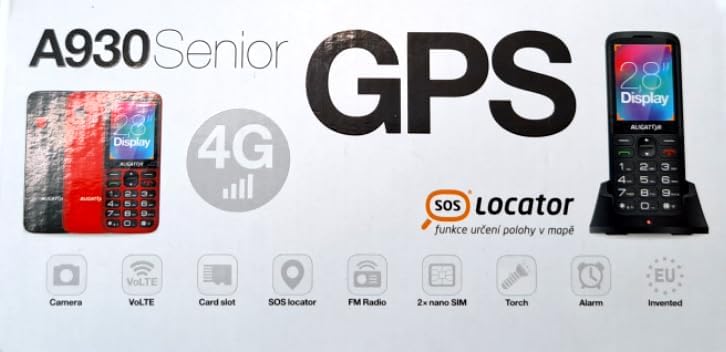
Figure 3.1: Product packaging illustrating the phone, charging dock, and various features such as 4G connectivity, GPS, SOS Locator, camera, VoLTE, card slot, FM radio, torch, and alarm. The box also indicates the 2.8-inch display.
4. Configurare
4.1. Introducerea cartelelor SIM
The ALIGATOR AZA930B supports Dual SIM (2 x Nano SIM) functionality. To insert SIM cards:
- Opriți telefonul.
- Scoateți capacul din spate și bateria.
- Locate the SIM card slots. Insert your Nano SIM cards into the designated slots, ensuring the gold contacts face down and the cut corner aligns correctly.
- Înlocuiți bateria și capacul din spate.
4.2. Introducerea unui card Micro SD
The phone supports a Micro SD memory card up to 256 GB for additional storage.
- Follow steps 1 and 2 from "4.1. Inserting SIM Cards".
- Locate the Micro SD card slot. Insert the Micro SD card with the gold contacts facing down until it clicks into place.
- Înlocuiți bateria și capacul din spate.
4.3. Încărcarea inițială
Before first use, fully charge the phone's 1700 mAh Li-ion battery.
- Connect the USB-C cable (not included) to the phone's USB-C port or place the phone in the charging dock.
- Connect the other end of the cable to a compatible charger (e.g., ALIGATOR CHA0047, 2.5-3W) or a powered USB port.
- The charging indicator will illuminate. A full charge may take several hours.

Figure 4.1: The ALIGATOR AZA930B phone placed in its dedicated charging dock. The phone's screen shows the current time and network signal indicators.

Figure 4.2: Detail from the product box, explicitly showing an icon indicating that a charger is not included and specifying a recommended charger power of 2.5-3W.
5. Instrucțiuni de utilizare
5.1. Pornire/Oprire
- Pentru a porni: Apăsați și mențineți apăsat butonul Pornire/Încheiere apel (butonul roșu) până când ecranul se aprinde.
- Pentru a opri: Apăsați și mențineți apăsat butonul Pornire/Închidere apel până când apar opțiunile de oprire, apoi selectați „Oprire”.
5.2. Funcții de apel de bază
- Efectuarea unui apel: Enter the phone number using the large keypad and press the Call button (green button).
- Răspunsul la un apel: Când sună telefonul, apăsați butonul de Apelare (butonul verde).
- Încheierea unui apel: Apăsați butonul Pornire/Încheiere apel (butonul roșu).
- Mâini libere: During a call, activate hands-free mode via the on-screen option or a dedicated button if available.
5.3. SOS Button and SOS Locator
The SOS button is a critical safety feature, allowing quick contact in emergencies.
- Butonul SOS: Located on the back of the phone (often red). Press and hold this button to activate the emergency sequence.
- SOS Presets: You can set up to 5 preset emergency contacts. When the SOS button is pressed, the phone will automatically call these numbers in sequence and send an emergency SMS.
- SOS Locator: This function sends the phone's location via SMS to the emergency contacts after the SOS button is pressed. The recipient can then view the location on a map via a web link provided in the SMS. This feature utilizes both GSM and GPS for location accuracy.

Figura 5.1: Spate view of the ALIGATOR AZA930B, showing the prominent red SOS button and the speaker grille for clear audio.

Figura 5.2: Spate înclinat view of the ALIGATOR AZA930B, demonstrating the activated flashlight feature.
5.4. "Zachranka" Rescue Application
The "Zachranka" application is a mobile emergency call application pre-installed on the device.
- It provides quick contact with emergency medical services or mountain rescue.
- The application is valid in Austria, Hungary, the Czech Republic, and in the territories of the Slovak mountains.
- For more information, refer to the "Zachranka" app's official resources.

Figura 5.3: Față și spate views of the ALIGATOR AZA930B, accompanied by the "Zachranka" rescue application logo, indicating its integration with the device.
5.5. Alte caracteristici
- Carte de telefoane: Stocați până la 500 de contacte.
- Mesaje: Send and receive SMS messages (memory for 100 SMS). Supports sending photos via MMS.
- Multimedia:
- Radio FM: Ascultați posturi de radio FM.
- Media Player: Redare audio și video files stored on the phone or Micro SD card.
- Înregistrator vocal: Înregistrați note vocale.
- Lanternă: Activați lanterna încorporată pentru iluminare.
- Instrumente: Includes Alarm, Calculator, and SIM toolkit support.
- Bluetooth: Conectați-vă la căști Bluetooth sau la alte dispozitive.
- Alarmă de vibrații: Set the phone to vibrate for incoming calls or notifications.
- Melodii: Choose from 10+1 pre-installed melodies.
- Reglare automată a orei: The phone can automatically adjust its time.

Figura 5.4: Față view of the ALIGATOR AZA930B, highlighting its user-friendly large keypad and vibrant color display.
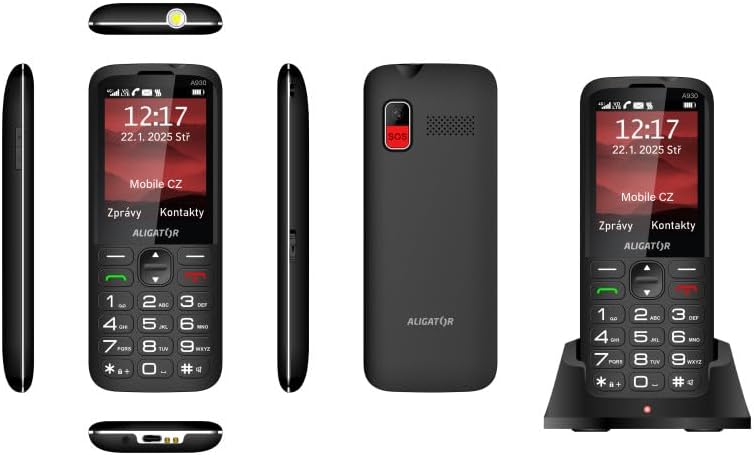
Figura 5.5: Cuprinzătoare views of the ALIGATOR AZA930B, illustrating its design from the top, sides, front, back, and when seated in its charging dock.
6. Întreținere
- curatenie: Folosește o cârpă moale și uscată pentru a curăța suprafața telefonului. Evită utilizarea substanțelor chimice dure sau a materialelor abrazive.
- Îngrijirea bateriei: To prolong battery life, avoid fully discharging the battery frequently. Store the phone in a cool, dry place if not used for extended periods.
- Depozitare: Keep the phone away from extreme temperatures, direct sunlight, and dusty environments.
7. Depanare
| Problemă | Cauza posibila | Soluţie |
|---|---|---|
| Telefonul nu pornește. | Bateria este descărcată sau nu este introdusă corect. | Încărcați bateria. Asigurați-vă că bateria este introdusă corect. |
| Fără semnal de rețea. | SIM card not inserted correctly or out of network coverage. | Reinsert SIM card. Move to an area with better network coverage. |
| Nu pot efectua sau primi apeluri. | No credit, SIM card issue, or network problem. | Check your account balance. Verify SIM card insertion. Contact your network provider. |
| Butonul SOS nu funcționează. | SOS numbers not set up or incorrect. | Ensure SOS numbers are correctly configured in settings. Check network signal. |
| Bateria se descarcă rapid. | High usage, background apps, or aging battery. | Reduceți luminozitatea ecranului. Închideți aplicațiile inutile. Luați în considerare înlocuirea bateriei dacă este veche. |
8. Specificații
| Caracteristică | Detaliu |
|---|---|
| Numărul de model | AZA930B |
| Afişa | Ecran color TFT de 2.8 inci |
| Sloturi pentru carduri SIM | Dual SIM (2 x Nano SIM) |
| Suport card de memorie | Micro SD de până la 256 GB |
| Baterie | 1700 mAh Li-ion |
| Timp de vorbire | Până la 480 de minute |
| Timp de așteptare | Până la 10 de zile |
| Camera foto | 1.9 MP |
| Conectivitate | 4G/LTE/VoLTE, Bluetooth |
| Port de încărcare | USB-C |
| Mufă pentru căști | 3.5 mm |
| Dimensiuni | 14.3 x 5.8 x 1.36 cm |
| Greutate | 95 g |
| Sistem de operare | Symbian 9.1 |
| Culoare | Negru |
Notă: Specificațiile pot fi modificate fără notificare prealabilă.
9. Garanție și asistență
ALIGATOR products are designed and manufactured to the highest quality standards. For detailed warranty information, including terms, conditions, and duration, please refer to the warranty card included with your product or visit the official ALIGATOR website-ul.
For technical support, service, or inquiries regarding your ALIGATOR AZA930B mobile phone, please contact ALIGATOR customer service or visit their official support channels. Keep your purchase receipt and product serial number (IMEI) handy when seeking support.
- IMEI 1: 357140835088496
- IMEI 2: 357140835088504
- Barcode/UPC: 8596426108267