
1. Introducere
This manual provides essential information for the safe and effective operation of your Thermal Master Handheld Thermal Camera THOR 002. Please read this manual thoroughly before using the device and retain it for future reference. This thermal imager is designed for professionals in electrical, HVAC, mechanical, and building inspections, offering advanced thermal imaging capabilities for detailed diagnostics.
2. Informații de siguranță
Always operate the device in accordance with the instructions provided. Do not attempt to disassemble or modify the camera, as this may void the warranty and cause damage. Avoid direct exposure of the lens to strong light sources. Ensure the device is charged using the provided cable and a compatible power source. Keep the device away from extreme temperatures and corrosive environments. The laser positioning feature should be used with caution; avoid direct eye exposure.
3. Conținutul pachetului
Upon unboxing, please verify that all items listed below are present and in good condition.
- Thor002 Thermal Camera ×1
- Explosion-Proof Case ×1
- 100cm USB Data Cable ×1
- Card de memorie de 32 GB (preinstalat)

Figure 3.1: Contents of the Thermal Master THOR 002 package, showing the thermal camera, explosion-proof case, and USB data cable.
4. Produs terminatview
The Thermal Master THOR 002 is a robust handheld thermal camera designed for professional use. It features an ergonomic body with an alloy base for durability.

Figura 4.1: Față și laterală view of the THOR 002, highlighting the 3.5" IPS screen, laser targeting, LED light, thermal camera, visible light camera, flash shield, noise-reducing mic, and alloy base.
Caracteristici cheie:
- Afişa: 3.5'' 640×480 IPS screen with 60Hz refresh rate.
- Rezoluție termică: 512×384 X³ IR Resolution (upgraded from 256×192).
- Cameră vizuală: 2MP visible light camera.
- Interval de temperatură: -4 ° F la 1022 ° F (-20 ° C la 550 ° C).
- Precizie: ±3.6°F (±2°C) or ±2% of the reading.
- Sensibilitate: Ultra-fine 40mK.
- Obiectiv: 4.3mm lens, 4X digital zoom.
- Conectivitate: USB for PC, WiFi for smartphones/tablets.
- Depozitare: 8GB RAM, 32GB internal storage.
- Baterie: 5000mAh lithium battery, up to 10.5 hours runtime, 18W fast charging.
- Durabilitate: IP54 protection, 2-meter drop resistance.
5. Configurare
5.1 Încărcare inițială
Before first use, fully charge the thermal camera. Connect the provided USB data cable to the camera's USB-C port and plug the other end into a compatible 18W fast charger or a PC USB port. The battery indicator on the screen will show charging status.

Figure 5.1: The THOR 002 features a 5000mAh battery for up to 10.5 hours runtime and supports 18W fast charging.
5.2 Pornire/Oprire
- Pornire: Press and hold the power button (usually located below the screen) for a few seconds until the Thermal Master logo appears.
- Oprire: Apăsați și țineți apăsat butonul de pornire până când apare mesajul de oprire, apoi confirmați.
6. Instrucțiuni de utilizare
6.1 Navigare de bază
Use the directional buttons and the central selection button to navigate through the camera's menu and settings on the 3.5" IPS screen.
6.2 moduri de măsurare
The camera offers precise temperature measurement with multiple spot analysis options.
- Standard Points: Measure center, hottest, and coldest spots automatically.
- Custom Points: Define up to three additional measurement spots for specific areas of interest.

Figure 6.1: The camera display showing options for minimum, maximum, center, and three custom temperature points.
6.3 moduri de imagine
Switch between different imaging modes to best suit your inspection needs.
- Infraroșu (IR): Afișează doar imaginea termică.
- Lumină vizibilă: Displays only the visual image from the 2MP camera.
- Mod de fuziune: Blends the thermal and visual images for enhanced detail.
- Picture-in-Picture (PIP): Overlays a smaller thermal image onto the visible light image.
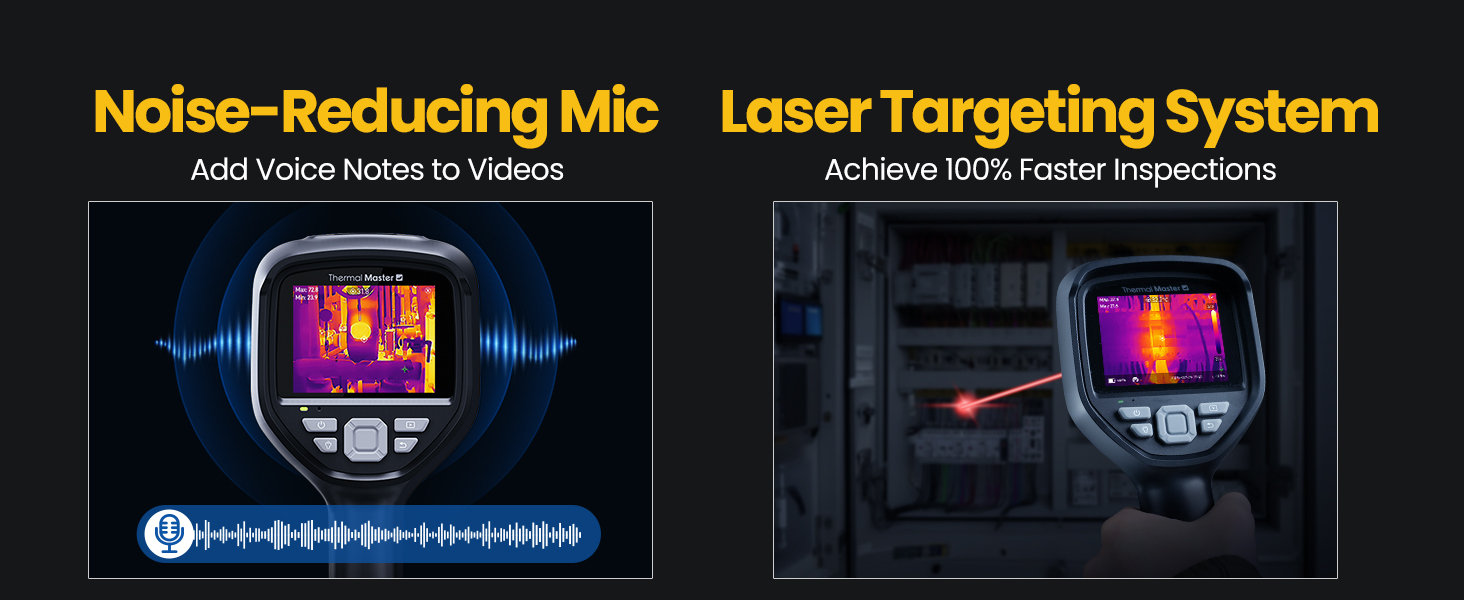
Figure 6.2: Comparison of Fusion Imaging and Picture-in-Picture modes for combining thermal and visual data.
6.4 Conectivitate
The THOR 002 supports both wired and wireless connectivity for data transfer and real-time analysis.
- Conexiune USB: Connect to a PC via the USB cable for real-time thermal analysis and data transfer.
- Împerechere WiFi: Pair with smartphones and iPads using the 'Thermal Smart' app for flexible operation and remote viewing.

Figure 6.3: The camera connected wirelessly to a smartphone and wired to a laptop for thermal reporting.
6.5 Înregistrare
Capture and store inspection data directly on the device.
- Captură foto: Press the trigger button once to take a photo.
- Înregistrare video: Press and hold the trigger button to start recording video. Press again to stop.
- Note vocale: Add voice annotations to videos for detailed on-site documentation.
- QR Code Management: Use QR codes for simplified file management and reporting.

Figure 6.4: The camera features a noise-reducing microphone for voice notes and a laser targeting system for precise aiming.
6.6 Zoom & Focus
Reglați view for detailed inspections.
- Zoom digital: Utilize the 4X digital zoom (1x, 2x, and 4x magnification) for closer inspection of targets.
- Obiectiv: The 4.3mm lens extends the detection range by 34.4%.
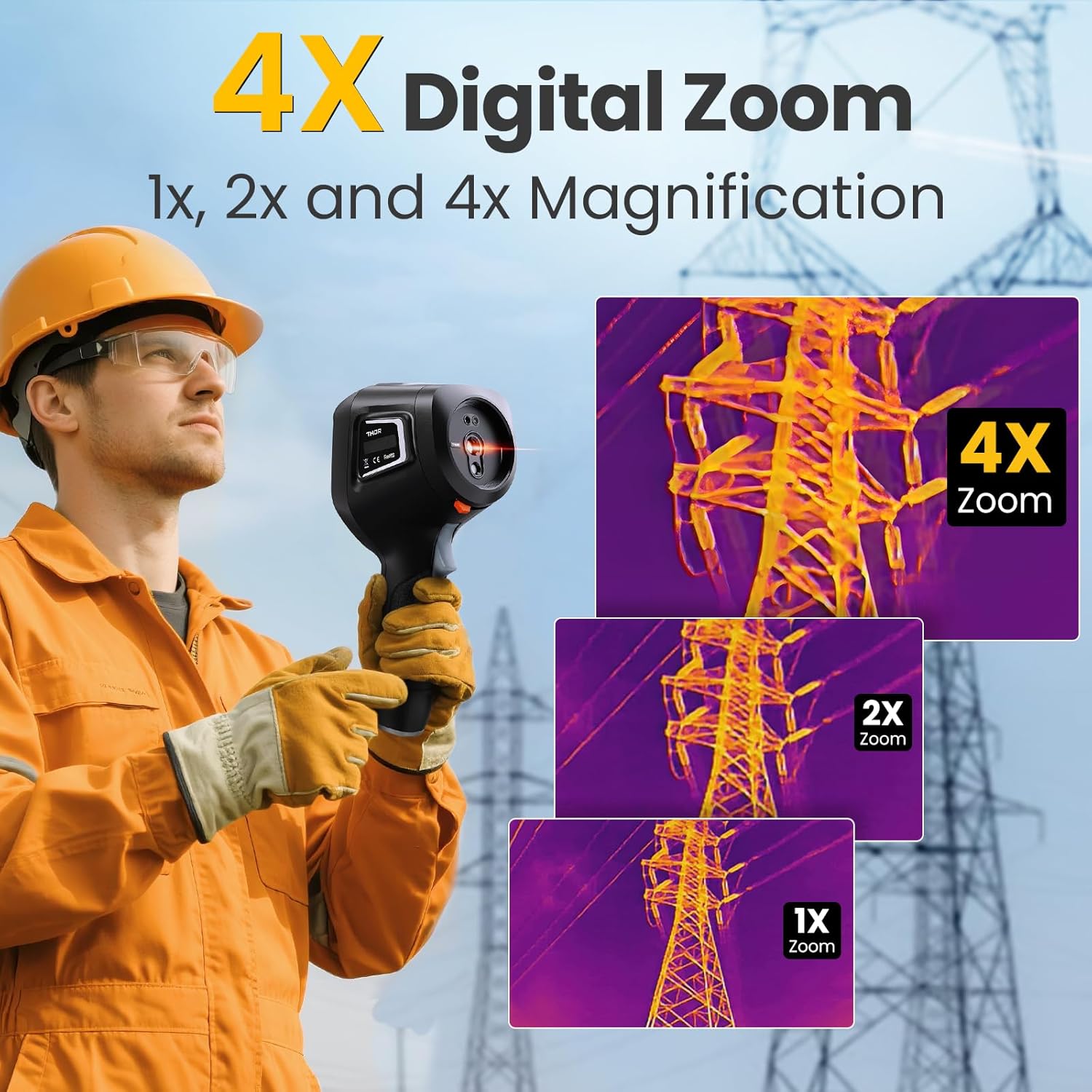
Figure 6.5: The camera's 4X digital zoom function, illustrating 1x, 2x, and 4x magnification levels.
6.7 Reglarea emisivității
For accurate temperature readings, adjust the emissivity setting based on the surface material being inspected.

Figure 6.6: Emissivity settings menu, allowing adjustment for various materials like polished aluminum, light aluminum oxide, brass mirror, and brass oxide.
7. Întreținere
To ensure the longevity and optimal performance of your Thermal Master THOR 002, follow these maintenance guidelines:
- curatenie: Use a soft, dry cloth to clean the camera body. For the lens, use a lens cleaning cloth and solution.
- Depozitare: Store the camera in its explosion-proof case when not in use to protect it from dust, moisture, and impact.
- Îngrijirea bateriei: Avoid fully discharging the battery frequently. Charge the battery regularly, even if the camera is not in active use, to maintain battery health.
- Actualizări de software: Periodically check the Thermal Master official website for any available firmware or software updates for your device.
8. Depanare
If you encounter any issues with your Thermal Master THOR 002, refer to the common problems and solutions below. If the problem persists, contact customer support.
| Problemă | Cauza posibila | Soluţie |
|---|---|---|
| Camera nu pornește | Baterie descărcată sau descărcată | Încărcați complet bateria. |
| Imaginea este neclară sau neclară | Lens is dirty; Incorrect focus/zoom settings | Clean the lens. Adjust digital zoom. |
| Citiri inexacte ale temperaturii | Incorrect emissivity setting; Distance to target too far | Adjust emissivity for the material. Ensure appropriate distance. |
| Cannot connect via WiFi | Incorrect WiFi password; Device not in hotspot mode | Verify password and network name. Ensure WLAN hotspot is enabled on camera. |
| PC software not working | Software not installed correctly; Compatibility issues | Download the latest software from the official website. Ensure PC meets system requirements. |
9. Specificații
Detailed technical specifications for the Thermal Master THOR 002.
| Caracteristică | Caietul de sarcini |
|---|---|
| Dimensiunile produsului | 10.24 x 4.33 x 4.13 inci; 4.59 lire sterline |
| Numărul de model al articolului | Thor 002 |
| baterii | Este necesară 1 baterie litiu-ion (inclusă) |
| Producător | Maestru termic |
| Rezolutie termica | 512×384 X³IR |
| Cameră vizuală | 2MP |
| Ecran de afișare | 3.5" 640×480 IPS |
| Rata de reîmprospătare | 60 Hz |
| Sensibilitate termică (NETD) | 40mK |
| Interval de temperatură | -4°F până la 1022°F (-20°C până la 550°C) |
| Precizia temperaturii | ±3.6°F (±2°C) or ±2% of the reading |
| Zoom digital | 4X |
| Depozitare | 8 GB RAM, 32 GB stocare internă |
| Capacitatea bateriei | 5000mAh |
| Durata de funcționare a bateriei | Până la 10.5 ore |
| Încărcare | Încărcare rapidă de 18 W |
| Evaluare de protecție | IP54 |
| Rezistenta la cadere | Până la 2 metri |
10. Garanție și asistență
Thermal Master is committed to providing high-quality products and customer satisfaction.
- Garantie: The Thermal Master THOR 002 comes with a 2-Year Warranty. Replacements are provided only under warranty conditions.
- Suport tehnic: Lifetime technical support is available. For assistance, please contact Thermal Master customer service.
Figure 10.1: The camera display showing options for minimum, maximum, center, and three custom temperature points.