
1. Introducere
This manual provides essential information for the safe and efficient operation of your Voltcraft DOV704 Digital Oscilloscope. The DOV704 is a high-quality, innovative, and compact 4-channel digital storage oscilloscope featuring a 70 MHz bandwidth, 1.25 GSa/s maximum sampling rate, and a 12-bit analog-to-digital converter. It is equipped with a 7-inch touchscreen display supporting gesture control, USB, LAN, and HDMI interfaces. Please read this manual thoroughly before using the device.
2. Informații de siguranță
Respectați întotdeauna următoarele măsuri de siguranță pentru a preveni vătămările corporale și deteriorarea dispozitivului:
- Asigurați-vă că sursa de alimentare voltage corespunde cerințelor specificate pe dispozitiv.
- Do not operate the oscilloscope in wet or damp conditii.
- Evitați expunerea dispozitivului la lumina directă a soarelui sau la temperaturi extreme.
- Utilizați numai adaptorul de alimentare și accesoriile furnizate.
- Nu încercați să deschideți sau să modificați dispozitivul. Apelați la personal calificat pentru orice operațiune de service.
- Before making any connections, ensure the device is powered off.
3. Conținutul pachetului
Verificați dacă toate articolele enumerate mai jos sunt prezente în colet:
- Voltcraft DOV704 Digital Oscilloscope
- Adaptor de alimentare USB tip C
- Cablu USB
- Patru (4) sonde de testare
- Două (2) kituri de ajustare a sondei
- Software with English Manual (on CD)
- Ghid de pornire rapidă
- Fișa de date a produsului
4. Produs terminatview
The Voltcraft DOV704 is designed for precise signal analysis. Below are key features and a visual representation of the device.
4.1 Caracteristici cheie
- Lățimea de bandă de 70 MHz
- 4 Analog Input Channels
- 7-inch (17.78 cm) Touchscreen Display with Gesture Control (1024 x 600 pixels)
- 12-bit Analog-to-Digital Converter
- S maximampling Rate: 1.25 GSa/s
- Real-time Waveform Capture Rate: 50,000 wfms/s
- Segmented Waveform Capture Rate: 700,000 wfms/s
- Record Length: 50 Mpts
- Horizontal Scan Speed: 1 ns/div to 1000 s/div (1-2-5 steps)
- Vertical Sensitivity: 500 µV/div to 10 V/div
- Multiple Trigger Functions: Edge, Video, Pulse, Slope, Runt, Window, Timeout, Nth, Logic, RS232/UART, I2C, SPI, CAN, LIN
- Connectivity: USB, LAN, HDMI
4.2 Aspectul dispozitivului
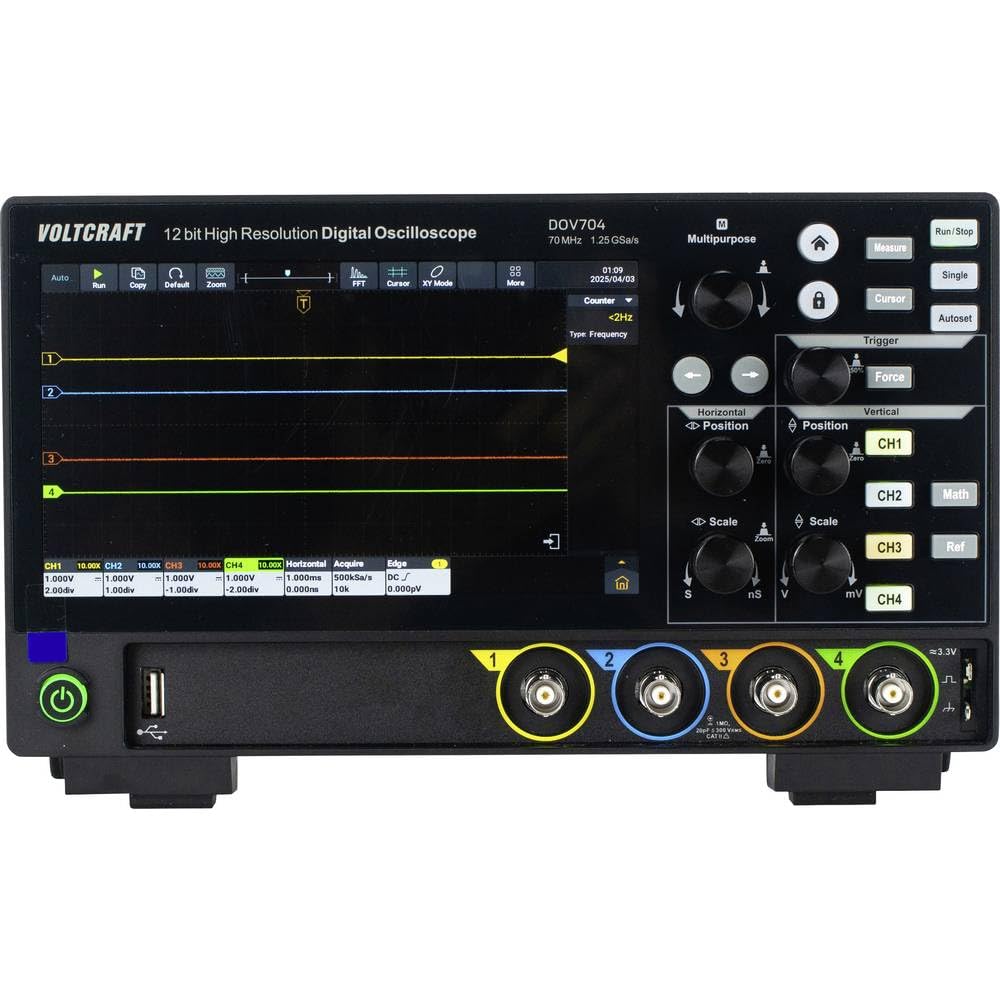
Figura 1: Faţă view of the Voltcraft DOV704 Digital Oscilloscope, showing the 7-inch touchscreen display, control knobs, buttons, and four BNC input connectors at the bottom. The power button and USB ports are also visible.

Figura 2: Față înclinată view of the Voltcraft DOV704 Digital Oscilloscope, providing a clearer perspective of the control panel and input ports. The screen displays a waveform.

Figura 3: Latura view of the Voltcraft DOV704 Digital Oscilloscope, illustrating its compact profile și grile de ventilație.
5. Configurare
5.1 Pornirea dispozitivului
- Connect the USB Type-C power adapter to the oscilloscope's power input port.
- Conectați adaptorul de alimentare la o priză electrică adecvată.
- Press the power button located on the front panel to turn on the oscilloscope. The display will illuminate.
5.2 Probe Connection and Compensation
- Connect a test probe to one of the BNC input channels (CH1-CH4) on the front panel.
- Attach the probe tip to the probe compensation output (usually a square wave signal output on the front or side).
- Adjust the probe compensation screw (located on the probe body) until the square wave displayed on the screen has flat tops and bottoms, without overshoot or undershoot.
- Repeat this process for all probes you intend to use.
6. Instrucțiuni de utilizare
6.1 Basic Waveform Display
- Selectarea canalului: Press the CH1, CH2, CH3, or CH4 buttons to enable or disable a channel.
- Vertical Scale: Utilizați Scară verticală knob to adjust the volts per division (V/div) for the selected channel.
- Pozitie verticala: Utilizați Pozitie verticala knob to move the waveform up or down on the screen.
- Horizontal Scale: Utilizați Scară orizontală knob to adjust the time per division (s/div).
- Poziție orizontală: Utilizați Pozitie orizontala knob to shift the waveform left or right.
6.2 Funcții de declanșare
The oscilloscope offers various trigger types to stabilize and capture specific parts of a waveform.
- Apăsați tasta Trigger button to access trigger settings.
- Select the desired trigger type (e.g., Edge, Pulse, Video) from the menu.
- Adjust the trigger level using the dedicated Nivel de declanșare knob or via the touchscreen.
- Choose the trigger source (CH1-CH4) as needed.
6.3 Touchscreen and Gesture Control
The 7-inch touchscreen allows for intuitive control.
- Robinet: Select menu items, buttons, or adjust settings.
- Ciupire pentru zoom: Use two fingers to zoom in or out on waveforms (horizontal and vertical scaling).
- trageți: Move waveforms or menu elements across the screen.
6.4 Data Storage and Connectivity
The DOV704 supports various methods for data storage and external connectivity.
- USB: Connect a USB flash drive to save waveform data, screenshots, or settings. Use the USB cable to connect to a computer for data transfer.
- LAN: Connect the oscilloscope to a network for remote control and data access using the provided software.
- HDMI: Connect an external display via the HDMI port for larger viewing of waveforms.
7. Întreținere
7.1 Curățare
- Deconectați alimentarea înainte de curățare.
- Utilizați o cârpă moale și uscată pentru a șterge exteriorul dispozitivului.
- For the touchscreen, use a soft, lint-free cloth slightly dampened with a screen cleaner. Avoid abrasive cleaners.
- Nu permiteți pătrunderea lichidelor în dispozitiv.
7.2 Depozitare
When not in use, store the oscilloscope in a clean, dry environment, away from direct sunlight and extreme temperatures.
8. Depanare
| Problemă | Cauza posibila | Soluţie |
|---|---|---|
| Dispozitivul nu pornește. | Cablul de alimentare nu este conectat sau este defect. | Check power cable connection. Ensure power outlet is functional. Use the provided power adapter. |
| Nu este afișată nicio formă de undă. | Channel disabled, probe not connected, or signal too weak/strong. | Ensure the desired channel is enabled. Check probe connection. Adjust vertical scale (V/div) and horizontal scale (s/div). Check trigger settings. |
| Waveform is unstable. | Incorrect trigger settings. | Adjust trigger level and trigger type. Ensure trigger source is correctly selected. |
| Ecranul tactil nu răspunde. | Eroare temporară de software. | Restart the device. If the problem persists, contact support. |
9. Specificații
| Parametru | Valoare |
|---|---|
| Numărul de model | VC-16753910 |
| Lățimea de bandă | 70 MHz |
| Canale analogice | 4 |
| Max. SampLing Rate | 1.25 GSa/s |
| Lungimea înregistrării | 50 Mpts |
| Rezoluția ADC | 12 biți |
| Waveform Capture Rate (Real-time) | 50,000 wfms/s |
| Waveform Capture Rate (Segmented) | 700,000 wfms/s |
| Afişa | 7-inch Touchscreen (1024 x 600 pixels) |
| Horizontal Scan Speed | 1 ns/div până la 1000 s/div |
| Sensibilitate verticală | 500 µV/div până la 10 V/div |
| Interfețe | USB, LAN, HDMI |
| Dimensiuni produs (L x A x H) | 26 x 7.8 x 16 cm |
| Greutate | 2.71 kg |
10. Garanție și asistență
For warranty information, please refer to the product data sheet included in your package or visit the official VOLTCRAFT website. For technical support, troubleshooting assistance beyond this manual, or service inquiries, please contact VOLTCRAFT customer service. Contact details can typically be found on the manufacturer's website-ul sau în documentația furnizată împreună cu produsul.