
1. Introducere
This manual provides detailed instructions for the installation, operation, and maintenance of your UNITOPSCI 2G+64G Android Car Stereo Radio. Please read this manual thoroughly before installation and use to ensure proper function and safety.
The UNITOPSCI 2G+64G Android Car Stereo Radio is an advanced in-dash multimedia system featuring a 7-inch capacitive touchscreen, Android 13 operating system, 2GB RAM, and 64GB ROM. It integrates wireless CarPlay, Android Auto, GPS navigation, Bluetooth, FM/RDS radio, and supports a backup camera and steering wheel controls.
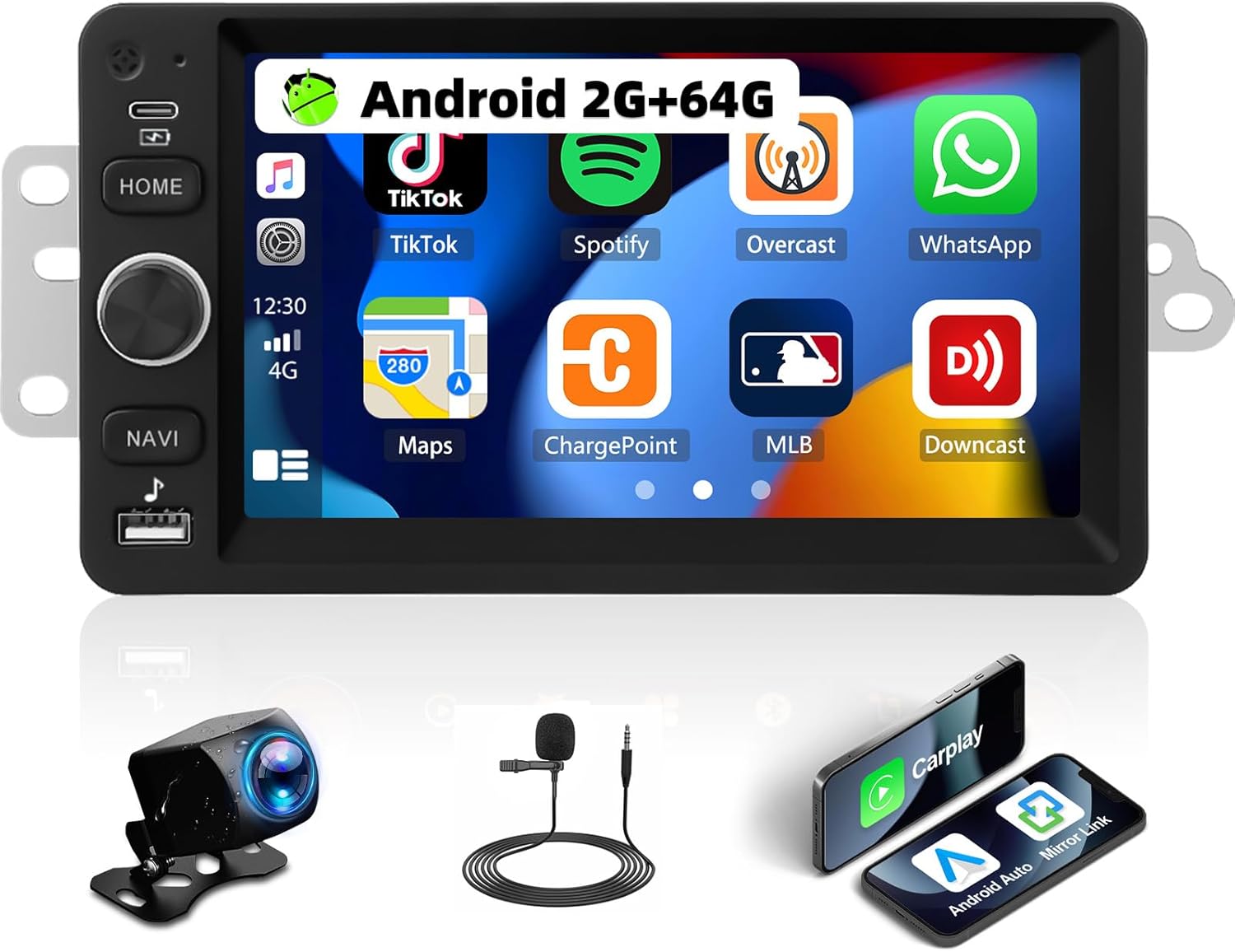
Image 1.1: UNITOPSCI 2G+64G Android Car Stereo Radio and included components.
2. Compatibilitatea vehiculului
This Android car stereo is designed to fit specific vehicle models. Please verify your vehicle's compatibility before proceeding with installation.
- Chevy Chevrolet: Silverado, SSR, Tahoe (2003-2006)
- GMC: Siera, Yukon (2003-2006)
- Hummer: (2003-2006)
It is recommended to measure the size and shape of your original radio in the car's center console to confirm fitment.

Image 2.1: Visual comparison of a vehicle's dashboard before and after installing the UNITOPSCI car stereo.

Image 2.2: Detailed list of compatible Chevrolet, GMC, Hummer, Isuzu, Oldsmobile, Saturn, Pontiac, Buick, and Cadillac models and their respective years.
Special Note for Bose Audio System Owners:
If your vehicle is factory-equipped with a Bose premium audio system, a high-end wiring harness and a Bose-specific CANBUS decoder are required for proper function of all features, including the audio system and steering wheel controls. Consult with a professional or the manufacturer for accessory recommendations if unsure.
3. Configurare și instalare
3.1. Conținutul pachetului
Verificați dacă toate componentele sunt prezente în pachet:
- Android Car Stereo Unit
- Cablu(i) de alimentare
- RCA prin cablu
- Cablu de intrare pentru camera din spate
- Camera foto
- Antena GPS
- Cutia Canbus
- Cablu(uri) USB
- Small Horn (External Microphone)
- Adaptor de antenă
- Antenă radio
- Manual de utilizare

Image 3.1: Illustration of all items included in the product package.
3.2. Schema de cablare
Refer to the following diagrams for correct wiring connections. Incorrect wiring can damage the unit or vehicle electronics.

Image 3.2: Comprehensive wiring diagram illustrating connections for power, RCA, USB, camera, GPS, and CANBUS.
- Cablu de alimentare: Conectați la sursa de alimentare a vehiculului (ACC, B+, GND).
- Cablu RCA: For audio output (FR OUT, FL OUT, RR OUT, RL OUT, SUBWOOFER) and auxiliary input (AUX IN L/R), video output (VIDEO OUT), and camera input (CVBS IN).
- Cablu USB: Pentru conectarea dispozitivelor USB.
- Cablu de intrare pentru camera din spate: Connects the backup camera.
- Antena GPS: Montați într-un loc cu lumină naturală view cerului pentru o recepție optimă a semnalului.
- Canbus Box: Connect for vehicle data communication, especially for steering wheel controls and vehicle information.
- Antena radio: Connect for FM/AM radio reception.
Note importante de instalare:
- Asigurați-vă că toate conexiunile sunt sigure pentru a preveni problemele intermitente.
- If your vehicle does not provide an Ignition (IGN) wire, a manual switch may be required to power the unit.
- For vehicles with complex wiring or premium sound systems, professional installation is recommended.
4. Instrucțiuni de utilizare
4.1. Operare de bază
- Pornire/Oprire: Press and hold the power button (usually labeled HOME or a dedicated power icon) to turn the unit on or off. A short press typically mutes or returns to the home screen.
- Controlul volumului: Use the physical knob or on-screen controls to adjust the audio volume.
- Touch screen: The 7-inch capacitive touchscreen responds to touch gestures for navigation and control.
4.2. CarPlay wireless și Android Auto
Connect your smartphone wirelessly to access navigation, music, calls, and messages through the car stereo interface.
- Asigurați-vă că Bluetooth și Wi-Fi sunt activate pe smartphone-ul dvs.
- Pe sistemul stereo al mașinii, selectați aplicația CarPlay sau Android Auto.
- Urmați instrucțiunile de pe ecran pentru a vă asocia dispozitivul.
- Voice control functions (Siri for CarPlay, Google Assistant for Android Auto) are supported.

Image 4.1: Demonstrates the user interfaces for Wireless CarPlay, Android Auto, and Mirror Link functionality.
4.3. Legătură în oglindă
Mirror your smartphone screen to the car stereo display for video and map viewing.
- Compatible with both Android and iOS devices.
- Access the Mirror Link application on the stereo and follow the pairing instructions.
4.4. Navigație WiFi și GPS
The unit features built-in WiFi and GPS for online and offline navigation.
- Wifi: Connect to a Wi-Fi hotspot to access online functions such as streaming videos (YouTube), online TV, music, and downloading applications.
- GPS: Preloaded with free offline maps. Connect to Wi-Fi to download updated maps via applications like Here WeGo. Supports online real-time navigation.

Image 4.2: Displays the interfaces for WiFi connectivity, GPS navigation, FM/RDS radio, and the audio equalizer settings.
4.5. Bluetooth
Enable hands-free calling and audio streaming via Bluetooth.
- Pair your phone with the stereo via Bluetooth settings.
- Supports hands-free calling, Bluetooth audio streaming, and automatic phone book download.
- An external microphone can be added for improved call quality.
4.6. Radio FM/RDS
Enjoy radio broadcasts with 18 preset stations.
- Tune to your preferred FM stations.
- RDS (Sistemul de date radio) oferă informații suplimentare, cum ar fi numele postului și titlul melodiei, acolo unde sunt disponibile.
4.7. Setări audio EQ
Personalizează-ți experiența audio cu egalizatorul încorporat.
- Adjust various frequency bands to match your audio preferences.
- Pre-set EQ modes may also be available.
4.8. Funcționalitatea ecranului împărțit
Display two applications simultaneously on the screen.
- De example, use navigation on one side and music playback on the other.
- Comutare ușoară între aplicații.

Image 4.3: Illustrates the Bluetooth interface, split-screen mode, various UI themes, and the clarity of the HD touchscreen.
4.9. Cameră video pentru marșarier
The system supports a backup camera for safer parking.
- Automatically switches to the clear reversing image when the vehicle is in reverse.
- The included camera features a 170-degree wide viewing angle, night vision, and is waterproof.

Image 4.4: Shows the clear reversing image from the backup camera and the interface for setting up steering wheel controls.
4.10. Controlul volanului (SWC)
Configure your vehicle's steering wheel buttons to control the stereo functions.
- Access the SWC settings menu on the stereo.
- Follow the on-screen instructions to map functions (e.g., volume, track skip, mode) to your steering wheel buttons.
4.11. Ieșire video
Share video content with rear-seat passengers.
- The unit can work with a headrest monitor to display the same video content.
- A USB video output box may be required (not included).

Image 4.5: Depicts the video output feature, allowing rear-seat passengers to view content on separate monitors.
4.12. Multiple UI Themes
Personalize the stereo's appearance with various user interface themes.
- Choose from 26 available UI themes to match your preference.
5. Întreținere
Pentru a asigura longevitatea și performanța optimă a sistemului stereo auto, urmați aceste instrucțiuni de întreținere:
- curatenie: Folosiți o lavetă moale și uscată pentru a curăța ecranul tactil și exteriorul unității. Evitați substanțele de curățare abrazive sau solvenții.
- Actualizări de software: Periodically check for and install software updates provided by UNITOPSCI to enhance features and improve stability.
- Conditii de mediu: Evitați expunerea unității la temperaturi extreme, la lumina directă a soarelui pentru perioade lungi de timp sau la umiditate excesivă.
- Organizare de cabluri: Asigurați-vă că toate cablurile sunt pozate și fixate corect pentru a preveni deteriorarea cauzată de vibrații sau agățare.
6. Depanare
If you encounter issues with your UNITOPSCI car stereo, refer to the following common problems and solutions:
6.1. Fără putere
- Verificați conexiunile de alimentare: Ensure the power cable is securely connected to the vehicle's power supply (ACC, B+, GND).
- Vehicle Fuse: Inspect the vehicle's fuse box for any blown fuses related to the radio or accessory power.
- Cablu de aprindere: If your vehicle lacks a dedicated IGN wire, verify that any custom wiring for ignition is correctly implemented.
6.2. Fără sunet
- Conexiuni difuzoare: Verify that all speaker wires are correctly connected to the stereo and the vehicle's speaker harness.
- Nivel de volum: Asigurați-vă că volumul nu este redus la dezactivare sau setat la un nivel foarte scăzut.
- Bose System: If your vehicle has a Bose audio system, confirm that the correct wiring harness and CANBUS decoder are installed.
- Sursa audio: Check if the correct audio source (e.g., Radio, Bluetooth, CarPlay) is selected.
6.3. Comenzile de pe volan nu funcționează
- CANBUS Connection: Ensure the CANBUS box is correctly connected and configured in the stereo's settings.
- SWC Learning: Re-perform the steering wheel control learning process in the stereo's settings menu.
- Compatibilitate vehicul: Confirm that your vehicle's steering wheel control system is compatible with the stereo's CANBUS.
6.4. Probleme cu semnalul GPS
- Plasarea antenei: Ensure the GPS antenna is mounted in a location with an unobstructed view a cerului.
- Conexiune antenă: Check that the GPS antenna is securely connected to the stereo.
- Map Data: Verify that offline maps are downloaded and up-to-date, or that a stable internet connection is available for online maps.
6.5. Ecranul tactil nu răspunde
- Reporniți unitatea: Try restarting the car stereo.
- Ecran curat: Asigurați-vă că ecranul este curat și fără resturi sau umezeală.
Pentru probleme persistente, vă rugăm să contactați serviciul de asistență pentru clienți.
7. Specificații
| Caracteristică | Detaliu |
|---|---|
| Model | 2G+64G Android Car Stereo |
| Sistem de operare | Android 13 |
| RAM | 2 GB |
| ROM | 64 GB |
| Dimensiunea afișajului | 7 inchi |
| Rezoluția afișajului | 1024*600 |
| Tehnologia de conectivitate | Bluetooth, WiFi |
| Caracteristici speciale | Wireless CarPlay, Android Auto, Mirror Link, Built-in GPS, FM/RDS Radio, EQ Audio, Split Screen, Backup Camera Support, Steering Wheel Control |
| Mod ieșire audio | Stereo |
| Tip de montare | Suport tablou de bord |
| Greutatea articolului | 0.634 uncii |
| Dimensiuni pachet | 13.54 x 9.06 x 4.25 inci |
8. Informații despre garanție
The UNITOPSCI 2G+64G Android Car Stereo Radio comes with a 1 an garanție from the date of purchase. Additionally, a replacement is available within 24 months for eligible issues.
This warranty covers manufacturing defects and malfunctions under normal use. It does not cover damage caused by improper installation, misuse, accidents, unauthorized repairs, or external factors.
Vă rugăm să păstrați dovada achiziției pentru cererile de garanție.
9. Asistență pentru clienți
For any questions, technical assistance, or warranty claims, please contact UNITOPSCI customer support:
- E-mail: UNITOPSCI@126.com
- Timp de răspuns: Quick responses typically within 16 hours.
- Asistență post-vânzare: Lifetime after-sales consultation and technical support are provided.
- Returnări: 60-day no-worry return policy.