
1. Introducere
Thank you for choosing the KOIOS H13 True HEPA Air Purifier. This manual provides important information for the proper setup, operation, and maintenance of your air purifier. Please read it thoroughly before use and keep it for future reference. This air purifier is designed to improve indoor air quality by capturing various airborne particles and odors, creating a healthier environment for you and your family.
2. Informații de siguranță
- Always unplug the air purifier before moving it, opening the casing, or performing any maintenance.
- Nu utilizați aparatul cu un cablu sau un ștecher deteriorat.
- Țineți purificatorul de aer departe de apă sau zone umede.
- Asigurați o ventilație adecvată în jurul unității; nu blocați admisiile sau ieșirile de aer.
- Acest aparat nu este destinat utilizării de către persoane (inclusiv copii) cu capacități fizice, senzoriale sau mentale reduse sau cu lipsă de experiență și cunoștințe, cu excepția cazului în care acestea au fost supravegheate sau instruite cu privire la utilizarea aparatului de către o persoană responsabilă pentru siguranța lor.
- Nu introduceți niciun obiect în orificiile de ventilație.
- Use only genuine KOIOS replacement filters to ensure optimal performance and avoid damage.
3. Produs terminatview
The KOIOS H13 True HEPA Air Purifier (Model BK08) is a compact and efficient air purification system. It features a 360° air intake and a multi-layer filtration system to effectively clean the air in your home.
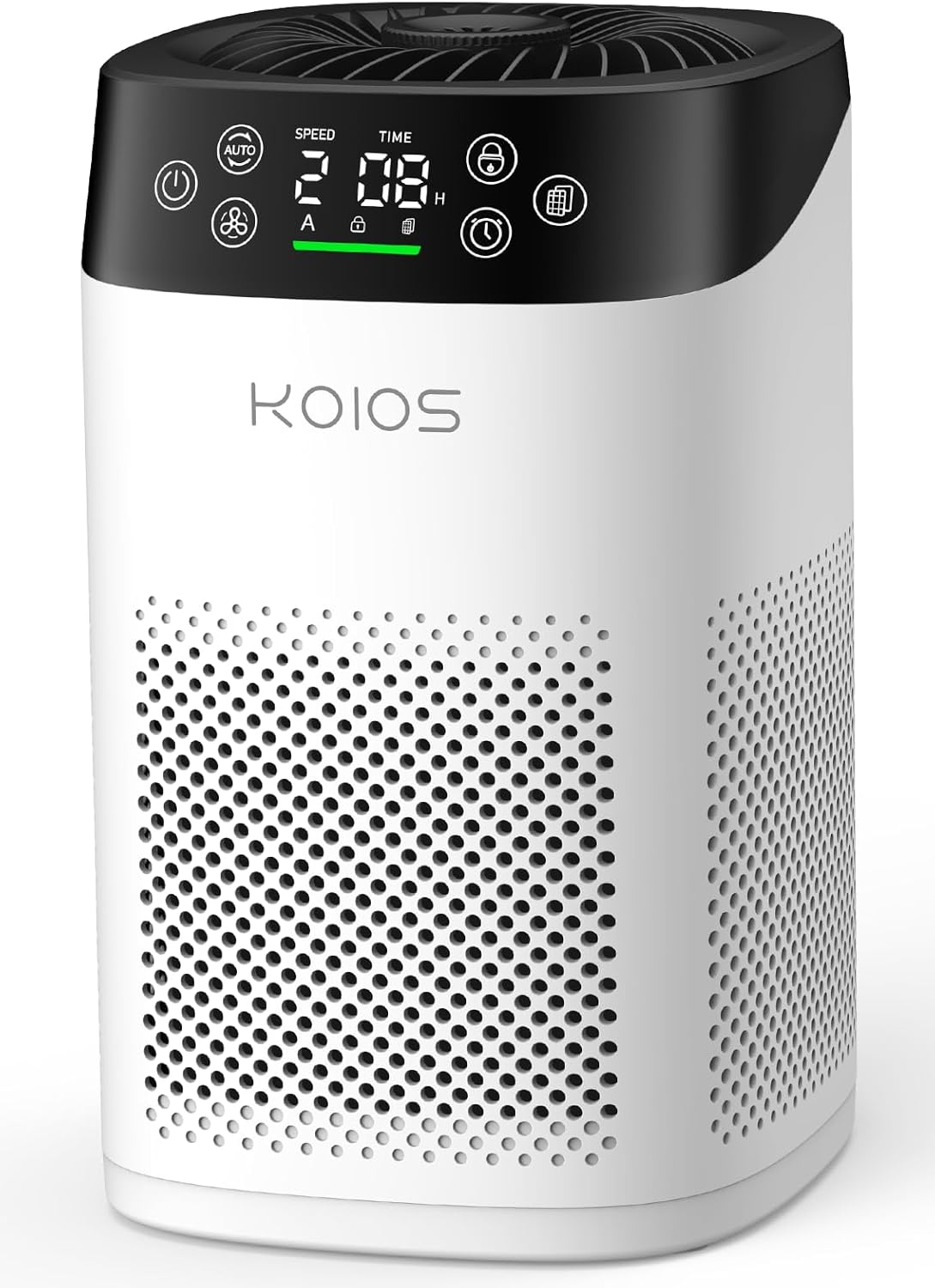
Figure 3.1: KOIOS H13 True HEPA Air Purifier (Model BK08)
Caracteristici cheie:
- Filtru HEPA adevărat H13: Captures 99.97% of airborne particles as small as 0.3 microns, including smoke, pollen, dander, and pet hair.
- Senzor de calitate a aerului: Built-in sensor detects air quality levels and displays them on the screen in real-time.
- All-in-One LED Touch Screen: Intuitive display for PM2.5 levels, fan speed, child lock, filter replacement reminder, and timer settings.
- Funcționare ultra-silențioasă: Operates as low as 15dB in sleep mode, ensuring a peaceful environment.
- Aroma Fragrance Function: Includes an aroma sponge for adding essential oils to disperse a gentle fragrance.
- Blocare pentru copii: Prevents accidental changes to settings by children or pets.
- Design compact: Dimensions of 6.3" L x 6.9" W x 10.3" H, suitable for various spaces.
Panou de control terminatview:
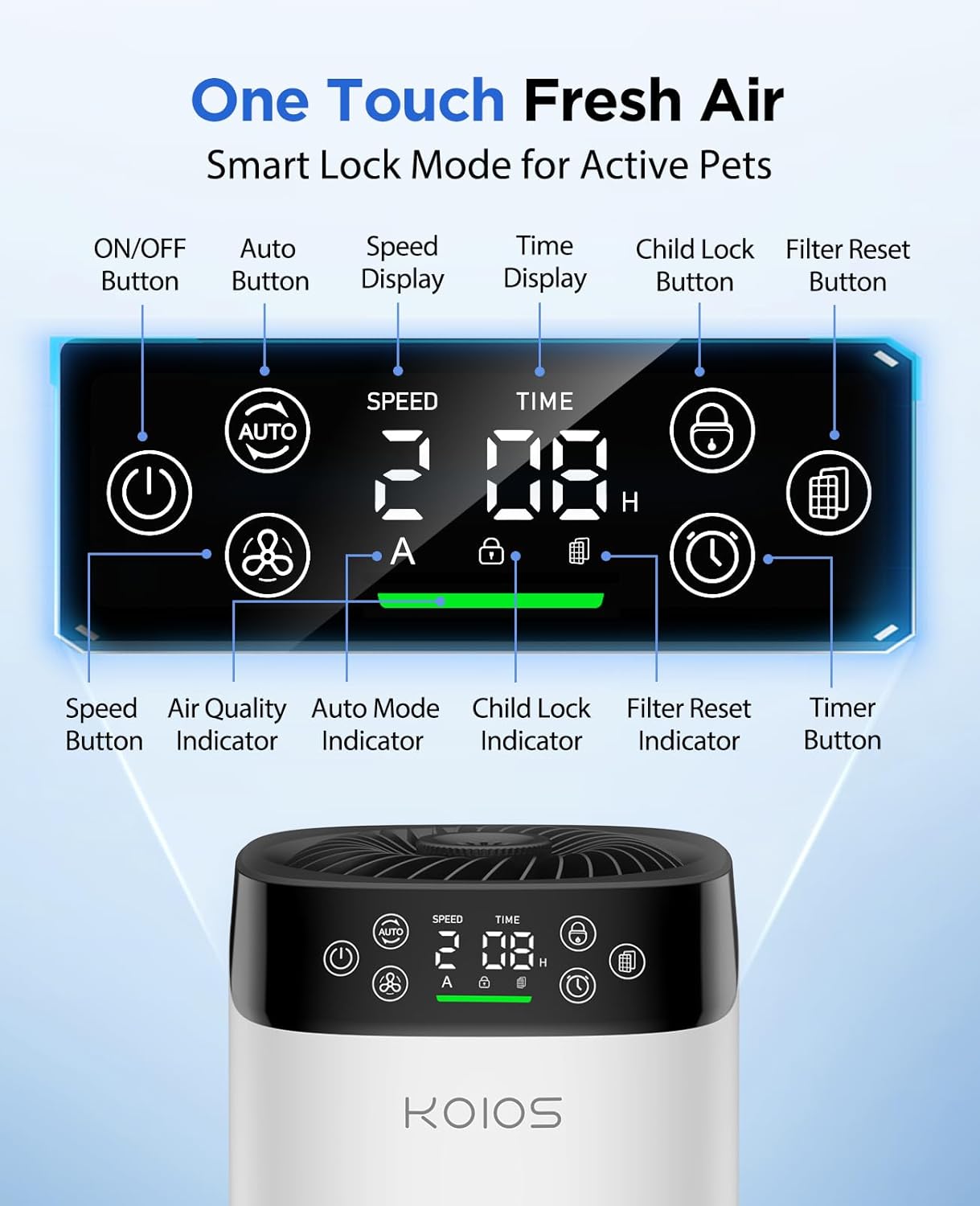
Figura 3.2: Detaliat view of the LED Touch Screen Control Panel
- Buton ON/OFF: Pornește sau oprește unitatea.
- Buton automat: Activates automatic mode, adjusting fan speed based on air quality.
- Buton de viteza: Cycles through fan speeds (Low, Mid, High).
- Buton de blocare pentru copii: Press and hold for 3 seconds to activate/deactivate child lock.
- Buton de resetare a filtrului: Press and hold for 3 seconds after replacing the filter to reset the reminder.
- Buton cronometru: Sets the operating timer (1-12 hours).
- Indicator de calitate a aerului: Displays air quality via color (Green: Excellent, Yellow: Good, Orange: Moderate, Red: Poor).
4. Configurare
Before first use, ensure to remove the protective plastic from the filter.
- Întoarceți purificatorul de aer cu susul în jos.
- Twist the base counter-clockwise to unlock and remove it.
- Carefully pull out the filter. It will be enclosed in a plastic bag.
- Scoateți ambalajul de plastic din filtru.
- Introduceți filtrul înapoi în purificatorul de aer.
- Puneți baza la loc și rotiți-o în sensul acelor de ceasornic pentru a o bloca în siguranță.
- Plug the power adapter into the port at the back of the unit, then into a power outlet.

Figure 4.1: Filter removal and installation process
The filter features three layers for enhanced purification: a washable pre-filter, an H13 True HEPA filter, and an activated carbon filter.

Figure 4.2: Close-up of the three-layer filter
5. Instrucțiuni de utilizare
Pornire/Oprire:
Apăsați tasta ON/OFF butonul de pe panoul de control pentru a porni sau opri unitatea.
Reglarea vitezei ventilatorului:
Apăsați tasta Viteză button to cycle through Low, Mid, and High fan speeds. Higher speeds provide faster air purification.
Modul automat:
Apăsați tasta Auto button to enable automatic mode. The air purifier will automatically adjust its fan speed based on the detected air quality.
Funcția de blocare pentru copii:
Pentru a activa blocarea pentru copii, apăsați și mențineți apăsat butonul Blocare pentru copii button for 3 seconds. The lock icon will appear on the display. To deactivate, press and hold the button again for 3 seconds.
Setarea temporizatorului:
Apăsați tasta Cronometru button to set the desired operating time from 1 to 12 hours. The unit will automatically turn off after the set time.
Indicator de calitate a aerului:
The air quality indicator light on the display changes color to reflect the current air quality:
- Verde: Excellent Air Quality (0-50 ug/m³)
- Galben: Good Air Quality (50-100 ug/m³)
- Portocale: Moderate Air Quality (100-150 ug/m³)
- Roşu: Poor Air Quality (>150 ug/m³)
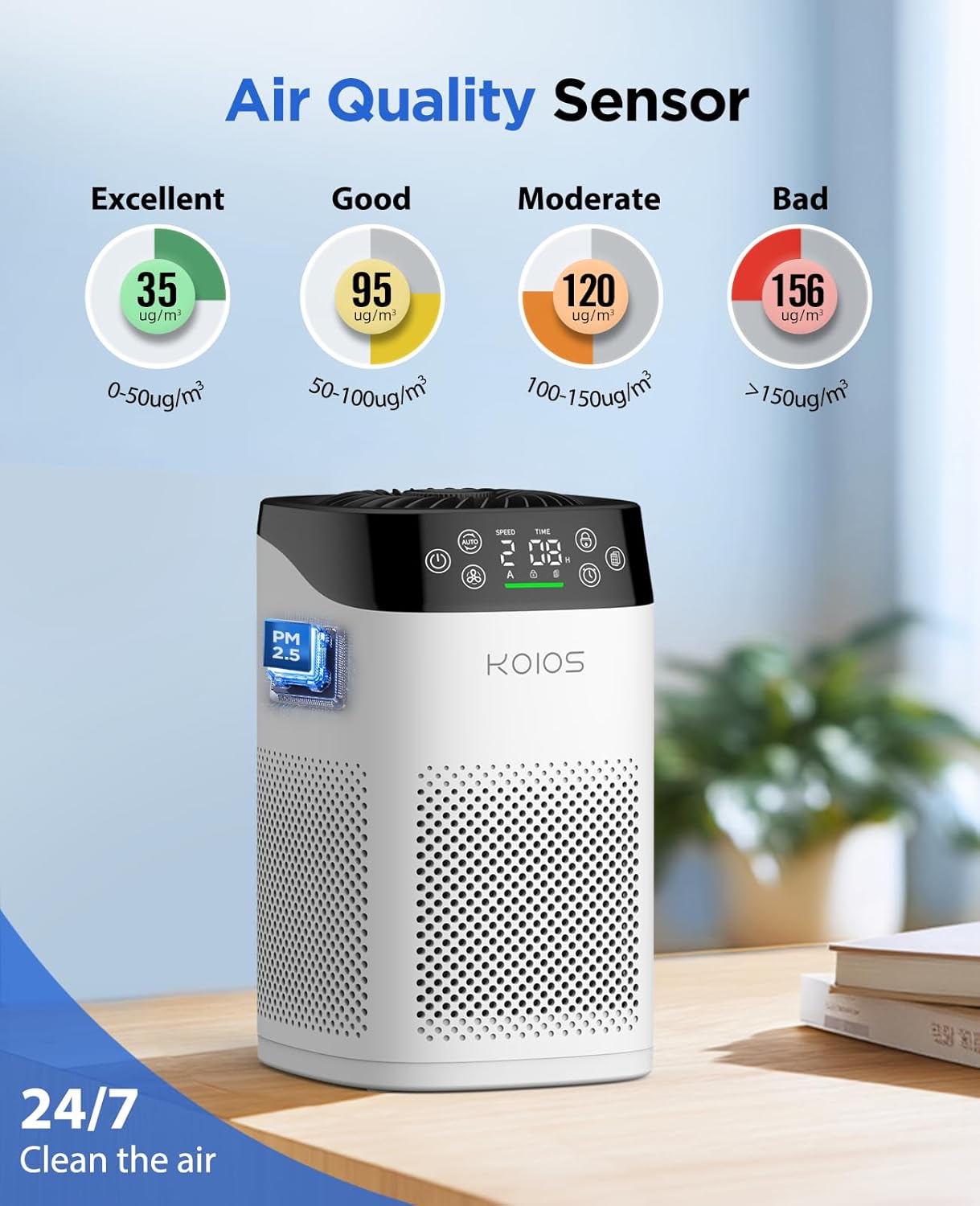
Figure 5.1: Air Quality Sensor and Display
Funcția de aromaterapie:
To use the aromatherapy function, locate the aroma sponge compartment on the top of the unit. Add a few drops of your favorite essential oil to the aroma pad. Close the compartment. The air purifier will then disperse a gentle fragrance along with the purified air.
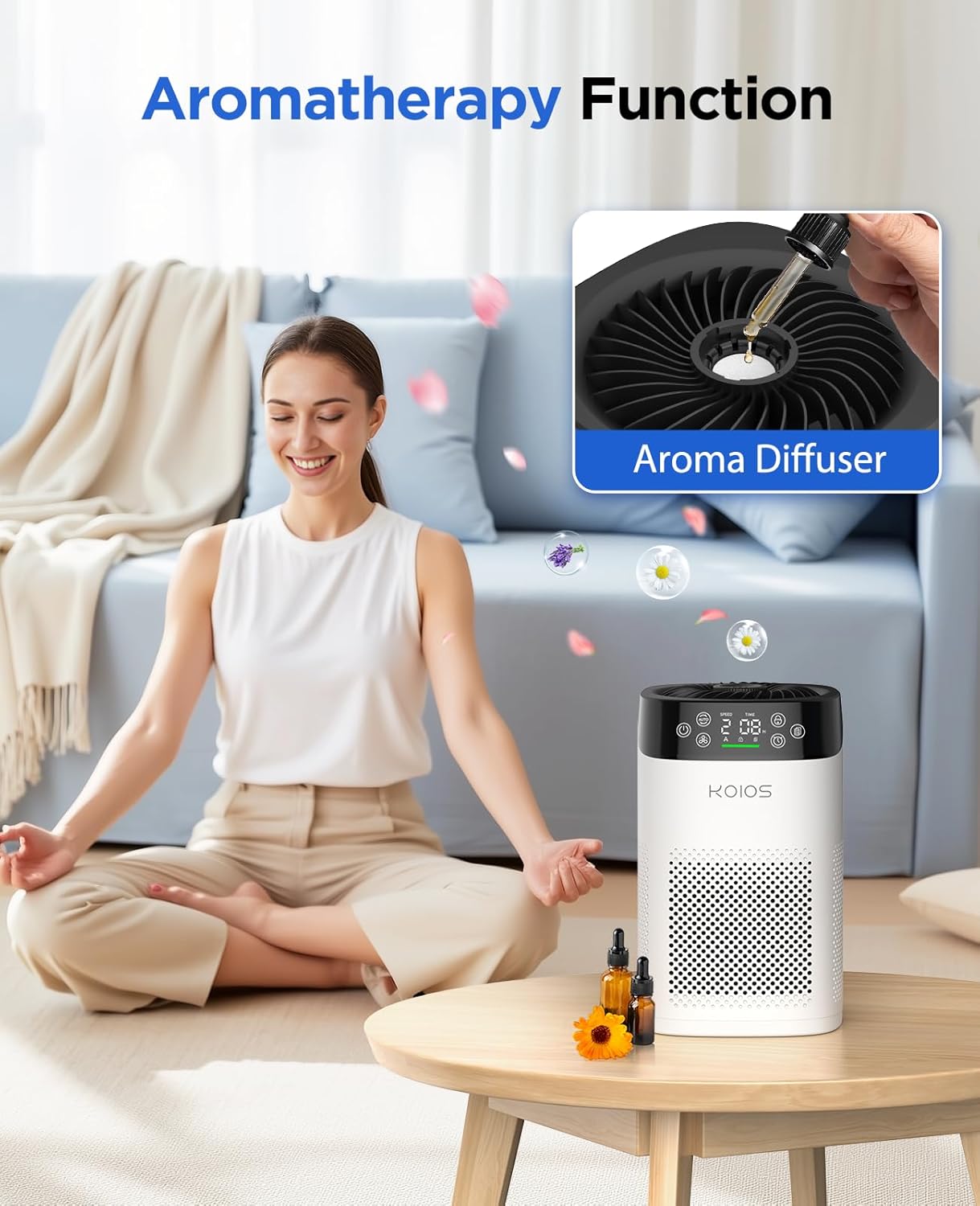
Figure 5.2: Adding essential oils for aromatherapy
6. Întreținere
Înlocuirea filtrului:
The air purifier is equipped with a filter replacement reminder function. When the filter needs to be replaced, the filter icon on the display will start flashing. For optimal performance, it is recommended to replace the filter every 3-6 months, depending on usage and environment. Use only genuine KOIOS BK08 replacement filters (ASIN: B0F42QRPC1).

Figure 6.1: Steps for checking, replacing, and resetting the filter reminder
- Check the filter indicator: The helpful indicator lets you know when to replace the filter.
- Replace the filter: Unplug the air purifier and remove the front cover. Remove the old filter and install a new filter.
- Reset it: Press and hold the filter icon for 3 seconds to reset.
Curățarea unității:
Wipe the exterior of the air purifier with a soft, dry cloth. Do not use abrasive cleaners or solvents. The pre-filter layer of the main filter can be washed, but ensure it is completely dry before re-inserting.
7. Depanare
| Problemă | Cauza posibila | Soluţie |
|---|---|---|
| Unitatea nu pornește | Nu este conectat la priză; Se oprește alimentareatage; Damaged power cord. | Ensure unit is properly plugged in; Check power outlet; Contact support if cord is damaged. |
| Fluxul de aer este slab | Filter is dirty or clogged; Air inlets/outlets are blocked. | Replace the filter; Ensure no obstructions around the unit. |
| Zgomot neobișnuit | Filtrul nu este instalat corect; Corp străin în interior. | Reinstall filter correctly; Unplug and check for foreign objects. |
| Mirosul persistă | Filter needs replacement; Strong odor source. | Replace the filter; Identify and remove strong odor sources. |
| Indicatorul calității aerului este întotdeauna roșu/portocaliu | High pollutant levels; Sensor needs cleaning. | Allow time for purification; Clean the sensor area with a dry cotton swab. |
8. Specificații
| Caietul de sarcini | Detaliu |
|---|---|
| Numărul de model | BK08 |
| Marca | KOIOS |
| Dimensiunile produsului | 6.3" D x 6.9" L x 10.3" H |
| Greutate | 2.05 lire sterline |
| Acoperirea suprafeței podelei | Până la 1200 de metri pătrați |
| Tip filtru | H13 True HEPA (3-stagfiltrare electronică) |
| Nivel de zgomot | De până la 15dB (mod repaus) |
| Wattage | 6 wați |
| Certificari | CARB, ETL, DOE, FCC Certified |
| Culoare | Alb |
9. Garanție și asistență
KOIOS products are built with high-quality and durable materials. For any product-related inquiries, technical support, or warranty claims, please contact KOIOS customer service. Refer to the product packaging or the official KOIOS website pentru cele mai recente informații de contact.
Protection plans are available for purchase separately to extend coverage beyond the manufacturer's warranty. These include 3-Year and 4-Year Protection Plans, as well as a Complete Protect plan.