1. Introducere
This manual provides detailed instructions for the installation, operation, and maintenance of the QUASAR X99 H5 Motherboard. The X99 H5 is a robust solution designed for workstations and servers, supporting LGA 2011-3 socket processors, including Intel Xeon V3/V4 series. It features DDR4 REG ECC memory support in a Dual Channel configuration, ensuring reliable stability and high performance for demanding applications such as rendering, virtualization, and intensive data processing.
Key features include PCIe 16X slots for expansion, an M.2 NVMe slot for high-speed storage, and multiple SATA 3.0 ports for additional drives. High-speed USB 3.0 ports are also integrated for rapid data transfer and peripheral connectivity. Its well-planned layout simplifies system assembly and maintenance, while quality components contribute to operational longevity and stability.
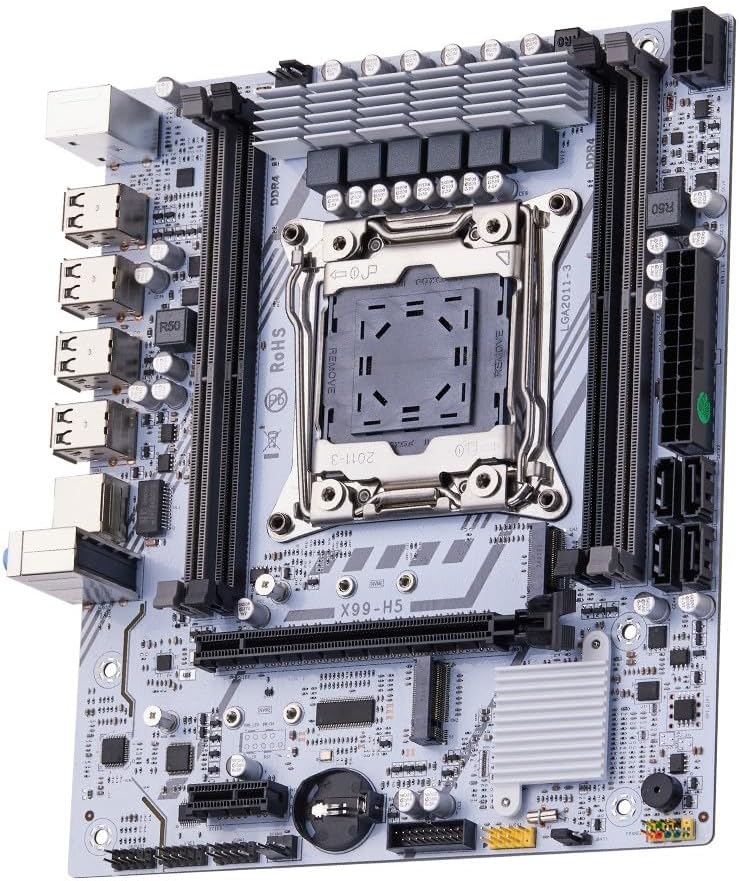
Figura 1.1: Pesteview of the QUASAR X99 H5 Motherboard. This image displays the full motherboard, highlighting its compact and efficient design, including the CPU socket, memory slots, and various expansion ports.
2. Informații de siguranță
Please read all safety instructions carefully before installing or operating the motherboard. Failure to follow these guidelines may result in personal injury, damage to the product, or damage to other components.
- Deconectați întotdeauna sursa de alimentare de la priza de perete înainte de a instala sau demonta orice componente.
- Purtați o curea antistatică la încheietura mâinii sau atingeți frecvent un obiect metalic împământat pentru a descărca electricitatea statică înainte de a manipula placa de bază sau alte componente.
- Manevrați placa de bază de margini pentru a evita atingerea componentelor sensibile.
- Ensure proper ventilation within the computer case to prevent overheating.
- Nu expuneți placa de bază la umiditate sau temperaturi extreme.
- A nu se lăsa la îndemâna copiilor.
3. Configurare și instalare
3.1. Identificarea componentelor
Familiarizați-vă cu diversele componente și conectori de pe placa de bază înainte de a începe instalarea.

Figure 3.1: Labeled diagram of the QUASAR X99 H5 Motherboard. This image indicates the location of key components such as the CPU socket, DDR4 memory slots, PCIe slots, M.2 NVMe slot, SATA ports, USB ports, and power connectors.
- LGA 2011-3 CPU Socket: For Intel Xeon V3/V4 processors.
- DDR4 Memory Slots (4x): Supports DDR4 REG ECC memory up to 128GB.
- PCIe 16X Slots: For graphics cards and other expansion cards.
- M.2 NVMe Slot: For high-speed solid-state drives.
- SATA 3.0 Ports: For connecting traditional hard drives and SSDs.
- Conector de alimentare ATX cu 24 de pini: Intrare principală de alimentare.
- 8-pin CPU Power Connector: Additional power for the CPU.
- USB 3.0/2.0 Ports: For peripheral connectivity.
- Port Gigabit Ethernet: Pentru conectivitate la rețea.
- Mufe audio: Pentru intrare/ieșire audio.
- Porturi PS/2: Pentru tastatură și mouse vechi.
3.2. Lista de verificare înainte de instalare
- Compatible CPU (Intel Xeon V3/V4 series, LGA 2011-3 socket).
- Compatible DDR4 REG ECC memory modules.
- ATX power supply unit.
- Computer case with ATX form factor support.
- Storage devices (M.2 NVMe SSD, SATA SSD/HDD).
- Graphics card (if CPU does not have integrated graphics or for dedicated performance).
- Screwdriver set, anti-static wrist strap.
3.3. Etape de instalare
- Pregătiți cazul: Instalați ecranul I/O în deschiderea din spate a carcasei computerului.
- Instalați procesorul:
- Deschideți mecanismul de fixare a soclului procesorului.
- Carefully align the CPU with the socket, ensuring the triangular mark on the CPU matches the mark on the socket.
- Introduceți ușor procesorul în soclu, fără a-l forța.
- Închideți mecanismul de fixare pentru a fixa procesorul.
- Instalați coolerul procesorului: Aplicați pastă termoconductoare (dacă nu ați aplicat-o în prealabil) și instalați coolerul procesorului conform instrucțiunilor producătorului. Conectați cablul ventilatorului procesorului la mufa CPU_FAN de pe placa de bază.
- Instalați modulele de memorie:
- Open the clips on the DDR4 memory slots.
- Aliniați crestătura de pe modulul de memorie cu cheia din slot.
- Press down firmly on both ends of the module until the clips snap into place. For Dual Channel configuration, refer to the motherboard's silkscreen for recommended slot pairing (e.g., A1 and B1).
- Montați placa de bază: Carefully place the motherboard into the computer case, aligning it with the standoffs. Secure the motherboard with screws.
- Instalați dispozitive de stocare:
- For M.2 NVMe SSDs: Insert the M.2 SSD into the M.2 slot and secure it with the provided screw.
- For SATA drives: Connect SATA data cables from the motherboard's SATA ports to your drives. Connect power cables from the PSU to your drives.
- Instalați plăcile de expansiune: Introduceți plăcile grafice sau alte plăci de expansiune PCIe în sloturile PCIe corespunzătoare și fixați-le cu mecanismul de fixare al carcasei.
- Conectați sursa de alimentare:
- Connect the 24-pin ATX power cable from the PSU to the motherboard.
- Connect the 8-pin CPU power cable from the PSU to the motherboard.
- Conectați cablurile panoului frontal: Connect the power button, reset button, HDD LED, power LED, and front panel USB/audio cables to their respective headers on the motherboard. Refer to the motherboard's silkscreen or a detailed diagram for correct pin assignments.
- Conectați periferice: Conectați monitorul, tastatura, mouse-ul și alte periferice la porturile I/O din spate.

Figura 3.2: Prim-plan view of the rear I/O panel of the QUASAR X99 H5 Motherboard. This image shows the PS/2 ports for keyboard and mouse, multiple USB ports, the Ethernet port, and the audio jacks.
4. Instrucțiuni de utilizare
4.1. Prima pornire și configurarea BIOS-ului
- After connecting all components and power, press the power button on your computer case.
- În timpul procesului de pornire, apăsați în mod repetat butonul DEL or F2 key (common BIOS entry keys) to enter the BIOS/UEFI setup utility. The exact key may vary; check your screen for prompts.
- In the BIOS, verify that all installed components (CPU, RAM, storage drives) are detected correctly.
- Configurați ordinea de pornire pentru a prioritiza mediul de instalare al sistemului de operare (unitate USB sau DVD).
- Salvați modificările și ieșiți din BIOS. Sistemul va reporni.
4.2. Instalarea sistemului de operare
Follow the instructions provided with your operating system (e.g., Windows, Linux) to complete the installation process. Ensure you install all necessary drivers for the motherboard's chipsets, network adapter, audio, and any other integrated components. Drivers are typically available on the manufacturer's website or included on a driver disc.
4.3. Instalarea driverului
For optimal performance and stability, install the latest drivers for your motherboard. These typically include:
- Drivere pentru chipset-uri
- Drivere LAN (Ethernet)
- Drivere audio
- USB Drivers (if specific ones are required)
- SATA/NVMe Storage Drivers
Visit the manufacturer's support website for the X99 H5 motherboard to download the most current drivers.
5. Întreținere
Întreținerea regulată ajută la asigurarea longevității și a performanței optime a plăcii de bază și a sistemului.
- Îndepărtarea prafului: Periodically clean dust from inside your computer case, especially from fans, heatsinks, and the motherboard surface. Use compressed air or a soft brush. Ensure the system is powered off and unplugged before cleaning.
- Actualizări BIOS/UEFI: Verifică-l pe cel al producătorului website for BIOS/UEFI updates. Updates can improve compatibility, stability, and performance. Follow the update instructions carefully to avoid damaging the motherboard.
- Actualizări ale driverului: Keep your system drivers updated to the latest versions.
- Organizare de cabluri: Asigurați-vă că cablurile interne sunt poziționate corespunzător pentru a îmbunătăți fluxul de aer și a preveni interferențele.
- Controlul mediului: Operate the system in a clean, dry, and well-ventilated environment. Avoid extreme temperatures and humidity.
6. Depanare
Această secțiune oferă soluții pentru problemele comune pe care le-ați putea întâmpina.
| Problemă | Cauza posibila | Soluţie |
|---|---|---|
| Sistemul nu pornește. | No power, loose connections, faulty PSU. | Check power cable, 24-pin and 8-pin power connectors. Ensure PSU switch is ON. Test PSU if possible. |
| Niciun afișaj pe monitor. | Loose graphics card, faulty RAM, incorrect monitor input. | Reseat graphics card and RAM modules. Check monitor cable and input source. Test with one RAM stick. |
| Sistemul repornește în mod neașteptat. | Overheating, unstable power, faulty components. | Check CPU cooler installation. Ensure adequate case ventilation. Verify PSU stability. Run memory diagnostic. |
| Sistem de operare negăsit. | Incorrect boot order, unformatted drive, faulty drive. | Check BIOS boot order. Ensure storage drive is properly connected and formatted with an OS. |
| Dispozitivele USB nu sunt recunoscute. | Missing drivers, faulty port, device issue. | Install/update USB drivers. Try different USB ports. Test device on another system. |
If issues persist, consult the manufacturer's support resources or a qualified technician.
7. Specificații
| Caracteristică | Detaliu |
|---|---|
| Marca | Generic (Manufactured by Machinist) |
| Serie model | X99 H5 |
| Soclu CPU | LGA 2011-3 |
| Procesoare compatibile | Intel Xeon V3/V4 series |
| Tehnologia memoriei | DDR4 REG ECC |
| Sloturi de memorie | 4 x DDR4 DIMM slots (Dual Channel) |
| Memorie maximă acceptată | 128 GB |
| Viteza ceasului memoriei | Up to 3200 MHz (actual speed depends on CPU and memory modules) |
| Interfețe de stocare | 1 x M.2 NVMe slot, Multiple SATA 3.0 ports |
| Sloturi de expansiune | PCIe 16X slots (number not specified, but typically at least one) |
| Rețele | 1 x port Gigabit Ethernet |
| Porturi USB | USB 3.0 and USB 2.0 ports (number not specified, but typically multiple) |
| Audio | Integrated Audio Jacks |
| Factor de formă | ATX (Dimensions: 30.5 x 24.4 cm) |
| Greutatea produsului | 1 kilogram |
8. Garanție și asistență
For warranty information and technical support, please refer to the documentation provided with your purchase or visit the manufacturer's official webPăstrați dovada achiziției pentru reclamații în garanție.
Typical support resources include:
- Online FAQs and Knowledge Base
- Driver and BIOS Download Section
- Customer Service Contact Information (Email/Phone)
When contacting support, please have your motherboard model (X99 H5) and any relevant error messages or system configurations ready.


