
Introducere
The DEWENWILS Wi-Fi Matter Smart Dimmer Plug (Model MRD01) is designed to provide intelligent control over your outdoor lighting. This device allows you to manage on/off functions, adjust brightness, and set schedules for various lighting setups, including string lights, landscape lighting, patio lights, and holiday decorations. It features Matter certification for broad compatibility with leading smart home platforms and is built for outdoor durability.
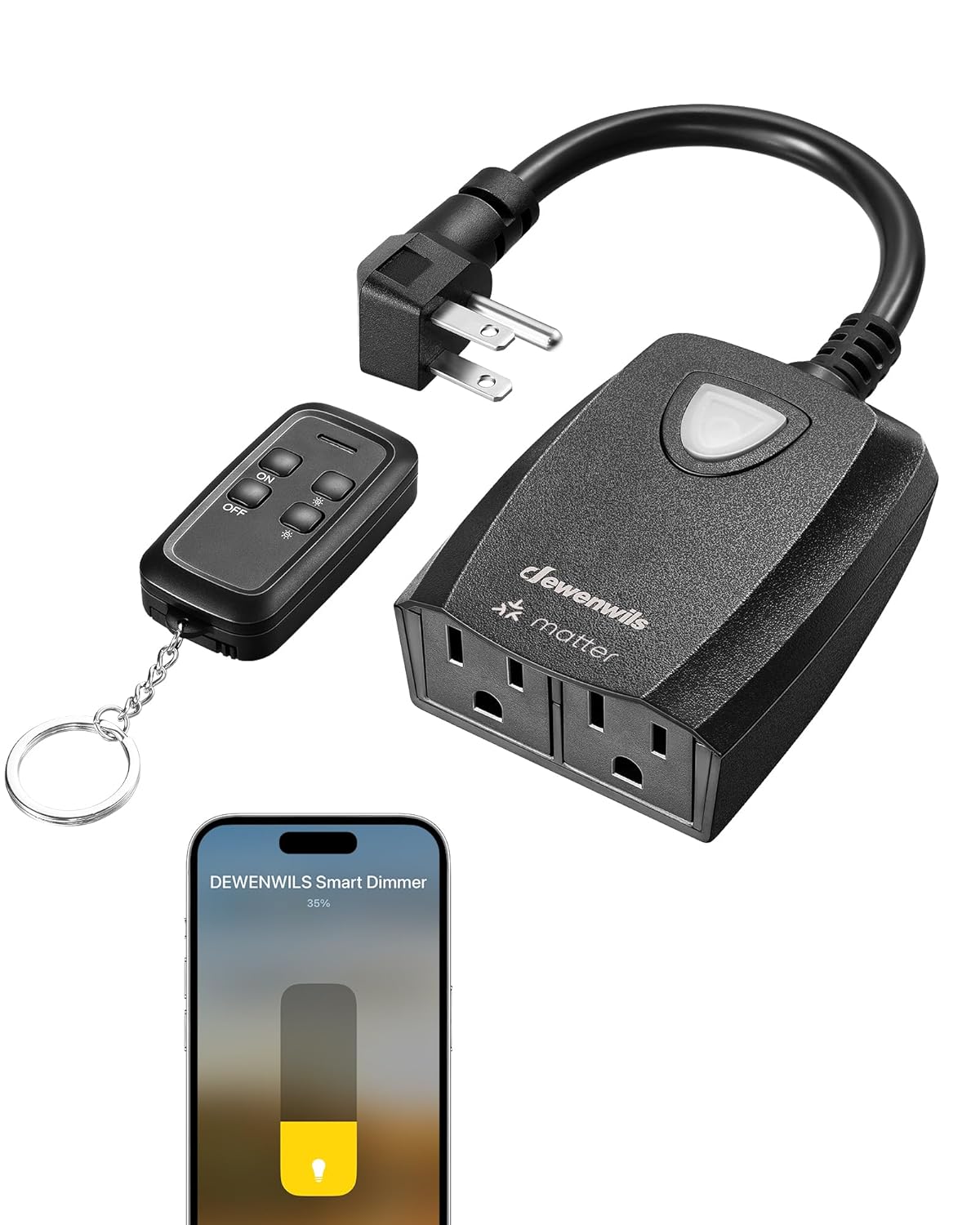
The DEWENWILS Smart Dimmer Plug, highlighting its features including smooth dimming, remote control, voice control, weatherproof design, scheduling, and group control.

The DEWENWILS outdoor dimmer plug seamlessly integrated with string lights in a backyard environment.
Informații de siguranță
Vă rugăm să citiți și să înțelegeți toate instrucțiunile de siguranță înainte de a utiliza acest produs. Nerespectarea acestor instrucțiuni poate duce la electrocutare, incendiu sau vătămări corporale grave.
- Nu scufundați dispozitivul în apă și nu îl expuneți la umiditate excesivă.
- Asigurați puterea totalătage of connected devices does not exceed the maximum load capacity (200W for dimmable LED, 400W for tungsten).
- Only use with dimmable light bulbs. Non-dimmable bulbs may cause damage or malfunction.
- Țineți copiii departe de dispozitivele electrice.
- Do not disassemble or modify the device. Contact customer support for service.
- Asigurați-vă că dispozitivul este conectat corect la o priză cu împământare.
Conținutul pachetului
Verificați dacă toate articolele sunt prezente în colet:
- DEWENWILS Wi-Fi Matter Smart Dimmer Plug (Dimmer body)
- Telecomandă (dacă este inclusă în modelul dvs. specific)
- Manual de utilizare (acest document)
Specificații
| Caracteristică | Detaliu |
|---|---|
| Model | MRD01 |
| Vol. De operaretage | 120 volți |
| Evaluare curentă | 2 A |
| Max Wattage (Tungsten) | 400 wați |
| Max Wattage (Dimmable LED) | 200 wați |
| Protocol de conectivitate | Wi-Fi (doar 2.4 GHz) |
| Metoda de control | Telecomandă, Aplicație, Voce |
| Dispozitive compatibile | Apple Home, Alexa, Google Home, SmartThings (Gateway Required) |
| Evaluarea internațională de protecție | IP20 (Note: Product is designed for outdoor use, but ensure vertical downward placement for water resistance) |
| Temperatura de operare | -4°F până la 113°F (-20°C până la 45°C) |
| Dimensiuni articol (L x l x H) | 5.56 x 3.93 x 1.55 inci |
| Prize | 2 prize împământate |

A închide view of the dimmer plug's two grounded outlets and supported wattage for tungsten and dimmable LED bulbs.

Visual representation of the dimmer's compatibility with LED bulbs (Max 200W) and Tungsten bulbs (Max 400W).
Înființat
1. Listă de verificare preinstalare
- Ensure your outdoor lights are reglabil. This dimmer is not compatible with non-dimmable lights.
- Confirm your Wi-Fi network operates on the Banda de 2.4 GHz. This device does not support 5.0GHz Wi-Fi.
- Have your Matter-compatible smart home hub or gateway ready (e.g., Apple HomePod, Amazon Echo, SmartThings Hub).
2. Instalare fizică
- Plug the DEWENWILS Smart Dimmer Plug into a grounded outdoor electrical outlet.
- Connect your dimmable outdoor lights to the outlets on the dimmer plug.
- For optimal weather resistance, ensure the dimmer is positioned vertically downward.
3. Matter Pairing with Smart Home Platforms
The DEWENWILS Smart Dimmer Plug is Matter-certified, allowing integration with various smart home ecosystems. A Matter-compatible gateway or hub is required for this process.
- Ensure your Matter gateway (e.g., Apple Home, Alexa, Google Home, SmartThings) is set up and connected to your 2.4GHz Wi-Fi network.
- Open your preferred smart home app (e.g., Apple Home app, Alexa app, Google Home app, SmartThings app).
- Follow the app's instructions to add a new Matter device. You may need to scan the QR code located on the dimmer plug or enter a pairing code.
- Once detected, follow the prompts to complete the pairing process. You can then assign the dimmer to a room and name it for easy control.

The Matter ecosystem, illustrating compatibility with Apple Home, Alexa, Google Home, and SmartThings (gateway required).

Visual guide to DEWENWILS Matter device compatibility with SmartThings, Apple Home, and Alexa devices.
Instrucțiuni de operare
1. Controlul aplicației
Once paired with your smart home app, you can control the dimmer from your smartphone or tablet:
- Pornit/Oprit: Tap the power icon in the app to turn connected lights on or off.
- intensității luminoase: Folosește cursorul sau procentultage controls in the app to adjust brightness from 1% to 100%.
- Programare: Create custom schedules to automatically turn lights on/off or adjust brightness at specific times or based on sunrise/sunset.

Controlling outdoor string lights using the DEWENWILS Smart Dimmer app on a smartphone.

The smart dimming interface within the app, allowing precise brightness adjustments.

Example of scheduling: lights automatically turning on at 8 PM and off at 6 AM.

The app's scheduling interface, allowing users to set custom routines for their outdoor lighting.
2. Telecomanda
Use the included remote control for convenient operation up to 100 feet away:
- Pornit/Oprit: Press the 'ON' or 'OFF' button to toggle power.
- intensității luminoase: Use the '+' and '-' buttons to increase or decrease brightness.
- Preset Levels: Some remotes may include buttons for preset dimming levels (e.g., 25%, 50%, 75%, 100%).

The remote control in use, demonstrating various dimming levels for string lights.

Remote dimming from a distance of up to 100 feet, providing flexible control.
3. Control vocal
Integrate with voice assistants like Alexa or Google Assistant for hands-free control:
- Ensure your smart dimmer is linked to your voice assistant account through the respective app.
- Folosește comenzi precum:
- „Alexa, pornește [numele dispozitivului].”
- "Hey Google, dim [device name] to 50%."
- "Siri, set [device name] to full brightness."

A family using a smart speaker to control the brightness of their outdoor string lights via voice commands.

Voice control in action, demonstrating how to adjust light brightness using a smart speaker.
4. Control manual
The physical button on the dimmer plug can also be used for basic control:
- Press the button once to turn the connected lights on or off.
- Press and hold the button to cycle through brightness levels. Release when the desired brightness is reached.

Detaliat view of the dimmer plug, highlighting the flat plug, ground outlets, switches/dimming button, and mounting hole.
Întreţinere
To ensure the longevity and optimal performance of your DEWENWILS Smart Dimmer Plug, follow these maintenance guidelines:
- curatenie: Disconnect the dimmer from power before cleaning. Wipe the exterior with a soft, damp pânză. Nu utilizați substanțe chimice dure sau produse de curățare abrazive.
- Protecție împotriva intemperiilor: The dimmer is designed to be weatherproof (IP20 rated, suitable for outdoor use). For best performance and water resistance, always ensure the dimmer is installed with the outlets facing vertically downward. This prevents water accumulation.
- Inspecţie: Verificați periodic cablul de alimentare și ștecherul pentru a depista orice semne de deteriorare. Dacă constatați deteriorări, întrerupeți utilizarea și contactați serviciul de asistență pentru clienți.

The dimmer plug shown in a rainy outdoor setting, emphasizing its weatherproof design. Ensure vertical downward placement for optimal protection.

The durable weatherproof cover of the smart dimmer, designed to withstand various outdoor elements.
Depanare
If you encounter issues with your DEWENWILS Smart Dimmer Plug, refer to the following common problems and solutions:
- Device appears "Offline" in Google Home or other apps:
- Asigurați-vă că rețeaua Wi-Fi este de 2.4 GHz. Dispozitivul nu acceptă rețele de 5.0 GHz.
- Verify the dimmer is within range of your Wi-Fi router and Matter gateway.
- Restart the dimmer by unplugging it for 10 seconds and plugging it back in.
- Check your router settings to ensure there are no restrictions for new devices.
- Lights are not dimming or flickering:
- Confirm that the connected light bulbs are explicitly labeled as reglabil. Non-dimmable bulbs will not function correctly with this dimmer.
- Asigurați puterea totalătage of connected lights does not exceed the dimmer's maximum capacity (200W for LED, 400W for tungsten).
- Test with a different set of dimmable bulbs to rule out bulb compatibility issues.
- Telecomanda nu funcționează:
- Verificați bateria din telecomandă și înlocuiți-o dacă este necesar.
- Ensure you are within the 100-foot operating range of the dimmer.
- If the remote was not pre-paired, refer to the remote's specific pairing instructions (usually involves pressing and holding a button on the dimmer and remote simultaneously).
- Nu se poate conecta la Wi-Fi:
- Verificați dacă rețeaua Wi-Fi este de 2.4 GHz.
- Ensure your phone is connected to the 2.4GHz network during the setup process.
- Move the dimmer closer to your Wi-Fi router during initial setup.
- Temporarily disable 5GHz Wi-Fi on your router if you have a combined network, then re-enable after setup.
Garanție și suport
DEWENWILS products are designed for reliability and performance. For warranty information, technical support, or any questions regarding your Smart Dimmer Plug, please contact DEWENWILS customer service through their official website-ul sau distribuitorul de unde a fost achiziționat produsul.
Please have your model number (MRD01) and purchase details ready when contacting support.