
1. Introducere
This manual provides detailed instructions for the installation, operation, and maintenance of your EDISION CAM-100 Broadband TV Antenna Amplifier. The CAM-100 is designed to enhance Digital Terrestrial Television (DVB-T/T2) signals, featuring adjustable gain and integrated 5G LTE protection to ensure optimal reception quality.
2. Instrucțiuni de siguranță
Please read these safety instructions carefully before installing or operating the device. Failure to follow these instructions may result in electric shock, fire, or damage to the product.
- Asigurați-vă că sursa de alimentare voltage corespunde cerințelor specificate pe dispozitiv.
- Nu expuneți dispozitivul la ploaie, umezeală sau temperaturi extreme.
- Evitați plasarea dispozitivului în apropierea surselor de căldură sau în lumina directă a soarelui.
- Nu deschideți dispozitivul casing. Apelați la personal calificat pentru toate lucrările de service.
- Deconectați alimentarea cu energie electrică înainte de a efectua orice conexiune sau deconectare.
3. Conținutul pachetului
Verificați dacă toate articolele sunt prezente în colet:
- Antenă TV EDISION CAM-100 Ampmai în viață
- Ghid de pornire rapidă
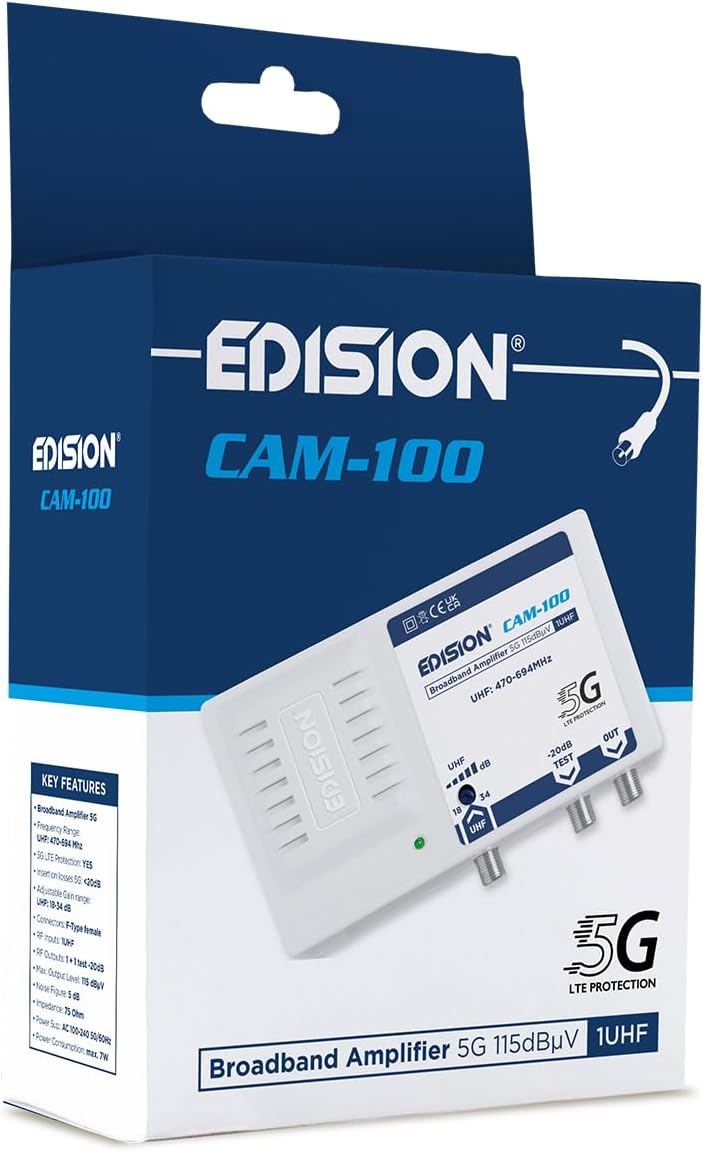
The EDISION CAM-100 amplifier presented in its retail box, showcasing the product branding and key features listed on the packaging.
4. Produs terminatview
The EDISION CAM-100 is a compact broadband amplifier designed for UHF signals. It features adjustable gain and a built-in 5G LTE filter.

The EDISION CAM-100 broadband amplifier, shown with its power plug, features a single UHF input, adjustable gain from 18-34dB, and two output ports (one main, one -20dB test port). It includes 5G LTE protection and operates within the UHF 470-694MHz frequency range.

Prim-plan frontal view of the EDISION CAM-100, clearly displaying the UHF input, the adjustable gain knob, the -20dB test output, and the main output port. The 5G LTE PROTECTION label is also visible.

The rear side of the EDISION CAM-100 amplifier, featuring keyhole slots for wall mounting, indicating easy installation.
5. Configurare și instalare
Follow these steps to properly install your EDISION CAM-100 ampmai în viață:
- Montare: Choose a suitable indoor location for the amplifier, away from direct heat or moisture. Use the keyhole slots on the back of the unit to securely mount it to a wall or flat surface.
- Conexiune antenă: Connect your outdoor UHF antenna cable to the UHF IN portul pe ampAsigurați-vă că conexiunea este sigură.
- TV Connections: Connect your television(s) to the OUT port(s) of the amplifier using coaxial cables. The main output provides the amplified signal. There is also a -20dB TEST port for signal measurement or connecting a single device with reduced signal.
- Conexiune de alimentare: Conectați amplifier's power cord into a standard AC 100-240V, 50/60Hz electrical outlet. The power indicator LED on the front of the unit should illuminate.
- Ajustați câștigul: Turn the adjustable gain knob (labeled UHF dB) to set the desired amplification level. Start with a lower setting and gradually increase it until optimal signal quality is achieved on your television.

An illustrative diagram demonstrating a typical installation scenario for the EDISION CAM-100. It shows an outdoor UHF antenna connected to the amplifier, which then distributes the signal to multiple televisions indoors, including connections for a test point.
6. Instrucțiuni de utilizare
Once installed, the EDISION CAM-100 operates continuously when powered. The primary operational adjustment is the gain control.
- Indicator de alimentare: A green LED on the front panel indicates that the ampLifizerul primește energie electrică și este funcțional.
- Ajustarea câștigului: Use the rotary knob to adjust the UHF signal gain between 18dB and 34dB. Adjust this setting while monitoring your TV's signal quality meter (if available) or picture quality. The goal is to achieve a strong, stable signal without over-amplification, which can cause distortion.
- Rezultat test: The -20dB TEST output provides a reduced signal level, useful for connecting a single TV or for signal strength measurements without affecting the main output.
7. Întreținere
The EDISION CAM-100 requires minimal maintenance to ensure long-term performance.
- curatenie: Ștergeți periodic exteriorul unității cu o cârpă moale și uscată. Nu utilizați agenți de curățare lichizi sau materiale abrazive.
- Ventilare: Ensure that the ventilation slots on the device are not obstructed to prevent overheating.
- Conexiuni: Occasionally check all cable connections to ensure they are secure and free from corrosion.
8. Depanare
If you experience issues with your EDISION CAM-100, refer to the following common problems and solutions:
| Problemă | Cauza posibila | Soluţie |
|---|---|---|
| Fara indicator luminos de alimentare | Fără alimentare la unitate | Check power cord connection and wall outlet. Ensure the outlet is live. |
| No signal or weak signal on TV |
|
|
| Distorted picture or sound | Signal over-amplification or interference | Reduce the gain setting. Ensure the 5G LTE filter is effective; if interference persists, check for external sources. |
9. Specificatii tehnice
| Caracteristică | Caietul de sarcini |
|---|---|
| Model | CAM-100 (26-01-0403) |
| Gama de frecvente | UHF 470-694 MHz |
| Intrare | 1 UHF |
| Ieșiri | 1 Main Output, 1 Test Output (-20dB) |
| Câștig reglabil | 18-34 dB (UHF) |
| Max. Nivel de ieșire | 115 dBµV |
| Filtra | Protecție 5G LTE |
| Alimentare electrică | AC 100-240V, 50/60Hz |
| Dimensiuni | 11 x 14 x 5 cm |
| Greutate | 270 g |
| Dispozitive compatibile | TV antenna, Televisions |
10. Informații despre garanție
EDISION products are covered by a standard manufacturer's warranty against defects in materials and workmanship. Please refer to the warranty card included with your product or visit the official Edision webConsultați site-ul pentru termenii și condițiile detaliate ale garanției. Păstrați dovada achiziției pentru solicitările de garanție.
11. Suport
Pentru asistență suplimentară, asistență tehnică sau pentru a view additional products, please visit the official Edision store or contact customer service:
- Edision Store: Visit the Edision Store on Amazon
- Serviciu clienți: Refer to the contact information provided in your Quick Start Guide or on the official Edision website-ul.