
Introducere
Thank you for choosing the FLEXISPOT 71x32 Inch Dual Motor Electric Standing Desk. This manual provides essential information for the safe and efficient assembly, operation, and maintenance of your new standing desk. Please read all instructions carefully before use and retain this manual for future reference.
This electric standing desk is designed to provide a versatile and ergonomic workspace, allowing seamless transitions between sitting and standing positions. Its dual-motor system ensures stable and quiet height adjustments, supporting a heavy-duty capacity suitable for various professional and creative setups.
Ghid de siguranță
- Urmați întotdeauna cu atenție instrucțiunile de asamblare.
- Ensure the desk is properly anchored to the floor to prevent tipping, especially when fully extended.
- Do not exceed the maximum weight capacity of 198 pounds (90 kg) to maintain stability and safety.
- Keep the work surface clear of items that could fall or cause obstruction during height adjustment.
- Țineți copiii și animalele de companie departe de birou în timpul funcționării.
- Evitați plasarea lichidelor direct pe panoul de control sau în apropierea componentelor electrice.
- Do not attempt to disassemble or repair the motor or control system yourself. Contact qualified service personnel if issues arise.
Warning: Anti-Collision System
The desk is equipped with an anti-collision system. If the desk encounters an obstacle during height adjustment, it will stop and reverse slightly to prevent damage. Ensure the area around the desk is clear before operation.

This image illustrates the desk's quiet operation (less than 50dB) and anti-collision system, showing the desk stopping and reversing when an obstacle (a pet) is detected.
Configurare și asamblare
The FLEXISPOT 71x32 Inch Dual Motor Electric Standing Desk requires assembly. While some tools may be included, an electric drill can expedite the process. It is recommended to have two people for assembly due to the size and weight of the components.
Despachetarea și pregătirea:
- Despachetați cu grijă toate componentele și verificați-le cu lista de piese din manualul inclus.
- Place the desktop upside down on a soft, clean surface (e.g., carpet or packaging foam) to prevent scratches.
- Ensure all cables and electrical components are free from damage before proceeding.
Pași de asamblare (general)view):
- Attach the lifting columns to the desktop using the provided screws.
- Connect the foot supports to the lifting columns.
- Install the control box and connect all motor and control panel cables. Ensure cables are neatly managed to avoid interference with desk movement.
- Ridicați cu grijă biroul în poziție verticală.
- Conectați cablul de alimentare la o priză cu împământare.
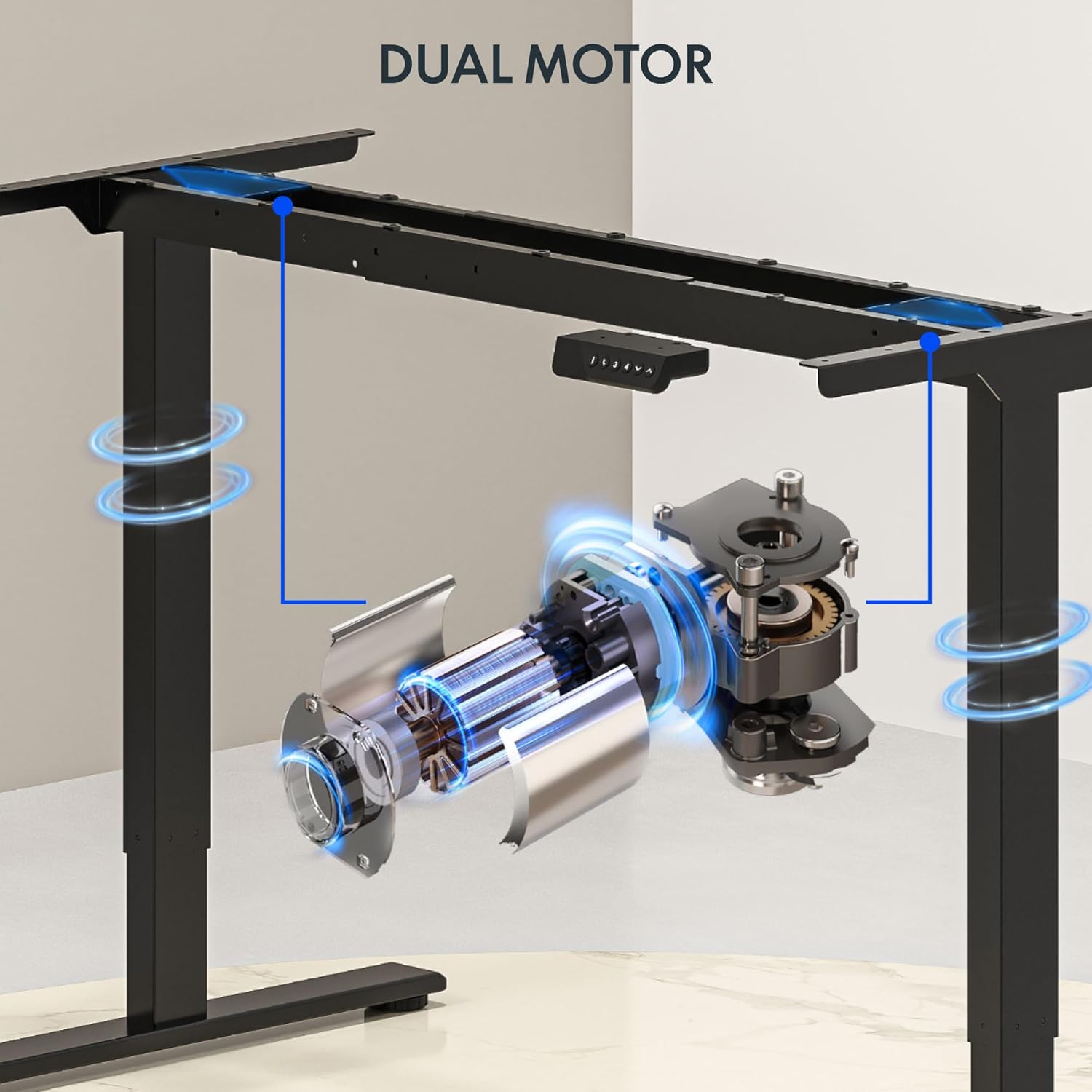
This image illustrates the dual motor system integrated into the desk frame, highlighting its robust design for stable lifting.
Sfat:
Consider using cable management accessories (not included) to keep wires organized and prevent them from snagging during height adjustments.
Instrucțiuni de operare
The FLEXISPOT standing desk features an intuitive control panel for easy height adjustment and memory presets.
Panou de control terminatview:

This image displays the desk's control panel, featuring an LED display, up/down arrows, and four programmable memory preset buttons.
- Săgeți sus/jos (▲ / ▼): Apăsați și mențineți apăsat pentru a regla manual înălțimea biroului. Eliberați pentru a opri la înălțimea dorită.
- Display LED: Shows the current desk height in inches.
- Presetări de memorie (1, 2, 3, 4): Memorează și reține înălțimile preferate de ședere și de stat în picioare.
- 'i' Button: Information or settings button (refer to detailed manual for specific functions).
Setarea presetărilor de memorie:
- Reglați biroul la înălțimea dorită folosind săgețile sus/jos.
- Press the 'i' button (or 'M' button if present) once. The display may flash.
- Within 3 seconds, press one of the number buttons (1, 2, 3, or 4) to save the current height to that preset. The display will confirm the setting.
Reapelarea presetărilor de memorie:
- Simply press the desired number button (1, 2, 3, or 4). The desk will automatically move to the saved height.
Video: FLEXISPOT Dual-Motor Strength. More Space to Create.
This video demonstrates the smooth and stable operation of the FLEXISPOT dual-motor system, highlighting its capacity and the ample workspace it provides for various setups.
Întreţinere
- curatenie: Ștergeți suprafața de lucru și rama cu o lavetă moale șiamp Evitați substanțele chimice dure sau produsele de curățare abrazive.
- Organizare de cabluri: Periodically check and reorganize cables to ensure they do not interfere with the desk's movement or become pinched.
- Elemente de fixare: Verificați ocazional toate șuruburile și bolțurile pentru a vă asigura că sunt strânse. Strângeți-le din nou dacă este necesar.
- Inspecția motorului: Listen for any unusual noises during operation. If you hear grinding or straining, discontinue use and contact support.
Depanare
| Problemă | Cauza posibila | Soluţie |
|---|---|---|
| Biroul nu se mișcă | Power cord unplugged; circuit breaker tripped; control panel not connected. | Check power connection; reset circuit breaker; ensure all cables are securely connected. |
| Desk moves unevenly or makes noise | Overload; loose fasteners; obstruction. | Reduce weight on desk (ensure it's below 198 lbs); check and tighten all fasteners; remove any obstructions. |
| Sistemul anti-coliziune se activează frecvent | Sensitivity too high; frequent obstructions. | Ensure clear path for desk movement; consult the full manual for adjusting anti-collision sensitivity if available. |
| Presetările de memorie nu funcționează | Presets not properly saved. | Re-save your desired heights following the 'Setting Memory Presets' instructions. |
If you encounter issues not listed here or if solutions do not resolve the problem, please contact FLEXISPOT customer support.
Specificații
- Marca: FLEXISPOT
- Model: 71x32 (Black Top + Black Frame)
- Desktop Dimensions: 71"W x 32"D (180.34 cm x 81.28 cm)
- Gama de inaltime: 28.3" până la 47.6" (71.9 cm până la 120.9 cm)
- Capacitate maximă de greutate: 198 lbs (90 kg)
- Tip motor: Motor dublu
- Lift Speed: Up to 1 inch per second (2.54 cm/s)
- Panou de control: Memory Controller with 4 programmable presets, LED display, Up/Down arrows.
- Material cadru: Oțel aliat
- Material de sus: Wood (Painted Wood Finish)
- Caracteristici speciale: Dual Motor, Heavy-Duty Capacity, Memory Controller, Anti-Collision System.
- Asamblare: Required (Assembly tools not fully included, electric drill recommended).

This image provides a visual representation of the desk's key dimensions and performance specifications, including its adjustable height range, maximum speed, and load capacity.
Informații despre garanție
The FLEXISPOT 71x32 Inch Dual Motor Electric Standing Desk comes with a limited warranty:
- Cadru și motor: 5 ani garanție limitată.
- Electronica: 2 ani garanție limitată.
Please retain your proof of purchase for warranty claims. For detailed terms and conditions, refer to the official FLEXISPOT website-ul sau contactați asistența pentru clienți.
Asistență pentru clienți
For any questions, technical assistance, or warranty claims regarding your FLEXISPOT standing desk, please visit the official FLEXISPOT website-ul web sau contactați departamentul de asistență pentru clienți. Informațiile de contact pot fi găsite de obicei pe ambalajul produsului sau pe site-ul oficial al mărcii. website-ul.
Resurse online: www.flexispot.com