
1. Introducere
The RADIOMASTER Boxer Crush Radio Controller Transmitter is a high-performance remote control system designed for RC enthusiasts. It features the EdgeTX Operating System and an ExpressLRS RF System, providing reliable and precise control for various remote-controlled vehicles. This manual provides essential information for setting up, operating, and maintaining your Boxer Crush transmitter.
2. Caracteristicile produsului
- Available in seven vibrant colors: Iron Grey, Frost White, Mint Mist, Hot Pink, Cherry Red, Iceberg Blue, and Lemon Twist Yellow.
- Equipped with CNC Aluminum AG01 Hall-effect Gimbals for precise control.
- Features a powerful STM32F407VGT6 microcontroller with 1MB Flash and 192KB RAM.
- Built-in ExpressLRS Backpack for enhanced connectivity.
- Redesigned SD card slot with a new and improved 512MB pre-loaded SD card included.

Image: The RADIOMASTER Boxer Crush Radio Controller in Iron Grey, highlighting its sleek design.

Image: A display of the RADIOMASTER Boxer Crush Radio Controller available in multiple vibrant colors.
3. Conținutul pachetului
Upon unboxing your RADIOMASTER Boxer Crush, ensure all the following items are present:
- 1 x Boxer Crush Radio Transmitter
- 1 x Signature Carry Case
- 1 x T Antenna
- 1 x cablu USB-C
- 1 x Gimbal Protector

Image: The complete package contents of the RADIOMASTER Boxer Crush, including the transmitter, carry case, antenna, USB-C cable, and gimbal protector.
4. Configurare
4.1. Instalarea bateriei
The Boxer Crush requires a 2S 6200mAh Li-Po battery (not included) or AA batteries using the provided battery pack. To install:
- Locate the battery compartment on the back of the transmitter.
- Glisați zăvorul capacului bateriei pentru a deschide compartimentul.
- Connect the Li-Po battery to the internal connector, ensuring correct polarity. If using AA batteries, insert them into the battery pack and connect the pack.
- Carefully place the battery into the compartment and close the cover, ensuring it latches securely.
Video: Demonstrates battery installation and basic handling of the RADIOMASTER Boxer transmitter.
4.2. Instalarea antenei
Attach the T Antenna to the designated port on the top of the transmitter. Ensure it is securely fastened but do not overtighten.
4.3. Gimbal Protector Removal
Remove the gimbal protector before operating the transmitter to allow full range of motion for the gimbals.
5. Instrucțiuni de utilizare
5.1. Pornire/Oprire
To power on the transmitter, press and hold the power button located centrally above the screen until the EdgeTX logo appears. To power off, press and hold the power button until the power-down sequence completes.
5.2. Controale de bază
The Boxer Crush features two main gimbals for control inputs, along with various switches and buttons for auxiliary functions. Familiarize yourself with the layout:
- Gimbaluri: Controlează suprafețele principale de zbor (accelerație, eleron, elevator, cârmă).
- Comutatoare: Used for flight modes, arming, and other programmable functions.
- Buttons (RTN, PAGE, TELE, SYS): Navigate through the EdgeTX menu system.
- Rotiță de defilare: Folosit pentru navigarea în meniu și ajustarea parametrilor.
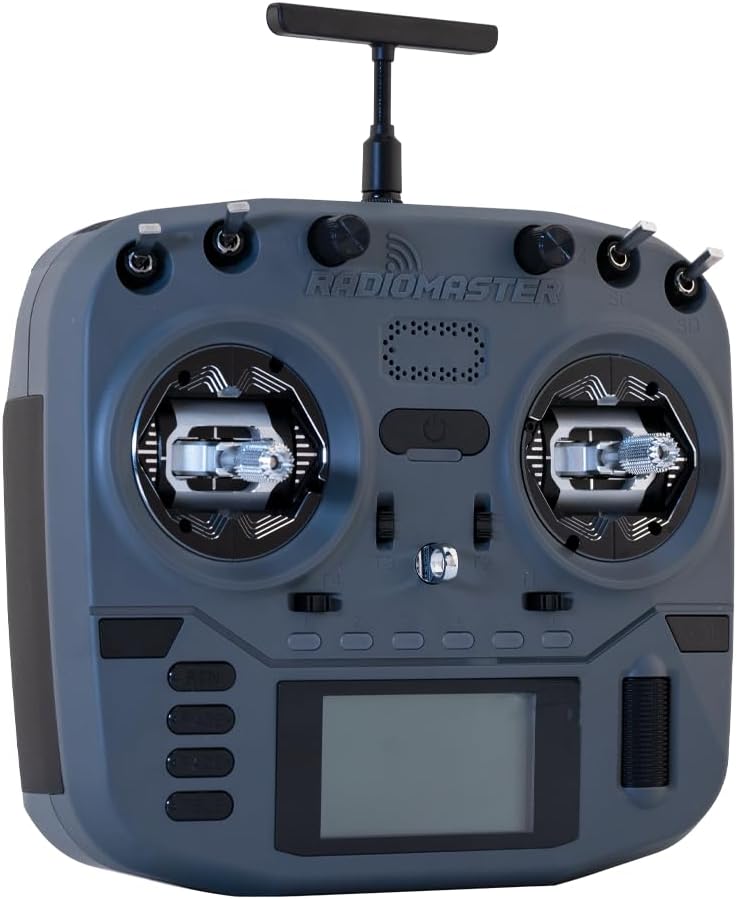
Imagine: față view of the RADIOMASTER Boxer Crush, showing gimbals, screen, and control buttons.
5.3. Menu Navigation (EdgeTX)
The EdgeTX operating system provides extensive customization. Use the SYS button to enter the system menu, the PAGE buttons to navigate between pages, and the scroll wheel to select options and adjust values. The RTN button returns to the previous screen.
Video: Pesteview of the RADIOMASTER Boxer Crush RC Transmitter, highlighting the EdgeTX Operating System and various features.
5.4. Calibrarea joystick-ului
Regular joystick calibration ensures optimal performance. Refer to the transmitter's internal menu for the calibration procedure. Generally, this involves moving both gimbals through their full range of motion.
Video: Demonstrates the joystick calibration process for a Radiomaster Pocket remote control. The steps are generally similar for the Boxer Crush.
5.5. Binding/Pairing
To bind your Boxer Crush transmitter to a receiver, follow the specific binding procedure outlined in your receiver's manual. Typically, this involves putting the receiver into bind mode and then initiating the binding process from the transmitter's EdgeTX menu.
6. Întreținere
- Keep the transmitter clean and free from dust and debris. Use a soft, dry cloth for cleaning.
- Store the transmitter in its carry case when not in use to protect it from damage.
- Ensure batteries are charged using appropriate chargers and follow battery safety guidelines.
- Periodically check all switches and gimbals for smooth operation.
7. Depanare
- Transmitter not powering on: Verificați nivelul de încărcare al bateriei și asigurați-vă că este instalată corect.
- No control response: Verify the transmitter is bound to the receiver and that the model is correctly selected in EdgeTX. Check antenna connection.
- Erratic control: Perform joystick calibration. Check for any physical obstructions to the gimbals.
- Erori ale cardului SD: Ensure the SD card is properly seated. If issues persist, try reformatting the card (backing up data first) or using a different SD card.
8. Specificații
| Caracteristică | Caietul de sarcini |
|---|---|
| Dimensiunile produsului | 7 x 6 x 4 inci |
| Vârsta recomandată de producător | 18 ani în sus |
| Producător | Greathobby RC |
| Cardanele | CNC Aluminum AG01 Hall-effect Gimbals |
| Sistem de operare | EdgeTX |
| Sistem RF | ExpressLRS |

Image: Diagram illustrating the dimensions of the RADIOMASTER Boxer Crush Radio Controller.
9. Garanție și asistență
For warranty information and technical support, please refer to the official RADIOMASTER website-ul web sau contactați distribuitorul autorizat. Păstrați dovada achiziției pentru a putea solicita garanție.
Official RADIOMASTER Website: www.radiomasterrc.com


