
ZPSHYD XY-SK150
ZPSHYD XY-SK150 Buck Boost DC Power Supply User Manual
Model: XY-SK150
1. Introducere
The ZPSHYD XY-SK150 is a high-performance digital adjustable DC power supply module designed for a wide range of applications. It features a buck-boost function, allowing for both step-up and step-down voltage conversion, and incorporates Maximum Power Point Tracking (MPPT) for efficient solar charging. With its full-color LCD display and multiple protection features, it provides a safe, precise, and user-friendly experience for various electrical tasks.

Figure 1.1: ZPSHYD XY-SK150 Buck Boost DC Power Supply front view.
2. Specificații
The following table outlines the key technical specifications of the XY-SK150 power supply:
| Parametru | Valoare |
|---|---|
| Vol. De intraretage | DC 6-36V |
| Ieșire Voltage | DC 0-36V |
| Curent de ieșire | 0-7A |
| Putere de ieșire | 0-150W |
| Voltage Precizia | ±0.5%+1 digit |
| Precizia curentă | ±0.5%+3 cifre |
| Voltage Rezoluție | 0.01V |
| Rezoluția curentă | 0.001A |
| Afişa | Deplin-view VA Color LCD |
| Răcire | Intelligent Temperature-Controlled Fan, Thickened Heat Sink |
| Protecții | Anti-reverse, Anti-backflow, Under/Overvoltage, Overcurrent, Overtemperature, Overpower, Timeout |
| Caracteristici speciale | MPPT Solar Charging Function, External Temperature Probe Support |

Figure 2.1: Display showing key specifications and capabilities.

Figura 2.2: Dimensiunile produsului (79 mm x 39 mm x 23 mm).
3. Configurare și conexiuni
Before operating the device, ensure all connections are secure and correct. The module requires a DC input power source within the specified range.
3.1 Power Input Connection
Connect your DC input power source (6-36V) to the input terminals of the XY-SK150 module. Observe polarity: positive to positive, negative to negative. The module has anti-reverse connection protection, but correct polarity is always recommended.
3.2 Output Load Connection
Conectați sarcina la terminalele de ieșire. Asigurați-vă că volumul sarciniitage and current requirements are within the module's 0-36V and 0-7A output range. The module features anti-backflow protection to prevent current from flowing back into the power supply.
3.3 External Temperature Probe (Optional)
For precise overheating management, an external temperature probe can be connected to the designated NTC temperature probe interface. This allows the device to automatically stop charging or operation if the temperature exceeds a safe limit.

Figura 3.1: Example connection diagram for MPPT solar charging with external temperature probe.
4. Instrucțiuni de utilizare
The XY-SK150 features an intuitive interface with a full-color LCD and several control buttons and an encoder knob.
4.1 Main Interface and Display
The LCD simultaneously displays real-time voltage, current, and power. It provides clear and bright readings for easy monitoring.

Figure 4.1: Full-view color LCD screen displaying voltage, curent și putere.
4.2 Funcțiile butoanelor
- VSET Button:
Apăsare scurtă: Setați volumul de ieșiretage.
Apăsare lungă: Enter or exit the data group interface. - Butonul SW:
Apăsare scurtă: Switch input and output voltage or shift display.
Apăsare lungă: Enter or exit the system settings interface. - ISET Button:
Apăsare scurtă: Set output current.
Apăsare lungă: Enter or exit the data group interface. - Encoder Key (Rotary Knob):
Apăsare scurtă: Switch output power (W), capacity (Ah/energy Wh), time (h), or temperature (C) display.
Apăsare lungă: Turn on/off the lock function. - Power Key (Yellow Button):
Apăsare scurtă: Turn on/off the power output.
Apăsare lungă: Long press on the capacity (Ah/energy Wh) or time (h) interface to clear the value.

Figure 4.2: Introduction to key functions and controls.
5. Caracteristici cheie
5.1 Versatile Power Range and High Precision
The XY-SK150 offers a wide adjustable DC input range of 6-36V and an output range of 0-36V, capable of handling up to 7A current and 150W power. Its precise voltage and current accuracy (±0.5%+1 digit for voltage, ±0.5%+3 digits for current) with resolutions of 0.01V and 0.001A make it suitable for detailed and delicate electrical tasks, ensuring reliable performance for sensitive applications.
5.2 Full-View Ecran LCD color
Equipped with a state-of-the-art VA color LCD display, the power supply simultaneously shows voltage, current, and power. This display provides clear and bright readings, reducing the need to switch between different display modes and enhancing overall user convenience and efficiency.
5.3 Robust Safety Features
The adjustable DC power supply incorporates comprehensive protection mechanisms to ensure safe and secure operations. These include:
- Protecție împotriva conexiunii inverse
- Anti-backflow protection
- Subervoltage protectie
- Overvoltage protectie
- Protecție la supracurent
- Protectie la supratemperatura
- Protecție la supraputere
- Protecție timeout
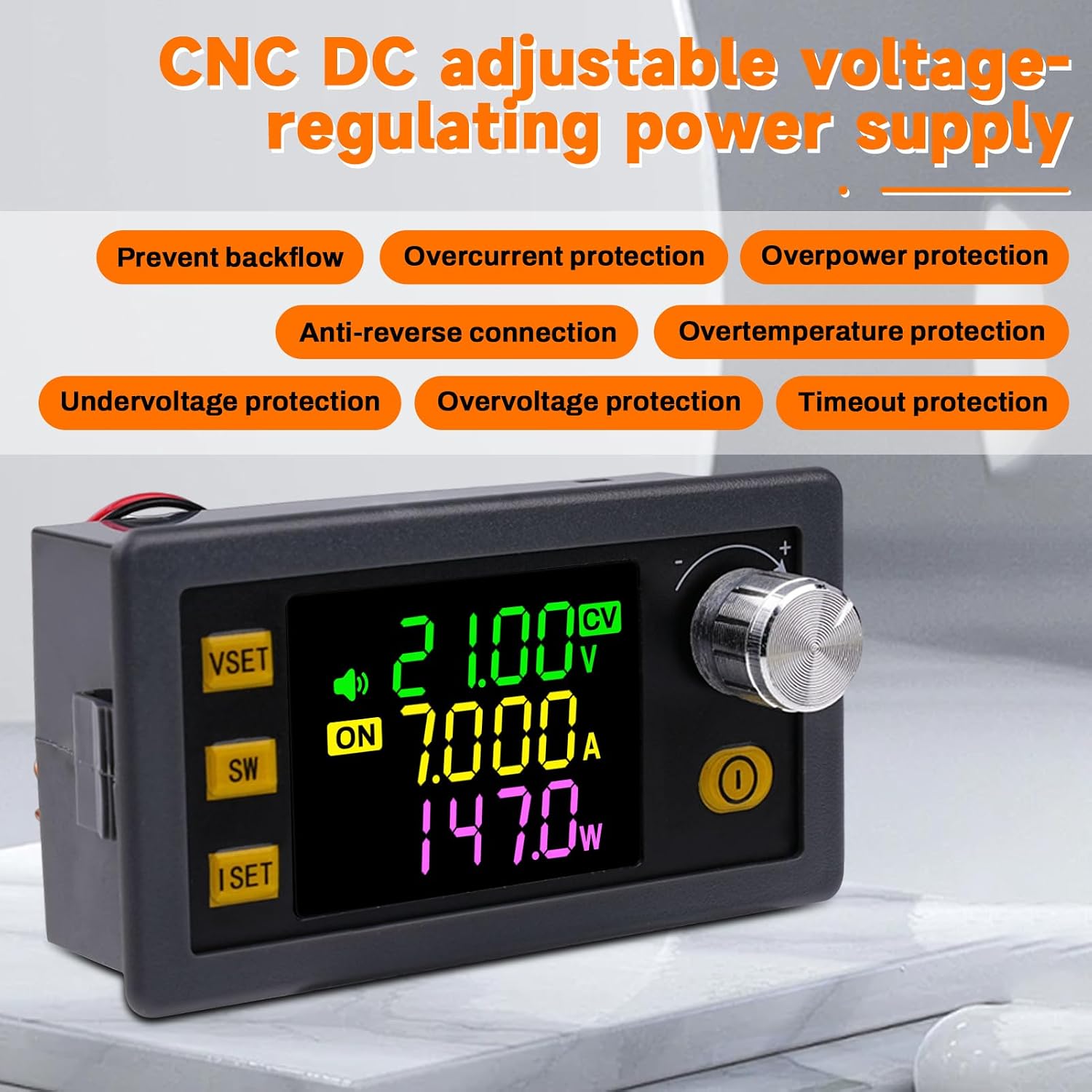
Figura 5.1: Pesteview of multiple protection functions.
5.4 Efficient Cooling and Upgrade Features
The Buck Boost power supply features an intelligent temperature-controlled fan and a thickened heat sink, secured with screws, for excellent heat dissipation. This design ensures stable performance even under demanding conditions. Additionally, it includes integrated buzzer alerts, button prompts, and alarm signals for enhanced safety and usability. The module also supports external temperature probe connections for precise overheating management.

Figure 5.2: Illustration of the intelligent cooling system.
5.5 MPPT Solar Charging Capability
A key feature of the XY-SK150 is its integrated MPPT (Maximum Power Point Tracking) function. This allows the power supply to efficiently utilize solar energy, making it an ideal solution for outdoor applications such as camping, as well as for powering devices in laboratories, electric scooters, or golf carts.
6. Aplicații
The ZPSHYD XY-SK150 is highly versatile and can be used in a variety of settings:
- Laboratory Power Supply: Provides precise and stable power for electronic experiments and circuit testing.
- În aer liber Camping: Ideal for charging batteries and powering devices using solar panels, thanks to its MPPT function.
- Electric Scooters and Golf Carts: Can be used for charging or powering these vehicles.
- DIY Electronics Projects: Suitable for hobbyists and makers requiring adjustable DC power.
- Aplicatii industriale: For various industrial electrical needs within its power range.

Figure 6.1: Diverse applications of the XY-SK150 power supply.
7. Întreținere
To ensure the longevity and optimal performance of your ZPSHYD XY-SK150 power supply, follow these maintenance guidelines:
- curatenie: Regularly clean the exterior of the device with a soft, dry cloth. Do not use abrasive cleaners or solvents. Ensure ventilation openings are free from dust and debris.
- Depozitare: Când nu îl utilizați, depozitați dispozitivul într-un loc răcoros și uscat, ferit de lumina directă a soarelui și de temperaturi extreme.
- Conexiuni: Verificați periodic toate conexiunile de intrare și ieșire pentru a vă asigura că sunt sigure și fără coroziune.
- Ventilare: Ensure adequate airflow around the device during operation to prevent overheating. Do not block the fan or ventilation holes.
8. Depanare
If you encounter issues with your ZPSHYD XY-SK150, consider the following common troubleshooting steps:
- Fără alimentare/afișaj:
Check input power: Asigurați-vă că volumul de intraretage is within the 6-36V range and the power source is functioning correctly.
Verificați conexiunile: Verify that the input wires are securely connected and polarity is correct. - Fără ieșire:
Check output enable: Ensure the power output is enabled using the yellow Power Key.
Check load: Verify that your load is connected correctly and is not short-circuited or drawing excessive current.
Check protection triggers: The device may have activated one of its protection features (e.g., overcurrent, overvoltage, overpower). Check the display for error messages or indicators. Disconnect the load, resolve the issue, and then re-enable output. - Citiri incorecte:
Recalibrate (if applicable): Refer to advanced settings in the system menu if calibration options are available (consult manufacturer for detailed steps if needed).
Verificați conexiunile: Loose connections can lead to inaccurate readings. - Supraîncălzire:
Asigurați ventilație: Make sure the fan and heat sink are not obstructed and there is sufficient airflow around the unit.
Reduceți sarcina: If operating continuously at maximum power, consider reducing the load or providing additional cooling.
Dacă problema persistă după încercarea acestor pași, vă rugăm să contactați serviciul de asistență pentru clienți pentru asistență suplimentară.
9. Informații de siguranță
Please read and understand all safety warnings before operating the ZPSHYD XY-SK150 power supply. Failure to do so may result in injury or damage to the device.
- Siguranta electrica: This device operates with DC voltage. Always observe correct polarity when making connections. Incorrect polarity, especially when charging batteries, can damage the device and connected equipment.
- Încărcarea bateriei: Battery charging requires certain professional knowledge. Non-professionals should not charge directly to prevent fire and explosion. Always use appropriate battery management systems and monitor charging processes.
- Ventilare: Ensure the device is operated in a well-ventilated area. Do not cover the ventilation holes or fan.
- Mediu: Do not expose the device to water, moisture, high temperatures, or corrosive environments.
- Supraîncărcare: Nu depășiți volumul maxim de intrare specificattage, output current, or output power. The built-in protections will activate, but continuous overloading can reduce the lifespan of the device.
- Copii: Nu lăsați dispozitivul la îndemâna copiilor.
10. Garanție și asistență
For warranty information and technical support, please refer to the documentation provided with your purchase or contact ZPSHYD customer service through the retailer where the product was acquired. Please have your model number (XY-SK150) and purchase details ready when contacting support.
Ask a question about this manual
Ask about setup, troubleshooting, compatibility, parts, safety, or missing instructions. Manuals+ will review the question and use this page’s manual context to help answer it.