
Introducere
The GXTrust Mylox Wireless Mobile Controller is designed to elevate your mobile gaming experience. This versatile gamepad features Bluetooth 5.0 for a low-latency connection, dual vibration feedback for immersive gameplay, and customizable RGB LED lighting. It is compatible with a wide range of devices, including iPhone, Android smartphones, and supports remote play for PlayStation 5 and Xbox consoles, as well as PC game streaming.

Image: The GXTrust Mylox Mobile Gaming Controller highlighting its key features: included travel case, low-latency Bluetooth 5.0, dual vibration feedback, included rechargeable battery, and RGB LED lighting.
Înființat
Conținutul pachetului
- GXTrust Mylox Wireless Mobile Controller
- Cablu de încărcare USB
- Fabric Carrying Case
Încărcarea controlerului
Before initial use, fully charge the controller. Connect the provided USB charging cable to the controller's charging port and plug the other end into a USB power source (e.g., a computer USB port or a USB wall adapter). The LED indicator will show charging status and turn off when fully charged. A full charge provides up to 12 hours of playtime.
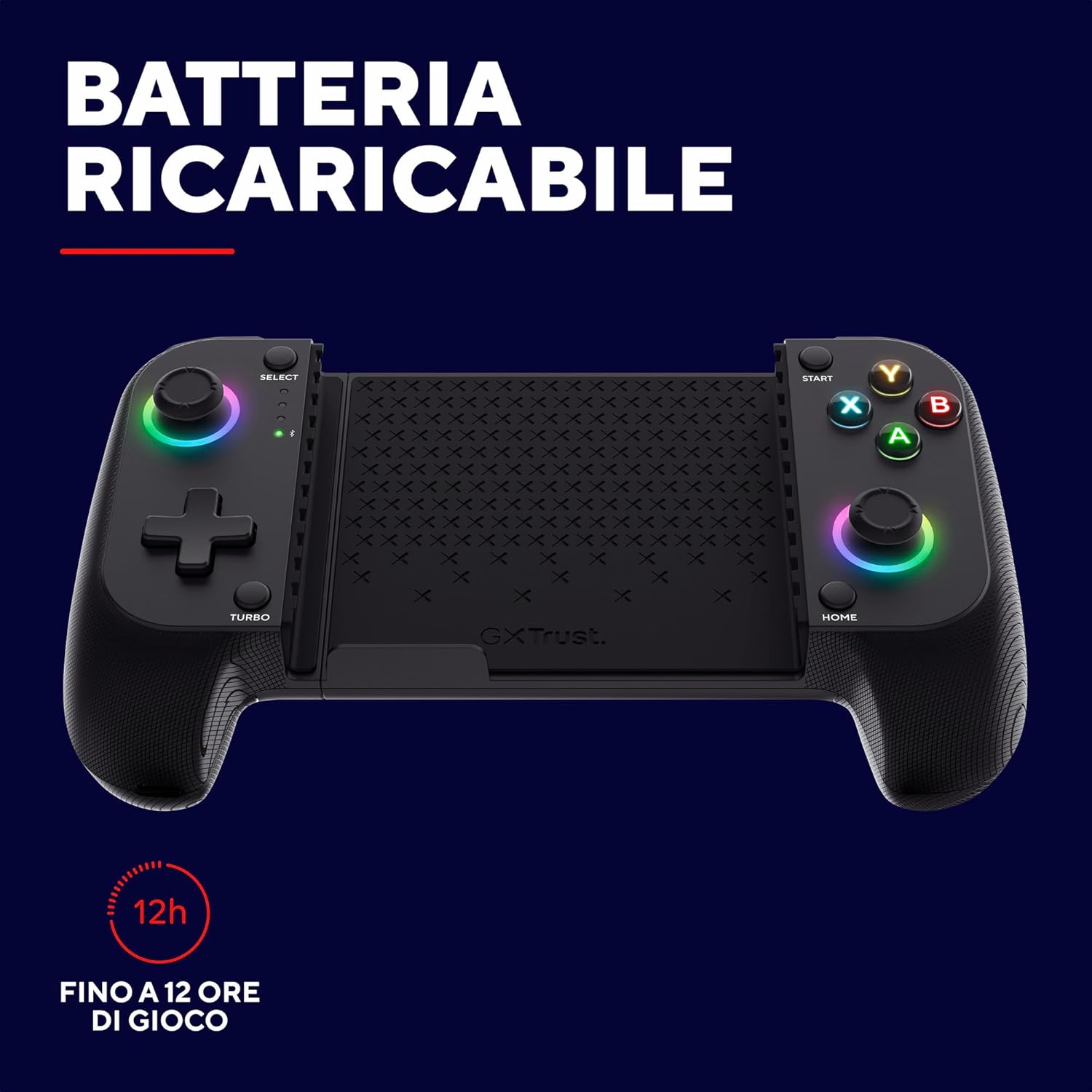
Image: The GXTrust Mylox Controller with an overlay indicating up to 12 hours of playtime on a single charge.
Pairing via Bluetooth 5.0
- Ensure your smartphone or compatible device has Bluetooth enabled.
- Press and hold the Bluetooth pairing button on the GXTrust Mylox controller until the indicator light begins to flash rapidly.
- On your device, search for available Bluetooth devices and select 'GXTrust Mylox' from the list.
- După conectare, indicatorul luminos de pe controler va deveni continuu.
Montarea telefonului smartphone
The controller features a rubberized spring clamp designed to securely hold smartphones. Gently extend the clamp and insert your smartphone. The clamp accommodates devices up to 17cm in length, even with most phone cases attached.

Image: The GXTrust Mylox Controller with a smartphone mounted, illustrating its adjustable clamp that fits phones up to 17cm, even with a case.
Instrucțiuni de operare
Pornire/Oprire
- To power on, press the Home button.
- To power off, press and hold the Home button for a few seconds until the controller shuts down.
Compatibilitate cu mai multe platforme
The Mylox controller offers broad compatibility for various gaming scenarios:
- Jocuri mobile: Play native iOS and Android games that support external controllers.
- Jocuri în cloud: Compatible with services like Xbox Cloud Gaming, Nvidia GeForce Now, and Amazon Luna.
- Redare de la distanță: Utilize PlayStation Remote Play and Xbox Remote Play to stream console games to your smartphone.
- PC Streaming: Stream PC games to your smartphone using compatible applications.
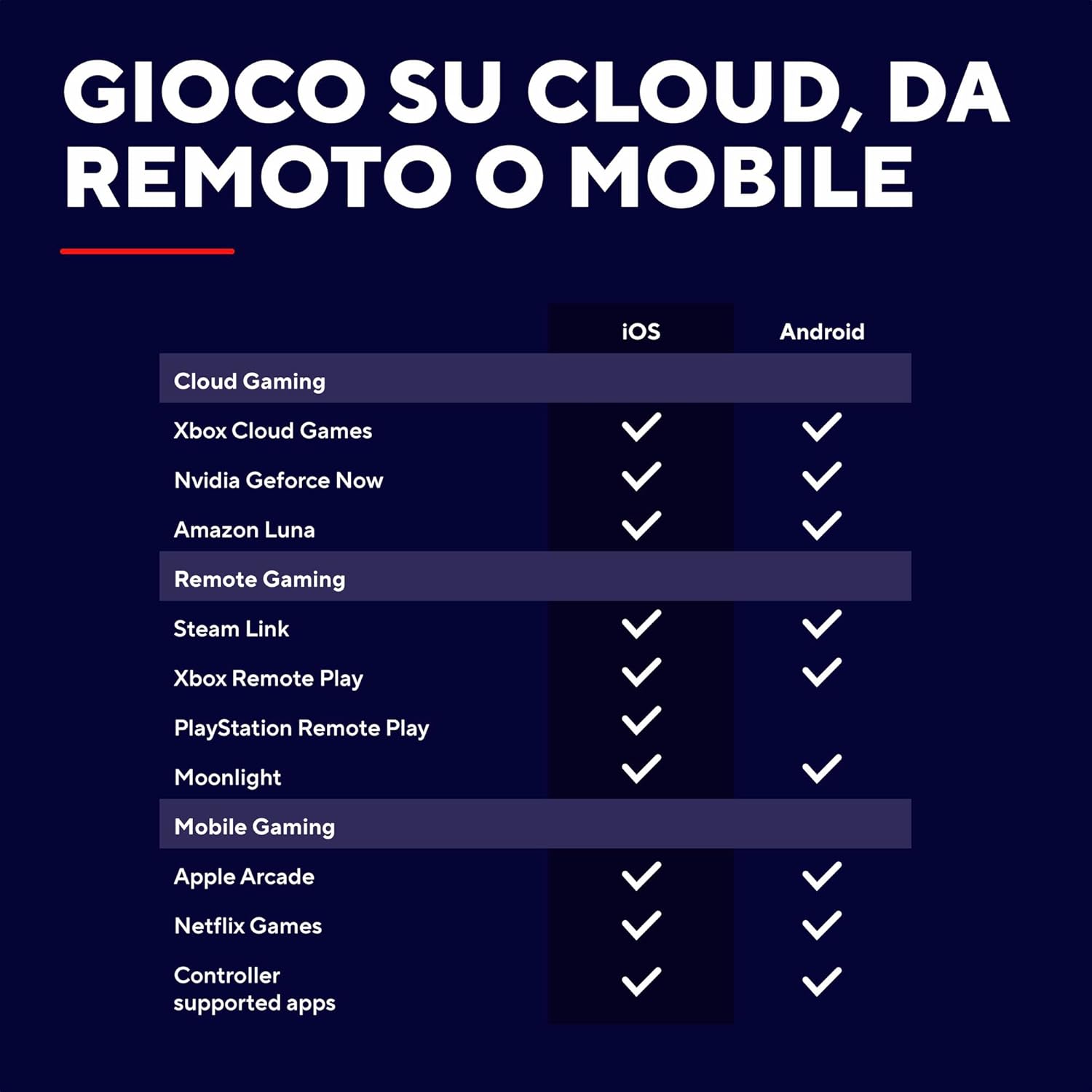
Image: A compatibility chart detailing support for various cloud gaming, remote gaming, and mobile gaming platforms on both iOS and Android devices.

Image: Icons indicating multi-platform compatibility for PC, PlayStation, Xbox, and Mobile, with a note that remote applications are required for console play.
Immersive Features
- Feedback dublu cu vibrații: Experience enhanced immersion with haptic feedback that responds to in-game actions.
- Iluminare LED RGB: The joysticks feature customizable RGB LED lighting. Refer to the quick start guide for instructions on changing lighting modes or turning them off.

Image: The GXTrust Mylox Controller in use with a smartphone, showcasing the active RGB LED lighting on the joysticks during gameplay.

Image: A person smiling and actively playing a mobile game using the GXTrust Mylox Controller, demonstrating low-latency gaming.
Întreţinere
Curatenie
To clean the controller, use a soft, dry, lint-free cloth. Avoid using abrasive cleaners, solvents, or harsh chemicals, as these can damage the surface and internal components.
Depozitare
When not in use, store the controller in a cool, dry place away from direct sunlight and extreme temperatures. Utilize the included fabric carrying case to protect the controller from dust and scratches.
Depanare
- Controller not connecting or disconnecting frequently:
Ensure Bluetooth is enabled on your device and the controller is within range. Verify the controller is sufficiently charged. Try unpairing and re-pairing the controller with your device. Check for any potential wireless interference from other devices. - Întârziere la introducerea datelor sau răspuns întârziat:
Confirm that the controller is connected via Bluetooth 5.0. Reduce the distance between the controller and your device. Close any unnecessary background applications on your smartphone that might consume resources. - Butoanele sau joystick-urile nu răspund:
Ensure the controller is powered on and properly paired. Check for any physical obstructions or debris around the buttons or joysticks. If the issue persists, try resetting the controller (refer to the quick start guide for specific reset instructions). - Durată scurtă de viață a bateriei:
Ensure the controller is fully charged before use. Reduce the intensity or turn off the RGB LED lighting to conserve battery power. Battery performance may degrade over time with prolonged use. - Controller not working with a specific game:
Not all mobile games natively support external controllers. Check the game's settings or the developer's information to confirm controller compatibility. Some games may require specific controller mapping or third-party applications. Note that some games like Call of Duty Mobile or FIFA Mobile may have limited or no support for this controller.
Specificații
| Marca | GXTrust |
| Numele modelului | GXT 735 Mylox |
| Tehnologia de conectivitate | Bluetooth 5.0 |
| Dispozitive compatibile | Android, iOS Smartphones, PlayStation 5 (via Remote Play), Xbox One (via Remote Play), Xbox Series X (via Remote Play), PC (via Streaming) |
| Durata de viață a bateriei | Până la 12 ore |
| Caracteristici speciale | Dual Vibration Feedback, RGB LED Lighting, Adjustable Spring Clamp (fits phones up to 17 cm) |
| Numărul de butoane | 12 |
| Greutatea articolului | 220 grame |
| Dimensiuni articol (L x l x H) | 10.6 x 18.5 x 4.6 cm |
Informații despre garanție
The GXTrust Mylox Wireless Mobile Controller comes with a Garanție de 2 an de la producător de la data achiziției. Această garanție acoperă defectele de materiale și de fabricație în condiții normale de utilizare. Nu acoperă daunele cauzate de utilizarea necorespunzătoare, accidente, modificări neautorizate sau uzură normală. Vă rugăm să păstrați dovada achiziției pentru reclamațiile în garanție.
Sprijin
For additional support, frequently asked questions, or to download the latest drivers and software, please visit the official GXTrust website. If you require further assistance or have specific questions not covered in this manual, please contact GXTrust customer support through their website's contact section.
Puteți găsi mai multe informații și asistență la GXTrust Brand Store.


