Introducere
The Qolsys QZ2131-840 700 Series Z-Wave Plus Outlet Plugin-In Module is designed to provide advanced control over your electrical devices. This module integrates with Z-Wave compatible hubs and smartphone applications, enabling remote management of plugged-in appliances, lighting, and other electronics. It offers a convenient solution for automating and optimizing power usage within a smart home environment.
Produs terminatview
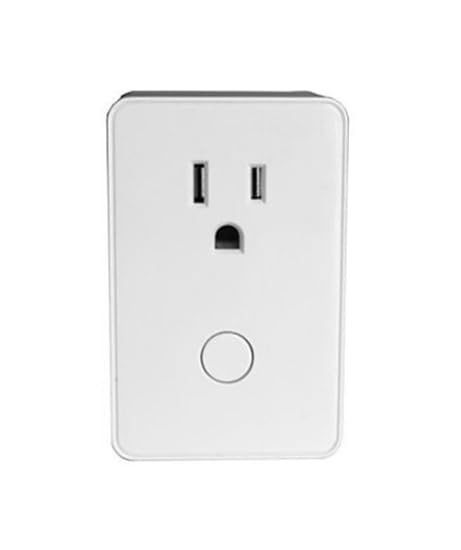
Figura 1: Față view of the QZ2131-840 Z-Wave Plus Outlet Plugin-in Module. The module is white, rectangular, and features two standard three-prong electrical outlets on the upper half and a circular control button on the lower half. This design allows for easy integration into existing wall outlets while providing smart control capabilities.
The QZ2131-840 module is a compact, plug-in device that converts any standard electrical outlet into a smart, controllable outlet. It utilizes Z-Wave Plus technology for reliable communication within your smart home network. The module features a simple design for easy installation and operation.
Înființat
- Despachetați modulul: Carefully remove the QZ2131-840 module from its packaging.
- Alegeți o locație: Select a standard electrical outlet where you wish to control a device. Ensure the outlet is easily accessible.
- Plug In the Module: Insert the QZ2131-840 module directly into the chosen wall outlet.
- Conectați-vă dispozitivul: Plug the appliance or device you wish to control into the outlet on the front of the QZ2131-840 module.
- Pair with Z-Wave Hub:
- Put your Z-Wave compatible hub into inclusion/pairing mode. Refer to your hub's instruction manual for specific steps.
- Press the circular button on the front of the QZ2131-840 module once. The LED indicator on the module will flash to indicate pairing mode.
- Once successfully paired, the LED indicator will stop flashing and remain solid, or turn off, depending on the module's status.
- Funcționalitate de testare: Use your Z-Wave hub or smartphone app to turn the connected device on and off to confirm successful setup.
Instrucțiuni de operare
The QZ2131-840 module offers both manual and remote control options for connected devices.
Control manual
- Comutare activată / dezactivată: Press the circular button on the front of the module once to manually toggle the power to the connected device. Each press will switch the state (on to off, or off to on).
Remote Control via Z-Wave Hub
- Aplicație pentru smartphone: Use the dedicated smartphone application associated with your Z-Wave hub to remotely turn the module on or off.
- Automatizare și programare: Configure schedules, scenes, and automation rules through your Z-Wave hub to automatically control the connected device based on time, events, or other smart home triggers. This feature helps in energy management.
- Control vocal: If your Z-Wave hub supports integration with voice assistants (e.g., Amazon Alexa, Google Assistant), you can control the module using voice commands.
Întreţinere
The QZ2131-840 module requires minimal maintenance to ensure optimal performance.
- curatenie: Disconnect the module from the power outlet before cleaning. Use a soft, dry cloth to wipe the exterior. Do not use liquid cleaners or abrasive materials.
- Actualizări firmware: Periodically check your Z-Wave hub's application for any available firmware updates for the QZ2131-840 module. Follow the hub's instructions for applying updates.
- Conditii de mediu: Ensure the module is used within its specified operating temperature and humidity ranges. Avoid exposing it to extreme temperatures, direct sunlight, or moisture.
Depanare
| Problemă | Cauza posibila | Soluţie |
|---|---|---|
| Module not responding to Z-Wave commands. | Module is out of range of the Z-Wave hub, or not properly paired. |
|
| Connected device does not turn on/off. | Device is not properly plugged in, or the device itself is faulty. |
|
| Module LED indicator is not lit. | No power to the module. |
|
Specificații
- Model: QZ2131-840
- Tehnologie: Z-Wave Plus 700 Series
- Putere de intrare: AC standard
- Ieșire: Single controllable outlet
- Producător: Qolsys
- ASIN: B0DVB7B7R1
- Țara de origine: STATELE UNITE ALE AMERICII
Informații despre garanție
This product is covered by a standard manufacturer's warranty. For specific warranty terms and conditions, please refer to the documentation provided with your purchase or contact the manufacturer directly. Protection plans may also be available for extended coverage.
Nota: Protection plans mentioned in the product listing (e.g., 3-Year Protection Plan, 4-Year Protection Plan) are typically offered by third-party providers and are separate from the manufacturer's warranty.
Sprijin
For technical assistance, troubleshooting beyond this manual, or general inquiries, please contact the manufacturer or your product retailer.
- Producător: Qolsys
- Resurse online: Vizitați site-ul oficial Qolsys website pentru actualizări de produse, întrebări frecvente și documentație de asistență suplimentară.
- Suport pentru comercianții cu amănuntul: Contact the seller (NATO Security) for purchase-related inquiries or initial support.


