
1. Introducere
Mulțumesc pentru achizițieasing the VIGORWORK 7-inch Car Stereo MP5 Player. This device is designed to enhance your in-car entertainment and connectivity with its high-definition touchscreen, Bluetooth capabilities, mirror link function, and various media playback options. Please read this manual thoroughly before installation and operation to ensure proper use and to maximize your enjoyment of the product.
2. Informații de siguranță
Pentru a preveni vătămările corporale sau deteriorarea unității, vă rugăm să respectați următoarele măsuri de siguranță:
- Instalare profesională recomandată: Due to the complexity of car electrical systems, professional installation is highly recommended. Incorrect wiring can cause damage to the unit or the vehicle.
- Alimentare electrică: Asigurați-vă că unitatea este conectată la o sursă de alimentare de 12V CC cu împământare negativă.
- Evitați apa și umezeala: Nu expuneți unitatea la apă sau umiditate excesivă.
- Temperatură: Operați unitatea în limitele temperaturilor normale de funcționare ale vehiculului.
- Siguranța la conducere: Nu utilizați unitatea într-un mod care vă distrage atenția de la condus. Acordați întotdeauna prioritate siguranței rutiere.
- Ventilare: Asigurați o ventilație adecvată în jurul unității pentru a preveni supraîncălzirea.
- Înlocuirea siguranței: When replacing a fuse, ensure the new fuse has the correct amprating erage.
3. Conținutul pachetului
Vă rugăm să verificați pachetul pentru următoarele articole:
- VIGORWORK 7-inch Car Stereo MP5 Player Unit
- Cablaj de alimentare
- Remote Control (Steering Wheel Controller)
- Manual de utilizare
- Mounting Brackets/Screws (if included)
4. Produs terminatview
The VIGORWORK Car Stereo MP5 Player features a 7-inch HD digital touchscreen with a 1024*600 resolution, supporting 1080P video playback. It offers a range of functionalities for an enhanced driving experience.
Caracteristici cheie:
- Ecran tactil HD: 7-inch display with 1024*600 resolution for clear visuals and 1080P video support.
- Conectivitate Bluetooth: Hands-free calling, Bluetooth music streaming, and voice navigation support.
- Legătură oglindă: Two-way connection for Android phones and one-way projection for Apple phones.
- Control la volan: Compatible with included steering wheel controller for easy operation.
- Reverse Image Support: Comută automat în spate view when reversing (requires optional camera).
- Multiple Media Playback: Supports USB, AUX, TF card, and various audio/video formats (APE, FLAC, WAV, DIS, MP3, AVI, MP4, etc.).
- Radio FM: High-performance digital tuning with 18 radio station presets.
- Personalizare sunet: Electronic volume, treble, bass, balance, and sound field adjustments with various EQ modes.
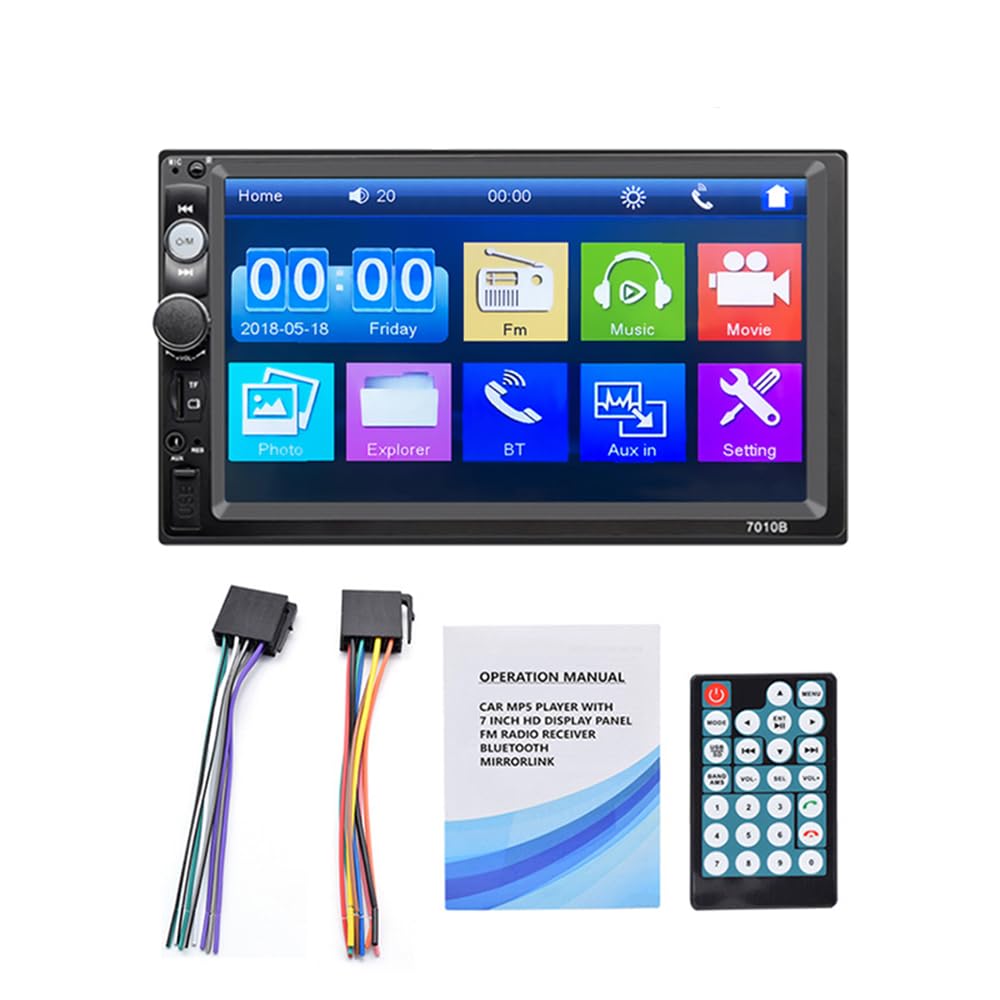
Figure 4.1: The 7-inch car stereo displaying video content, highlighting its 1024x600 resolution and multi-format playback capabilities.
5. Instalare și configurare
This section provides general guidelines for installing your car stereo. Due to variations in vehicle models, specific wiring and mounting procedures may differ. If you are unsure, consult a professional installer.
5.1 Schemă de cablare (generalități)
Refer to the wiring diagram provided with your unit for specific connections. A typical setup includes:
- Sârmă galbenă: 12V constant (pozitiv baterie)
- Fir roșu: ACC (Accessory/Ignition Switch 12V)
- Sârmă neagră: Masă (masă șasiu)
- Orange/Brown Wire: Illumination (Connect to vehicle's illumination wire)
- Sârmă albastră: Antena de putere/AmpPornire de la distanță a lifier-ului
- Cabluri difuzoare: Conectați la difuzoarele corespunzătoare ale vehiculului (de exemplu, Alb/Alb-Negru pentru Față Stânga, Gri/Gri-Negru pentru Față Dreapta, Verde/Verde-Negru pentru Spate Stânga, Mov/Mov-Negru pentru Spate Dreapta).
- Reverse Gear Wire: Connect to the vehicle's reverse light circuit for automatic camera switching.
- Intrare video: Pentru spate view aparat de fotografiat.
5.2 Montarea unității
- Remove the existing car stereo from your dashboard.
- Connect the wiring harness from the new unit to your vehicle's wiring. Ensure all connections are secure.
- Slide the new stereo into the dashboard opening. Secure it using the provided mounting brackets and screws.
- Reasamblați ornamentul bordului.
- Testați toate funcțiile înainte de finalizarea instalării.
6. Instrucțiuni de utilizare
6.1 Operare de bază
- Pornire/Oprire: Press the power button or turn the ignition key to ACC/ON.
- Controlul volumului: Use the rotary knob or steering wheel controls to adjust volume.
- Navigare prin meniu: Tap icons on the touchscreen to access different functions (Radio, Bluetooth, USB, AUX, Settings, etc.).
6.2 Conectivitate Bluetooth
Connect your mobile phone via Bluetooth for hands-free calls and audio streaming.
- On the stereo, navigate to the Bluetooth menu.
- Activați Bluetooth pe telefonul mobil și căutați dispozitivele disponibile.
- Select "Car Radio" or a similar name from the list on your phone.
- Confirmați codul de asociere dacă vi se solicită.
- Once connected, you can make/receive calls and play music through the car stereo.

Figure 6.1: The Bluetooth interface of the car stereo, demonstrating hands-free call functionality and music streaming.
6.3 Funcția de legătură în oglindă
Mirror Link allows you to display your phone's screen on the car stereo. Use a USB data cable for connection.
- Pentru telefoanele Android: Supports two-way connection (control from stereo or phone). Connect your phone via USB and follow on-screen prompts to enable USB debugging and allow screen mirroring.
- Pentru telefoanele Apple: Supports one-way screen projection (view only, control from phone). Connect your iPhone via USB and allow screen mirroring when prompted.

Figure 6.2: Illustration of the Mirror Link feature, showing how mobile phones connect to the car stereo for screen mirroring.
6.4 Funcționarea radioului FM
Accesați funcția radio FM pentru a asculta posturile preferate.
- Auto scanare: Press the "SCAN" button to automatically search and save available stations.
- Reglare manuală: Folosiți butoanele săgeată pentru a regla fin frecvențele.
- presetări: Tap on a preset number (1-6) to recall a saved station. To save a station, tune to it and then press and hold a preset number.

Figure 6.3: The FM radio interface, displaying frequency tuning and station preset options.
6.5 Media Playback (USB, AUX, TF Card)
The unit supports various media inputs for audio and video playback.
- USB: Insert a USB flash drive into the USB port. The unit will automatically switch to USB mode or you can select it from the main menu.
- Card TF: Insert a TF (Micro SD) card into the designated slot. The unit will detect the card and allow playback.
- AUX: Connect an external audio device (e.g., MP3 player) to the AUX input using a 3.5mm audio cable. Select AUX mode from the main menu.

Figure 6.4: Visual representation of the four available playback modes: USB flash disk, AUX input, Bluetooth, and TF Card.
6.6 Comandă la volan
Use the provided steering wheel controller for convenient operation without taking your hands off the wheel.
- Răspuns / închide: Manage phone calls.
- Sări peste piese: Navigate to the next or previous song.
- Reglarea volumului: Increase or decrease the audio volume.

Figura 6.5: Un example of a steering wheel controller, illustrating its functions for managing calls, changing tracks, and adjusting volume.
6.7 Funcția camerei video pentru mers înapoi
Dacă este prevăzută o opțiune spate view camera is connected and properly wired, the stereo will automatically display the reverse image when the vehicle is shifted into reverse gear.

Figure 6.6: The car stereo screen automatically switching to a reverse image with parking guidelines when the vehicle is in reverse gear.
7. Întreținere
- Curățarea ecranului: Folosiți o lavetă moale și uscată pentru a șterge ecranul tactil. Pentru pete persistente, ștergeți ușorampClătiți laveta cu apă sau cu un produs de curățare a ecranelor conceput pentru electronice. Evitați substanțele chimice dure.
- Curatenie generala: Păstrați unitatea curată de praf și resturi. Folosiți o perie moale sau aer comprimat pentru a curăța zona din jurul butoanelor și porturilor.
- Evitați temperaturile extreme: Prolonged exposure to extreme heat or cold can affect the unit's performance and lifespan.
8. Depanare
| Problemă | Cauza posibila | Soluţie |
|---|---|---|
| Fără putere | Cablare incorectă; Siguranță arsă; Conexiune slăbită. | Check power and ground connections. Inspect and replace fuses if necessary. Ensure all wires are securely connected. |
| Nici un sunet | Volume too low; Mute function active; Incorrect speaker wiring; Faulty speakers. | Increase volume. Check if mute is active. Verify speaker connections. Test with known good speakers. |
| Bluetooth nu se conectează | Bluetooth not enabled on phone/stereo; Device not discoverable; Incorrect pairing process. | Ensure Bluetooth is on for both devices. Make sure the stereo is in pairing mode. Delete previous pairings and try again. |
| Legătura în oglindă nu funcționează | Incorrect USB cable; USB debugging not enabled (Android); Phone not compatible. | Use a high-quality USB data cable. Enable USB debugging in Android developer options. Ensure your phone model supports Mirror Link with the unit. |
| Spate view camera nu afișează | Camera nu este conectată; Firul de declanșare inversă nu este conectat; Cameră defectă. | Check camera video input and power connections. Ensure the reverse trigger wire is correctly connected to the vehicle's reverse light circuit. |
9. Specificații
| Caracteristică | Detaliu |
|---|---|
| Dimensiunea ecranului | 7-inch HD Digital Touch Screen |
| Rezoluţie | 1024*600 |
| Redare video | Supports 1080P video |
| Bluetooth | Hands-free calls, music player, voice navigation |
| Link în oglindă | Android (two-way), Apple (one-way) |
| Formate audio | APE, FLAC, WAV, DIS, MP3, WMA, ACC, OGG, RA, AC3, MP2, AMR |
| Formate video | AVI, MP4, FLV, PMP, RM, RMVB, MPG |
| Formate de imagine | JPEG |
| Port USB | High-speed USB 2.0, supports high current output for phone charging |
| Slot pentru carduri TF | Da |
| Intrare AUX | Da |
| Radio FM | Automatic scanning, 18 station storage |
| Alimentare electrică | 12V DC (împământare negativă) |
| Dimensiuni (aprox.) | 180 mm (l) x 104 mm (înălțime) x 63 mm (d) |

Figure 9.1: Product dimensions of the VIGORWORK 7-inch Car Stereo, indicating width, height, and depth.
10. Garanție și asistență
VIGORWORK products are designed and manufactured to the highest quality standards. For warranty information and technical support, please refer to the warranty card included with your product or contact your retailer. Keep your purchase receipt as proof of purchase.
For further assistance, please visit the VIGORWORK official website-ul sau contactați serviciul pentru clienți.