
1. Introducere
Thank you for choosing the UNITOPSCI 10.1 Inch Single Din Adjustable Car Stereo. This advanced car multimedia player is designed to enhance your driving experience with its versatile features, including Wireless CarPlay, Android Auto, Bluetooth 5.2, and a large IPS floating touchscreen. This manual provides detailed instructions for installation, operation, maintenance, and troubleshooting to ensure optimal performance and user satisfaction.

Figure 1.1: UNITOPSCI 10.1 Inch Single Din Adjustable Car Stereo with its main components.
2. Caracteristicile produsului
The UNITOPSCI Car Stereo is equipped with a range of features designed for convenience and entertainment:
- 10.1 Inch Touchscreen MP5 Car Radio, Detachable Screen & Touch Button Design: Features a floating and adjustable design, allowing for 30° front/rear tilt, 30° left/right tilt, and 5cm vertical movement for optimal viewing. The touch button design simplifies volume, mute, and power control.
- Wireless CarPlay & Android Auto, Mirror Link: Seamlessly connect your smartphone via wireless/wired BT/WIFI or USB for access to navigation, contacts, and media. The Mirror Link function allows screen mirroring from your phone to the car radio display.
- Bluetooth 5.2, EQ Sound: Advanced Bluetooth 5.2 ensures faster and more stable connections for hands-free calls and music streaming. Multi-band EQ mode allows for personalized audio customization.
- You-tube Online Video, Lossless Sound Quality: Supports online video streaming via phone hotspot. Enjoy pure, uncompressed sound with FLAC mode support.
- FM/AM Radio, USB & TF & AUX-IN: Digital stereo FM/AM radio with 30 preset stations (18 FM, 12 AM) and memory function. Dual USB ports for playback and 5V_2A phone charging, plus TF card and AUX-IN support.
- Spate View Camera, SWC: Automatic display of reversing video when in reverse gear. Includes a 12-LED backup camera with 170° wide angle for safer parking. Steering Wheel Control (SWC) compatibility for convenient function access.

Figure 2.1: Wireless CarPlay, Android Auto, and Mirrorlink capabilities.
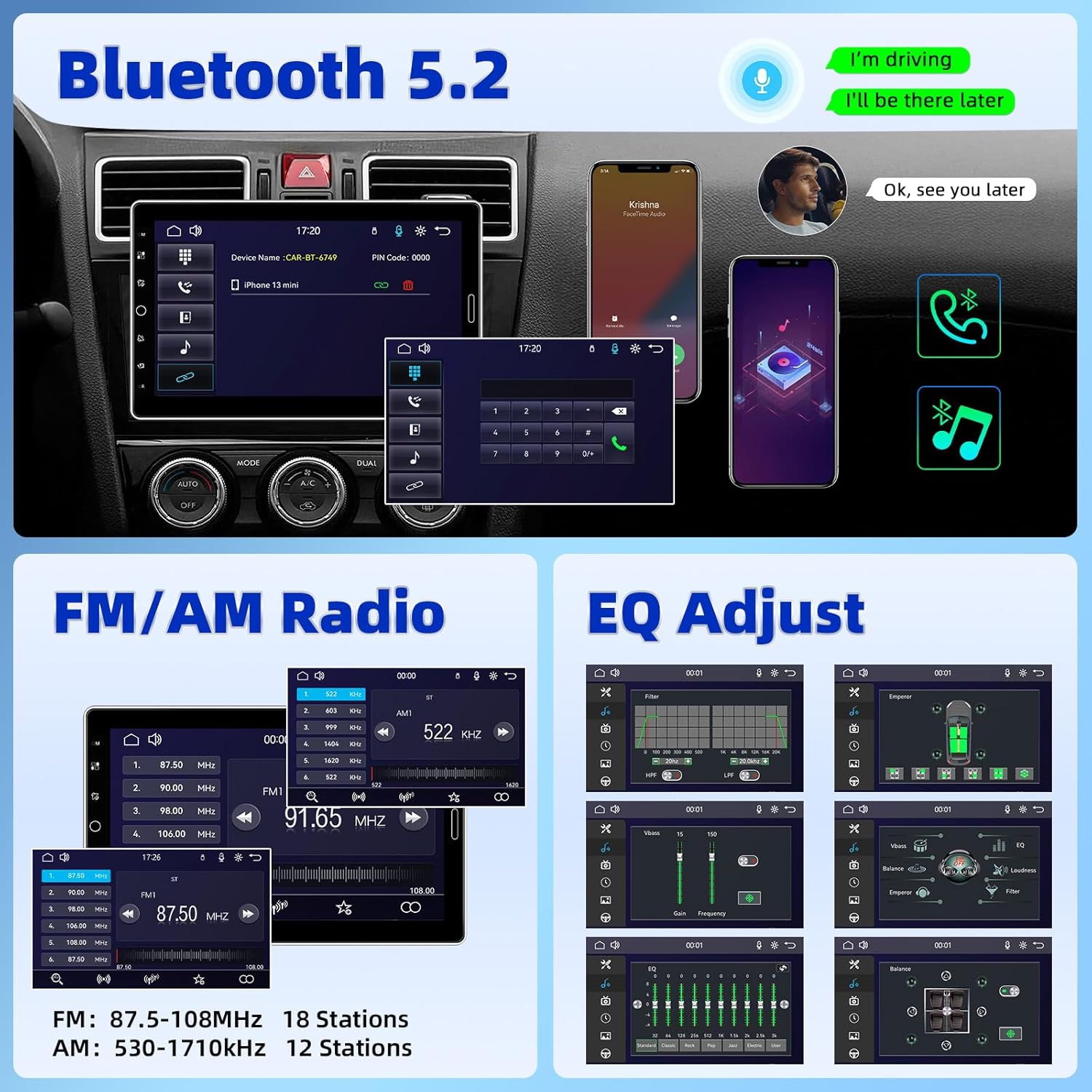
Figure 2.2: Bluetooth 5.2, FM/AM Radio, and EQ Adjustment options.

Figure 2.3: Support for YouTube Online Video playback.

Figure 2.4: Detachable and adjustable 10.1 Inch IPS Touchscreen.
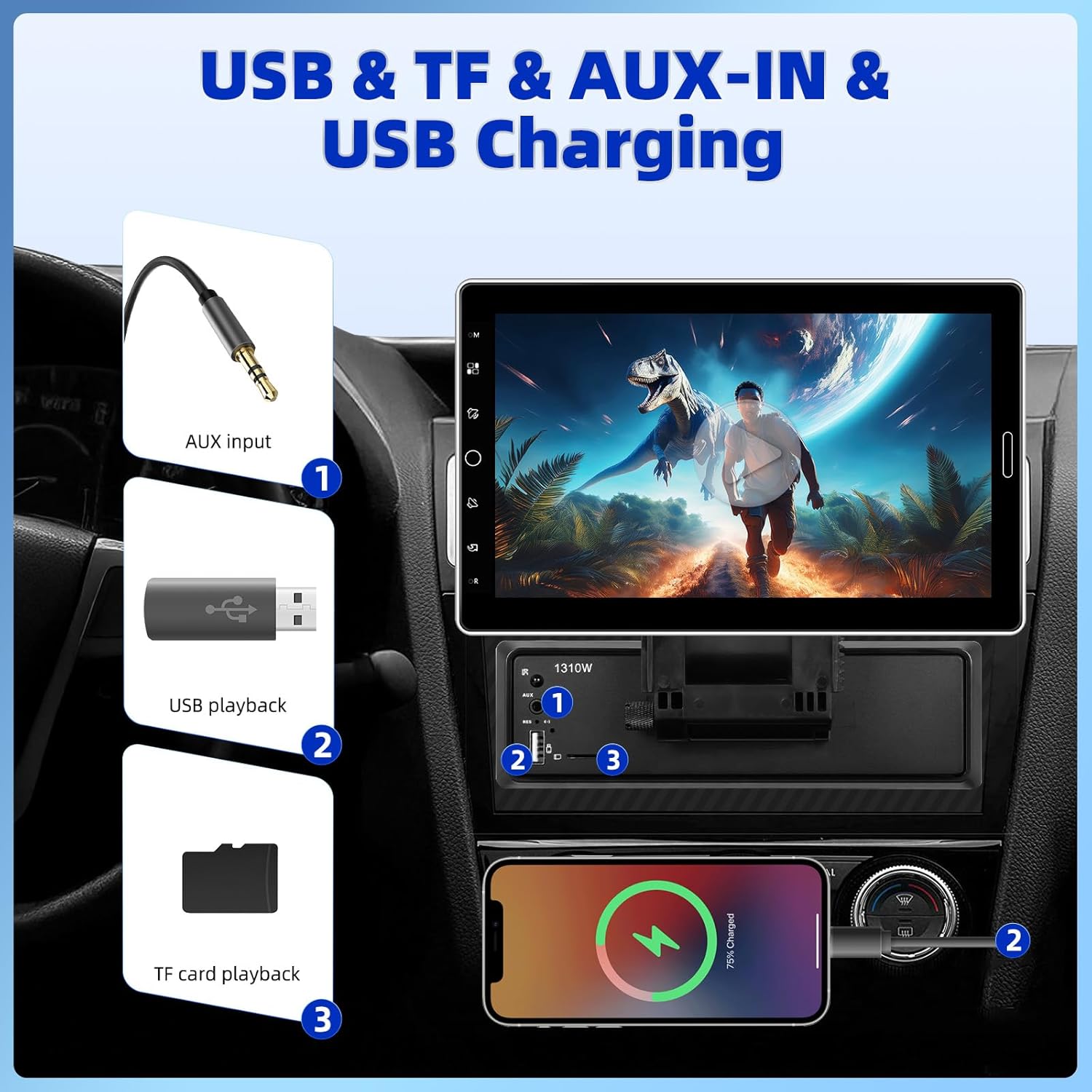
Figure 2.5: USB, TF, AUX-IN, and USB Charging ports.
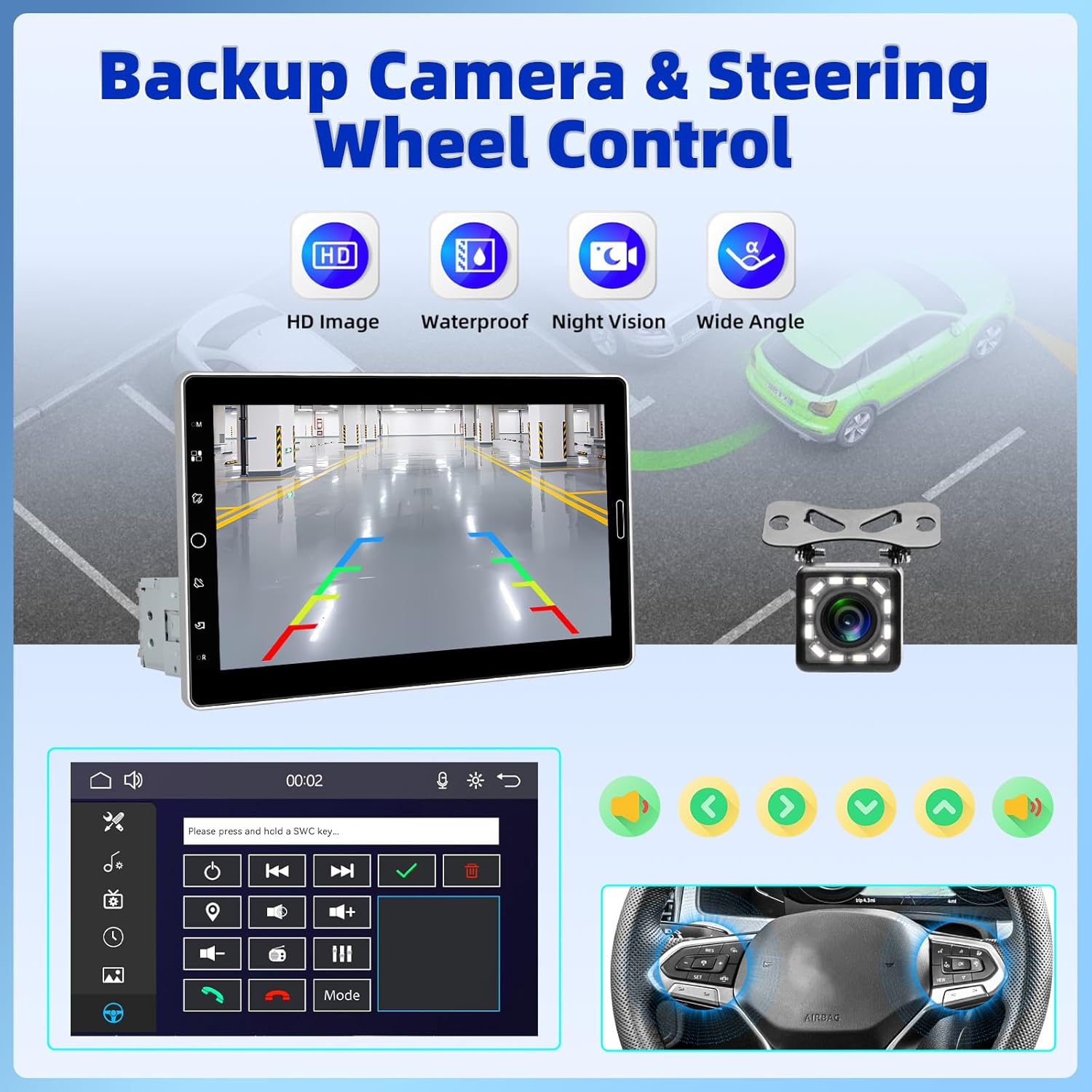
Figure 2.6: Backup Camera and Steering Wheel Control (SWC) functionality.
3. Ce se află în cutie
Upon opening your product package, please verify that all the following items are included:
- 1 x Player MP5 auto (unitate principală)
- 1 x cablu de alimentare
- 1 x Cablu claxon
- 1 x Microfon
- 1 x suport de montare
- 1 x Manual de utilizare
- 1 x 12 LEDs Backup Camera

Figure 3.1: Product Size and Packing List overview.
4. Configurare și instalare
Installing the UNITOPSCI Car Stereo requires careful wiring and mounting. Due to the complexity of car audio systems and varying vehicle models, professional installation is highly recommended to ensure proper functionality and avoid damage to your vehicle or the stereo unit. If you choose to install it yourself, please refer to the detailed wiring diagrams and instructions provided in the included user manual.
Note: Some users have reported that wiring instructions may require prior experience with car radios. Pay close attention to wire colors and functions.
4.1 Montarea unității
- Ensure the single DIN slot in your vehicle is compatible with the stereo's dimensions.
- Use the provided mounting bracket to secure the main unit firmly into the dashboard.
- Attach the 10.1-inch display to the main unit, ensuring it clicks securely into place. Adjust the screen angle for optimal viewing.
4.2 Conexiuni de cablare
Connect the power cable, horn cable, microphone, and backup camera according to the wiring diagram in the dedicated user manual section. Ensure all connections are secure and properly insulated to prevent short circuits.
5. Instrucțiuni de utilizare
This section outlines the basic operation of your UNITOPSCI Car Stereo.
5.1 Pornire/Oprire și comenzi de bază
- Apăsați butonul de pornire de pe unitate pentru a o porni sau opri.
- Adjust volume using the touch buttons or steering wheel controls (if connected).
- The screen dimming option or screen-off feature can be accessed through the settings menu.
CarPlay wireless 5.2 și Android Auto
- Pentru conexiune wireless: Enable Bluetooth and Wi-Fi on your smartphone. On the car stereo, navigate to the CarPlay or Android Auto icon. Follow the on-screen prompts to pair your device.
- Pentru conexiune prin cablu: Connect your smartphone to the stereo's USB port using a compatible USB cable. The system should automatically detect and launch CarPlay or Android Auto.
- Once connected, you can access navigation, make calls, send messages, and play music directly from the stereo's interface.
5.3 Conectivitate Bluetooth
- Accesați setările Bluetooth de pe sistemul stereo.
- Enable Bluetooth on your phone and search for available devices. Select "UNITOPSCI" (or similar name) from the list.
- Confirm the pairing code on both devices. Once paired, you can make hands-free calls and stream audio.
5.4 Radio FM/AM
- Select the FM/AM radio application from the main menu.
- Use the scan function to automatically search and save available stations.
- Acordați manual frecvențele sau selectați dintre posturile presetate.
5.5 Media Playback (USB, TF, AUX-IN, Online Video)
- USB/TF: Insert your USB drive or TF card into the respective slot. The system will automatically detect and allow you to browse and play media files (audio, video, imagini).
- AUX-IN: Connect an external audio device to the AUX-IN port using a 3.5mm audio cable. Select the AUX input source on the stereo.
- Online Video (YouTube): Connect the stereo to your phone's hotspot. Open the YouTube application on the stereo to browse and stream videos.
5.6 Setări EQ
- Access the EQ settings from the audio menu.
- Adjust various frequency bands to customize your sound profile. Preset EQ modes are also available.

Figure 5.1: User Interface Display and Media Playback examples.
6. Întreținere
Întreținerea corespunzătoare asigură longevitatea și performanța optimă a sistemului stereo auto.
- Curățarea ecranului: Folosiți o lavetă moale, fără scame, pentru a șterge ușor ecranul tactil. Pentru petele persistente, ștergeți ușor.ampCurățați laveta cu apă sau cu un produs de curățare sigur pentru ecran. Evitați materialele abrazive sau substanțele chimice dure.
- Curatenie generala: Păstrați unitatea curată de praf și resturi. Folosiți o perie moale sau aer comprimat pentru a curăța orificiile de ventilație și porturile.
- Temperatură: Evitați expunerea unității la temperaturi extreme. Expunerea prelungită la lumina directă a soarelui sau la condiții de frig foarte scăzut poate afecta performanța și durata de viață.
- Conexiuni: Verificați periodic toate conexiunile cablurilor pentru a vă asigura că sunt sigure și fără coroziune.
7. Depanare
If you encounter issues with your UNITOPSCI Car Stereo, refer to the following common problems and solutions:
| Problemă | Cauza posibila | Soluţie |
|---|---|---|
| Unitatea nu pornește. | Lipsă alimentare cu energie electrică; Siguranță arsă; Cablare incorectă. | Check power cable connections. Inspect vehicle's fuse box and the unit's fuse. Verify wiring against the manual. |
| Fără sunet sau sunet distorsionat. | Speaker wires disconnected; Volume too low; Incorrect audio source. | Check speaker connections. Increase volume. Ensure correct audio input (Radio, USB, Bluetooth, AUX). Adjust EQ settings. |
| CarPlay/Android Auto nu se conectează. | Bluetooth/Wi-Fi off; Incorrect USB cable; Phone software issue. | Ensure phone's Bluetooth/Wi-Fi is on. Use original or certified USB cable. Restart phone and stereo. |
| Camera video pentru marșarier nu afișează. | Camera not connected; Reverse trigger wire not connected. | Verify camera cable connection to the stereo. Ensure the reverse trigger wire is correctly connected to the vehicle's reverse light circuit. |
| Comenzile de pe volan nu funcționează. | SWC wires not connected; SWC not configured. | Ensure SWC wires are correctly connected. Access the stereo's settings to configure steering wheel controls. |
If the problem persists after attempting these solutions, please contact UNITOPSCI customer support for further assistance.
8. Specificații
Detailed technical specifications for the UNITOPSCI 10.1 Inch Single Din Adjustable Car Stereo:
- Dimensiuni produs: 5.44 x 7.01 x 6.34 inchi (13.82 x 17.81 x 16.10 cm)
- Greutatea articolului: 2.2 lire sterline (1 kilogram)
- Număr de model: A4061A3
- Tehnologie de conectivitate: Auxiliar, Bluetooth, USB
- Tipul controlerului: Control manual
- Dispozitive compatibile: Smartphone, difuzor
- Tip conector: USB tip A
- Mod de ieșire audio: Mono
- Putere de iesire: 180 wați
- Dimensiunea ecranului: Ecran tactil IPS de 10.1 inchi
- Versiune Bluetooth: 5.2
- Frecvențe radio: FM: 87.5-108MHz (18 Stations), AM: 530-1710KHz (12 Stations)
9. Garanție și asistență
UNITOPSCI is committed to providing high-quality products and excellent customer service. Your car stereo comes with comprehensive support and warranty coverage:
- Replacement Availability: Replacements are available within 24 months of purchase.
- Răspuns rapid: Așteptați un răspuns la solicitările dumneavoastră în termen de 16 de ore.
- Asistență post-vânzare pe viață: Benefit from lifetime consultation and technical support.
- POLITICA DE RETURNARE: Enjoy a 60-day no-worry return period.
For any technical issues, questions, or support needs, please contact us directly:
E-mail: UNITOPSCI@126.com

Figure 9.1: UNITOPSCI Customer Support Information.