
UNITOPSCI A4034A3
UNITOPSCI 10.4 Inch Single Din Adjustable Vertical Car Stereo
Manual de utilizare
Model: A4034A3 | Brand: UNITOPSCI
1. Introducere
This manual provides detailed instructions for the installation, operation, and maintenance of your UNITOPSCI 10.4 Inch Single Din Adjustable Vertical Car Stereo. Please read this manual thoroughly before using the product to ensure proper function and safety.
Caracteristici cheie:
- 10.4 Inch IPS 1280*480 Vertical Touchscreen with Detachable & Adjustable Design
- Wireless CarPlay & Android Auto Support
- Bluetooth 5.2 pentru apeluri hands-free și streaming audio
- FM/AM/RDS Radio with EQ Adjustments
- USB & TF Card Playback and Charging
- Funcționalitatea Mirror Link
- Suport pentru spate View Camera and Steering Wheel Control (SWC)
- Seven Color Backlight Options

Figura 1.1: Pesteview of the UNITOPSCI 10.4 Inch Car Stereo with included backup camera and smartphone integration icons.
2. Ce se află în cutie
Vă rugăm să verificați conținutul coletului în raport cu lista de mai jos:
- 1 x Player MP5 auto
- 1 x cablu de alimentare
- 1 x Cablu claxon
- 1 x MIC
- 1 x suport de montare
- 1 x Manual de utilizare
- 1 x D-BUS Cable
- 1 x 12 LEDs Backup Camera
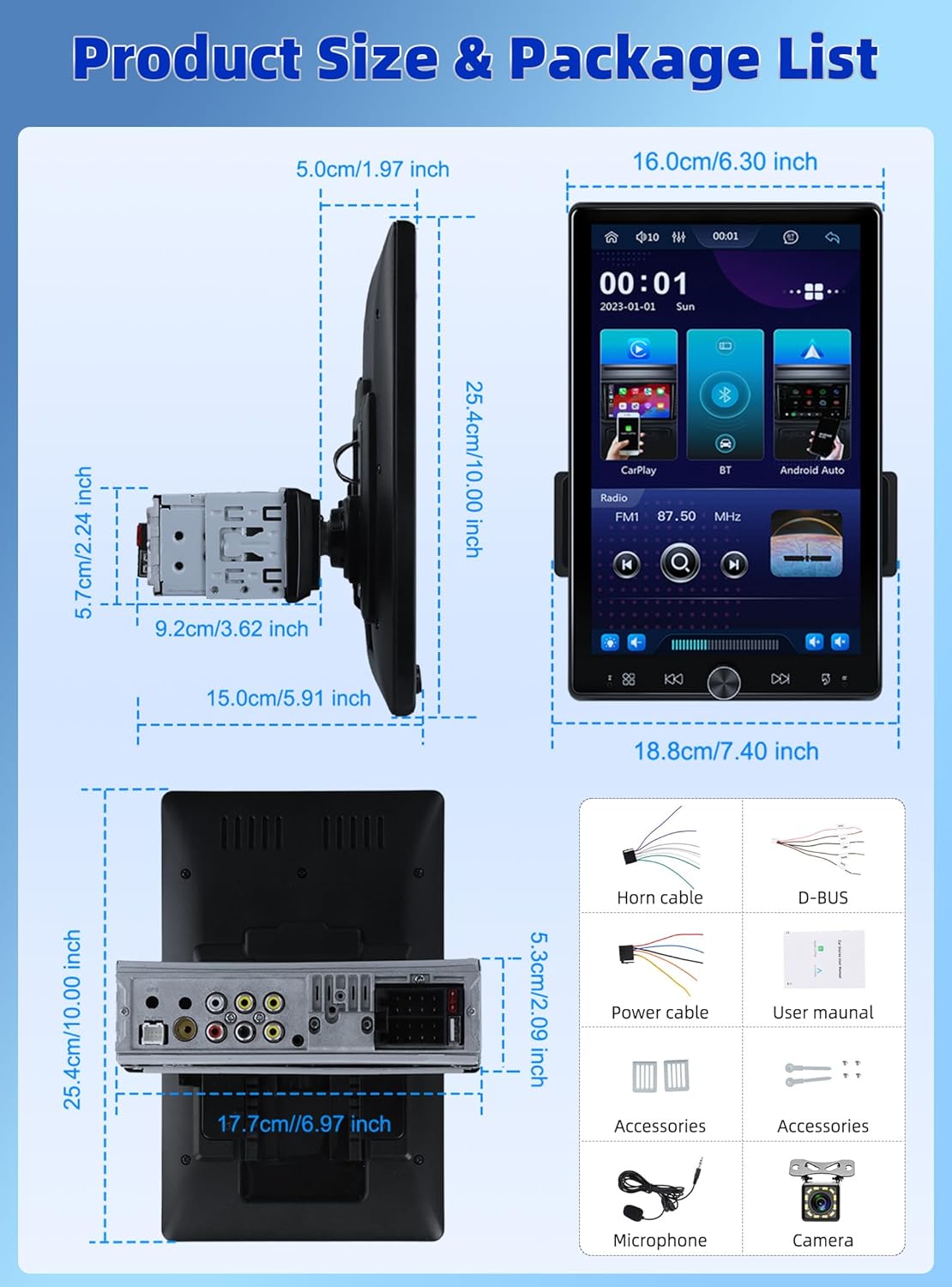
Figure 2.1: Diagram showing the dimensions of the car stereo and a visual representation of the included package contents.
3. Configurare și instalare
Proper installation is crucial for optimal performance. It is recommended to have this unit installed by a professional.
3.1 Reglarea ecranului
The 10.4-inch floating touchscreen is designed for adjustability to provide the best viewing angle. It can be adjusted in three directions:
- Approximately 30° front/rear tilt
- Approximately 30° left/right tilt
- Approximately 5cm vertical movement

Figure 3.1: Illustration of the adjustable and floating design of the 10.4-inch touchscreen, highlighting tilt and vertical movement capabilities.
3.2 Spate View Cablarea camerei
To enable the automatic display of the reversing video, connect the included rear view camera according to the diagram below. Ensure the trigger wire (labeled "back" or "reverse" on the power cable) is connected to the reversing light positive.
- The rear camera features 12 LED lights for clear images in various conditions.
- A 170° horizontal wide angle provides a comprehensive view.

Figure 3.2: Detailed wiring diagram for connecting the rear view camera to the car stereo system.
4. Instrucțiuni de utilizare
CarPlay wireless 4.1 și Android Auto
Connect your smartphone wirelessly or via USB to access CarPlay or Android Auto. This allows seamless integration of your phone's contacts, GPS navigation, music, and other applications directly on the car stereo screen.

Figure 4.1: Display showing the Wireless CarPlay and Android Auto interfaces, including voice assistant prompts.
4.2 Conectivitate Bluetooth 5.2
The unit features advanced Bluetooth 5.2 technology for faster and more stable connections. Use Bluetooth for hands-free calling and streaming music with lossless sound quality.

Figure 4.2: Screenshots illustrating the Bluetooth 5.2 interface for hands-free calls and music playback.
4.3 FM/RDS Radio and EQ
Enjoy digital stereo FM radio with 18 preset stations. The RDS function provides real-time road conditions, news, and weather. Customize your audio experience using the multi-band EQ mode.

Figure 4.3: Visuals of the FM/RDS radio interface and the adjustable equalizer settings.
4.4 USB & TF Card Functionality
The unit supports USB for media playback and phone charging. The TF card slot allows for playing various audio formats.
4.5 Knob Control and Backlight
A physical knob provides easy adjustment for volume, mute, and power on/off. The unit also features seven customizable backlight colors to match your car's interior.

Figure 4.4: Depiction of the various interfaces, USB charging capability, the adjustable knob, and the seven-color backlight feature.
4.6 Controlul volanului (SWC)
If your vehicle supports it, connect the SWC wires to control various functions (e.g., switch songs, adjust volume) directly from your steering wheel for convenience and safety.
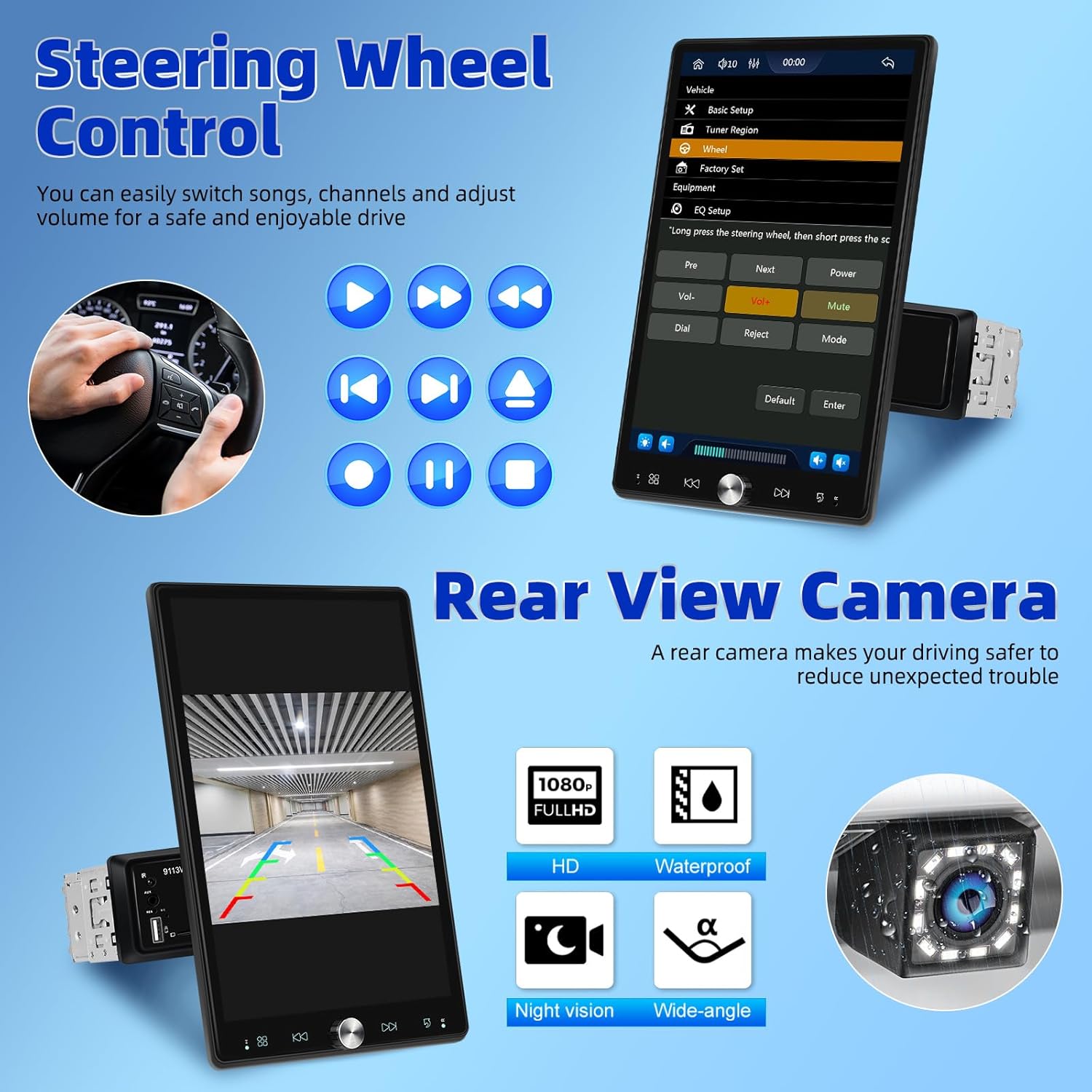
Figure 4.5: Illustration of steering wheel control functionality and the display of the rear view fluxul camerei.
4.7 Legătură în oglindă
The mirror link function allows you to display your smartphone's screen directly onto the car stereo's display.
5. Întreținere
Pentru a asigura longevitatea și performanța optimă a sistemului stereo auto, urmați aceste instrucțiuni de întreținere:
- curatenie: Folosiți o cârpă moale și uscată pentru a curăța ecranul și exteriorul. Pentru petele persistente, ștergeți ușor.ampClătiți laveta cu apă. Evitați substanțele de curățare abrazive sau solvenții.
- Temperatură: Nu expuneți unitatea la temperaturi extreme, la lumina directă a soarelui pentru perioade lungi de timp sau la umiditate ridicată.
- Ventilare: Asigurați-vă că orificiile de ventilație nu sunt blocate pentru a preveni supraîncălzirea.
- Putere: Disconnect power before performing any cleaning or maintenance.
6. Depanare
Dacă întâmpinați probleme cu sistemul stereo al mașinii, consultați următoarele probleme și soluții frecvente:
| Problemă | Cauza posibila | Soluţie |
|---|---|---|
| Fără putere | Conexiune de alimentare slăbită; Siguranță arsă | Check power cables and connections; Inspect and replace fuse if necessary. |
| Nici un sunet | Volum prea mic; Silențios activat; Problemă de cablare a difuzorului | Măriți volumul; Dezactivați funcția de dezactivare a sunetului; Verificați conexiunile difuzoarelor. |
| Bluetooth nu se conectează | Bluetooth off on device/stereo; Pairing mode not active | Ensure Bluetooth is enabled on both devices; Put stereo into pairing mode; Delete previous pairings and re-pair. |
| CarPlay/Android Auto nu funcționează | Incorrect USB cable; Software glitch; Phone compatibility | Use original or certified USB cable; Restart phone and stereo; Check phone's compatibility with CarPlay/Android Auto. |
| Camera din spate nu afișează | Incorrect wiring; Camera malfunction | Verify all camera wiring, especially the trigger wire; Test camera with another display if possible. |
If the problem persists after trying these solutions, please contact UNITOPSCI customer support.
7. Specificații
| Caracteristică | Caietul de sarcini |
|---|---|
| Dimensiunile produsului | 5.91 x 7.4 x 10 inchi (15.0 x 18.8 x 25.4 cm) |
| Greutatea articolului | 2.2 lire sterline (1 kilogram) |
| Numărul de model | A4034A3 |
| Tehnologia de conectivitate | Auxiliar, Bluetooth, USB |
| Tip controler | Control manual |
| Dispozitive compatibile | Smartphone, difuzor |
| Tip conector | USB tip A |
| Mod ieșire audio | Mono |
| Putere de ieșire | 180 wați |
| Dimensiunea ecranului | 10.4 inch |
| Rezoluția ecranului | 1280*480P |
8. Garanție și asistență
UNITOPSCI is committed to providing high-quality products and satisfactory services. Your product comes with the following support:
- Replacement Available: Within 24 Months of purchase.
- Răspuns rapid: Asistența pentru clienți își propune să răspundă în termen de 16 de ore.
- Lifetime After-Sales: Consult and Technical Support.
- POLITICA DE RETURNARE: 60-days No Worry to Return.
For online support, please contact us at: UNITOPSCI@126.com


Figure 8.1: Information regarding UNITOPSCI's customer support, warranty, and contact details.
Ask a question about this manual
Ask about setup, troubleshooting, compatibility, parts, safety, or missing instructions. Manuals+ will review the question and use this page’s manual context to help answer it.