
1. Introducere
Thank you for choosing the VIGORWORK 1 Din 12V Car Radio. This versatile audio system is designed to enhance your in-car entertainment experience, offering a wide range of features including DVD/VCD/CD/MP3 playback, Bluetooth connectivity for hands-free calls and audio streaming, FM radio, and support for USB, SD card, and AUX input. This manual provides detailed instructions to help you install, operate, and maintain your new car radio.
2. Conținutul pachetului
Please check the package contents carefully upon unpacking. If any items are missing or damaged, contact your retailer.
- VIGORWORK 1 Din Car Radio Unit
- Alimentarea și cablajul difuzoarelor
- Telecomanda
- Installation Removal Keys (2 pieces)
- Manual de utilizare

Image: Contents of the VIGORWORK car radio package, including the main unit, wiring, remote, removal keys, and manual.
3. Produs terminatview
Familiarize yourself with the main components and controls of your car radio.
Aspect panou frontal

Imagine: față view of the VIGORWORK car radio, highlighting the display, control knob, buttons (PWR, MUTE, BND, MOD, CLK), USB port, SD card slot, and AUX input.
- Power (PWR) / Mute: Turns the unit on/off or mutes/unmutes audio.
- Buton de volum: Adjusts audio volume. Press to select menu options.
- Band (BND): Switches between FM radio bands (FM1, FM2, FM3).
- Mode (MOD): Cycles through input sources (Radio, DVD/CD, USB, SD, AUX, Bluetooth).
- Ceas (CLK): Displays or sets the time.
- Port USB: Connect USB flash drives for media playback or charging.
- Slot pentru card SD: Introduceți carduri SD pentru redarea fișierelor media.
- Intrare AUX: Conectați dispozitive audio externe printr-o mufă de 3.5 mm.
- Slot pentru disc: Insert DVDs or CDs for playback.

Image: A smartphone screen displaying an incoming call next to the car radio, illustrating the intelligent Bluetooth call feature for convenient call management.

Image: A collage showing various car entertainment scenarios, including video playback, Bluetooth hands-free calling, listening to radio, and cell phone charging, demonstrating the unit's versatility.

Image: An infographic highlighting eight key advantages of the car radio, such as professional hardware, Bluetooth, DVD player, radio reception, U disk/SD card play, 52W*4 power output, USB car charger, and sound quality enhancement.
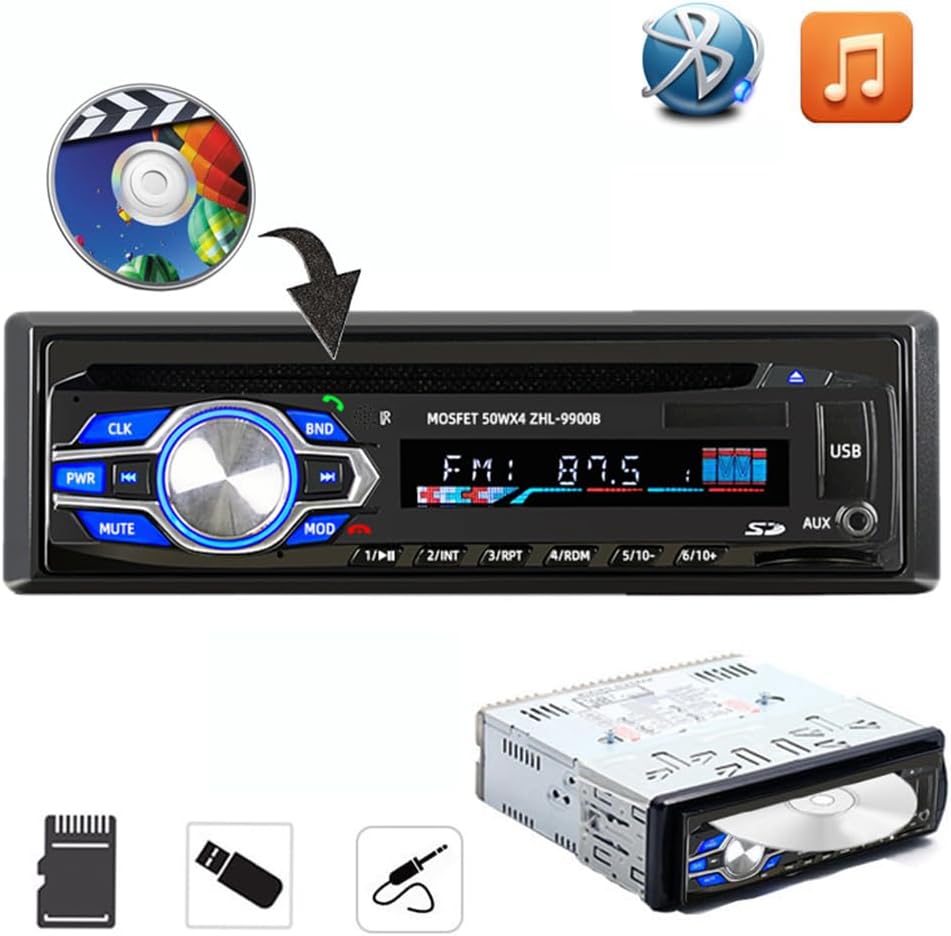
Image: The car radio unit with icons representing various media playback options, including CD/DVD, Bluetooth, and music notes, indicating its compatibility with different audio sources.

Image: The car radio unit with arrows pointing to the USB port and SD card slot, emphasizing its support for vast USB/SD storage equipment for convenient music playback.

Image: A hand holding a smartphone connected to the car radio via USB, illustrating the unit's ability to provide 5V USB charging for mobile devices.
Dimensiuni

Image: The car radio unit with dimensions labeled: 18.8cm (7.4 inches) width and 5.8cm (2.3 inches) height, indicating its standard 1 Din size.
4. Configurare și instalare
This car radio is designed for easy installation in most vehicles. It is recommended to have the installation performed by a qualified professional if you are unsure about the wiring or mounting process.
Pașii de instalare:
- Deconectați bateria: Înainte de pornire, deconectați borna negativă a bateriei vehiculului pentru a preveni scurtcircuitele.
- Eliminați unitatea veche: Scoateți cu grijă radioul auto existent de pe bord.
- Conectare cablare: Connect the provided wiring harness to your vehicle's wiring. Ensure correct connections for power (constant 12V, accessory 12V, ground), speaker outputs, and antenna. Refer to your vehicle's wiring diagram if necessary.
- Unitate de montare: Slide the new VIGORWORK car radio into the dashboard opening until it clicks into place. Use the provided removal keys to secure or remove the unit.
- Reconectați bateria: Reconectați borna negativă a bateriei vehiculului dumneavoastră.
- Funcționalitate de testare: Turn on the unit and test all functions (radio, CD/DVD, USB, Bluetooth, AUX) to ensure proper operation.
5. Instrucțiuni de utilizare
5.1 Pornire/Oprire și selectare mod
- Apăsați tasta PWR Apăsați și țineți apăsat butonul pentru a porni unitatea. Apăsați și mențineți apăsat pentru a opri.
- Apăsați tasta MOD button repeatedly to cycle through available input sources: FM Radio, DVD/CD, USB, SD, AUX, Bluetooth.
5.2 Conexiune Bluetooth
Dispozitivul dispune de Bluetooth încorporat pentru apeluri hands-free și streaming audio.
- Ensure the car radio is powered on and in Bluetooth mode (select using MOD buton).
- Pe dispozitivul mobil, activați Bluetooth și căutați dispozitivele disponibile.
- Select "VIGORWORK" or a similar name from the list.
- Once paired, the unit will confirm the connection. You can now make/receive calls and stream audio.
- Use the car radio's controls or remote to answer/end calls, adjust volume, and control music playback.
5.3 Funcționarea radioului FM
- Presa MOD to select FM radio mode.
- Presa BND to switch between FM1, FM2, and FM3 bands. Each band can store 6 stations, totaling 18 presets.
- Utilizați << şi >> butoane pentru a regla manual sau a căuta posturi.
- To auto-scan and store stations, press and hold the BND buton.
- To recall a preset station, press the corresponding number button (1-6).
5.4 Redare de pe USB/card SD
- Introduceți o unitate flash USB în portul USB sau un card SD în slotul pentru card SD.
- The unit will automatically switch to USB/SD mode and begin playing compatible audio/video files.
- Utilizați << şi >> butoane pentru navigarea pe pistă.
- The unit supports MP3, WMA, and other common audio formats, as well as DIVX and MPEG4 video formats.
5.5 Redare DVD/CD
- Gently insert a DVD or CD into the disc slot with the label side facing up.
- The unit will automatically load the disc and begin playback.
- Use the control buttons or remote for playback control (play, pause, skip, fast forward/rewind).
5.6 Intrare AUX
- Connect an external audio device (e.g., smartphone, MP3 player) to the AUX input jack using a 3.5mm audio cable.
- Presa MOD pentru a selecta modul AUX.
- Audio from the connected device will now play through the car radio's speakers. Control playback from the external device.
6. Întreținere
Întreținerea corectă asigură longevitatea și performanța optimă a radioului auto.
- curatenie: Folosiți o lavetă moale și uscată pentru a șterge panoul frontal. Pentru murdăria persistentă, ștergețiampClătiți ușor cârpa cu apă. Nu utilizați produse de curățare abrazive sau solvenți.
- Îngrijirea discurilor: Manipulați discurile de margini. Păstrați-le curate și fără zgârieturi. Depozitați discurile în carcasele lor atunci când nu le utilizați.
- Temperatură: Evitați expunerea unității la temperaturi extreme, la lumina directă a soarelui pentru perioade lungi de timp sau la umiditate ridicată.
- Ventilare: Asigurați-vă că unitatea are o ventilație adecvată pentru a preveni supraîncălzirea. Nu blocați orificiile de ventilație.
7. Depanare
Dacă întâmpinați probleme cu radioul auto, consultați următoarele probleme și soluții frecvente:
| Problemă | Cauza posibila | Soluţie |
|---|---|---|
| Fără putere | Siguranță arsă; Cablare incorectă; Conexiune slăbită. | Check vehicle's fuse box and unit's fuse; Verify wiring connections (constant 12V, accessory 12V, ground); Ensure all connectors are secure. |
| Fără sunet | Volume too low; Mute function active; Incorrect speaker wiring; Damaged speakers. | Increase volume; Press MUTE button; Check speaker wire connections; Test with known good speakers. |
| Bluetooth nu se conectează | Bluetooth nu este activat pe dispozitiv; Unitatea nu este în modul de asociere; Interferență. | Ensure Bluetooth is on and discoverable on your phone; Select Bluetooth mode on the unit; Move closer to the unit; Try unpairing and re-pairing. |
| Disc Error / Disc Not Playing | Dirty or scratched disc; Incorrect disc format; Disc inserted incorrectly. | Clean the disc; Ensure disc format is compatible (DVD, VCD, CD, MP3); Re-insert disc correctly. |
| USB/SD Not Reading | Incompatibil file format; corupt files; USB/SD card not formatted correctly; Card/drive capacity too large. | Asigura files are MP3/WMA/DIVX/MPEG4; Reformat USB/SD card to FAT32; Try a different USB/SD card. |
8. Specificații
Key technical specifications for the VIGORWORK 1 Din Car Radio.
- Număr de model: 5014BT
- Alimentare electrică: 12V DC (împământare negativă)
- Putere de iesire: 52W x 4 (Max)
- Formate de disc acceptate: DVD, VCD, CD, MP3
- Supported Video Encoding: MPEG-4, DIVX
- Interval de frecvență FM: 87.5 - 107.90 MHz
- Bluetooth: Built-in Bluetooth for hands-free calls and audio streaming
- Conectivitate: USB, SD Card, AUX (3.5mm Jack)
- Dispozitive compatibile: Smartphone, Tablet, Laptop (via AUX/Bluetooth)
- Mod de ieșire audio: Stereo
- Configurația canalului de sunet surround: 5.1 (for compatible media)
- Dimensiuni articol (L x l x H): Aproximativ 7.4 x 2.3 x 6.5 inchi (18.8 x 5.8 x 16.5 cm)
- Greutatea articolului: Aproximativ 3.03 lire sterline (1.38 kg)
9. Garanție și asistență
For warranty information, technical support, or service inquiries, please contact the manufacturer, VIGORWORK, or your authorized retailer. Keep your purchase receipt as proof of purchase.