
1. Introducere
The MESTEK EMF02R is a versatile 5-in-1 Electromagnetic Field (EMF) meter designed to detect and measure electric fields, magnetic fields, and radio frequency (RF) radiation. This rechargeable device provides accurate readings for various electromagnetic sources, including household appliances, WiFi signals, 5G signals, and base stations. It features a clear LCD display, audible and visual alarms, data hold, and maximum/average value measurement functions, making it an essential tool for assessing electromagnetic environments.

Figure 1: MESTEK EMF02R 5-in-1 EMF Meter with key features highlighted.
2. Informații de siguranță
- Citiți cu atenție toate instrucțiunile înainte de a utiliza dispozitivul.
- Nu încercați să dezasamblați sau să modificați dispozitivul. Acest lucru poate provoca deteriorarea și anula garanția.
- Țineți dispozitivul departe de apă și de medii cu umiditate ridicată.
- Evitați expunerea dispozitivului la temperaturi extreme sau la lumina directă a soarelui pentru perioade lungi de timp.
- Folosiți doar cablul de încărcare furnizat sau un cablu USB-C compatibil pentru încărcare.
- Dispose of the device and its battery according to local regulations. Do not incinerate.
3. Conținutul pachetului
Verificați dacă toate articolele sunt prezente în colet:
- 1 x MESTEK EMF02R EMF Meter
- 1 x cablu de încărcare USB de tip C
- 1 x Manual de utilizare (acest document)
- 1 x EMF Meter Carry Bag

Figure 2: Package contents of the MESTEK EMF02R.
4. Produs terminatview
Familiarize yourself with the components and controls of the MESTEK EMF02R meter.

Figure 3: Labeled diagram of the MESTEK EMF02R components.
- Induction Probe: Detects electromagnetic fields.
- Ecran de afișare: Shows measurement values, modes, and status indicators.
- Buton de pornire / oprire: Apăsați pentru a porni sau opri dispozitivul.
- SEL Button (Function Selection): Used to switch between Electric Field (E-field) and Magnetic Field (H-field) measurement modes.
- AVG/MAX Button: Toggles between average and maximum value display.
- Țineți butonul apasat: Îngheață citirea curentă de pe afișaj.
- Buton alarmă: Toggles the audible alarm on or off.
- RF Button (High-frequency Signal Selection): Activates Radio Frequency (RF) measurement mode.
- Indicator luminos de încărcare: Indică starea de încărcare.
- Port de încărcare tip C: Pentru conectarea cablului de încărcare USB-C.
5. Configurare
5.1 Încărcarea dispozitivului
The MESTEK EMF02R is equipped with a 2000mAh/3.7V Lithium battery and supports USB-C charging.
- Conectați cablul de încărcare USB Type-C furnizat la portul de încărcare al dispozitivului.
- Conectați celălalt capăt al cablului la un adaptor de alimentare USB standard (nu este inclus) sau la portul USB al unui computer.
- Indicatorul luminos de încărcare se va aprinde în timpul încărcării.
- A full charge typically takes several hours. The indicator light will change or turn off once charging is complete.
- The device features a low battery indication on the display to alert you when charging is needed.

Figura 4: Port de încărcare USB-C și indicator de încărcare.
6. Instrucțiuni de utilizare
6.1 Pornire/Oprire
- Pentru a porni dispozitivul, țineți apăsat butonul Pornire/Oprire butonul până când afișajul se aprinde.
- Pentru a opri dispozitivul, țineți apăsat butonul Pornire/Oprire butonul până când afișajul se stinge.
- The device features an auto-shutdown function after 15 minutes of inactivity to conserve battery life.
6.2 Measurement Modes (RF, E-field, H-field)
The MESTEK EMF02R can measure three types of electromagnetic fields:
- RF (Radio Frequency) Radiation: Detects WiFi signals, 5G signals (30MHz ~ 8GHz), and microwave radiation.
- E-field (Electric Field) Radiation: Measures electric fields emitted by household appliances like TVs, laptops, and microwaves.
- H-field (Magnetic Field) Radiation: Measures magnetic fields from appliances such as refrigerators, washing machines, and air conditioners.

Figure 5: Switching between RF, E-field, H-field modes and using the HOLD function.
- High-frequency Signal Radiation Measurement (RF): Apăsați scurt pe RF button. The screen will display "RF" and show the high-frequency radiation measurement.
- E-field Radiation Measurement: Apăsați scurt pe SEL button. The screen will display "E-field" to enter electric field radiation measurement mode.
- Electromagnetic Field Radiation Measurement (H-field): Apăsați scurt pe SEL button again (after E-field mode). The screen will display "H-field" to enter electromagnetic field radiation measurement mode. Short press SEL button again to change the measurement unit (mG/µT).
6.3 Funcția de păstrare a datelor
Pentru a îngheța citirea curentă pe afișaj:
- Apăsați scurt pe ȚINE button to lock the displayed data. The "HOLD" indicator will appear on the screen.
- Apăsați tasta ȚINE button again to unlock the data and resume real-time measurement.
6.4 MAX/AVG Measurement
The device can display either the instantaneous reading, the maximum value detected, or the average value detected.

Figure 6: Maximum (MAX) and Average (AVG) value display.
- Apăsați scurt pe AVG/MAX button to cycle through instantaneous, maximum (MAX), and average (AVG) readings during measurement.
6.5 Setări de alarmă
The MESTEK EMF02R provides visual and audible alarms when radiation levels exceed predefined thresholds.
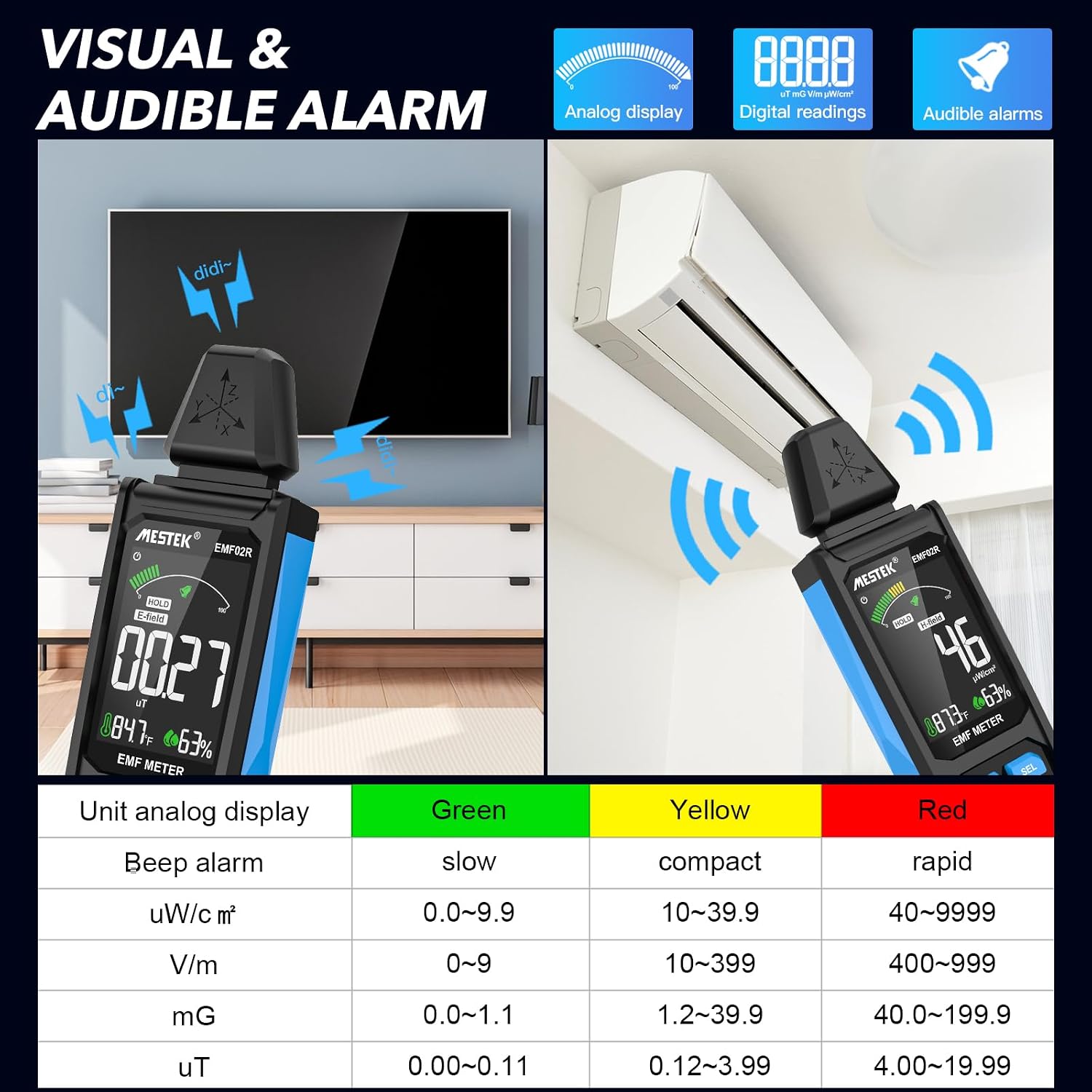
Figure 7: Visual and audible alarm thresholds.
- The display will show a color-coded bar (Green, Yellow, Red) indicating the radiation level.
- When the analog display reaches the yellow area, the device will emit an audible alarm, indicating that radiation levels are elevated.
- When the red area is reached, the alarm will become more rapid, indicating high radiation levels.
- To toggle the audible alarm on or off, short press the Alarma buton.
6.6 Unit Switching and Temperature/Humidity Display
The device can display temperature and humidity, and allows switching between temperature units.

Figura 8: Afișajul temperaturii și umidității cu comutarea unităților.
- The device displays ambient temperature in both Celsius (°C) and Fahrenheit (°F), and relative humidity (%).
- To switch between °C and °F, refer to the specific instructions in the device's on-screen menu or a dedicated button if available (not explicitly detailed in provided data, typically combined with another button press or a menu option).
7. Understanding Readings and Radiation Sources
The MESTEK EMF02R helps identify common sources of electromagnetic radiation in your environment.

Figure 9: Common sources of electromagnetic radiation.
- Radio Frequency (RF) Sources: Routers, cell phones, 5G towers, microwave ovens (when operating).
- Electric Field (E-field) Sources: TVs, laptops, power lines, ungrounded electrical appliances.
- Magnetic Field (H-field) Sources: Refrigerators, washing machines, induction cookers, motors, high-voltage cabluri.
When measuring, slowly move the meter closer to the suspected source. Observe the readings and the alarm indicators to determine the strength and type of radiation. If the radiation value reaches the yellow or red alarm zone, consider taking protective measures or increasing your distance from the source.
8. Întreținere
- curatenie: Ștergeți dispozitivul cu o lavetă moale și uscată. Nu utilizați substanțe de curățare abrazive sau solvenți.
- Depozitare: Store the device in its carry bag in a cool, dry place, away from direct sunlight and extreme temperatures.
- Îngrijirea bateriei: Pentru o durată optimă de viață a bateriei, încărcați dispozitivul în mod regulat, chiar dacă nu îl utilizați frecvent. Evitați descărcarea completă a bateriei pentru perioade lungi de timp.
9. Depanare
| Problemă | Cauza posibila | Soluţie |
|---|---|---|
| Dispozitivul nu pornește. | Baterie descărcată sau fără încărcare. | Încărcați dispozitivul folosind cablul USB-C. |
| Citiri inexacte. | Interference from other electronic devices; device not held correctly. | Move away from other electronics; ensure the probe is directed towards the source. |
| Alarma sonoră nu funcționează. | Alarm function is turned off. | Apăsați tasta Alarma butonul pentru a-l activa. |
| Display is frozen. | Data Hold function is active. | Apăsați tasta ȚINE butonul pentru a elibera. |
10. Specificații
- Moduri de măsurare: Electric Field (E-field), Magnetic Field (H-field), Radio Frequency (RF)
- Gama de frecvență RF: 30MHz ~ 8GHz
- Magnetic Field Units: mG / µT (switchable)
- Electric Field Units: V/m
- RF Field Units: uW/cm²
- Afişa: Large Color LCD Screen
- Baterie: 2000mAh/3.7V Lithium Ion (rechargeable)
- Port de încărcare: USB tip C
- Oprire automată: 15 minute de inactivitate
- Caracteristici suplimentare: Data Hold, MAX/AVG measurement, Audible/Visual Alarm, Low Battery Indication, Temperature & Humidity Display
- Greutatea articolului: 15.2 uncii
- Dimensiuni pachet: 7 x 2 x 1 inci
11. Garanție și asistență
MESTEK provides comprehensive customer support for your EMF02R meter.
- Garantie: 24 months after-sale service.
- Suport tehnic: 7/24 customer service available.
- Politica de înlocuire: If the meter is damaged within 24 months of purchase, please contact MESTEK customer service for a replacement.
For assistance, please refer to the contact information provided with your purchase or visit the official MESTEK website-ul.