
Introducere
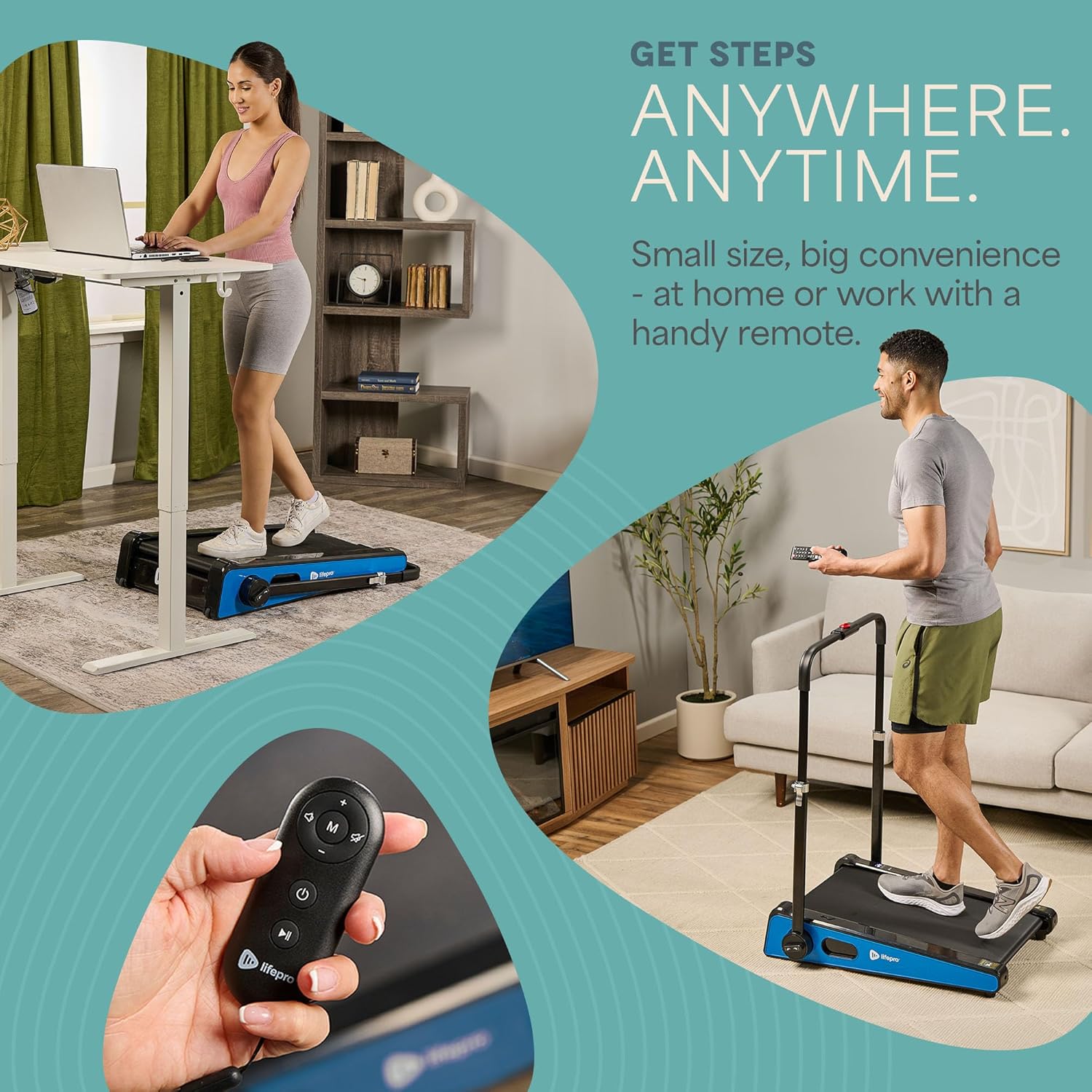
The LifePro Pacer Mini Pro Treadmill is a compact and versatile walking pad designed for light exercise and fitness in both home and office environments. Its adjustable incline and variable speed settings allow for a customized workout experience, helping you stay active throughout your day. This manual provides essential information for the safe and effective use, setup, operation, and maintenance of your Pacer Mini Pro Treadmill.
Informații importante privind siguranța
Please read and understand all instructions before operating the treadmill. Failure to follow these instructions may result in injury or damage to the product.
- Așezați întotdeauna banda de alergare pe o suprafață plană și stabilă.
- Țineți copiii și animalele de companie departe de banda de alergare în timpul funcționării.
- Nu utilizați banda de alergare dacă este deteriorată sau funcționează defectuos.
- Consultați un medic înainte de a începe orice program nou de exerciții.
- Asigurați-vă că cablul de alimentare nu este ciupit sau deteriorat.
- Do not attempt to service the treadmill yourself. Contact customer support for assistance.
Conținutul pachetului
Verificați dacă toate componentele sunt prezente în pachet:
- LifePro Pacer Mini Pro Treadmill Unit
- Telecomanda
- Cablu de alimentare
- Lubrifiant
- Ghidon reglabil
- Suport pentru tablete
Înființat
Follow these steps to set up your LifePro Pacer Mini Pro Treadmill:
- Despachetarea: Scoateți cu grijă banda de alergare și toate componentele din ambalaj.
- Plasare: Choose a flat, stable surface for the treadmill. Ensure there is adequate space around the unit for safe operation.
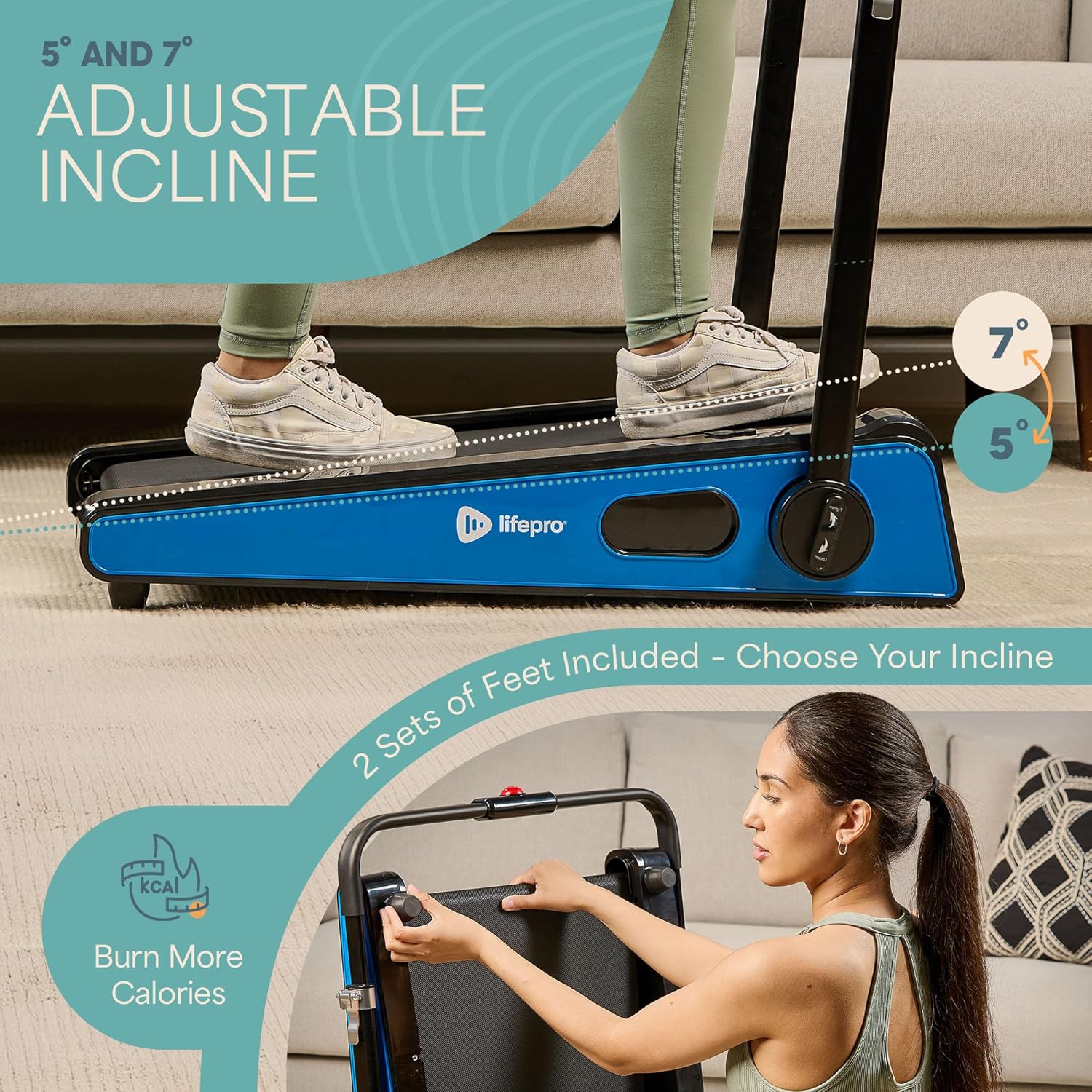
- Handlebar and Feet Assembly: While the main unit comes pre-assembled, minimal assembly is required. Attach the adjustable handlebar and the incline feet as instructed in the included quick start guide. Ensure all screws are tightened securely.
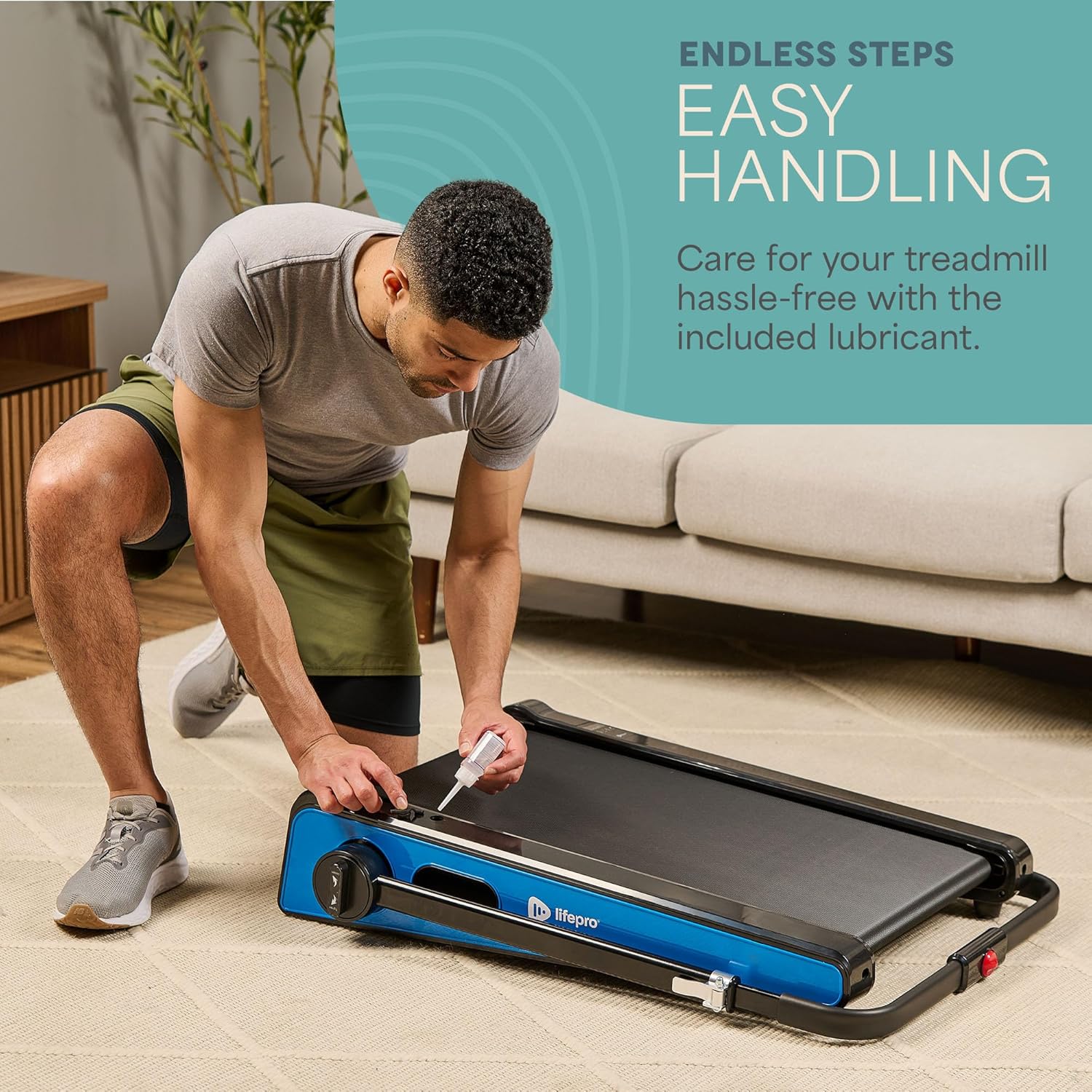
- Lubrifiere inițială: The treadmill may come with some initial lubrication. Refer to the maintenance section for instructions on how to check and apply lubricant if needed before first use.
- Conexiune de alimentare: Conectați cablul de alimentare la banda de alergare și apoi la o priză electrică cu împământare.

Instrucțiuni de operare
Operating your Pacer Mini Pro Treadmill is straightforward:
- Pornire: Plug in the treadmill and press the power button on the unit or the remote control. The LED display will illuminate.
- Ajustarea vitezei: Use the remote control to increase or decrease the walking speed. The maximum speed is 3 MPH. The current speed will be shown on the LED display.
- Reglarea înclinării: The treadmill offers adjustable incline settings of 5 or 7 degrees. To change the incline, manually adjust the feet at the rear of the treadmill. Refer to the setup section and product diagrams for visual guidance.
- Monitorizarea antrenamentului: The LED display shows important workout metrics such as speed, calories burned, and distance covered. This helps you track your progress and stay motivated.
- Oprire: To stop your workout, press the stop button on the remote control or the unit. For complete power off, unplug the treadmill from the power outlet.

Întreţinere
Regular maintenance ensures the longevity and optimal performance of your treadmill:
- Lubrifiere: The walking belt requires periodic lubrication to reduce friction and wear. A dedicated slot on the upper left side of the treadmill allows for easy injection of the provided lubricant. Lubricate as needed, typically every few months depending on usage.
- curatenie: Ștergeți suprafața benzii de alergare cu reclameamp ștergeți o lavetă după fiecare utilizare pentru a îndepărta transpirația și praful. Nu folosiți produse de curățare abrazive.
- Depozitare: The Pacer Mini Pro is designed for compact storage. It can be easily stored under a couch, desk, or in a closet thanks to its small footprint and built-in wheels for portability.
Depanare
If you encounter any issues with your treadmill, refer to the following common solutions:
- Banda de alergare nu pornește: Ensure the power cord is securely plugged into both the treadmill and a working electrical outlet. Check the power switch on the unit.
- Cureaua alunecă sau este neuniformă: The walking belt may require adjustment or lubrication. Refer to the maintenance section for lubrication instructions. For belt tension adjustment, consult the detailed manual or contact customer support.
- Zgomote neobișnuite: Stop using the treadmill immediately and inspect for any loose parts or obstructions. If the noise persists, contact customer support.
For issues not covered here, please contact LifePro customer support for assistance.
Specificații
| Marca | LifePro |
| Numărul de model | LP-PCRMP-BLU-VC |
| Culoare | Blue with Handlebar |
| Dimensiuni produs (D x L x H) | 83.1 cm x 63.5 cm x 104.1 cm |
| Greutatea articolului | 53.9 lire sterline |
| Material | Oţel inoxidabil |
| Viteza maxima | 3 MPH |
| Înclinare reglabilă | 5 sau 7 de grade |
| Caracteristica specială | Design compact |
| Utilizări recomandate | Light exercise, walking, home and office use |
| Publicul țintă | Adult |
| Putere maximă | 1.75 CP |
| Tip de afișare | LED |
| Sursa de alimentare | Electric cu fir |
| Tehnologia de conectivitate | Ethernet |
| Tip de contor | Digital |
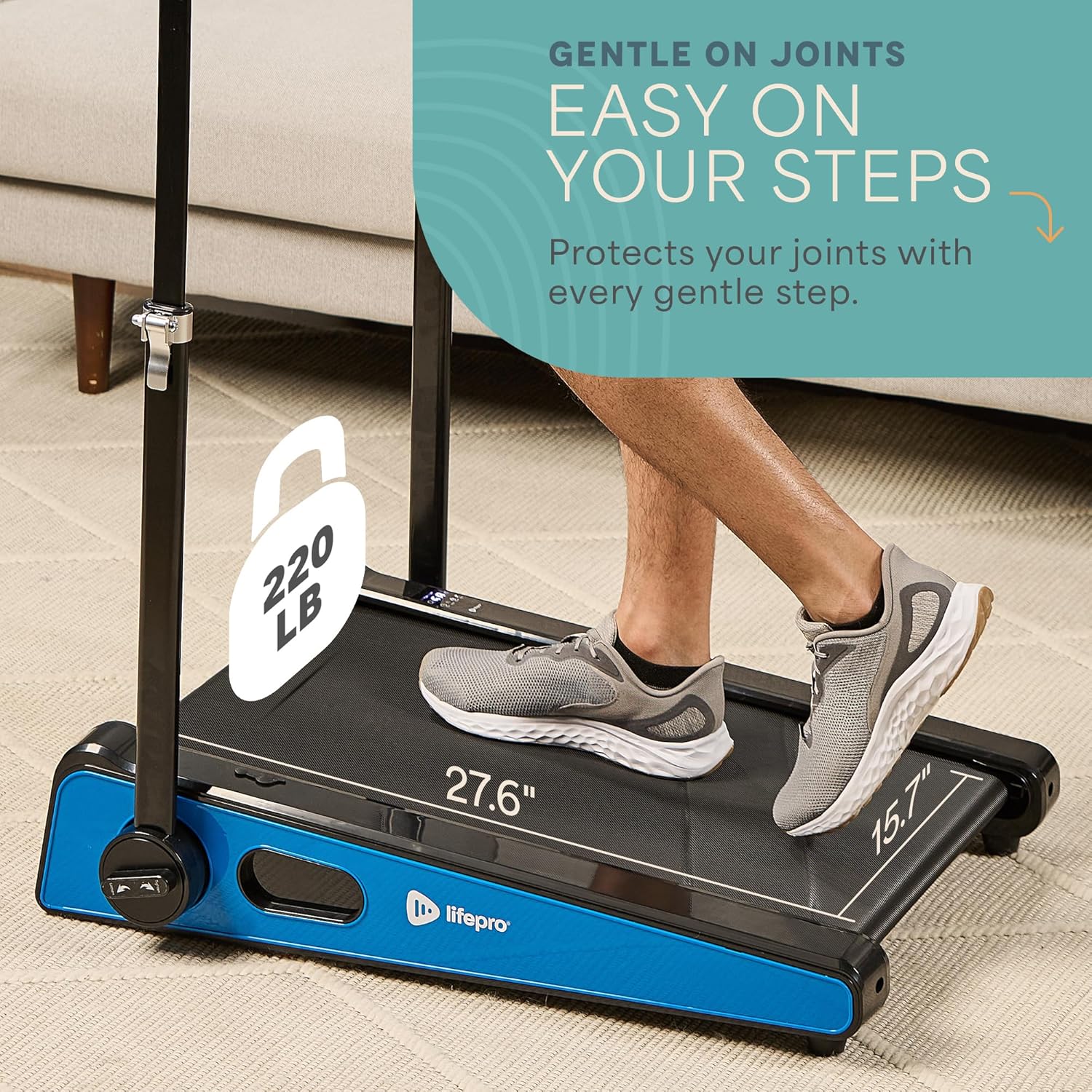
| Greutate maximă recomandată | 220 lire sterline |
| Numărul de programe | 1 |
| Running Surface Length | 40 inci |
| Running Surface Width | 15.7 inci |
| Dimensiunea ecranului | 30 inci |
| Asamblare necesară | Minimal (Handlebar and feet attachment) |
| UPC | 810161332328 |
Garanție și suport
LifePro is committed to providing high-quality products and customer satisfaction. The LifePro Pacer Mini Pro Treadmill comes with a garanție pe viață, asigurându-vă liniștea sufletească pentru investiția dumneavoastră.
For any questions, concerns, or technical support, please contact LifePro customer service:
- Website: www.lifeprofitness.com (Example link, please replace with actual support link if available)
- E-mail: support@lifeprofitness.com (Example email, please replace with actual support email if available)
- Telefon: [Insert Phone Number Here]
Please have your model number (LP-PCRMP-BLU-VC) and proof of purchase ready when contacting support.