
1. Introducere
This manual provides comprehensive instructions for the Mycket portable DAB/DAB+/FM radio, Model D009. It covers setup, operation, maintenance, and troubleshooting to ensure optimal performance and longevity of your device. Please read this manual carefully before using the product.
The Mycket D009 radio features advanced signal reception technology for clear audio, Bluetooth 5.0 for wireless streaming, USB playback, AUX-in connectivity, a dual alarm clock, and a sleep timer. Its integrated rechargeable battery offers portability for use in various environments.
2. Instrucțiuni de siguranță
- Nu expuneți dispozitivul la ploaie, umezeală sau temperaturi extreme.
- Evitați scăderea sau supunerea dispozitivului la impacturi puternice.
- Nu dezasamblați și nu încercați să reparați singur dispozitivul. Apelați la personal calificat pentru toate lucrările de service.
- Țineți dispozitivul departe de surse de căldură, cum ar fi calorifere, registre de căldură, sobe sau alte aparate (inclusiv ampliificatori) care produc căldură.
- Use only the specified charging cable and power adapter (5V via USB) to charge the device.
- Ensure proper ventilation around the device during operation and charging.
- Eliminați bateriile și componentele electronice în mod responsabil, conform reglementărilor locale.
3. Produs terminatview
3.1 Conținutul pachetului
- 1 x Mycket Portable DAB Radio (Model D009)
- 1 x cablu de încărcare USB
- 1 x Manual de utilizare
3.2 Aspectul dispozitivului și comenzile
Familiarize yourself with the main components and controls of your Mycket radio.

Imaginea 1: Faţă view of the Mycket D009 portable DAB radio, showing the speaker grille, LCD display, control buttons (MODE, OK, O/M, FAV, 1-4), and the telescopic antenna extended. The right side shows the DC 5V USB-C port, reset button, and headphone jack.
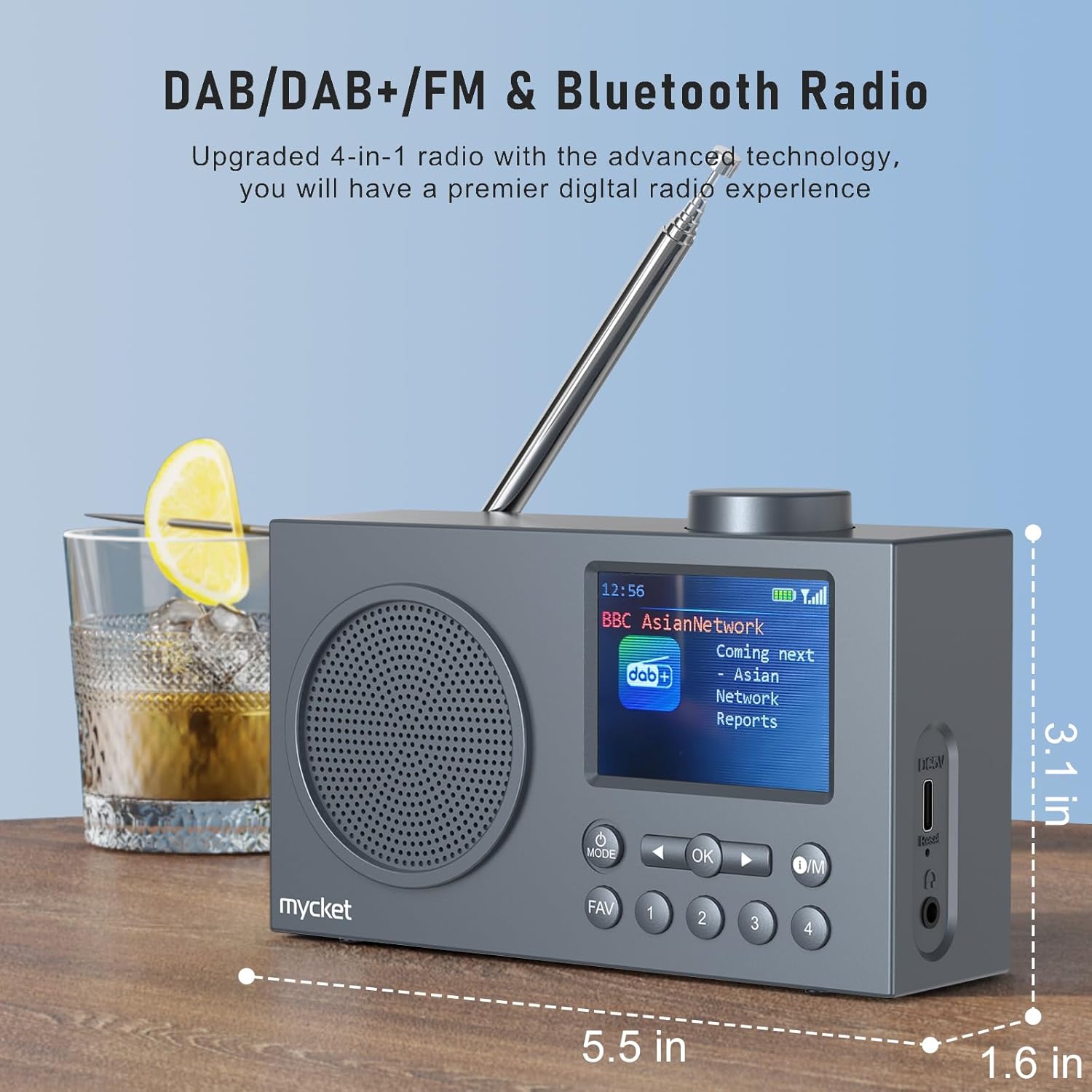
Imaginea 2: Latura view of the Mycket D009 radio illustrating its compact dimensions: approximately 5.5 inches (length), 1.6 inches (width), and 3.1 inches (height). The image also highlights its DAB/DAB+/FM and Bluetooth capabilities.
- Afişa: 2.4-inch TFT color display for station information, time, and settings.
- Vorbitor: Integrated Hi-Fi speaker for audio output.
- Antena telescopica: For optimal radio signal reception.
- Butonul MOD: Switches between DAB, FM, Bluetooth, USB, and AUX modes.
- Buton OK: Confirmă selecțiile sau accesează meniurile.
- O/M Button: Power On/Off and Menu access.
- Butonul FAV: Accesses favorite presets.
- Butoane numerice (1-4): Direct access to stored presets.
- Butoane de navigare (stânga/dreapta): Navigates menus or tunes stations.
- Buton de volum: Reglează volumul audio.
- DC 5V USB-C Port: Pentru încărcarea bateriei interne.
- Buton de resetare: Resets the device (use a thin object to press).
- Mufă pentru căști de 3.5 mm: Pentru ascultare privată.
4. Configurare
4.1 Încărcarea bateriei
The radio is equipped with a built-in 2200mAh lithium battery. Before first use, fully charge the device.
- Connect the provided USB charging cable to the DC 5V USB-C port on the side of the radio.
- Conectați celălalt capăt al cablului USB la un adaptor de alimentare USB compatibil (nu este inclus) sau la un port USB al computerului.
- The charging indicator on the display will show the charging status. A full charge typically takes approximately 2.5 hours and provides up to 12 hours of playback time at 70% volume.

Imaginea 3: The Mycket D009 radio display showing a full battery indicator, emphasizing its long playback time on a single charge.
4.2 Reglarea antenei
Pentru o recepție radio optimă, extindeți complet antena telescopică. Reglați-i poziția pentru o calitate optimă a semnalului.
4.3 Pornirea inițială
Țineți apăsat butonul Operațiune/Întreținere button to power on the radio. The display will light up, and the device will typically start in the last used mode or initiate a DAB scan if it's the first use.
5. Instrucțiuni de utilizare
5.1 Comutarea modurilor
Apăsați tasta MOD button repeatedly to cycle through available modes: DAB, FM, Bluetooth, USB, and AUX.
5.2 Funcționarea radioului DAB/DAB+
- Comutați la modul DAB utilizând MOD buton.
- The radio will automatically perform a full scan for available DAB/DAB+ stations upon first use or if no stations are found. To initiate a manual scan, press and hold the OK button, then select "Full Scan" from the menu.
- Once the scan is complete, use the navigation buttons (Left/Right) to browse through the list of available stations.
- Presa OK pentru a selecta și asculta un post de radio.

Imaginea 4: The Mycket D009 radio display showing a DAB station and highlighting the auto-scan and 40 preset features (20 DAB & 20 FM).
5.2.1 Storing DAB Presets
The radio supports up to 20 DAB presets.
- Tune to the desired DAB station.
- Press and hold one of the number buttons (1-4) sau FAV button to save the current station to a preset slot. Follow the on-screen prompts to select a slot if using the FAV button.
- To recall a preset, briefly press the corresponding number button or the FAV button and select from the list.
5.3 Funcționarea radioului FM
- Comutați la modul FM folosind MOD buton.
- To auto-scan for FM stations, press and hold the OK butonul. Radioul va scana și va memora posturile disponibile.
- To manually tune, use the navigation buttons (Left/Right) to adjust the frequency.
- Presa OK to confirm the station.
5.3.1 Stocarea presetărilor FM
The radio supports up to 20 FM presets, similar to DAB presets.
- Acordați postul FM dorit.
- Press and hold one of the number buttons (1-4) sau FAV button to save the current station.
- To recall a preset, briefly press the corresponding number button or the FAV button and select from the list.
5.4 Bluetooth 5.0 Împerechere
Connect your smartphone or tablet to the radio via Bluetooth for wireless audio streaming.
- Comutați la modul Bluetooth utilizând MOD button. The radio display will show "Bluetooth Pairing" or similar.
- Pe dispozitivul mobil, activați Bluetooth și căutați dispozitivele disponibile.
- Select "Mycket D009" from the list of devices.
- Once paired, the radio will confirm the connection, and you can play audio from your device through the radio.

Imaginea 5: The Mycket D009 radio displaying "Playing" in Bluetooth mode, next to a smartphone showing "Mycket D009" as a connected Bluetooth device.
5.5 Redare USB
Redați audio MP3 fileeste direct de pe o unitate USB.
- Introduceți o unitate USB care conține MP3 files în portul USB.
- Comutați la modul USB utilizând MOD buton.
- Radioul va detecta automat și va începe să redea fișiere MP3. files. Use the navigation buttons to skip tracks.
5.6 Conexiune AUX-in
Conectați dispozitive audio externe folosind un cablu audio de 3.5 mm (nu este inclus).
- Connect one end of a 3.5mm audio cable to the AUX-in port on the radio.
- Conectați celălalt capăt la mufa pentru căști sau la ieșirea audio a dispozitivului extern.
- Comutați în modul AUX folosind MOD buton.
- Controlați redarea de pe dispozitivul dvs. extern.
5.7 Funcția ceas cu alarmă
Configurați până la două alarme independente.
- Țineți apăsat butonul Operațiune/Întreținere butonul pentru a intra în meniu.
- Navigate to "Alarm Settings" using the navigation buttons and press OK.
- Selectați Alarmă 1 sau Alarmă 2.
- Set the alarm time, source (DAB, FM, or Buzzer), and volume.
- Confirmați setările apăsând OK.
5.8 Funcția temporizatorului de repaus
Setați radioul să se oprească automat după o perioadă specificată.
- Țineți apăsat butonul Operațiune/Întreținere butonul pentru a intra în meniu.
- Navigate to "Sleep Timer" and press OK.
- Select the desired duration (e.g., 15, 30, 60 minutes).
- The radio will automatically power off after the set time.
5.9 Utilizarea căștilor
Connect 3.5mm headphones to the headphone jack for private listening. The internal speaker will be muted automatically.
6. Întreținere
- curatenie: Folosiți o lavetă moale și uscată pentru a curăța exteriorul radioului. Nu utilizați produse de curățare abrazive sau solvenți.
- Îngrijirea bateriei: Pentru a prelungi durata de viață a bateriei, evitați descărcarea completă frecventă a bateriei. Încărcați dispozitivul în mod regulat, chiar dacă nu îl utilizați pentru perioade lungi de timp.
- Depozitare: Depozitați radioul într-un loc răcoros și uscat, ferit de lumina directă a soarelui și de temperaturi extreme.
7. Depanare
| Problemă | Cauza posibila | Soluţie |
|---|---|---|
| Fără alimentare / Radioul nu pornește. | Bateria este epuizată. | Încărcați radioul folosind cablul USB furnizat. |
| Recepție radio slabă (DAB/FM). | Antenna not fully extended or positioned correctly. Weak signal area. | Extindeți complet și reglați antena telescopică. Încercați să mutați radioul într-o altă locație. Efectuați o scanare completă pentru posturi. |
| Asocierea Bluetooth nu reușește. | Radio not in Bluetooth mode. Device too far. Bluetooth not enabled on external device. | Ensure the radio is in Bluetooth mode. Keep devices within range (approx. 10 meters). Enable Bluetooth on your external device and search for "Mycket D009". |
| Niciun sunet din difuzor. | Volume too low. Headphones connected. | Increase the volume. Disconnect headphones if not intended for private listening. |
| Redarea prin USB nu funcționează. | Unitatea USB nu a fost introdusă corect. Incompatibilă file format. | Asigurați-vă că unitatea USB este introdusă complet. Verificați dacă filesunt în format MP3. |
| Dispozitivul nu răspunde. | Eroare temporară de software. | Press the reset button on the side of the radio using a thin object (e.g., a paperclip). |
8. Specificații
| Marca | Foarte |
| Model | D009 |
| Moduri radio | DAB, DAB+, FM |
| Versiune Bluetooth | 5.0 |
| Opțiuni de redare | FM, DAB, DAB+, Bluetooth, USB MP3, AUX-in |
| Putere de ieșire difuzor | 5 wați |
| Unitate difuzor | 4 Ω10 W 78 mm x 1 |
| Afişa | LCD color TFT de 2.4 inchi |
| Presetări | 40 (20 DAB, 20 FM) |
| Tip baterie | Built-in Lithium-ion (18650) |
| Capacitatea bateriei | 2200 mAh (3.7V - 2.2 Ah) |
| Timp de redare | Approx. 8-9 hours at 70% volume (up to 12 hours) |
| Timp de încărcare | Aproximativ. 2.5 ore |
| Intrare de putere | 5V prin USB |
| Dimensiuni (produs) | Aprox. 14 cm (L) x 4 cm (l) x 7.8 cm (Î) |
| Conexiuni de ieșire | Mufă pentru căști de 3.5 mm |
9. Garanție și asistență
Mycket products are designed for reliability and performance. This product comes with:
- Garanție 12 pe lună: Enjoy a hassle-free 12-month warranty from the date of purchase.
- Asistență clienți: For any questions, issues, or support needs, please contact Mycket customer service.
Vă rugăm să păstrați dovada achiziției pentru cererile de garanție.