
1. Introducere
This manual provides detailed instructions for the installation, operation, and maintenance of your CHSTEK 8581A Android 13 Car Radio Multimedia Navigation System. This unit is designed for specific Porsche models, including the Cayman, Boxster, 911, 987, and 997 from 2004-2013. Please read this manual thoroughly before installation and use to ensure proper functionality and safety.
2. Informații de siguranță
- Instalare profesională recomandată: Din cauza complexității sistemelor electrice auto, instalarea profesională este foarte recomandată pentru a preveni deteriorarea unității sau a vehiculului dumneavoastră.
- Alimentare electrică: Asigurați-vă că unitatea este conectată la o sursă de alimentare de 12V CC cu împământare negativă.
- Evitați distragerile: Nu utilizați unitatea într-un mod care vă distrage atenția de la condus. Acordați întotdeauna prioritate siguranței rutiere.
- Temperatură: Evitați expunerea unității la temperaturi extreme sau la lumina directă a soarelui pentru perioade lungi de timp.
- Umiditate: Keep the unit dry. Exposure to moisture can cause malfunction or damage.
3. Conținutul pachetului
Verificați dacă toate articolele sunt prezente în colet:
- CHSTEK 8581A Car Radio Unit
- Microfon extern
- Antena GPS
- Cablaj de alimentare
- Cabluri USB
- Manual de utilizare (acest document)

Figura 3.1: The CHSTEK 8581A car radio unit and its primary accessories, including the external microphone, highlighting key features like 2GB RAM + 32GB storage, 8-core 1.6GHz processor, DSP*36EQ, CarPlay, Android Auto, and Android 13 operating system.
4. Instalare
The CHSTEK 8581A is designed for a plug-and-play installation in compatible Porsche models. However, specific vehicle configurations may require additional components or professional assistance.
4.1 Verificarea compatibilității
- This unit is compatible with Porsche Cayman 911 981 997 Boxster models from 2004-2013.
- BOSE Audio System: If your vehicle is equipped with an original BOSE or Harman Kardon audio system, a separate fiber optic box is required for sound output. Please contact customer support for details on obtaining this component.
- Comenzi la volan: Some high-grade versions of the car, such as certain Cayman 2010-2012 models, may not fully support the steering wheel control keys.
4.2 Pași de instalare (generali)
- Deconectați bateria: Before beginning, disconnect the vehicle's negative battery terminal to prevent electrical shorts.
- Scoateți radioul original: Carefully remove the existing car radio unit from the dashboard. Refer to your vehicle's service manual for specific instructions.
- Conectare cablare: Connect the provided power harness, GPS antenna, and any other necessary cables to the CHSTEK 8581A unit. Ensure all connections are secure.
- Instalați microfonul: Route and install the external microphone in a suitable location for clear voice pickup.
- Funcționalitate de testare: Before fully reassembling the dashboard, reconnect the battery and perform a basic test of the unit's functions (power, audio, touch screen).
- Unitate securizată: Mount the CHSTEK 8581A unit securely into the dashboard opening.
- Reasamblați tabloul de bord: Reinstall any removed trim panels and components.
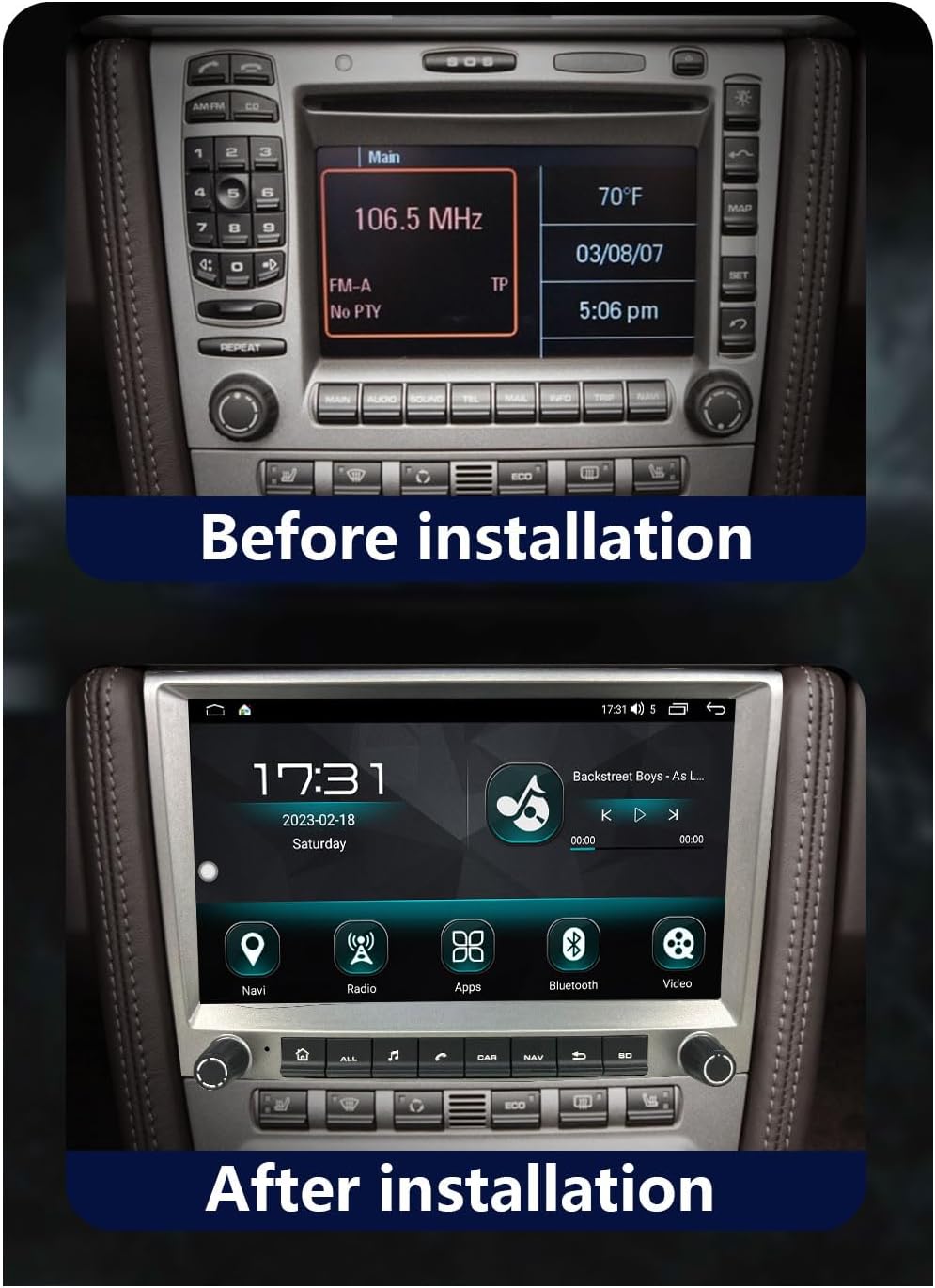
Figura 4.1: Example of a Porsche dashboard with the original radio unit prior to the CHSTEK 8581A installation.

Figura 4.2: Example of a Porsche dashboard after the CHSTEK 8581A unit has been successfully installed, showing the integrated display.
4.3 4G SIM Card Functionality (Americas)
If you are located in the Americas (e.g., United States, Canada, Mexico, Brazil) and require 4G SIM card network functionality, please inform customer service at the time of purchase or installation. Specific hardware configurations may be necessary to ensure 4G network compatibility in these regions.
5. Instrucțiuni de utilizare
This section details the primary functions and features of your CHSTEK 8581A car radio.
5.1 Pornire/Oprire și Navigare de Bază
- Pornire: De obicei, unitatea se va porni automat atunci când contactul vehiculului este cuplat.
- Oprire: The unit will power off when the vehicle's ignition is turned off.
- Touch screen: Navigate through menus and applications by touching the icons and controls on the 8-inch 1280x720P HD touch screen.
- Physical Buttons/Knobs: Use the physical buttons and rotary knobs for quick access to common functions like volume, home, navigation, and radio.
5.2 CarPlay wireless și Android Auto cu fir
The unit supports both wireless Apple CarPlay and wired Android Auto, allowing seamless integration with your smartphone.
5.2.1 Wireless CarPlay (for iPhone users)
- Asigurați-vă că Bluetooth și Wi-Fi sunt activate pe iPhone.
- On the car radio, navigate to the CarPlay application.
- Follow the on-screen prompts to pair your iPhone via Bluetooth.
- Once paired, CarPlay will launch automatically, displaying a simplified version of your iPhone's interface on the car radio screen.
- Use Siri voice control for hands-free operation of navigation, calls, messages, and music.
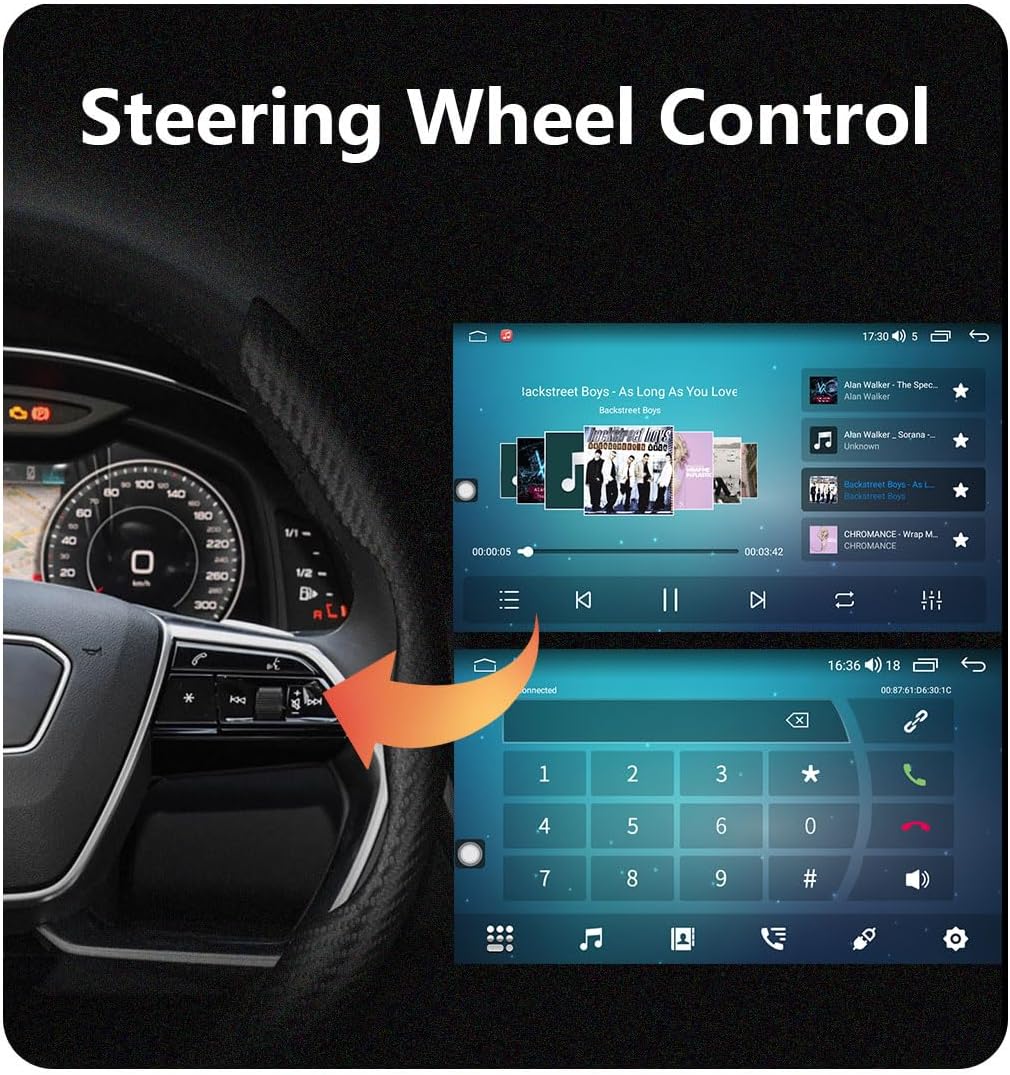
Figura 5.1: The wireless Apple CarPlay interface displayed on the car radio screen, showing common applications and Siri voice control functionality.
5.2.2 Wired Android Auto (for Android users)
- Ensure Android Auto is installed on your Android phone.
- Connect your Android phone to the car radio using a USB cable.
- On the car radio, navigate to the Android Auto application.
- Urmați orice instrucțiuni de pe ecran atât de pe telefon, cât și de la radioul auto pentru a stabili conexiunea.
- Android Auto will mirror essential features like GPS mapping, music playback, and communication.

Figura 5.2: The wired Android Auto interface displayed on the car radio screen, demonstrating connectivity with an Android smartphone.
5.3 Navigare GPS
The unit features built-in GPS navigation with support for both online and offline maps.
- Navigare online: Connect to Wi-Fi or 4G (if enabled) to access real-time traffic conditions and up-to-date map data.
- Navigare offline: Download desired map regions for navigation without an internet connection. This is useful in areas with poor network coverage.
- Poziționare precisă: The system uses accurate satellite positioning to prevent getting lost and provide precise directions.
5.4 Funcționalitate Bluetooth
Conectați-vă smartphone-ul prin Bluetooth pentru apeluri hands-free și streaming audio.
- Apeluri fără mâini: Pair your phone to make and receive calls directly through the car radio. The external microphone ensures clear communication.
- Muzică Bluetooth: Redă în flux audio de pe telefon în difuzoarele mașinii.
- Sincronizare agendă telefonică: Download your phone's contacts to the unit for easy access.
5.5 Radio FM
Access local radio stations with the built-in FM tuner.
- Gama de frecvente: FM 87.50-108.0 MHz.
- Posturi presetate: Salvează până la 18 dintre posturile tale preferate pentru acces rapid.
- Funcția EQ: Utilize the equalizer to customize audio output for an optimal listening experience.
5.6 UI Desktop Themes & Split Screen
Personalize your user experience and enhance multitasking.
- Teme multiple pentru interfața utilizator: Choose from various built-in desktop themes to refresh the look and feel of your interface.
- Funcția ecran împărțit: Run two applications simultaneously on the screen, such as navigation and music playback, for improved convenience.

Figura 5.3: A visual representation of various user interface (UI) desktop themes and integrated features available on the CHSTEK 8581A system, including navigation, radio, apps, Bluetooth, and DSP equalizer settings.
5.7 Comandă la volan
Integrați-vă cu comenzile de pe volanul vehiculului pentru o operare sigură și convenabilă.
- Functionalitate: Control volume, track skipping, answer/end calls, and other functions directly from your steering wheel.
- Notă de compatibilitate: As mentioned in the installation section, some high-grade Porsche models (e.g., Cayman 2010-2012) may have limited or no support for steering wheel controls.
Figura 5.4: Illustration of how the car radio integrates with existing steering wheel controls for convenient operation while driving.
6. Întreținere
Întreținerea corectă asigură longevitatea și performanța optimă a radioului auto.
- Curățarea ecranului: Folosiți o lavetă moale, fără scame, pentru a șterge ușor ecranul tactil. Pentru petele persistente, ștergeți ușor.ampCurățați laveta cu apă sau cu un produs de curățare sigur pentru ecran. Evitați materialele abrazive sau substanțele chimice dure.
- Actualizări de software: Periodically check for available software updates to ensure the unit has the latest features and bug fixes. Updates can typically be performed via Wi-Fi.
- Evitați lichidele: Do not spill liquids on the unit. If accidental spillage occurs, power off the unit immediately and allow it to dry completely before use.
- Controlul temperaturii: While the unit is designed for automotive environments, extreme heat or cold can affect performance. Park in shaded areas when possible during hot weather.
7. Depanare
This section addresses common issues you might encounter with your CHSTEK 8581A unit.
| Problemă | Cauza posibila | Soluţie |
|---|---|---|
| Niciun sunet de la unitate. | Vehicle has BOSE/Harman Kardon audio system without fiber optic box. Incorrect wiring. | Install a fiber optic box (if applicable). Check all audio wiring connections. |
| Comenzile de pe volan nu funcționează. | Vehicle incompatibility (e.g., certain Cayman 2010-2012 models). Incorrect wiring. | Verify vehicle compatibility. Check steering wheel control wiring. |
| 4G network not working in Americas. | Unit not configured for Americas 4G bands. | Contact customer service to ensure your unit has the correct hardware for Americas 4G SIM card functionality. |
| Android Auto not connecting with Samsung phone. | Known compatibility issue with some Samsung devices. | Ensure Android Auto app is updated. Try different USB cables. If issue persists, contact support. |
| Ecranul tactil nu răspunde sau este inexact. | Software glitch. Physical damage. | Restart the unit. If problem persists, contact customer support. |
If you encounter issues not listed here or require further assistance, please contact CHSTEK customer support.
8. Specificații
Key technical specifications for the CHSTEK 8581A Car Radio.
| Caracteristică | Caietul de sarcini |
|---|---|
| Numărul de model | 8581A |
| Sistem de operare | Android 13 |
| Afişa | 8-inch 1280*720P HD Touch Screen |
| RAM + Stocare | 2 GB RAM + 32 GB stocare internă |
| Procesor | 8 nuclee la 1.6 GHz |
| Conectivitate | Bluetooth, USB, Wi-Fi, 4G (optional) |
| Caracteristici speciale | Built-In Bluetooth, Touchscreen, Wireless CarPlay, Wired Android Auto, GPS Navigation, Split Screen, Multiple UI Themes, DSP Equalizer |
| Mod ieșire audio | Stereo |
| Configurare canal de sunet surround | 2.0 |
| Greutatea articolului | 4.41 lire sterline |
| Dimensiuni pachet | 7.87 x 7.87 x 7.87 inci |
9. Garanție și asistență
For warranty information, technical support, or service inquiries, please refer to the warranty card included with your product or contact CHSTEK customer service directly. Ensure you have your product model number (8581A) and purchase details available when contacting support.