
1. Introducere
This manual provides essential information for the proper use and operation of your Seeed Studio XIAO nRF52840 Sense (Pre-Soldered) microcontroller board. Please read this manual thoroughly before use to ensure optimal performance and longevity of the device.
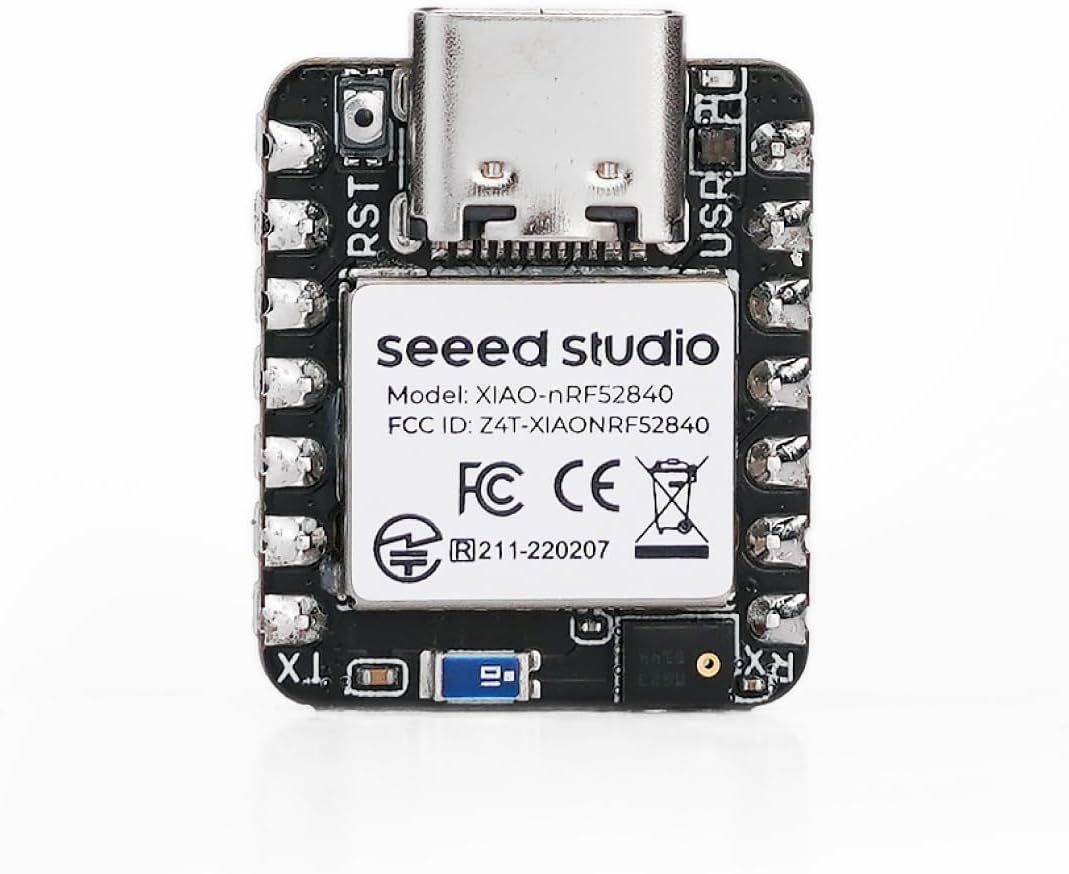
The Seeed Studio XIAO nRF52840 Sense is a compact, versatile microcontroller board featuring the Nordic nRF52840 chip. It is designed for various applications, including embedded Machine Learning, wearable devices, and IoT projects, offering Bluetooth 5.0, BLE, and NFC capabilities, along with an onboard digital microphone and 6-axis IMU.
2. Caracteristici cheie
- Microcontroler: Nordic nRF52840 with FPU, operating up to 64 MHz.
- Conectivitate wireless: Bluetooth 5.0, BLE, and NFC with an onboard antenna.
- Senzori: Integrated digital microphone and 6-axis IMU (Inertial Measurement Unit).
- Gestionare a energiei: Ultra-low power consumption (5 µA in deep sleep) and lithium battery charge management.
- Development Support: Compatible with Arduino and CircuitPython.
- Design compact: Thumb-sized form factor (21 x 17.5mm).
3. Ghid de instalare
3.1 Conținutul pachetului
Verify that your package contains the Seeed Studio XIAO nRF52840 Sense (Pre-Soldered) board.
3.2 Conexiune hardware
- Conectare la computer: Use a USB-C cable to connect the XIAO nRF52840 Sense to your computer. Ensure you use a reliable USB 2.0 port if encountering connection issues, as some USB 3.0 ports may cause DFU mode errors.
- Alimentare electrică: The board can be powered via the USB-C port or an external lithium battery (JST connector). The board includes charge management for lithium batteries.


3.3 Software Setup (Arduino IDE)
- Instalați IDE-ul Arduino: Descărcați și instalați IDE-ul Arduino de pe Arduino oficial website-ul.
- Add Board Support:
- Deschideți Arduino IDE, accesați File > Preferințe.
- In "Additional Board Manager URLs", add the URL for Seeed Studio XIAO nRF52840 Sense board support. (Note: Specific URL can be found on Seeed Studio's official documentation.)
- Du-te la Instrumente > Consiliu > Manager consiliu, search for "Seeed Studio nRF52 Boards" and install it.
- Selectați placa: Du-te la Instrumente > Tablă and select "Seeed Studio XIAO nRF52840 Sense".
- Selectați portul: Du-te la Instrumente > Port and select the COM port associated with your XIAO board.
4. Instrucțiuni de utilizare
4.1 Încărcarea codului
- Scrieți sau încărcați schița: Deschide un example sketch or write your own code in the Arduino IDE.
- Verify Code: Click the "Verify" button (checkmark icon) to compile your code and check for errors.
- Cod de încărcare: Click the "Upload" button (right arrow icon) to upload the compiled code to your XIAO nRF52840 Sense board.
4.2 Entering DFU Mode (Bootloader)
To upload new firmware or recover the board, you may need to enter DFU (Device Firmware Upgrade) mode:
- Locate the small reset button on the board.
- Double-click the reset button quickly. The onboard LED may change color or blink to indicate DFU mode.
- In DFU mode, a new drive (often labeled "D" or similar) and a COM port should appear on your computer.
4.3 Diagrama pinilor
Refer to the pinout diagram for detailed information on the board's GPIOs, power pins, and peripheral interfaces.

5. Întreținere
- curatenie: Use a dry, soft cloth to clean the board. Avoid using liquids or solvents.
- Depozitare: Store the board in an anti-static bag in a dry environment when not in use.
- Actualizări firmware: Regularly check the official Seeed Studio website for the latest firmware and board support package updates to ensure optimal performance and access to new features.
6. Depanare
- Board not recognized / "not in DFU mode" error:
Try connecting the board to a USB 2.0 port instead of a USB 3.0 port. Some users have reported issues with USB 3.0 ports preventing proper DFU mode entry or recognition. Ensure you double-click the reset button to enter DFU mode.
- Upload failures:
Verify that the correct board and COM port are selected in the Arduino IDE. Ensure the board is in DFU mode if required for the upload process. Check your USB cable for proper connection and functionality.
- Board becomes unresponsive or burns out:
Ensure proper power supply. Avoid reverse polarity when connecting external batteries. If using a lithium battery, ensure correct JST cable connection. Over-current or incorrect wiring can damage the board. If issues persist, contact support.
- Difficulty finding resources or documentation:
Refer to the official Seeed Studio documentation and community forums for comprehensive guides and support. Caută "Seeed Studio XIAO nRF52840 Sense documentation" online.
7. Specificatii tehnice
| Caracteristică | Detaliu |
|---|---|
| Procesor | Nordic nRF52840 (64 MHz) |
| RAM | LPDDR (256 KB) |
| Memorie flash | 1 MB |
| Tip fără fir | Bluetooth 5.0, BLE, NFC |
| Suport sistem de operare | Arduino / CircuitPython |
| Senzori la bord | Digital Microphone, 6-axis IMU |
| Mod de putere redusă | 5 µA (deep sleep) |
| Dimensiuni | 21 x 17.5 mm |
| Greutatea articolului | 0.634 uncii |
| Tehnologia de conectivitate | Bluetooth, NFC |
8. Informații despre garanție
For warranty details and terms, please refer to the official Seeed Studio website-ul lor web sau contactați direct serviciul de asistență pentru clienți. Păstrați dovada achiziției pentru orice reclamații în garanție.
9. Suport și Resurse
For further assistance, technical documentation, tutorials, and community forums, please visit the official Seeed Studio website:
You can also find additional resources and project examples on platforms like Hackaday, Hackster.io, and GitHub by searching for "Seeed Studio XIAO nRF52840 Sense".