
Aune X1sGT
Aune X1s GT Hi-Res DAC User Manual
Model: X1s GT
1. Produs terminatview
The Aune X1s GT is an advanced Hi-Res Digital-to-Analog Converter (DAC) and headphone amplifier, designed to deliver high-fidelity audio performance. It features a precise PLL core, external clock support, and a fully-discrete balanced headphone amplifier, making it suitable for various audio setups including PC, mobile devices, and dedicated audio transports.

Figura 1: Față view of the Aune X1s GT Hi-Res DAC.
Caracteristici cheie:
- High-Resolution Audio Decoding: Supports USB input up to 32 bit/768 kHz DSD512 and Coaxial input up to 24 bit/384 kHz DoP128.
- External Clock Support: Features PLL technology and a 10MHz external clock input for enhanced audio precision.
- Clock Synchronization: Ensures low jitter and natural sound by feeding the digital and DAC parts with the same clock source.
- Căști puternice Ampmai în viață: Utilizes a fully-discrete balanced headphone amplifier circuit with 4x24 BJTs and a ±9V power supply.
- Exceptional Specifications: Achieves THD+N as low as 0.00013% and a noise floor as low as 1.92 µV.
2. Ghid de instalare
2.1 Despachetare și inspecție inițială
Carefully remove the Aune X1s GT from its packaging. Verify that all components, including the Quick Start Guide, are present and that the device is free from any visible damage.
2.2 Conectarea dispozitivului
The Aune X1s GT offers multiple input and output options. Refer to the diagram below for port identification.

Figure 2: Aune X1s GT front and rear panel connections.
- Conexiune de alimentare: Connect the provided power adapter to the "Power In" port on the rear panel and then to a suitable power outlet.
Atenţie: This device operates on 110V. Please check your local voltage before placing an order.
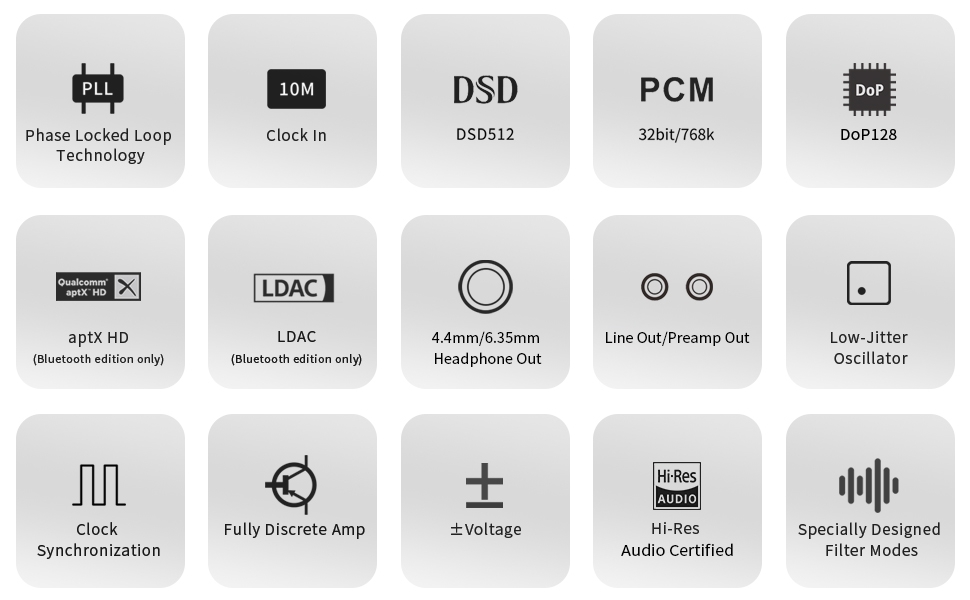
Figure 3: Important voltage compatibility notice.
- Conexiuni de intrare:
- Intrare USB: Connect your computer, smartphone (with OTG adapter), or digital player to the "USB" port using a compatible USB cable.
- Intrare coaxială: Connect devices such as CD players or digital transports to the "COAX" port using a coaxial cable.
- Intrare optică: Connect devices to the "OPT" port using an optical cable.
- Intrare externă ceas: For advanced users, connect a 10MHz external clock (e.g., Aune XC1) to the "External Clock Input" port.

Figure 4: Multi-connectivity options for the Aune X1s GT.
- Conexiuni de ieșire:
- Ieșire căști: Connect your headphones to either the 6.35mm or 4.4mm balanced headphone jack on the front panel.
- RCA Preamp Ieșire: Conectați-vă la o sursă de alimentare externă ampamplificator sau difuzoare active folosind cabluri RCA.
- Ieșire linie RCA: Provides a fixed line-level output for connection to an integrated ampliificator sau receptor.
3. Instrucțiuni de utilizare
3.1 Pornire/Oprire
Locate the power switch on the rear panel. Flip the switch to the "On" position to power on the device. The indicator lights on the front panel will illuminate. Flip the switch to "Off" to power down.
3.2 Selectarea intrării
Press the "Input" button on the front panel to cycle through the available input sources: USB, OPT (Optical), COAX (Coaxial), and B/C (Bluetooth, if applicable to your model). The corresponding indicator light will show the active input.
3.3 Controlul volumului
Adjust the large rotary volume knob on the front panel to control the output level for headphones and the Preamp Output. The Line Output provides a fixed level and is not affected by the volume knob.
3.4 Filter Modes
The X1s GT features specially designed filter modes to optimize sound for different listening scenarios. These modes are distinct from standard ES9038 series default filters and are controlled by an internal algorithm:
- Modul 1: Utilizare generală.
- Modul 2: Optimized for headphones.
- Modul 3: Pure mode for general use.
- Modul 4: Pure mode for headphones.
Refer to the Quick Start Guide or product interface for instructions on how to switch between these modes.

Figure 5: PLL Core and supported frequencies.
Redare audio de înaltă rezoluție 3.5
The X1s GT is capable of decoding high-resolution audio from various sources:
- De pe computer: Connect via USB. The X1s GT can support up to 32bit/768kHz DSD512, allowing playback of Hi-Res music files or content from online libraries like Apple Music HiFi.
- From Smartphone/Pad: Connect via USB (OTG cable may be required). This transforms your mobile device into a high-quality streaming media center.
- From Digital Transport/CD Player: Connect via Coaxial or Optical input. The X1s GT supports up to PCM 384kHz and DSD128 via Coaxial.
Video 1: Prezentare video oficială a produsuluiasing the Aune X1s GT Hi-Res DAC features and design.
4. Întreținere
4.1 Curățare
To maintain the appearance and functionality of your Aune X1s GT, regularly wipe the exterior with a soft, dry, lint-free cloth. Avoid using abrasive cleaners, solvents, or chemical sprays, as these can damage the finish or internal components.
4.2 Îngrijire generală
- Keep the device in a cool, dry place away from direct sunlight, heat sources, and excessive humidity.
- Asigurați o ventilație adecvată în jurul unității pentru a preveni supraîncălzirea.
- Evitați să plasați obiecte grele deasupra dispozitivului.
- Disconnect the power adapter during lightning storms or when the unit is left unused for extended periods.
5. Depanare
If you encounter issues with your Aune X1s GT, please refer to the following common troubleshooting steps:
| Problemă | Cauza posibila | Soluţie |
|---|---|---|
| Fără putere | Power cable not connected; Power switch off; Faulty power outlet. | Ensure power cable is securely connected. Flip power switch to "On". Try a different power outlet. |
| Fără ieșire de sunet | Incorrect input selected; Volume too low; Output device not connected or faulty; Driver issues (for USB). | Verify correct input is selected. Increase volume. Check headphone/speaker connections. Reinstall USB drivers on your computer if necessary. |
| Sunet distorsionat | Input signal too high; Faulty cables; Incorrect filter mode. | Reduce input volume from source. Replace cables. Try different filter modes. |
| Dispozitivul nu este recunoscut de computer | USB cable issue; Driver not installed or corrupted; USB port issue. | Try a different USB cable and USB port. Install or update the latest drivers from Aune's official website. Restart computer. |
If the problem persists after attempting these solutions, please contact Aune customer support for further assistance.
6. Specificații
| Caracteristică | Detaliu |
|---|---|
| Numărul de model | X1sGT |
| USB Input Support | Up to 32 bit/768 kHz DSD512 |
| Coaxial Input Support | Up to 24 bit/384 kHz DoP128 |
| Ieșiri pentru căști | 4.4 mm echilibrat, 6.35 mm cu capăt unic |
| Ieșiri analogice | RCA Preamp Out, RCA Line Out |
| External Clock Support | 10MHz |
| THD+N | De până la 0.00013% |
| Etajul de zgomot | As low as 1.92 µV |
| Alimentare electrică | ±9V (internal amplifier section) |
| Dimensiuni (pachet) | 9.69 x 7.2 x 4.49 inci |
| Greutate (pachet) | 4.21 lire sterline |
| Țara de origine | China |
7. Garanție și asistență
Aune is committed to providing excellent customer service and product support.
7.1 Informații despre garanție
All Aune products come with a Serviciu post-vânzare de 2 ani. This warranty covers manufacturing defects and ensures that your product functions as intended under normal use conditions.
7.2 Asistență pentru clienți
Should you encounter any issues or have questions regarding your Aune X1s GT, please contact our customer support team. We have a dedicated after-sales system to address your concerns promptly and provide satisfactory solutions.
For support, please visit the official Aune website sau contactați vânzătorul direct prin intermediul platformei dvs. de achiziție.
Nota: If you receive a product with traces of use, it may be due to logistics or warehousing. Please communicate with us to resolve the issue.
Ask a question about this manual
Ask about setup, troubleshooting, compatibility, parts, safety, or missing instructions. Manuals+ will review the question and use this page’s manual context to help answer it.