
Introducere
This manual provides detailed instructions for the BEITONG Asura 2 Pro Plus PC Gaming Controller. Please read this manual thoroughly before using the product to ensure proper operation and to maximize your gaming experience. This controller is designed for high-performance gaming across multiple platforms.

Figura 1: Pesteview of the BEITONG Asura 2 Pro Plus Controller with key features labeled.
Înființat
Conținutul pachetului
- BEITONG Asura 2 Pro Plus Game Controller
- 2.4G Wireless Receiver (Dongle)
- Cablu USB (de la tipul A la tipul C)
- Manual de utilizare
Opțiuni de conectivitate
The BEITONG Asura 2 Pro Plus controller offers versatile connectivity for various devices:
- 2.4GHz Wireless (via Dongle): For PC, Nintendo Switch, and Steam Deck. Insert the 2.4G wireless receiver into an available USB port on your device. The controller will automatically connect.
- Bluetooth 5.0 Wireless: For PC, Android, and iOS devices. Enable Bluetooth on your device and search for "BEITONG Asura 2 Pro+ Controller" to pair.
- Conexiune prin cablu USB: Connect the controller directly to your PC or other compatible device using the provided USB Type-A to Type-C cable. This allows for plug-and-play functionality and simultaneous charging.
Nota: This controller does NOT support MAC, Xbox consoles (Xbox One, Xbox Series X/S), or PlayStation consoles (PS4, PS5).

Figure 2: The controller supports PC, Android, iOS, Nintendo Switch, and Steam Deck.
Împerecherea inițială
For first-time use, ensure the controller is charged. Select your preferred connection method (2.4GHz dongle or Bluetooth) and follow the device's pairing instructions. The controller's indicator light will confirm a successful connection.
Operarea controlerului
Caracteristici și funcții cheie
- Joystick-uri și declanșatoare cu efect Hall: Experience anti-drift precision with a 600Hz polling rate in overclocking mode. Hall triggers offer 0.1mm accuracy for faster response.
- Chei mecanice: The A/B/X/Y buttons feature a 0.7mm trigger stroke, providing a crisp and responsive feel.
- Controlul mișcării pe 6 axe: Utilize the built-in gyroscope for motion-sensing games, particularly useful on Nintendo Switch and PC.
- Macro Keys (M1/M2): Two programmable back paddles (M1 and M2) can be remapped to any button or complex macro sequences using the BEITONG Gamepad Assistant software.
- Funcția Turbo: Activate rapid-fire input for any button. The turbo speed can be customized via the Gamepad Assistant.
- Funcția Shift: Allows for switching between different joystick modes or button mappings.

Figure 3: Hall Effect technology ensures precise, anti-drift control for joysticks and triggers.

Figure 4: Mechanical keys provide fast response and durability.
BEITONG Gamepad Assistant Software
Enhance your controller's performance and personalize your gaming experience with the BEITONG Gamepad Assistant software. This application allows you to:
- Customize macro keys (M1/M2)
- Set overclocking mode
- Adjust joystick dead zones and sensitivity curves
- Configure turbo speed
- Control vibration strength
- Manage RGB light effects
The software is available for PC, iOS, and Android. Refer to the included user manual for download links and detailed instructions on using the Gamepad Assistant.
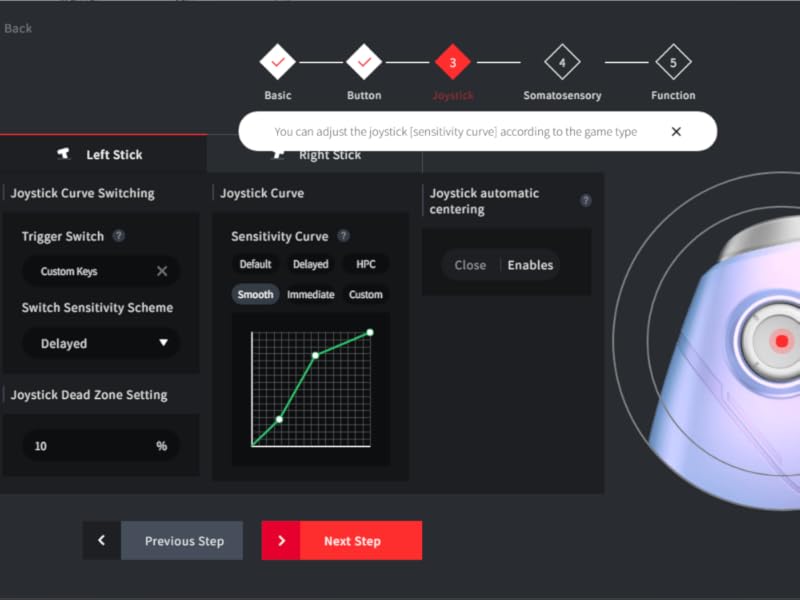
Figure 5: Customize joystick sensitivity and dead zones using the Gamepad Assistant.
Video Demonstration: BEITONG ASURA 2 Pro Game Controller
Videoclip 1: Un oficial terminatview of the BEITONG ASURA 2 Pro Game Controller, highlighting its features and performance.
Întreţinere
Managementul bateriei
The controller is equipped with a 600mAh battery, providing 12-17 hours of gameplay on a 2-hour charge. It features a smart sleep function to conserve battery life when idle.
- To charge, connect the controller using the provided USB cable to a power source (e.g., PC, USB wall adapter).
- The controller can be used while charging via wired connection.
- Evitați expunerea bateriei la temperaturi extreme sau la lumina directă a soarelui.
Curățare și depozitare
- Ștergeți controlerul cu o lavetă moale și uscată. Nu utilizați substanțe chimice dure sau materiale abrazive.
- Store the controller in a cool, dry place away from direct sunlight and moisture.
- When not in use for extended periods, ensure the controller is fully charged before storage to prolong battery life.
Depanare
- Controlerul nu se conectează: Ensure the controller is charged. For 2.4GHz, verify the dongle is securely inserted. For Bluetooth, ensure Bluetooth is enabled on your device and the controller is in pairing mode. Try restarting both the controller and the device.
- Left stick not working: Check if the SHIFT key on the controller has been accidentally pressed. This can sometimes affect left stick functionality.
- Întârziere la introducerea datelor sau lipsa de răspuns: Ensure the controller is fully charged. For wireless connections, try moving closer to the receiver or device. If using Bluetooth, ensure no other devices are causing interference. Consider using a wired connection for the lowest latency.
- Derivația manșonului: The Hall Effect joysticks are designed to prevent stick drift. If you experience unexpected movement, ensure the controller's firmware is up to date via the Gamepad Assistant. You can also recalibrate joysticks within the Gamepad Assistant.
- Butoanele care nu răspund: Check the button mappings in the BEITONG Gamepad Assistant. A reset of the controller may resolve temporary issues.
For further assistance, please contact BEITONG customer support.
Specificații
| Caracteristică | Detaliu |
|---|---|
| Numele modelului | Asura 2 Pro Plus |
| Tehnologia de conectivitate | 2.4G Dongle, Bluetooth 5.0, USB Type-A to Type-C |
| Dispozitive compatibile | PC, Android, iOS, Nintendo Switch, Steam Deck |
| Tip controler | Gamepad, Joystick, PC Game Controller |
| Caracteristici speciale | Hall Effect Joysticks & Triggers, Mechanical Buttons, 6-Axis Motion Sensing, Rumble Vibration, Macro Keys (M1/M2), Turbo Function |
| Capacitatea bateriei | 600mAh |
| Durata de viață a bateriei | 12-17 ore (aprox.) |
| Timp de încărcare | 2 de ore (aprox.) |
| Rata de sondare | Up to 600Hz (overclocking mode on PC) |
| Greutatea articolului | 0.42 kilograme |
Garanție și suport
BEITONG is committed to providing high-quality products and customer satisfaction. The BEITONG technology team is available to provide support for any issues you may encounter with your controller.
For technical assistance, troubleshooting, or warranty inquiries, please refer to the contact information provided in the original product packaging or visit the official BEITONG website-ul.