
Introducere
The Hohem AI Tracking Sensor with 3-Color Magnetic Fill Light (Model MTK-L03) is an advanced accessory designed to enhance your mobile videography experience. It integrates intelligent AI tracking and versatile lighting into a compact, magnetic unit, compatible with the Hohem iSteady V3 gimbal. This manual provides essential information for the proper setup, operation, and maintenance of your MTK-L03.

Image: The Hohem MTK-L03 AI Tracking Sensor with its integrated fill light.
Produs terminatview
This section details the key features and components of your MTK-L03 AI Tracking Sensor.
- Hardware AI Tracking Sensor: This separate AI tracking sensor adapts to the Hohem iSteady V3 gimbal. AI tracking can be turned on or off with a gesture without any app or phone restrictions. It will automatically track the footage you want to capture, regardless of the app you are using.
- Magnetic Fill Light: Not just an AI tracker but a fill light with 3 adjustable light modes. The magnetic snap design is not only more solid but also can be adjusted to the front and rear orientation, allowing both the front camera and rear camera to utilize the fill light.
- Temperatura de culoare: Offers three distinct color temperatures for various lighting needs: 6500K (Cool), 2700K (Warm), and 5000K (Neutral).

Image: Illustration of the magnetic AI tracker functionality.
Înființat
Follow these steps to set up your Hohem MTK-L03 AI Tracking Sensor:
- Attach to Gimbal: Securely attach the MTK-L03 to your Hohem iSteady V3 gimbal. The device features a magnetic snap design for easy and stable attachment. Ensure it is firmly in place.
- Orientare: Position the sensor to face the subject you wish to track. The magnetic design allows for adjustment to support both front-facing and rear-facing camera usage.

Image: The MTK-L03 sensor magnetically attached to a smartphone on a gimbal.

Imagine: Prim-plan view of the magnetic attachment mechanism.
Instrucțiuni de operare
Learn how to effectively use the AI tracking and fill light features of your MTK-L03.
Urmărire AI
The MTK-L03 features hardware-based AI tracking, allowing for app-free operation. Use specific hand gestures to control the tracking function.
- Activating/Deactivating Tracking: Refer to the gesture control image for visual examples of gestures to start and stop tracking.
- Urmărirea performanței: The AI tracker is designed to maintain focus on the subject even with fast motion, obstacles, or other people in the frame.

Imagine: Examples of hand gestures for controlling the AI tracking feature.

Image: Demonstrating AI tracking functionality across various apps without restrictions.

Image: The AI tracker maintaining focus on subjects in fast motion, behind obstacles, and among other people.
Operațiune de umplere cu lumină
The integrated fill light provides adjustable illumination for your recordings.
- Reglarea temperaturii culorii: Press the dedicated button on the device to cycle through the three available color modes: Cool Light (6500K), Warm Light (2700K), and Neutral Light (5000K).
- Controlul luminozității: The fill light supports continuous dimming. Adjust the brightness level as needed for optimal lighting conditions.
- Poziționare flexibilă: The magnetic attachment allows you to easily adjust the angle of the fill light to illuminate your subject effectively, whether using the front or rear camera.
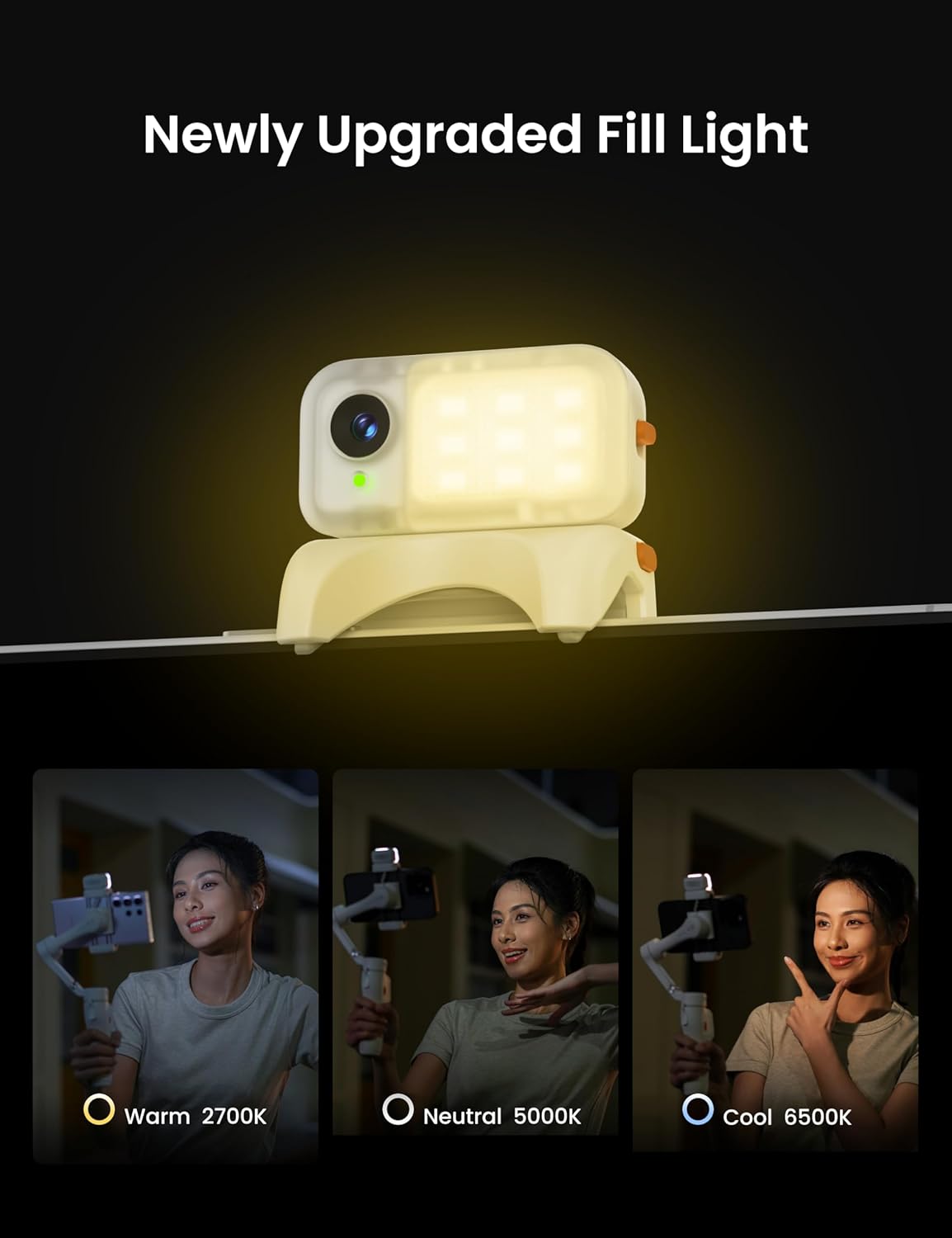
Image: Demonstrating the three color temperature modes: Warm (2700K), Neutral (5000K), and Cool (6500K).

Image: The magnetic fill light offering continuous dimming and remote control capabilities.

Image: Visual representation of the three distinct color temperature filters available.

Image: A user utilizing the Hohem MTK-L03 with a smartphone and gimbal for recording.
Întreţinere
Proper care ensures the longevity and optimal performance of your MTK-L03.
- curatenie: Use a soft, dry cloth to clean the exterior of the device. Avoid using abrasive materials, solvents, or harsh chemicals, as these can damage the surface or internal components.
- Depozitare: When not in use, store the MTK-L03 in a cool, dry place, away from direct sunlight, high humidity, and extreme temperatures.
- Îngrijirea lentilelor: Gently clean the AI sensor lens with a lens cleaning cloth if smudges or dust affect performance.
Depanare
If you encounter issues with your MTK-L03, refer to the following common problems and solutions:
- AI Tracking Not Responding:
- Ensure the sensor is properly attached to the gimbal and powered on.
- Verify that your gestures are clear, distinct, and performed within the recommended recognition distance (0.5 to 2 meters).
- Check for any obstructions blocking the sensor's view a subiectului.
- Fill Light Not Working or Dim:
- Confirmați că dispozitivul este pornit.
- If the light is dim, ensure the device has sufficient power.
- Press the light button to cycle through modes and check for functionality.
- Device Not Attaching Securely:
- Ensure the magnetic surfaces on both the MTK-L03 and your gimbal are clean and free from debris.
- Confirm that your gimbal is a compatible model, such as the Hohem iSteady V3.
Specificații
Detailed technical specifications for the Hohem MTK-L03 AI Tracking Sensor with 3-Color Magnetic Fill Light.
| Caracteristică | Caietul de sarcini |
|---|---|
| Greutate | 13.6 g |
| Dimensiuni (D x W x H) | 0.98" x 1.65" x 0.63" (25 mm x 42 mm x 16.5 mm) |
| Rezoluția obiectivului | 1 MP |
| Distanța de recunoaștere a gesturilor | 0.5 până la 2 m (1.64 până la 4.92 ft) |
| Distanța de urmărire | 0.5 până la 5 m (1.64 până la 16.1 ft) |
| Puterea Luminii | 2W |
| Iluminare | 110lux@0.5M |
| Temperatura de culoare | 2700K (Cald), 5000K (Neutru), 6500K (Rece) |
| Dispozitive compatibile | Cellphone, Hohem iSteady V3 Gimbal |

Image: Visual representation of the MTK-L03 specifications.
Garanție și suport
Your Hohem MTK-L03 AI Tracking Sensor is covered by a 1 ani garanție de producător de la data achiziției. Această garanție acoperă defectele de materiale și de fabricație în condiții normale de utilizare.
For warranty claims, technical support, or further assistance, please visit the official Hohem website-ul or contact their customer service directly. Please retain your proof of purchase for warranty validation.