
1. Introducere
Mulțumesc pentru achizițieasing the KTC 24-inch WQHD 100Hz IPS Monitor. This manual provides essential information for the safe and efficient use of your new monitor. Please read it thoroughly before use and keep it for future reference.
This monitor features a 24-inch IPS panel with WQHD (2560x1440) resolution, offering stunning visual clarity and vibrant colors with 122% sRGB coverage. A 100Hz refresh rate and FreeSync & G-Sync compatibility ensure smooth, tear-free visuals, ideal for both office work and casual gaming. Advanced eye care technologies, including blue light reduction and flicker-free operation, provide a comfortable viewing experience even during extended use. The monitor also supports HDR10 for enhanced dynamic range and features flexible connectivity options with HDMI and DisplayPort.
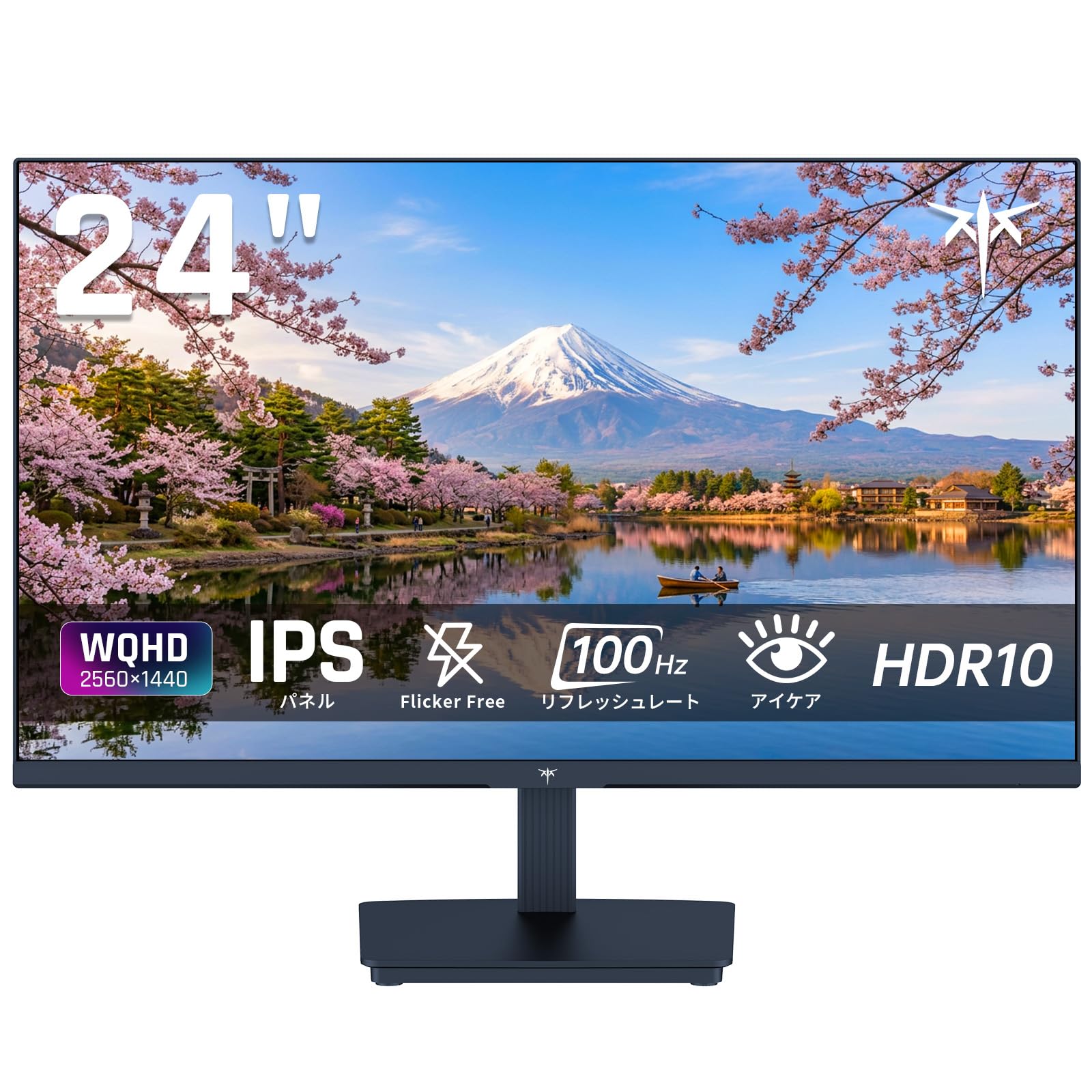
Image: KTC 24-inch WQHD 100Hz IPS Monitor.
2. Informații de siguranță
Please observe the following safety precautions to prevent damage to the monitor or injury to yourself or others:
- Nu expuneți monitorul la ploaie, umezeală sau temperaturi extreme.
- Asigurați o ventilație adecvată în jurul monitorului pentru a preveni supraîncălzirea.
- Folosiți doar adaptorul de alimentare furnizat împreună cu monitorul.
- Evitați să așezați obiecte grele pe cablul de alimentare sau pe monitor.
- Nu încercați să dezasamblați sau să reparați monitorul singur. Contactați personalul de service calificat.
- Țineți monitorul departe de câmpuri magnetice puternice.
3. Conținutul pachetului
Verificați dacă toate articolele sunt prezente în colet:
- KTC 24-inch WQHD 100Hz IPS Monitor (H24T27)
- Baza monitorului
- Cablu HDMI
- Adaptor de alimentare
- Manual de utilizare
4. Configurare
4.1 Asamblarea standului
- Scoateți cu grijă monitorul și baza din ambalaj.
- Atașați gâtul suportului la panoul monitorului.
- Fixați baza la gâtul suportului folosind șuruburile furnizate.
4.2 Conectarea monitorului
Conectați monitorul la computer sau la alte dispozitive folosind cablurile corespunzătoare.
- Conexiune de alimentare: Connect the power adapter to the monitor's DC input and then plug it into a power outlet.
- Conexiune video: Use the supplied HDMI cable or a DisplayPort cable to connect your computer's video output to the corresponding port on the monitor.
- Ieșire audio: If desired, connect headphones or external speakers to the 3.5mm audio output jack.

Image: Close-up of the KTC monitor's rear ports, including DC power, HDMI, DisplayPort, and audio out.
5. Instrucțiuni de utilizare
5.1 Pornire/Oprire
Apăsați butonul de alimentare situat pe monitor pentru a-l porni sau opri.
5.2 Meniul de afișare pe ecran (OSD).
The OSD menu allows you to adjust various monitor settings. Use the control buttons (usually located on the back or bottom of the monitor) to navigate the menu and make selections.
5.3 Setări de afișare
- Rezoluţie: The monitor supports WQHD (2560x1440) resolution for sharp and detailed images. Ensure your graphics card is set to this resolution for optimal display.
- Rata de reîmprospătare: Enjoy smooth visuals with a 100Hz refresh rate. This can be configured in your operating system's display settings.
- Gama de culori: The monitor offers 122% sRGB coverage for rich and accurate colors.

Image: KTC monitor highlighting key features like IPS panel, 100Hz, WQHD, 24-inch, Adaptive Sync, and blue light reduction.

Image: Comparison of WQHD (2560x1440) and FHD (1920x1080) resolutions, demonstrating enhanced detail with WQHD.

Image: Comparison of 100Hz and 60Hz refresh rates, showing smoother motion with 100Hz.
5.4 Adaptive Sync (FreeSync & G-Sync)
The monitor supports both FreeSync and G-Sync technologies to eliminate screen tearing and stuttering, providing a fluid gaming experience. Ensure this feature is enabled in your graphics card settings and the monitor's OSD.

Image: Monitor display showing HDR10 content on one side and standard HDR on the other, along with FreeSync & G-Sync comparison (ON/OFF).
5.5 Caracteristici de îngrijire a ochilor
The monitor includes Flicker-Free technology and a Blue Light Reduction mode to minimize eye strain during prolonged use. These settings can be adjusted via the OSD menu.

Image: KTC monitor displaying eye care features: Low Blue Light (ON/OFF) and Flicker-Free (ON/OFF).
Suport HDR10 5.6
This monitor supports HDR10, providing a wider range of colors and contrasts for a more immersive viewing experience. Ensure HDR is enabled in your device's display settings for compatible content.
5.7 Stand reglabil
The monitor stand allows for tilt adjustment from -5° to 15°, enabling you to find the most comfortable viewunghiul de ing.

Imagine: Laterală view of the KTC monitor demonstrating the tilt-adjustable stand (-5° to 15°).
5.8 Lat Viewunghiul ing
The IPS panel provides a wide 178-degree viewing angle, ensuring consistent color and image quality from almost any perspective.

Image: KTC monitor showcasing a wide 178-degree viewing angle with consistent color.
6. Întreținere
6.1 Curăţarea monitorului
- Deconectați întotdeauna monitorul înainte de curățare.
- Utilizați ușor o cârpă moale, fără scame dampcurățate cu apă sau cu o soluție de curățare a ecranelor blândă, neabrazivă.
- Nu pulverizați soluția de curățare direct pe ecran.
- Evitați utilizarea substanțelor chimice dure sau a materialelor abrazive.
6.2 Îngrijire generală
- Keep the monitor in a clean, dry environment.
- Protect the screen from sharp objects.
- When moving the monitor, handle it carefully and avoid putting pressure on the screen.
7. Depanare
Dacă întâmpinați probleme cu monitorul, consultați următoarele probleme și soluții frecvente:
| Problemă | Soluție posibilă |
|---|---|
| Nicio imagine pe ecran | Check power connections. Ensure video cable is securely connected to both monitor and computer. Select correct input source via OSD. |
| Imaginea este neclară sau distorsionată | Ensure the display resolution is set to 2560x1440. Check video cable for damage. |
| Ruperea sau sacadarea ecranului | Verify FreeSync/G-Sync is enabled in both monitor OSD and graphics card settings. |
| Niciun sunet din căști/difuzoare | Check audio cable connection. Ensure volume is not muted on monitor or computer. |
| Monitorul nu pornește | Check power outlet and power adapter connection. Try a different power outlet. |
If the problem persists after trying these solutions, please contact KTC customer support.
8. Specificații
Detailed technical specifications for the KTC H24T27 monitor:
| Caracteristică | Caietul de sarcini |
|---|---|
| Marca | KTC |
| Numărul de model | H24T27 |
| Dimensiunea ecranului | 24 inci |
| Rezoluţie | WQHD (2560 x 1440 pixeli) |
| Raportul de aspect | 16:9 |
| Tip panou | IPS |
| Suprafața ecranului | Non-orbire |
| Rata de reîmprospătare | 100 Hz |
| Timp de răspuns | 7 ms |
| Raport de contrast | 1300:1 |
| Luminozitate | 300 cd/m² |
| Gama de culori | 122% sRGB |
| Viewunghiul ing | 178 de grade |
| Tehnologia HDR | HDR10 |
| Sincronizare adaptivă | FreeSync, G-Sync |
| Conectivitate | 1x HDMI, 1x DisplayPort, ieșire audio |
| Consumul de energie | 12 wați |
| Voltage | 100 volți |
| Dimensiuni (D x W x H) | 18.3 x 54 x 40.5 cm |
| Caracteristici suplimentare | Adaptive Sync, Eye Care, Flicker-Free, Blue Light Filter, Tilt Adjustment |
| Dispozitive compatibile | Console de jocuri, Laptopuri |
| Culoare | Negru |
| Formă | Plat |
| Origine | China |
9. Garanție și asistență
9.1 Informații despre garanție
Your KTC monitor comes with a Garanție de 3 an de la producător. In the event of a product defect, a free replacement will be provided. Please note that this warranty does not cover loss or damage caused by customer negligence.

Image: KTC's 3-year free replacement warranty details and contact information.
9.2 Asistență pentru clienți
For any inquiries or concerns, please feel free to contact us. We are committed to providing full support to ensure your satisfaction.
Telefon: 050-3606-8990
E-mail: support@ktcplay.com
You can also contact support through Amazon:

Image: Step-by-step guide on how to contact customer support via Amazon.
10. Produs terminatview Video
Urmăriți acest videoclip pentru o imagine de ansambluview of the KTC QHD computer monitor and its features.
Video: This video showcases the KTC QHD computer monitor, highlighting its 2560x1440 (2K) resolution, 100Hz refresh rate, FreeSync and G-Sync compatibility, flicker-free and low blue light features, 8-bit & 116% sRGB color gamut, 3-side frameless design, -5° to 15° tilt adjustable stand, and available sizes (24, 27, 32 inches). It emphasizes its suitability for professional office use.